The Assumption Every Clock Makes
A computer’s clock works by counting something regular and trusting that it keeps counting. A crystal oscillates, a counter increments, and software multiplies out how much time has passed.
Virtualisation breaks the trusting part.
The kernel’s own KVM timekeeping documentation puts the problem in one sentence: “the virtual operating system does not run with 100% usage of the CPU, despite the fact that it may very well make that assumption.” Everything below follows from that.
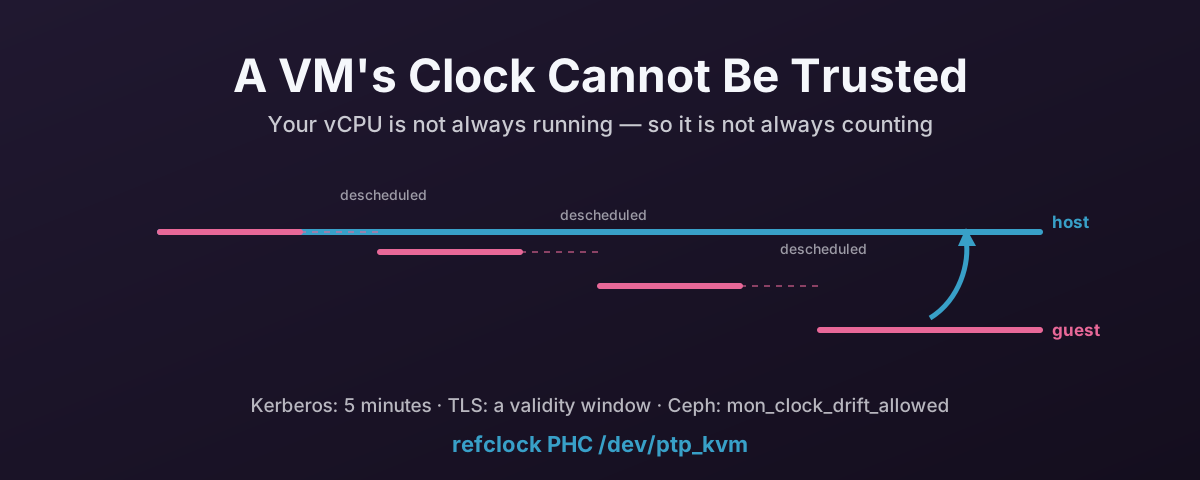
Your vCPU Is Not Always Running
A vCPU is a thread on the host. It runs when the host scheduler says so.
When it is not running, the guest is not merely idle — it is absent. It cannot count, it cannot service a timer interrupt, and it has no way to know how long it was gone. The host tracks that as steal time, which is the honest name for “time that happened to you rather than for you”.
Timer interrupts are where this hurts most. A guest that asks for a periodic tick is asking the host to deliver interrupts at a fixed rate, and the host cannot always oblige. Again from the kernel documentation: “the host virtualization engine may not be able to deliver the proper number of interrupts per second, and so guest time may fall behind.”
The higher the tick rate the worse it gets, and an overcommitted host makes it worse again. This is also why a busy host degrades the timekeeping of quiet guests. They are all queuing for the same physical cores.
The Counters Are Not Yours Either
If periodic ticks are unreliable, the obvious answer is to read a counter instead. That has its own problems.
The TSC is the fast one, and the kernel documentation is blunt about it: “The TSC is a CPU-local clock in most implementations… the TSCs of different CPUs may start at different times.” Its rate can vary with processor power states, and on older parts it stops entirely when the core idles. A vCPU that migrates between physical cores can therefore read a counter that disagrees with the one it read a microsecond ago.
The alternatives are worse in a different way. The HPET, the PIT and the ACPI PM timer are all emulated devices, so every read is a trap into the hypervisor. Correct, and expensive enough that a guest reading the clock in a hot loop will notice.
This is why paravirtual clocks exist. On KVM, kvm-clock lets the host publish its own timekeeping into a shared structure that the guest reads directly: no trap, no counting, no assumption that the guest was awake.
It is also why you should leave the guest’s clocksource alone rather than forcing tsc or hpet because a forum post said it was faster.
Migration, Snapshots and Suspend
Live migration, snapshot restore and suspend/resume all do the same thing to a guest clock: they stop it, and then start it again somewhere else.
What the guest sees is not drift, it is a step. The clock was one value, and now it is a different value, with nowt in between. Migrating to a host whose TSC runs at a different frequency compounds it.
Step changes matter because the software that corrects clocks is built to correct drift, not teleportation.
This Is Not a KVM Problem
It is tempting to read all of the above as a KVM shortcoming. It is not.
Every hypervisor ships a paravirtual clock, because every hypervisor has the same structural problem: KVM has kvm-clock, Hyper-V has its reference TSC page, VMware has a pseudo-performance counter plus Tools-based sync, Xen has its pvclock. Those are four independent implementations of one workaround.
The kernel documentation’s own conclusion is that there is no perfect solution here. Only trade-offs between accuracy, performance and complexity.
If you want it from a vendor rather than from kernel developers, Microsoft’s support boundary for high-accuracy time is remarkably candid. To claim 50 ms accuracy on a virtualised Windows system, one of the stated requirements is that “the one-day average CPU utilization of the host must not exceed 90%.” For 1 ms, the host must stay under 80%.
Read that again: the accuracy of the guest’s clock is documented as conditional on how busy the host is. That is not a Windows quirk, it is the same physics as the kernel doc describes, written down as a support boundary.
Why NTP Inside the Guest Is the Wrong Tool
NTP is good at what it was designed for: a machine with a real oscillator that runs slightly fast or slow, corrected by measuring the round trip to a remote server and gently slewing the local clock.
Each of those assumptions is shaky in a VM.
The local oscillator is not slightly wrong, it is intermittently absent. The round-trip measurement is taken by a process that may be descheduled between reading the clock and sending the packet, which corrupts the measurement itself. And the corrections needed after a migration are steps, which a slewing algorithm handles badly or refuses outright.
chrony copes far better than ntpd here. It slews faster, tolerates steps, and is honest about its own uncertainty. But it is still solving the wrong problem: pulling time across a network from a stratum-2 server 20 ms away, when the correct time is sitting in the hypervisor on the other side of a single memory boundary.
What you get in practice is a guest that is mostly right, occasionally tens or hundreds of milliseconds out, and never quite able to tell you which.
What Skew Actually Breaks
Nobody cares about clocks for their own sake. They care when something stops working.
Kerberos and Active Directory
Kerberos is time-dependent by design, because a ticket’s validity is expressed as a time window.
MIT’s krb5.conf documentation defines clockskew as “the maximum allowable amount of clockskew in seconds that the library will tolerate before assuming that a Kerberos message is invalid”, and the default is 300 seconds — five minutes.
Cross that and authentication does not degrade, it fails.
Since Active Directory authentication is Kerberos, that means domain logons, net use, SQL Server connections, Exchange, file shares — the lot.
Five minutes sounds generous until a guest steps backwards after a snapshot restore.
TLS
A certificate carries a validity window: notBefore and notAfter.
A guest whose clock is behind will reject a certificate that was issued this morning because, as far as it knows, the certificate is not valid yet.
A guest whose clock is ahead will reject one that has not actually expired.
The same arithmetic governs OCSP and CRL freshness, JWT nbf/exp claims, and TOTP multi-factor codes, which live in 30-second windows.
A clock 45 seconds out is an authentication outage with a very confusing error message.
Ceph
Ceph monitors care about this more than almost anything else in the stack, because their consensus depends on it.
The MON_CLOCK_SKEW health check fires when “the clocks on hosts running Ceph Monitor daemons are not well-synchronized”. Specifically, when the skew exceeds mon_clock_drift_allowed.
The documentation’s advice is to sync with ntpd or chrony against multiple sources, and it notes that monitor-to-monitor synchronisation particularly matters.
You can raise mon_clock_drift_allowed, but the docs are clear it has to stay “significantly below the mon_lease interval”. As such, it is a small budget, and spending it to paper over a hypervisor timekeeping problem is not a good trade.
Everything Else
Logs across hosts stop correlating, which turns an incident timeline into guesswork. Database replication and distributed consensus — etcd, Galera, anything doing leader leases — get unhappy. Backup and monitoring windows drift out of alignment with the thing they were meant to observe.
Windows Guests Skew Differently
Windows deserves its own note, because its time service was built with different goals and it shows.
Microsoft states plainly that versions before Windows 10 1607 / Server 2016 “can’t guarantee highly accurate time”. What the Windows Time service provided on those releases was “the necessary time accuracy to satisfy Kerberos version 5 authentication requirements” and “loosely accurate time” for machines in a common AD forest. Tighter than that was “outside of the design specification… and weren’t supported.”
In other words, older Windows aims to stay inside the five-minute Kerberos window, not to be right. Which is fine until something in your estate needs better. A virtualised Windows box that is 90 seconds out will authenticate happily while writing logs that cannot be correlated with anything.
Windows 10 and Server 2016 onward can do 1 s, 50 ms or even 1 ms — but only under the conditions quoted earlier, including the host CPU utilisation limits. Microsoft also notes that “anything that introduces network asymmetry, such as a one-way satellite connection or high CPU load on the target system, will negatively influence accuracy”. A contended vCPU is high CPU load on the target system by another name.
There is no ptp_kvm for Windows. What you have instead:
- Hyper-V clock enlightenments. Proxmox already exposes these to Windows guests.
PVE::QemuServer::CPUConfigsetshv_timealongsidehv_vapic,hv_spinlocks,hv_relaxedandhv_synic.hv_timeis the paravirtual clock, and it is the Windows-side equivalent ofkvm-clock. This is on by default for Windows-typed VMs; there is nothing to enable. - The QEMU guest agent. With the agent installed, the host can push its time into the guest after a resume or snapshot restore, which handles the step-change case that NTP handles worst.
- Pick one authority. The classic Windows-in-a-VM failure is two time sources fighting: host-to-guest sync and domain hierarchy sync, both correcting the same clock in opposite directions. For a domain-joined guest, let the domain hierarchy win and stop the host pushing time at it. For a standalone guest, host sync is fine. Never both.
If you want to know exactly what your hypervisor is telling a given VM about time, ask it rather than guessing:
# Everything Proxmox actually passes to QEMU for this VM, including -rtc and CPU flags
qm showcmd <vmid> --pretty
The Fix on QEMU/KVM: ptp_kvm
For Linux guests on KVM there is a proper answer, and it is not “more NTP servers”.
ptp_kvm lets the guest ask the host what time it is, directly, through a hypercall — KVM_HC_CLOCK_PAIRING on x86, and an equivalent firmware call on arm64.
The kernel presents that as a PTP hardware clock device, so from userspace it looks like any other precision clock source, and chrony can use it as a reference clock.
The properties that matter:
- No network. No jitter, no asymmetry, no stratum, no packets. The path is a memory boundary.
- Sub-microsecond. The accuracy is bounded by the hypercall, not by a round trip across a datacentre.
- It bypasses the broken part. The guest is not counting anything or estimating a round trip. It is reading a value the host computed with a clock that was running the whole time.
Implementation
Apply this to every Linux VM that has the driver. The host hypervisor needs working NTP or PTP of its own. ptp_kvm hands the guest the host’s time, so it inherits the host’s error.
1. Load the kernel module at boot.
# /etc/modules-load.d/ptp_kvm.conf
ptp_kvm
2. Give it a stable name and let chrony read it.
# /etc/udev/rules.d/90-ptp-kvm.rules
ACTION=="add", SUBSYSTEM=="ptp", ATTR{clock_name}=="kvm", SYMLINK+="ptp_kvm", GROUP="chrony", MODE="0660"
The symlink matters because PTP device numbering is not stable. /dev/ptp0 may be a NIC’s clock on one boot and the KVM clock on the next. Matching on clock_name gets the right one every time.
3. Point chrony at it, and remove the pools.
Edit /etc/chrony/chrony.conf on Debian and Ubuntu, or /etc/chrony.conf on RHEL family. Delete the pool lines and use:
refclock PHC /dev/ptp_kvm poll 2 stratum 1 delay 0.0004
Removing the pools is not optional tidiness. Leaving them in asks chrony to reconcile a sub-microsecond local reference against internet servers tens of milliseconds away, and the internet sources can only make the answer worse.
4. Restart and check.
systemctl restart chronyd # or chrony, on Debian/Ubuntu
Verify
# The symlink exists and points at the KVM clock
ls -l /dev/ptp_kvm
cat /sys/class/ptp/ptp*/clock_name

# chrony should be using PHC0 as its selected source
chronyc sources -v

# and the offset should be microseconds, not milliseconds
chronyc tracking
In chronyc sources, the PHC refclock appears as #* PHC0 once selected. The # marks a local hardware reference rather than a network peer, and the * marks it as the one in use.
If you see it listed but not selected, chrony has not accepted it: check permissions on the device and that the chrony group in the udev rule matches the user chrony actually runs as on your distribution.
Caveats
- The host must be right. This makes the guest agree with the host, which is only useful if the host agrees with reality. Give the hypervisors real NTP or PTP.
- Every guest needs it. A fleet where half the VMs use
ptp_kvmand half use internet pools is a fleet with two time authorities. - Live migration is fine, and is the point. After migrating, the guest reads its new host’s clock. Provided the hosts agree with each other, the guest never sees a step.
- KVM only. It is a KVM hypercall. Nested or foreign hypervisors will not present the device, and the udev rule simply will not fire. That is a clean failure rather than a silent wrong answer.
What Not To Do
- Don’t force the clocksource. Leave
kvm-clockalone. Forcingtscorhpeton the guest kernel command line trades a paravirtual clock designed for this situation for a counter that was never yours. - Don’t run
ntpdateorhwclockfrom cron. That is a step change on a schedule, which is exactly what databases and Kerberos hate. - Don’t keep the pools “as a fallback”. With a working refclock they are not a fallback, they are a second opinion from a worse source.
- Don’t raise
mon_clock_drift_allowedand call it fixed. You have spent part of a budget that exists for network reality, in order to tolerate a problem with a known solution.
That last one is worth saying plainly: widening the threshold is not fixing the clock. It is moving the alarm so it stops going off.
References
- Linux kernel — KVM timekeeping — why guest time falls behind, the TSC’s local-clock problem, and the conclusion that only trade-offs exist
- Linux kernel — PTP_KVM — the hypercall interface behind the PTP clock device
- Linux kernel — KVM x86 hypercalls —
KVM_HC_CLOCK_PAIRING, the x86 side of it - chrony — chrony.conf — the
refclockdirective and PHC driver options - MIT Kerberos — krb5.conf —
clockskewand its 300-second default - Microsoft — support boundary for high accuracy time — the accuracy targets, and the host CPU utilisation conditions for virtualised systems
- Ceph — health checks —
MON_CLOCK_SKEW,mon_clock_drift_allowedand its relationship tomon_lease