Why You Would Want One
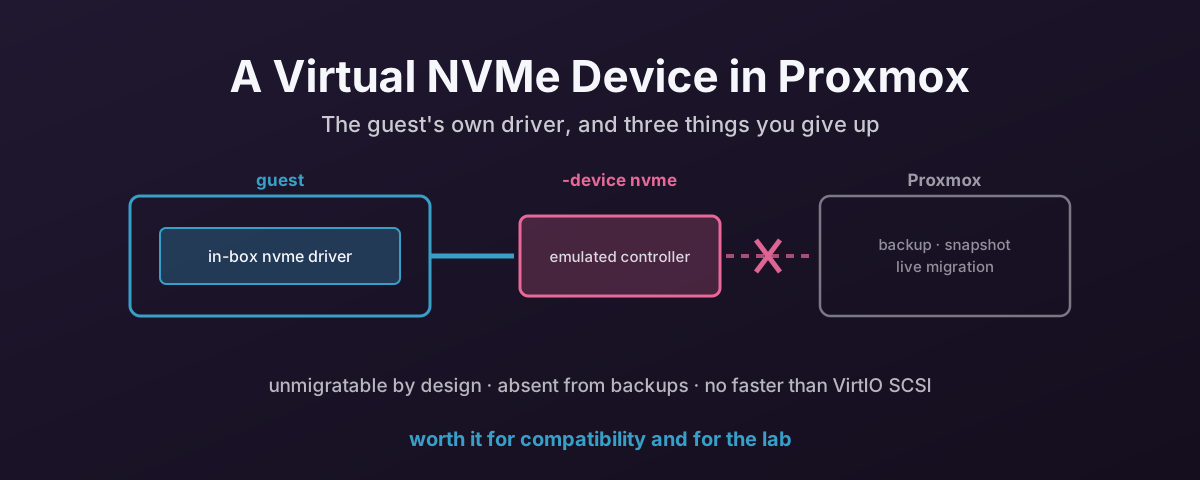
QEMU can emulate an actual NVMe controller — not a paravirtual device that needs a driver you supply, but a PCIe NVMe controller that a guest recognises as a normal SSD and drives with the NVMe support it already has.
That is the entire appeal, and it is worth more than it sounds.
Linux has had an in-box nvme driver for years. Windows has shipped stornvme since Windows 8.1 and Server 2012 R2. So a guest boots, enumerates a PCIe NVMe controller, loads its own driver and finds a disk. No VirtIO ISO, no driver injection at install time, and no “no drives found” screen halfway through a Windows installer.
Anyone who has sat looking at that screen, with the VirtIO ISO mounted and the installer still insisting there are no disks, will see the appeal immediately.
The second reason is that it behaves like NVMe all the way up. nvme-cli works. Namespaces are real. LBA formats, metadata bytes and protection information are all configurable. Which makes it a very good place to practise the operations you should not be practising on hardware that holds data.
How To Add One
Proxmox has no GUI checkbox or config key for this. It is a raw QEMU device, so it goes in args: in /etc/pve/qemu-server/<vmid>.conf.
The QEMU documentation gives the minimal pair: a backing drive with no interface, and the controller that consumes it. Edited straight into /etc/pve/qemu-server/<vmid>.conf, unquoted:
args: -drive file=/var/lib/vz/images/100/nvm.img,if=none,id=nvmidentifier -device nvme,serial=LAB-NVME-01,drive=nvmidentifier
if=none matters: it tells QEMU not to attach the drive to a default controller, because the -device nvme line is going to claim it. The id= on the drive and the drive= on the device have to match. That pairing is what joins the two halves.
The serial= is mandatory; QEMU refuses to start the VM without one. Choose something you will recognise, because it is exactly what the guest reports back in nvme list and smartctl, and “which of these four identical virtual drives is which” is a question you will eventually ask.
Quoting: The Bit That Catches Everyone
Whether you quote that string depends on where you are typing it, and getting it the wrong way round is the most common reason one of these fails on the first attempt.
Proxmox stores the args: value and later splits it with Text::ParseWords::shellwords. So in the config file, quotes are honoured and stripped. A fully quoted string becomes a single argument:
# WRONG in the config file — collapses to one argv element QEMU cannot parse
args: "-drive file=…,if=none,id=nvmidentifier -device nvme,serial=…,drive=nvmidentifier"
Run through shellwords, that yields exactly one element. Unquoted, the same line yields the four QEMU actually needs: -drive, its parameter blob, -device, its parameter blob.
On the command line it is the opposite, because there you are quoting for your shell, not for Proxmox. Here the quotes are required, and what gets stored in the config is the unquoted value:
qm set 100 --args "-drive file=/var/lib/vz/images/100/nvm.img,if=none,id=nvmidentifier -device nvme,serial=LAB-NVME-01,drive=nvmidentifier"
Both of those are correct. They just are not interchangeable. If you build the line with qm set, check the result with qm config 100 afterwards and you will see it stored bare. That is the form the config file wants.
Create the backing image first if it does not exist:
qemu-img create -f raw /var/lib/vz/images/100/nvm.img 32G
More Than One Namespace
For anything beyond a single disk, split the controller from its namespaces:
-device nvme,id=nvme-ctrl-0,serial=deadbeef
-drive file=nvm-1.img,if=none,id=nvm-1
-device nvme-ns,drive=nvm-1
Namespace identifiers are allocated from 1 upwards automatically. This is the configuration that makes the device genuinely useful for learning, because namespace management is the part of NVMe most people never get to touch.
A 4Kn Virtual Namespace
The namespace takes the usual block-size properties, and QEMU derives the LBA data size directly from them. hw/nvme/ns.c computes the format exponent as ds = 31 - clz32(ns->blkconf.logical_block_size). So this gives you a proper 4K-native namespace:
-device nvme-ns,drive=nvm-1,logical_block_size=4096,physical_block_size=4096
The namespace device also accepts ms for metadata bytes per LBA, mset for extended LBAs, and pi and pif for protection information type and guard format.
That is a complete laboratory for everything in the 4Kn and 512e article — 512-byte versus 4096-byte logical blocks, metadata-bearing formats, T10-PI — on a device you can destroy as often as you like.
Check It Landed
From inside the guest:
lsblk -o NAME,MODEL,SIZE,LOG-SEC,PHY-SEC
nvme list
nvme id-ns -H /dev/nvme0n1 | grep -i "lbaf\|data size"
You should see a real NVMe namespace, with the block sizes you asked for.
What You Give Up
Three things, and the first two are not performance trade-offs. They are capability removals. Know them before you put anything on the device.
1. Live Migration Is Off
This is not a Proxmox limitation or an oversight. QEMU declares the device unmigratable in the device model itself. From hw/nvme/ctrl.c in QEMU 10.2:
static const VMStateDescription nvme_vmstate = {
    .name = "nvme",
    .unmigratable = 1,
};
Three lines, and the middle one is the whole story. The controller has no migration state, so QEMU refuses the migration rather than attempting it. That is the right failure. You get an error, not a guest that resumes on another node with a confused disk.
There is a second, independent reason it cannot work: Proxmox does not know the disk exists. Even if QEMU could move the device state, nothing in PVE’s migration logic would arrange for the backing volume to be available on the target.
Worth watching, though: QEMU’s development branch has replaced the blanket flag with a nvme_set_migration_blockers() function that permits migration and blocks it only for specific features. More than one namespace, for instance, where the comment notes “we don’t handle this in migration code yet”. That has not appeared in a release up to and including 10.2, so it does not help you today, but this restriction looks likely to soften. Check your own QEMU version rather than trusting an article.
2. Proxmox Backups Will Not See It
vzdump and Proxmox Backup Server back up the volumes that appear in the VM config as drives — scsi0, virtio0, and so on. A disk attached through args: is not one of those. It is a raw QEMU device that PVE knows nowt about.
So the backup runs, reports success, and does not contain the device.
That failure mode is worse than an error, because nothing tells you. The same applies across the board: no PVE snapshots, no disk resize from the GUI, no Move Disk, no accounting in the storage view. If you created the volume through PVE and then detached it, PVE may not clean it up either. An orphan waiting to confuse somebody later.
If data is going to live on one of these, back it up from inside the guest, and write down somewhere that the hypervisor is not covering it.
3. It Is Not Faster Than VirtIO SCSI
This one surprises people, because “NVMe” reads like a performance feature. Here it is not one.
VirtIO SCSI and VirtIO block are paravirtual: the guest driver and the hypervisor share a ring buffer designed for exactly this job, and the guest knows it is talking to a hypervisor.
The emulated NVMe controller is the opposite by design. It presents real NVMe registers, so the guest programs it as though it were hardware. Every doorbell write is an MMIO access that traps into the hypervisor. Correct, and more expensive per IO than putting a descriptor on a ring.
QEMU’s own documentation is candid about the device’s rough edges too: interrupt coalescing “is not supported and is disabled by default”, and accounting numbers in the SMART/Health log page “are reset when the device is power cycled”.
None of that makes it slow in absolute terms. It is perfectly usable. It just means you should never pick it hoping for more throughput than VirtIO SCSI gives you. Pick it for the driver, or for the NVMe semantics.
Where It Actually Earns Its Place
- Installing a guest with no VirtIO media. A Windows installer that cannot see a VirtIO SCSI disk will see an NVMe one, because the driver is already in the image. Install onto it, then decide whether to switch to VirtIO afterwards.
- Appliances and images you do not control. Anything shipped as a fixed image that lacks VirtIO drivers, and that you would rather not rebuild.
- Learning and lab work.
nvme format --lbaf, namespace creation and attachment, metadata and protection information — the operations that are destructive and vendor-dependent on real hardware are free here. This is the safest way to build the muscle memory before touching a drive that matters. - Reproducing somebody else’s topology. If you are debugging a customer’s NVMe layout, an emulated controller with matching namespaces and block sizes is a much faster loop than borrowing their hardware.
What To Use Instead In Production
For a VM that needs performance, PVE features, and a quiet life: VirtIO SCSI single, with iothread=1, discard=on and ssd=1, on cache=none. That is the arrangement that keeps live migration, backups, snapshots and the storage view all working.
For a VM that needs the last few percent and can give up those features on purpose, the answer is not an emulated NVMe device. It is real passthrough, with its own hard trade-offs, covered in the IOMMU tax article.
The emulated NVMe device sits in neither camp. As such, it is a compatibility and lab tool, and it is very good at being that.
Use it for the job it is good at and it will not let you down. Ask it to be a performance feature and it will let you down very promptly.
References
- QEMU — NVMe Emulation — the
-drive/-device nvmesyntax,nvme-nsfor multiple namespaces, thems/mset/pi/pifnamespace parameters, and the stated limitations on interrupt coalescing and SMART accounting - QEMU source —
hw/nvme/ctrl.c— thenvme_vmstatedeclaration with.unmigratable = 1in the 10.2 release - QEMU source —
hw/nvme/ns.c— the namespace deriving its LBA format fromlogical_block_size - Proxmox VE — Backup and Restore — what
vzdumpcovers, and the per-volume backup options that exist for drives PVE manages - Proxmox VE — Qemu/KVM Virtual Machines — VirtIO SCSI,
iothread,discardand the supported disk options