Fewer Bytes Reach the Drive
VDO is the Linux kernel’s deduplication and compression layer. It sits under a volume group and works in 4 KiB blocks. Every block it has seen before, it stores once.
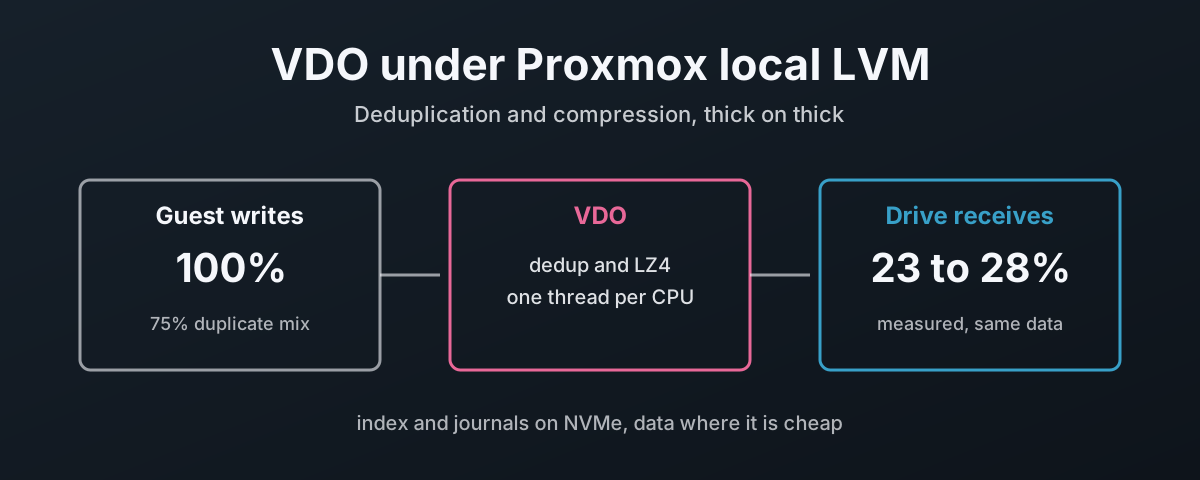
What that means for the hardware is simple. Fewer bytes reach the drive. I wrote a mix that was 75% duplicate and 50% compressible through VDO for 30 seconds at a time, and the drive’s own counters said it received 23 to 28% of what the guest wrote. Six full clones of a template disk added 8 data blocks between them. Thirty-two kilobytes.
Fewer bytes is less wear, and less work for any cache on the drive or the controller in front of it. It costs CPU and latency to get there, and on a fast drive that cost is measured below against the same Optane with no VDO at all. On slow spinning disks the same cost disappears into the seek times, which is where this gets interesting.
Two rules shape everything that follows. The stack is thick on thick: nothing above VDO, and VDO itself, can promise more space than the drive has. And VDO’s own metadata, its index and its journals, can live on NVMe while the data lives somewhere slower.
Every number here comes from one Proxmox VE 9.2 host, a Ryzen 7 5700G with 16 CPUs, kernel 7.0.14-25-pve, LVM 2.03.31 and the Debian vdo 8.3.1.1 tools, on two Intel Optane drives that were wiped afterwards.
What VDO Is and Where It Sits
The kernel describes dm-vdo as a device-mapper target that “provides block-level deduplication, compression, and thin provisioning”1. Each incoming 4 KiB block is hashed. If an identical block is already stored, VDO records a reference instead of a copy. Blocks that are not duplicates go through LZ4 and get packed several to a physical block, and blocks of all zeroes are not stored at all2.
LVM drives the whole thing.
lvcreate --type vdo makes a VDO pool, which holds the real blocks, and a VDO LV on top of it with whatever virtual size you ask for2.
A thick volume group goes on the VDO LV, and Proxmox uses it as ordinary lvm storage.
| Layer | Name in the lab | What it does |
|---|---|---|
| VM disks | vm-9901-disk-0 and so on | thick LVs, created by Proxmox |
| Volume group | vdovg, 35 GiB | plain LVM, what Proxmox’s lvm storage reads |
| VDO LV | vdolab/vdolv, 35 GiB virtual | dedup, LZ4, zero blocks dropped |
| VDO pool | vdolab/vdopool, 40 GiB | the real blocks, VDO’s metadata and index |
| Physical | nvme8n1 | VG vdolab |
Thick on thick, or not at all
VDO is a thin provisioner in its own right: the VDO LV can be given any virtual size. Make it bigger than the pool can hold and the volume group on top is thick on a promise, which is thin on thin moved down a layer. I did exactly that on the first build, a 120 GiB VDO LV on a 40 GiB pool, and Proxmox showed a third of the storage free while VDO was full.
So size the VDO LV to what the pool can actually address, no more.
lvcreate prints that figure, “can address 36.00 GB” on this 40 GiB pool, and VDO’s block map for the logical space comes out of the same room, so I gave it 35 GiB.
Then I proved it the hard way. One VM disk taking every extent Proxmox would give, 34 GiB, filled end to end with random data that VDO can do nothing with:
# vdostats --human-readable
Device                    Size      Used Available Use% Space saving%
vdolab-vdopool-vpool     40.0G     38.1G      1.9G  95%            0%
The disk ran out at its own end, as a thick disk should. VDO still had 1.9 GiB free, more than the 1 GiB Proxmox had left to allocate. Proxmox’s figure is the real limit, and VDO cannot run out first.
What you give up is the overcommit: the space deduplication saves shows up as drive that never gets written, not as extra disks for Proxmox. That is the right trade for this post, which is about the hardware. And do not put an lvmthin pool on it either. Two thin layers is two sets of books3.
What It Costs Before You Store a Byte
VDO keeps a deduplication index, the UDS index, on the pool itself.
An empty 40 GiB pool reported 4.0 GiB used and 36.0 GiB available.
vdolistmetadata, from the same vdo package, lists every metadata block on the device, and accounts for nearly all of it:
| Region | 4 KiB blocks | Size |
|---|---|---|
| UDS index | 679,127 | 2.59 GiB |
| Recovery journal | 32,768 | 128 MiB |
| Reference counts and journals, 18 slabs | 6,372 | 25 MiB |
| Space too small for a nineteenth slab | 336,555 | 1.28 GiB |
| Total | about 4.0 GiB |
The leftover line is worth knowing: slabs are 2 GiB, so size the pool in whole slabs plus the overhead or the remainder is simply unused.
RAM is the other bill. It is paid whether the pool is busy or idle:
| Cost | Rule from lvmvdo(7) | This 40 GiB pool |
|---|---|---|
| Fixed | 38 MiB | 38 MiB |
| Block map cache | 1.15 MiB per MiB of cache, minimum 150 MiB | 150 MiB (128 MiB default) |
| Physical space | 268 MiB per TiB | 11 MiB |
| UDS index (dense) | minimum 250 MiB, the default | 256 MiB |
| Total | about 455 MiB |
The default dense index covers a deduplication window of roughly 256 GiB, since a dense index with 1 GiB of RAM “maintains a 1 TiB deduplication window”2. The 128 MiB block map cache is sized for “efficient access to 100 GB of logical space at a time”, and the kernel documentation names it the most important value to adjust as the working set grows1.
Building the Stack
Let LVM see a PV on an LV
The volume group sits on an LV, and LVM ignores LVs as physical volumes by default.
devices/scan_lvs turns that on, and LVM’s reference carries the warning that goes with it: “Caution is required to avoid using PVs that belong to guest images stored on LVs”4.
A guest that uses LVM inside its own disk would otherwise have its volume groups turn up on the host.
So the filter changes too. Same edit. The stock filter on this host only rejected ZFS zvols and RBD devices. I added a reject for every Proxmox VM disk:
# lvmconfig devices/global_filter devices/scan_lvs
global_filter=["r|/dev/zd.*|","r|/dev/rbd.*|","r|/dev/mapper/.*-(vm|base)--[0-9]+--disk--[0-9]+|"]
scan_lvs=1
The same reference says scan_lvs “does not enable autoactivation of layered VGs”4.
Proxmox does not need it to. Its LVM plugin activates each disk with lvchange -aey when the VM starts5.
I tested it the way a boot leaves things, everything deactivated and then the same pvscan udev runs: the VG under VDO came up, and qm start activated the VM’s disk itself.
The catch is underneath. With the VG under VDO incomplete, the same qm start failed with “Volume group “vdovg” not found”.
The VDO pool, thick, with its settings on the creation line
The formatter is in Debian’s vdo package6:
# apt install vdo
Then the pool.
-L is the real space, -V the virtual size, kept inside what the pool can address.
The thread layout and the discard size go on the same line, because neither can be changed later without stopping every VM on the pool:
# pvcreate /dev/nvme8n1
  Physical volume "/dev/nvme8n1" successfully created.
# vgcreate vdolab /dev/nvme8n1
  Volume group "vdolab" successfully created
# lvcreate -y --type vdo -L 40G -V 35G -n vdolv vdolab/vdopool /dev/nvme8n1 --vdosettings "logical_threads=4 physical_threads=4 hash_zone_threads=2 cpu_threads=3 bio_threads=2 ack_threads=1 max_discard=4096"
  Wiping vdo signature on /dev/vdolab/vdopool.
    The VDO volume can address 36.00 GB in 18 data slabs, each 2.00 GB.
    It can grow to address at most 16.00 TB of physical storage in 8192 slabs.
    If a larger maximum size might be needed, use bigger slabs.
  Logical volume "vdolv" created.
# dmsetup table vdolab-vdopool-vpool
0 73402368 vdo V4 /dev/dm-7 10485760 4096 32768 16380 deduplication on compression on maxDiscard 4096 ack 1 bio 2 bioRotationInterval 64 cpu 3 hash 2 logical 4 physical 4
The thread layout is the one measured further down for a 16-CPU host; max_discard=4096 has its own section.
The volume group and the Proxmox storage
# pvcreate /dev/vdolab/vdolv
  Physical volume "/dev/vdolab/vdolv" successfully created.
# vgcreate vdovg /dev/vdolab/vdolv
  Volume group "vdovg" successfully created
# pvesm add lvm vdo-lvm --vgname vdovg --content images,rootdir --on-volume-remove discard=1
# pvesm status | grep -E "Name|vdo-lvm"
Name             Type     Status     Total (KiB)      Used (KiB) Available (KiB)        %
vdo-lvm           lvm     active        36696064               0        36696064    0.00%
on-volume-remove discard=1 matters, and it is covered below.
What Deduplication Saved
I wrote things a Proxmox host actually stores and read VDO’s block counters after each.
logical blocks used is what the layers above wrote; data blocks used is what VDO stored. Both are 4 KiB blocks.
| What was written | Logical blocks added | Data blocks added | Saved |
|---|---|---|---|
| Rocky Linux 10 rootfs, ext4 on a 4 GiB disk | 114,505 | 60,537 | 47% |
Six full clones of it (qm clone --full, about 4 s each) | 6,291,456 | 8 | 99.9999% |
| Proxmox Datacenter Manager 1.1 ISO, 1.36 GiB | 356,172 | 351,965 | 1.2% |
Its -auto rebuild, near enough the same bytes | 356,399 | 40 | 99.99% |
| 4 GiB of zeros | 1,048,575 | 0 | 100% |
| 1 GiB of random data | 262,143 | 262,144 | 0% |
Each clone wrote all 4 GiB, zeros included, because a full clone onto a thick LV copies every block. VDO stored the zeros as nothing and the rest as references.
VDO is very good at data it has seen before. And at nowt. It is useless on data that is already compressed or encrypted, which is why the first ISO, mostly squashfs, saved 1.2%.
With the template and its six clones in place, Proxmox showed the storage 80.01% used, 28 GiB of thick disks out of 35. The drive held 4.3 GiB, and most of that was the index. On thick storage that is the point: Proxmox counts what has been allocated, and the drive carries what is actually different.
What the Drive Actually Receives
Savings on disk are a snapshot. The hardware cares about the stream.
So I measured the bytes reaching the drive while writing: fio for 30 seconds, the drive’s write counter from /sys/block before and after, the same Optane with and without VDO, twice each.
The counter is honest. Across the whole run it added up to 794 GB, and the drive’s own SMART “Data Units Written” moved by 794 GB too.
| Workload, 30 s | Without VDO | With VDO, 16 threads | Bytes reaching the drive |
|---|---|---|---|
| 4k random write, QD32, 4 jobs, 75% dup, 50% compress | 582,013 IOPS, p99 244 µs | 460,887 IOPS, p99 1.05 ms | 28% |
| 128k write, QD8, 75% dup, 50% compress | 2,345 MiB/s, p99 490 µs | 2,179 MiB/s, p99 1.02 ms | 23% |
| 4k random write, QD32, 4 jobs, random data | 571,721 IOPS | 272,366 to 381,005 IOPS | 59 to 100% |
| 128k write, QD8, random data | 2,346 MiB/s | 1,051 to 1,854 MiB/s | 100% |
On a realistic mix, VDO kept 79 to 93% of the bare drive’s throughput and sent it a quarter of the bytes. On fully random data it saves nothing and costs a lot, and the two runs disagreed so widely that I am only giving the range.
The tail latency is VDO’s own processing, not the drive. A p99 of about a millisecond, against a quarter of one bare.
The Optane has no cache to relieve
These drives say so themselves: vwc 0 from nvme id-ctrl, write through in /sys/block.
An Optane writes in place with no DRAM or SLC staging, so on this hardware the gain is the bytes and the wear, not a drive cache that fills more slowly.
A NAND SSD with an SLC cache, or a RAID controller with a write-back cache, is where fewer bytes buys responsiveness as well. That is the RAID6 section below.
Matching VDO’s Threads to the CPUs
Out of the box LVM gives VDO ten threads: one logical, one physical, one hash zone, two CPU, four bio submission, one acknowledgement. On a 16-CPU host that leaves most of the machine idle while VDO’s block map work queues behind a single logical thread.
The kernel documentation explains the knobs1. Logical threads each own “a disjoint section of the block map”, physical threads “a disjoint section of the data blocks”, and both “can increase throughput”, while excess threads “can waste resources and increase contention”. Logical threads go up to 60, physical up to 16, and the pool needs at least one slab per physical thread. At 18 slabs this one has room.
| Layout | logical | physical | hash | cpu | bio | ack | Total |
|---|---|---|---|---|---|---|---|
| LVM defaults | 1 | 1 | 1 | 2 | 4 | 1 | 10 |
| Matched to 16 CPUs | 4 | 4 | 2 | 3 | 2 | 1 | 16 |
| Twice that | 8 | 8 | 4 | 6 | 2 | 2 | 30 |
Each layout ran the same fio jobs twice, interleaved, with random data, plus all seven clone disks read at once the way seven VMs boot together:
| Test, mean of two runs | Defaults | Matched to 16 CPUs | Twice that |
|---|---|---|---|
| 4k random write, QD32, 4 jobs | 292,466 IOPS | 365,314 IOPS | 302,461 IOPS |
| 4k random write p99, 4 jobs | 2.1 to 3.7 ms | 1.5 to 1.6 ms | 2.1 to 2.2 ms |
| 1M sequential write | 1,153 MiB/s | 1,729 MiB/s | 1,507 MiB/s |
| 4k random read, QD32, 4 jobs | 507,450 IOPS | 503,827 IOPS | 485,263 IOPS |
| Seven clone disks read at once | 7.5 s | 3.1 s | 3.4 s |
Matched to the CPU count wins nearly everything: a quarter more parallel writes, half as much again on sequential writes, seven disks read 2.4 times faster, and a tighter tail. Doubling again is worse across the board. That is the contention the documentation warns about. The defaults were also the least stable, with the seven-disk read swinging from 6.1 to 8.8 s between runs.
As such, the rule is one VDO thread per CPU, spread across the types as above, with physical threads capped by the slab count.
What VDO Costs on Fast Hardware
The same Optane with no VDO, against VDO with its threads matched, random data, mean of two runs:
| Test | Optane, no VDO | VDO, 16 threads |
|---|---|---|
| 4k random write, QD1 | 42,294 IOPS, 19.4 µs | 55,806 IOPS, 12.1 µs |
| 4k random write, QD32 | 142,416 IOPS | 144,292 IOPS |
| 4k random write, QD32, 4 jobs | 572,293 IOPS | 365,314 IOPS |
| 4k random read, QD1 | 55,276 IOPS, 14.4 µs | 27,988 IOPS, 31.4 µs |
| 4k random read, QD32, 4 jobs | 586,463 IOPS | 503,827 IOPS |
| 1M sequential write, QD8 | 2,348 MiB/s | 1,729 MiB/s |
| Seven template disks read at once | 11.1 s | 3.1 s |
Read it plainly. A single random read takes more than twice as long through VDO. Parallel random writes lose more than a third, sequential writes a quarter. On a drive this fast, VDO’s 17 µs of extra work per read is most of the read.
The QD1 write being faster through VDO is not a free lunch. Far from it. VDO acknowledges a write before it is on the drive, and the kernel documentation is plain that “unflushed writes may or may not persist after a crash”1. That number measures an acknowledgement. A guest that flushes, which every filesystem does, gets the durability it asks for.
The seven-disk line is the one VDO wins outright, and it is worth being clear why. Seven plain copies have to read 28 GiB of real bytes, zeros included. VDO reads one set of shared blocks and skips the zeros.
So on fast flash, VDO trades latency for bytes. Every one of those microseconds is fixed cost, though, and it does not grow when the drive underneath gets slower.
Putting VDO’s Metadata on NVMe
VDO has no separate metadata device. Everything lives on the one pool LV. But the dm-vdo source shows the layout is fixed, and an LV can be built from pieces on different drives.
The format code places the block map roots from the start of the data region, then the slab summary and the recovery journal from the end, and fills the middle with slabs7.
The UDS index sits before all of it, straight after the geometry block.
vdolistmetadata confirmed it on the lab pool:
| Blocks | What | Where it sits |
|---|---|---|
| 0 to 679,188 | geometry, UDS index, super block, block map roots | the first 2.59 GiB |
| inside each 2 GiB slab | data, block map leaves, 130 reference blocks and a 224-block slab journal | spread through the pool |
| 10,452,928 to 10,485,695 | recovery journal | the last 128 MiB, nearly |
| 10,485,696 to 10,485,759 | slab summary | the very last 256 KiB |
So build the pool LV in three pieces: the head on NVMe, the middle on the slow drive, the tail on NVMe.
Then convert it to a VDO pool, which lvmvdo(7) documents for an existing LV2.
Here nvme6n1 stands in for the NVMe and nvme8n1 for the slow drive:
# lvcreate -y -L 3G -n splitpool vdolab /dev/nvme6n1
  Logical volume "splitpool" created.
# lvextend -l +9408 vdolab/splitpool /dev/nvme8n1
  Size of logical volume vdolab/splitpool changed from 3.00 GiB (768 extents) to 39.75 GiB (10176 extents).
  Logical volume vdolab/splitpool successfully resized.
# lvextend -l +64 vdolab/splitpool /dev/nvme6n1
  Size of logical volume vdolab/splitpool changed from 39.75 GiB (10176 extents) to 40.00 GiB (10240 extents).
  Logical volume vdolab/splitpool successfully resized.
# lvconvert -y --type vdo-pool -n splitlv -V 35G vdolab/splitpool --vdosettings "logical_threads=4 physical_threads=4 hash_zone_threads=2 cpu_threads=3 bio_threads=2 ack_threads=1 max_discard=4096"
  WARNING: Converting logical volume vdolab/splitpool to VDO pool volume with formatting.
  THIS WILL DESTROY CONTENT OF LOGICAL VOLUME (filesystem etc.)
    The VDO volume can address 36.00 GB in 18 data slabs, each 2.00 GB.
    It can grow to address at most 16.00 TB of physical storage in 8192 slabs.
    If a larger maximum size might be needed, use bigger slabs.
  Logical volume "splitlv" created.
  Converted vdolab/splitpool to VDO pool volume and created virtual vdolab/splitlv VDO volume.
Then check that VDO put its metadata where the extents are:
# vdolistmetadata /dev/mapper/vdolab-splitpool_vdata | grep -v "slab [0-9]* \(reference\|journal\)"
0 .. 0: geometry block
1 .. 679127: index
679128 .. 679128: super block
679129 .. 679188: block map tree roots
10452928 .. 10485695: recovery journal
10485696 .. 10485759: slab summary
An extent is 1,024 blocks. The NVMe head is extents 0 to 767, blocks 0 to 786,431, which covers the index and roots, with about 420 MiB of the first slab’s data along for the ride. The NVMe tail is extents 10,176 to 10,239, blocks 10,420,224 onwards, which covers the recovery journal and slab summary.
How much of VDO’s work moves with it, per 30-second run, counted per device:
| Workload | NVMe write I/Os | Data drive write I/Os | NVMe share |
|---|---|---|---|
| 4k random write, 75% dup, 50% compress | 388,430 to 538,223 | 3.42 to 3.63 million | 10 to 13% |
| 128k write, 75% dup, 50% compress | 458,214 to 634,167 | 3.30 to 3.53 million | 12 to 15% |
| 4k random write, random data | 181,457 to 384,507 | 3.25 to 8.49 million | 4 to 5% |
| 4k random read | 0 writes, 2% of reads | 0 |
A tenth or so of the write operations: the recovery journal, index updates, and that slice of slab 0 on the NVMe head. They are small, scattered metadata writes, the kind a spinning disk handles worst. On NVMe they are nothing.
Two limits.
The per-slab metadata, reference counts, slab journals and block map leaves, lives inside the slabs, and stays with the data.
And I did not test growing a split pool. The journal is placed from the end, so after any lvextend, run vdolistmetadata again and see where it went before trusting it.
VDO on bcache: One NVMe, Two Jobs
bcache is the other way to put flash in front of slow disks. It is what I already run under Ceph on spinning drives, with every setting explained in the bcache post. So the question is what VDO does to a bcache cache when it sits on top of one.
One NVMe does both flash jobs, split into two partitions:
| Device | Size | Job |
|---|---|---|
nvme8n1p1 | 32 GiB | bcache cache, writeback |
nvme8n1p2 | 8 GiB | VDO’s head and tail: index, roots, recovery journal, slab summary |
nvme6n1 | 349 GiB | bcache backing device, where the data lives |
/dev/bcache0 | 349 GiB | the middle of the VDO pool, the slabs |
Both drives are Optanes again, so nvme6n1 is standing in for spinning disk.
Keep that in mind for every figure below. The backing device here is fast, so this measures what reaches the cache, not how long a spindle takes to drain it.
The partitions and the cache set, with the settings from that post:
# sgdisk --zap-all /dev/nvme8n1
# sgdisk -n 1:0:+32G -c 1:bcache-cache -n 2:0:+8G -c 2:vdo-meta /dev/nvme8n1
# blockdev --rereadpt /dev/nvme8n1
# apt install bcache-tools
# make-bcache -C /dev/nvme8n1p1 -B /dev/nvme6n1 --writeback
# B=/sys/block/bcache0/bcache
# echo 0 > $B/sequential_cutoff
# echo 40 > $B/writeback_percent
# echo 81920 > $B/writeback_rate
# echo 20480 > $B/writeback_rate_minimum
# CS=/sys/fs/bcache/47bac36f-a1d5-4e8e-8695-2e7ff944172d
# echo 0 > $CS/congested_read_threshold_us
# echo 0 > $CS/congested_write_threshold_us
Those echo lines last until the next reboot. The udev rule in the bcache post is how they stick.
Then the pool, split the same way as above, with nvme8n1p2 for the two ends and bcache0 for the middle:
# pvcreate /dev/bcache0 /dev/nvme8n1p2
# vgcreate vdolab /dev/bcache0 /dev/nvme8n1p2
# lvcreate -y -L 3G -n vdopool vdolab /dev/nvme8n1p2
# lvextend -l +9408 vdolab/vdopool /dev/bcache0
# lvextend -l +64 vdolab/vdopool /dev/nvme8n1p2
# lvconvert -y --type vdo-pool -n vdolv -V 35G vdolab/vdopool --vdosettings "logical_threads=4 physical_threads=4 hash_zone_threads=2 cpu_threads=3 bio_threads=2 ack_threads=1 max_discard=4096"
# lvs -a --segments -o lv_name,lv_size,segtype,seg_start_pe,seg_size_pe,devices vdolab
  LV              LSize  Type     Start SSize Devices
  vdolv           35.00g vdo          0  8960 vdopool(0)
  vdopool         40.00g vdo-pool     0 10240 vdopool_vdata(0)
  [vdopool_vdata] 40.00g linear       0   768 /dev/nvme8n1p2(0)
  [vdopool_vdata] 40.00g linear     768  9408 /dev/bcache0(0)
  [vdopool_vdata] 40.00g linear   10176    64 /dev/nvme8n1p2(768)
vdolistmetadata printed the same block ranges as the split build, so the index and both journals sit on nvme8n1p2.
vdovg and the Proxmox storage go on top exactly as before.
What reaches the cache
The comparison is an 8 GiB LV straight on bcache0 against an 8 GiB LV in vdovg, the same fio jobs for 30 seconds, twice, with the cache flushed clean between every run.
The device counters in /sys/class/block say where the bytes went.
| 75% dup, 50% compress, 30 s | bcache only | VDO on bcache |
|---|---|---|
| 4k random write, QD32, 4 jobs | 212,222 and 205,585 IOPS | 390,206 and 304,757 IOPS |
| p99 | 1.89 and 2.04 ms | 1.45 and 2.54 ms |
| Guest wrote | 24.29 and 23.53 GiB | 44.67 and 34.88 GiB |
| Written into the bcache cache | 25.00 and 24.26 GiB | 11.48 and 10.44 GiB |
| Written to VDO’s metadata partition | 1.18 and 0.59 GiB | |
| Cache writes per guest byte | 103% | 26 and 30% |
| Left dirty in the cache at the end | 6.0 and 6.5 GiB | 5.5 and 5.2 GiB |
| 128k write, QD8 | 2,001 and 1,985 MiB/s | 1,878 and 1,416 MiB/s |
| Cache writes per guest byte, 128k | 101% | 24 and 27% |
bcache on its own topped out at about 210,000 small writes a second, and it wrote every byte into the cache plus 3% of its own. Put VDO in front and the cache took a quarter of the bytes. On the first run the same cache then carried 390,206 writes a second, nearly twice as many, and still finished with less dirty data waiting for the slow drive. The cache was the limit. VDO moved it.
The second run is the honest one for a pool that has been in use. fio seeds its generators the same way every run by default8, so run two wrote data the index had already seen, pointing at blocks that had since been discarded. VDO treats the index as hints and reads each candidate block to check it is really a duplicate before sharing it9. During a write-only test, that second run read 7.11 GiB back out of the cache and 1.20 GiB from the data drive. The first read 0.12 GiB. Stale advice is not free, and on a pool where VMs come and go there will always be some.
Random data is the other side of it:
| Random data, 30 s | bcache only | VDO on bcache |
|---|---|---|
| 4k random write, QD32, 4 jobs | 205,984 and 203,066 IOPS | 203,186 and 85,882 IOPS |
| p99 | 2.04 and 2.15 ms | 5.7 and 17.7 ms |
| 128k write, QD8 | 2,038 and 2,017 MiB/s | 878 and 357 MiB/s |
| 4k random read, QD1 | 36,609 and 36,639 IOPS, 21.6 µs | 26,345 and 26,202 IOPS, 33.6 and 33.7 µs |
| 4k random read, QD32, 4 jobs | 471,585 and 471,730 IOPS | 335,461 and 336,941 IOPS |
Nothing to save, so VDO is pure overhead, and on the stale-index run it more than halved the small writes. Every read in both columns came from the cache. VDO’s 12 µs on top is the same fixed cost it adds on bare Optane.
So where the data repeats, the two stack well. The cache gets a quarter of the bytes, rides out a burst for longer, and has less to write back to the spindles. Where it does not repeat, bcache is better off on its own.
On HDD Hardware RAID6: Reasoned, Not Measured
I have no HDD RAID6 host to test on, so this section is reasoning built on the measurements above. Measure your own array before relying on it.
| On HDD RAID6 | What VDO changes |
|---|---|
| Writes reaching the array | about a quarter, on a mix like the one measured |
| Controller write-back cache | fills at a quarter of the rate, so it rides out a burst about four times as long |
| VDO’s CPU cost | 17 µs per read, lost inside a 5 to 10 ms seek |
| Recovery journal writes | a tenth or so of write I/Os, small and flushed: put them on NVMe |
| Index lookups | watch dedupe advice timeouts in vdostats; on slow storage VDO can give up looking and write the duplicate anyway |
| Reading one clone start to finish | slower: its blocks point back into the template’s, scattered across the array |
The first two lines are the hardware answer. While the controller’s battery or flash-backed cache has room, the guest sees cache latency. When it fills, the guest sees the spindles. Send it a quarter of the bytes and the same cache gives about four times the headroom, and has a quarter as much to drain. The bcache section above is that measured with a software cache in place of the controller’s.
The third is why VDO belongs on slow disks more than fast ones. On the Optane, VDO doubled the read latency. On 7,200 rpm drives the same fixed cost disappears into one seek.
The last three are the costs. A boot storm of identical clones gets faster, but one clone read end to end gets slower, because deduplication scatters it. And VDO’s own small writes land on the array too, which is the case for the split layout above: index and journal on NVMe, slabs on the RAID6.
Deleting a Disk: Make Proxmox Discard It
Removing an LV frees its extents in LVM. It does not tell VDO the blocks are unused, so VDO keeps them. The kernel documentation says why that matters: “If the vdo is thinly provisioned, discarding unused blocks is essential to prevent the target from running out of space”1. On thick storage it cannot run out, but undiscarded blocks are still drive space held for data nobody owns.
The on-volume-remove discard=1 option on the storage is the fix. Proxmox describes it as issuing “discard (TRIM) requests before removal”5:
| Delete | VDO blocks freed |
|---|---|
plain lvm storage, a disk holding 1 GiB | 0 |
with on-volume-remove discard=1, the same | 262,140, the whole 1 GiB |
It is slow on a big disk, though.
Deleting the 34 GiB disk from the fill test took Proxmox 262.6 s, while blkdiscard on the same kind of data managed 15 GiB in 2.25 s.
So for anything large, blkdiscard the disk first and then delete it.
The discard size matters too. VDO’s default max_discard is one 4 KiB block per request1:
| Discard of 15 GiB of random data | Elapsed | CPU (sys) |
|---|---|---|
max_discard=1, the default | 8.06 s | 8.06 s |
max_discard=4096, 16 MiB | 2.25 s | 0.00 s |
Inside the guests, turn on the drive’s Discard option so their TRIM reaches the storage10, and run fstrim on a schedule.
Where It Earns Its Place
| Fits | Does not fit |
|---|---|
| many VMs from the same few templates | databases and latency-bound work at depth |
| HDD RAID6 behind a write-back controller cache | an all-NVMe host that needs every microsecond |
| spinning data with an NVMe for VDO’s metadata | already compressed data: media, backups, ISOs |
| bcache in front of spinning data, where the data repeats | bcache in front of data that does not repeat |
| drives where write endurance is the limit | encrypted guest disks, which never deduplicate |
| a host with half a gigabyte of RAM per pool spare | a small pool, where the index eats a tenth |
| Setting | Default | Set it to | Change it later |
|---|---|---|---|
VDO virtual size -V | whatever you ask for | no more than the pool can address | grow only, never shrink |
| VDO threads | 10, one logical | one per CPU, spread as above | only with the pool’s VMs stopped |
max_discard | 1, which is 4 KiB | 4096, which is 16 MiB | only with the pool’s VMs stopped |
on-volume-remove on the storage | not set | discard=1 | yes, pvesm set |
| Discard on each virtual disk | off | on | yes, per disk |
scan_lvs and the filter | 0, no VM-disk reject | 1, VM disks rejected | yes, in lvm.conf |
None of that is hard. None of it is the default.
The Cheapest Write Is the One You Never Send
What strikes me about VDO is how badly it gets sold. It turns up as a way to put more on a disk than the disk holds, and that is the least useful thing it does. I did it by accident on the first build, and Proxmox showed a third of the storage free while VDO was full. Overcommit is a loan, and the drive calls it in at full write speed.
The real value is in the line most people never measure. A quarter of the bytes reaching the drive is a quarter of the wear and a controller cache that lasts four times as long. That is not capacity. It is the hardware doing less work for the same result, which is the only kind of saving that does not come back to bite you.
It costs CPU, and on fast flash it costs latency, and both are fixed. That is the trade, stated plainly: processor time spent so the slow, expensive part of the box does less. On spinning disks behind a RAID controller or a bcache, with the index and journal on an NVMe, that sum comes out well. On an all-Optane host it mostly does not.
And it will not look after itself. Every default that matters is wrong for this job: ten threads on sixteen CPUs, a discard size that burns a core, a virtual size you can set to anything, and nothing in the storage config telling Proxmox to give space back. None of that is hidden. It is all in the documentation.
So build it thick, once, properly, with the settings on the creation line and the metadata where it belongs. Do that and the drive does a quarter of the work. Skip it and you have bought another layer that promises more than it has.
Linux kernel documentation — dm-vdo — the target “provides block-level deduplication, compression, and thin provisioning”; “If the vdo is thinly provisioned, discarding unused blocks is essential to prevent the target from running out of space”; “unflushed writes may or may not persist after a crash”; the 128 MB block map cache supports “efficient access to 100 GB of logical space at a time”; thread parameters, their limits and the tuning guidance; maxDiscard “in 4096-byte blocks”. ↩︎ ↩︎ ↩︎ ↩︎ ↩︎ ↩︎
lvmvdo(7) — Support for Virtual Data Optimizer in LVM — VDO pool and VDO LV, converting an existing LV with
lvconvert --type vdo-pool, memory usage, the dense index and its 1 TiB window per GiB of RAM, and “You cannot reduce the size of a VDOPoolLV”. ↩︎ ↩︎ ↩︎ ↩︎Linux kernel source — drivers/md/dm-thin.c —
disable_discard_passdown_if_not_supported()turns discard passdown off when the data device cannot take a whole thin chunk, which is what VDO’s default does under a thin pool. ↩︎LVM2 — conf/example.conf.in —
devices/scan_lvs: “Caution is required to avoid using PVs that belong to guest images stored on LVs” and “This option does not enable autoactivation of layered VGs”. ↩︎ ↩︎Proxmox pve-storage — LVMPlugin.pm — the
on-volume-removeproperty, “Use ‘discard=1’ to issue discard (TRIM) requests before removal”; volumes are activated individually withlvchange -aeyrather than withvgchange -aly. ↩︎ ↩︎Debian trixie — package vdo — “Management tools for Virtual Data Optimizer”, version 8.3.1.1-1, which provides
vdoformat,vdostatsandvdolistmetadata. ↩︎Linux kernel source — drivers/md/dm-vdo/encodings.c —
vdo_initialize_layout()makes the block map partition at the beginning, the slab summary and recovery journal partitions at the end, and the slab depot from what is left. ↩︎fio documentation — randrepeat — “Seed all random number generators in a predictable way so the pattern is repeatable across runs. Default: true.” ↩︎
Linux kernel documentation — Design of dm-vdo — “vdo treats the locations in the index as hints, and reads each indicated block to verify that it is indeed a duplicate before sharing the existing block with a new one.” ↩︎
Proxmox VE documentation — Qemu/KVM Virtual Machines, Trim/Discard — “For the guest to be able to issue TRIM commands, you must enable the Discard option on the drive.” ↩︎