What Are i440fx and Q35?
Every QEMU virtual machine has a virtual chipset. It defines the whole virtual motherboard — the PCI/PCIe bus topology, the south bridge, the interrupt controller, what the guest OS sees when it enumerates hardware at boot.
QEMU offers two choices: i440fx and Q35.
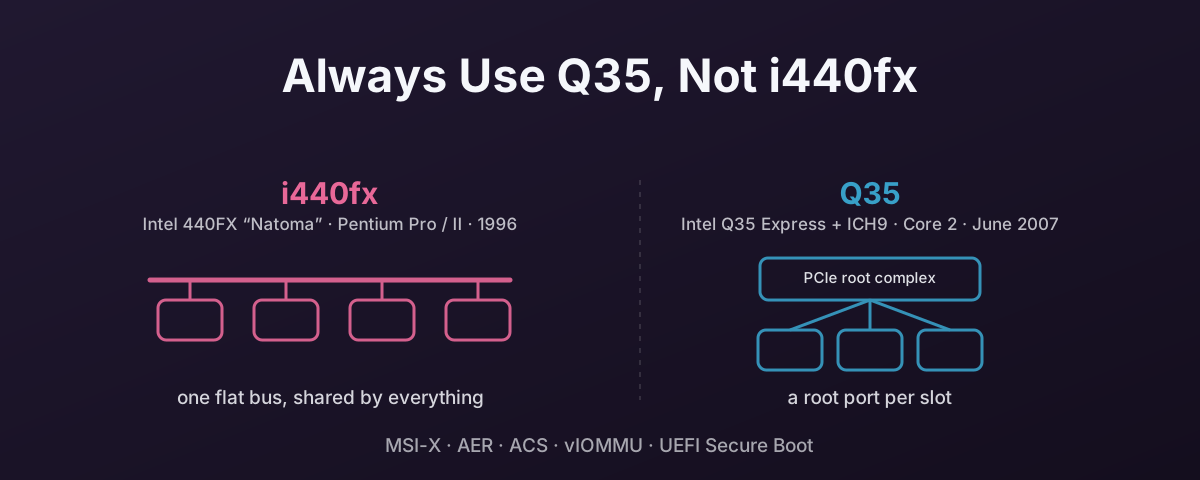
i440fx emulates the Intel 440FX — codenamed Natoma, released in 1996 as the chipset for the Pentium Pro and, later, the Pentium II. It presents a flat PCI bus with no native PCIe support. It was the original QEMU machine type and has been the default for a long time. Fair innings for a chipset designed for the Pentium Pro.
Q35 emulates the Intel Q35 Express, released in June 2007 for the Core 2 generation, paired with the ICH9 south bridge. It gives the guest a proper PCIe root complex and a modern interrupt controller. Passed-through devices appear as native PCIe devices with the correct topology.
Both are virtual. Neither affects the actual hardware the host uses. The difference is what the guest OS sees.
Why Q35 Matters for Passthrough
Devices passed through to an i440fx VM appear as legacy PCI devices regardless of what they actually are. The guest sees them as “really fast PCI devices” rather than PCIe devices. Some drivers work fine with this. Others expect PCIe and behave incorrectly or refuse to load when they don’t find it.
Q35’s PCIe root complex changes the picture in several ways.
MSI-X
MSI-X (Message Signalled Interrupts — Extended) requires PCIe. Under i440fx, MSI-X either falls back to legacy INTx interrupts or does not work at all.
This matters a lot for NVMe. NVMe controllers rely on MSI-X for their multi-queue architecture. Each IO queue pair gets its own interrupt vector. Without MSI-X, all IO completions funnel through a single interrupt, which creates a bottleneck at high IOPS.
It also matters for modern network cards and GPUs. Any device that uses multiple interrupt vectors to spread load across CPU cores needs MSI-X.
AER (Advanced Error Reporting)
PCIe AER lets the guest detect and handle device errors properly rather than silently failing. Under i440fx, the guest has no visibility into PCIe-level errors.
For a production workload with a passed-through device, silent error swallowing is a problem. AER gives the guest driver the ability to log, report, and in some cases recover from hardware errors that would otherwise go unnoticed until data is corrupted.
ACS (Access Control Services)
ACS controls peer-to-peer DMA between devices on the same bus. It is part of the IOMMU isolation model. It stops one device DMA-ing into another device’s memory space without going through the IOMMU.
Under i440fx, the virtual bus topology doesn’t support ACS at all. This does not break basic passthrough, but it weakens the isolation that the IOMMU is supposed to give you.
IOMMU Group Presentation
Q35’s PCIe hierarchy means each virtual slot can sit in its own IOMMU group within the guest. i440fx lumps everything onto one shared bus, which makes guest-side IOMMU configuration problematic.
This is relevant for nested virtualisation, where the guest itself needs clean IOMMU groups. It is also relevant for vIOMMU, which is only available on Q35.
vIOMMU
If you need the guest itself to have IOMMU capability — for nested passthrough, for DPDK, or for certain security configurations — that requires the Q35 machine type.
vIOMMU emulation lets the guest run its own IOMMU, which is useful for:
- Nested VM passthrough (a VM inside a VM with device access)
- DPDK userspace networking where the application needs IOMMU protection
- Security configurations that require DMA isolation within the guest
Why Q35 Matters Beyond Passthrough
Even if you are not doing passthrough, Q35 is the better choice for modern workloads.
OVMF (UEFI) Firmware
The combination of Q35 and OVMF gives the guest a modern UEFI boot environment with Secure Boot support. i440fx can use OVMF but the combination is less well tested and some features do not work correctly.
Windows 11 requires UEFI with Secure Boot. Microsoft’s hardware requirements mandate it. Windows Server 2025 works best with UEFI. Q35 with OVMF is the supported path for both.
If you are running a Windows 11 or Server 2025 VM on i440fx with SeaBIOS, you are fighting upstream. It might work today. It is not where the ecosystem is heading.
AHCI
Q35 includes native AHCI (Advanced Host Controller Interface) emulation through the ICH9 south bridge. i440fx uses the older IDE or LSI SCSI emulation for boot disks.
For VirtIO storage this does not matter. VirtIO bypasses the chipset’s storage controller entirely. But if you are using SATA emulation for a guest OS that lacks VirtIO drivers at install time, AHCI on Q35 is much faster than IDE on i440fx.
The Overhead i440fx Carries That Q35 Doesn’t
The AHCI gap is not just about one controller being newer. It is that i440fx makes the guest pay the hypervisor on almost every interaction, and Q35 mostly does not.
Trapped register access. IDE is programmed through legacy x86 I/O ports. The guest writes the sector count, then the LBA registers, then the command register. Each write hits a separate port. Every one of those accesses is trapped and emulated by the host, and each trap is a VM exit costing single-digit microseconds. Issuing one IDE command therefore costs several exits before any data moves.
AHCI works the other way round. The guest builds a command table in its own RAM — no traps, because it is just writing to memory — and then makes one MMIO write to a doorbell register to tell the controller to fetch it. One command costs roughly one exit instead of five or six.
No command queueing. IDE issues one command and waits for it to finish. AHCI supports NCQ, so up to 32 commands can be outstanding, and the drive is free to complete them out of order to reduce seeking. As such, the remaining per-command cost is spread across a queue rather than paid one at a time.
The legacy interrupt path. The PIIX3 IDE controller signals completion on the fixed legacy IRQs 14 and 15, delivered as level-triggered INTx. A level-triggered interrupt has to be acknowledged and unmasked, and because INTx lines are shared, the guest must also work out which device raised it. Each of those steps is another trap. MSI-X, which needs Q35, is a plain memory write with no shared line to identify and no acknowledge round-trip. On hardware with posted interrupts it can reach the guest without an exit at all.
A larger legacy device surface. i440fx always presents its legacy platform devices, including the IDE controller, whether the VM uses them or not. They occupy PCI slots, they get enumerated and probed at every boot, and guest drivers may poll them. Q35 presents a smaller, more modern set. Less for the host to hold up, less for the guest to walk.
None of this shows up in a VirtIO-backed VM, which is why the difference is easy to miss. It matters during installation, on appliance images without VirtIO drivers, and on any guest still using emulated SATA or IDE for its boot disk.
Fewer Virtual Devices, Cleaner Topology
i440fx comes with legacy virtual hardware that Q35 drops. A dummy sound card. A legacy IDE controller. Neither does owt useful, but both burn virtual PCI slots and can confuse guest software that tries to use them.
Q35 presents a cleaner set of virtual hardware that more closely matches what a modern physical server would expose.
The Direction of Travel
RHEL 10 Has Deprecated i440fx
Red Hat has formally deprecated the i440fx machine type in RHEL 10. That signals the direction of travel for the wider KVM ecosystem. When Red Hat deprecates something, it means they have stopped testing it as a first-class path and will not fix bugs tied to it.
The QEMU upstream project has been discussing i440fx deprecation for years. The consensus is that keeping two chipset paths is a burden. Q35 is the one that maps to modern hardware.
Proxmox Has Not Followed
Proxmox VE still creates new VMs as i440fx. The machine type in the create wizard reads “Default (i440fx)”, and it stays that way unless you change it. Q35 is one dropdown away, but it is a choice you have to make deliberately, on every VM you build.
That is the whole reason this post exists. The default is the 1996 chipset, and nothing in the wizard tells you the choice matters.
Switching an Existing VM
If you have an existing VM on i440fx, you can switch to Q35 in the hardware settings or straight in the config:
machine: q35
This is effectively a virtual motherboard swap. Different hardware on the next boot.
Linux generally handles this without issue.
The kernel re-enumerates devices and loads the right drivers.
Interface names will change because the virtual NIC moves from a PCI bus to a PCIe bus.
If your network config names them (e.g. eth0, ens18), update it before rebooting or you lose network access.
Windows is less forgiving. The chipset change means different virtual hardware IDs for the storage controller, network adapter, and other platform devices. Windows may need driver reinstallation. In some cases a fresh install is the cleanest path. Older Windows is the usual offender.
FreeBSD and derivatives (OPNsense, pfSense) generally handle the switch, but test first.
In all cases, test on a non-production VM before switching anything that matters.
When i440fx Is Still Needed
A handful of cases still need i440fx.
Legacy guest operating systems that predate UEFI — Windows XP, Windows 2000, and similar vintage — may not boot under Q35. These OSes expect the legacy PCI topology and SeaBIOS that i440fx provides.
Certain appliance images are built and tested exclusively against i440fx. If the vendor only supports i440fx, that is what you use until they update.
For everything else — new Linux VMs, modern Windows, any workload with passthrough — use Q35. There is nowt to be gained by sticking with a 1996 chipset out of habit.
References
- Proxmox VE Wiki — PCI(e) Passthrough — official Proxmox documentation noting Q35 as the recommended machine type for passthrough
- QEMU Q35 Chipset Specification (PDF) — the original QEMU Q35 design document
- Proxmox Forum — Q35 vs i440fx Discussion — community discussion covering the practical differences