The Switch You Do Not Buy
A three-node Proxmox cluster with Ceph wants a fast network between the nodes. The usual answer is a 100 Gbit switch, and the usual objection is what one costs.
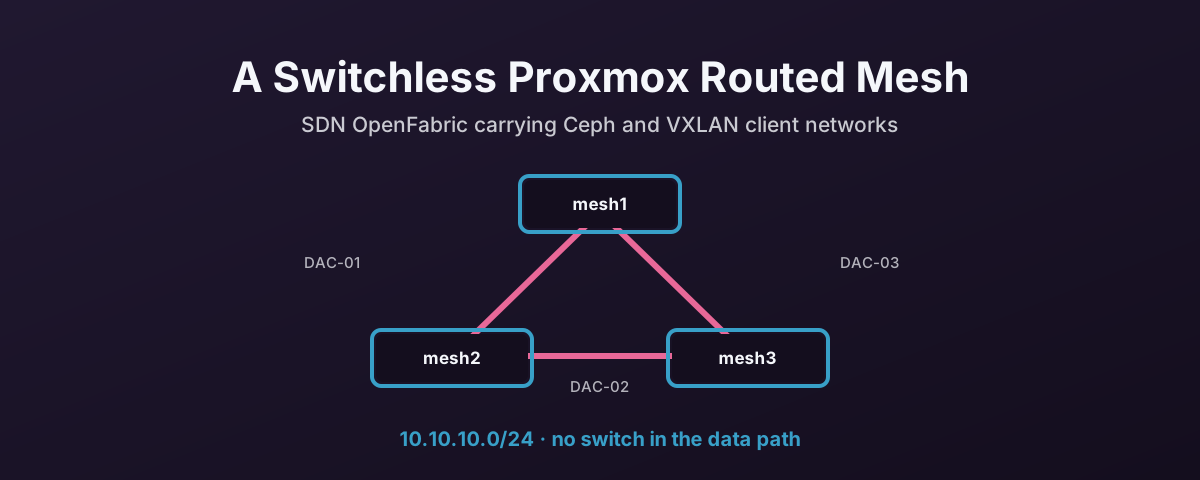
There is another answer for three nodes: cable them straight to each other in a triangle and route across it. No switch in the storage path at all.
The cheapest component in any design is the one you do not buy, and it is the only one that never fails.
That buys four things.
The switch cost disappears. You need network cards and three cables, not a 100 or 200 Gbit switch with the port count to match.
The data path has no single point of failure. A switch that fails or reboots takes the whole cluster’s east-west traffic with it. Nodes wired directly to each other do not care what happens to a switch elsewhere in the building.
The heavy traffic is on its own wires. Live migration and Ceph replication stay on the mesh rather than competing with office and management traffic.
Growing it is a wiring job, not a port-budget job. There is no central box acting as a bandwidth or port-count ceiling, so the fabric grows as long as each server has a free PCIe slot. OpenFabric routes across new links on its own.
And one honest limit, because it matters more than the four benefits. A full mesh needs a cable between every pair of nodes. Three nodes is three cables. Four is six. Five is ten. Wiring grows faster than the node count, and this design does not survive past a small cluster without moving to something switched, like leaf-spine.
Three nodes is exactly where a full mesh makes sense. Beyond that, with two mesh ports per node, what you can still build is a ring — and that needs one thing this build otherwise avoids, covered below.
What Gets Built
Three Proxmox VE hosts, each with two dedicated 100 Gbit interfaces, cabled into a triangle so every node has two direct neighbours.
Proxmox SDN runs the routing. OpenFabric is the protocol: it works out the best path across the mesh, and when a cable is pulled or a link drops it reroutes through the remaining path. Nobody logs in.
The fabric lives in 10.10.10.0/24, reserved for the mesh and nothing else — not management, not guests, not storage addressing, not anything external.
| Node | Mesh address | Mesh interfaces |
|---|---|---|
| mesh1 | 10.10.10.1/32 | nic1, nic2 |
| mesh2 | 10.10.10.2/32 | nic1, nic2 |
| mesh3 | 10.10.10.3/32 | nic1, nic2 |
Each node gets a /32, not a slice of the subnet.
That is the point of a routed mesh rather than a bridged one. The address identifies the node, OpenFabric advertises it, and the two physical links are just paths to reach it.
Proxmox creates a dummy loopback interface to hold it.
Wiring It
Active fibre DAC cables, in a triangle, with jumbo frames enabled on both mesh interfaces on every node.
| Cable | From | To |
|---|---|---|
| DAC-01 | mesh1 nic1 | mesh2 nic1 |
| DAC-02 | mesh2 nic2 | mesh3 nic1 |
| DAC-03 | mesh3 nic2 | mesh1 nic2 |
Active fibre rather than copper DAC, for two reasons that are about the rack rather than the network:
- Cable management. Active fibre DACs are thinner and far more flexible than copper, so they route cleanly and do not pile up behind the servers.
- Airflow. Less cable bulk behind the chassis means less disruption to front-to-back airflow, which matters when several high-speed links land in the same few rack units.
Two Networks, Not One
The mesh is not the only network, and it must not become one.
Each node has nic0 on a 2.5 Gbit switch, presented to Proxmox as the vmbr0 bridge.
That carries the web interface, admin access and client traffic. It is also the path you use while building the fabric, which is why it has to be independent of it.
nic0 is deliberately left out of the fabric. Only nic1 and nic2 are selected when the fabric nodes are created.
The mesh carries three things:
- Ceph. Node-to-node replication, recovery and backfill for the hyper-converged storage.
- Client virtual networking. VXLAN-backed VNets stretch guest networks across all three nodes, using the routed mesh as the underlay.
- Corosync, as a second path. Cluster membership traffic runs over the management network and the mesh, so quorum does not depend on either one surviving alone.
The rule worth writing on the change ticket: management and client access stay available through the 2.5 Gbit switch at all times, whatever state the 100 Gbit interfaces are in.
Everything Through the Web Interface
This build is done entirely in the Proxmox web interface. That is a deliberate choice, not a limit of the tooling.
Not used, on purpose:
- Editing
/etc/network/interfacesby hand. - Editing FRR configuration files by hand.
vtyshas a build method.
Proxmox generates the underlying network and routing configuration from the SDN objects you define. If something genuinely cannot be set in the interface, that is worth calling out as a prerequisite rather than quietly fixing on the command line. The next person to open the web interface will not know you did.
Command-line output appears below only as evidence, never as a build step.
The Build
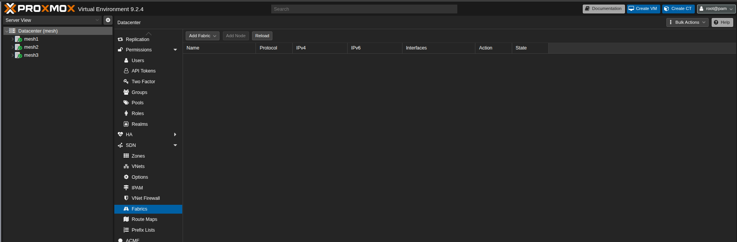
1. Open the Proxmox web interface and go to Datacentre → SDN → Fabrics.
2. Add the fabric. Name it, give it the mesh prefix, and set the timers.
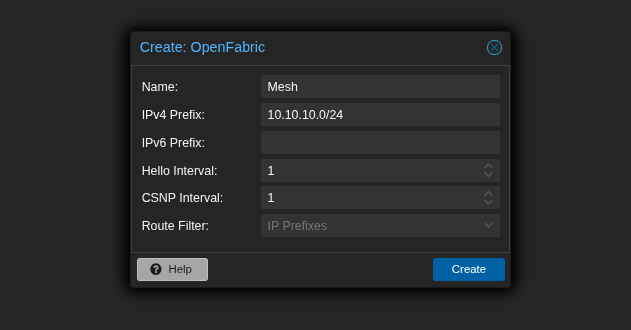
Hello and CSNP intervals of 1 update state as fast as possible when something changes, which is what you want on a fabric this small.
The cost is more control-plane chatter. Irrelevant on three nodes with two links each, worth a second thought if the fabric ever grows.
3. Add each node with Add node. Give it an address from the mesh range and tick the interfaces that take part.
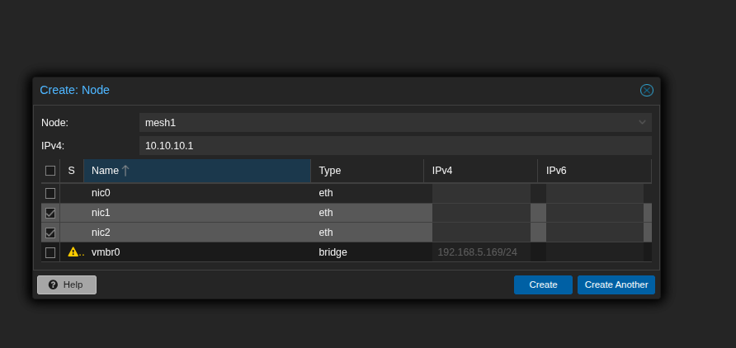
Note what is not ticked: nic0 stays out, and vmbr0 keeps the management address.
Use Create another for the first two nodes and Create on the last.
4. Check the result before applying it.
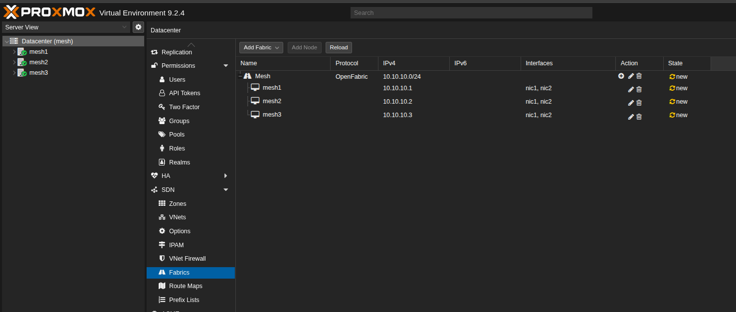
Three nodes, three addresses, nic1, nic2 on each, all marked new — nothing has been written yet.
5. Apply the SDN configuration.
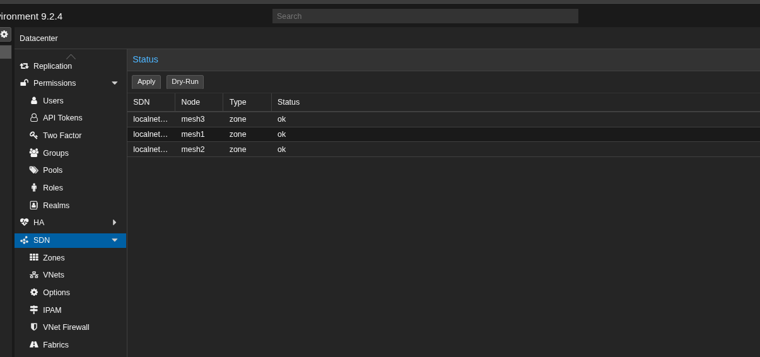
There is a Dry-Run next to Apply if you would rather see what it intends to do first.
Knowing It Worked
The status view should show both zone and fabric entries ok on all three nodes, and no pending changes left to apply.
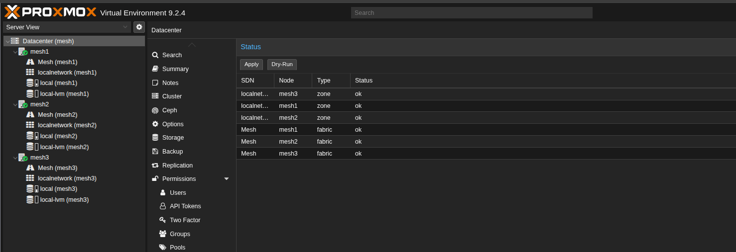
Then check the fabric from a node’s own point of view.
Routes first — each node should have a /32 to each of the others, and the Via column tells you which neighbour it is using.
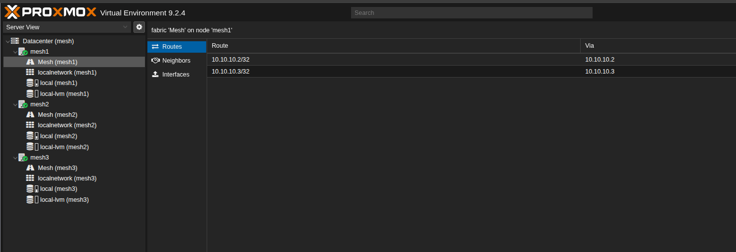
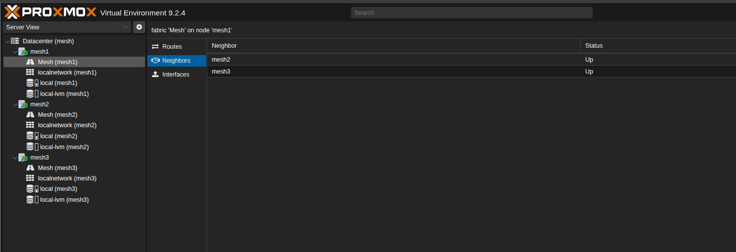
Neighbours next. Two, both Up, on a three-node triangle.
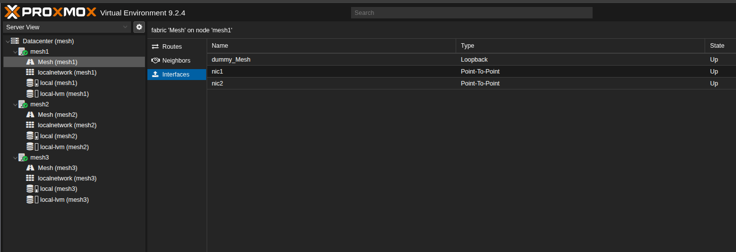
Then the interfaces, which is where the shape of the thing shows up: dummy_Mesh as the loopback holding the router address, and nic1 and nic2 as Point-To-Point rather than broadcast segments.
Finally, prove it end to end.
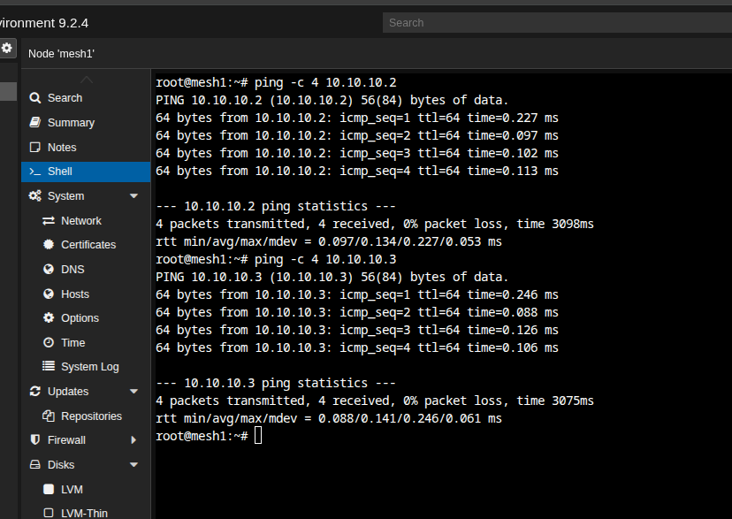
No loss, and averages of 0.134 ms and 0.141 ms. Both neighbours are one direct hop away, which is what a triangle gives you.
The check worth doing that no screenshot can show: pull one cable and confirm everything is still reachable. That is the whole reason for choosing a routed mesh over a pair of point-to-point links. As such, it is the only test that matters.
Beyond Three Nodes: The Ring
A triangle is a full mesh. Every node has a direct cable to every other node, every hop is one hop, and no node ever carries traffic that is not its own.
That property is what two mesh ports per node buys you at three nodes, and it is exactly what you lose at four. Not some of it. All of it. A full mesh of four nodes needs three ports each. With two, the most you can wire is a ring.
A ring changes the traffic model. Adjacent nodes still have a direct cable, but nodes on opposite sides of the ring do not — their traffic has to cross an intermediate node. And that node has to be willing to forward packets between its two mesh interfaces, which Linux will not do by default. The kernel documents ip_forward as “Forward Packets between interfaces” with a “Default: 0 (disabled)”.
Turn it on for the mesh interfaces, and only those:
# /etc/sysctl.d/99-mesh-forwarding.conf
net.ipv4.conf.nic1.forwarding = 1
net.ipv4.conf.nic2.forwarding = 1
sysctl --system
Read them back rather than assuming:
sysctl net.ipv4.conf.nic1.forwarding net.ipv4.conf.nic2.forwarding
The per-interface setting is the right scope here, and it works on its own. The global net.ipv4.ip_forward is not a prerequisite. The kernel’s forwarding decision reads the receiving interface’s own value:
#define IN_DEV_FORWARD(in_dev) IN_DEV_CONF_GET((in_dev), FORWARDING)
IN_DEV_CONF_GET returns that device’s setting, not an AND with the global one. So nic1 and nic2 forward transit traffic for the fabric while nic0 and vmbr0 stay exactly what they should be: host interfaces that do not route. Turning on the global switch would make every interface on the box a router, including the one facing your office network. That is nowt this design needs.
One thing to know about the global IPv4 switch even though you are not setting it: net.ipv4.ip_forward is a bulk setter, which is why the kernel documentation warns that changing it “resets all configuration parameters to their default state”. If anything else on the host ever writes it, it overwrites these per-interface values. Worth knowing before you spend an afternoon on why transit stopped working.
IPv6 is the exception, and it is the only place the global switch belongs. The kernel documentation says so directly under conf/all/forwarding:
Enable global IPv6 forwarding between all interfaces. IPv4 and IPv6 work differently here; the
force_forwardingflag must be used to control which interfaces may forward packets.
So there is no IPv6 equivalent of the tidy per-interface approach above. If the fabric carries IPv6 you enable forwarding globally and then scope it with force_forwarding, documented as “Enable forwarding on this interface only — regardless of the setting on conf/all/forwarding”. Note the same clobbering behaviour applies in reverse: setting conf.all.forwarding to 0 resets force_forwarding on every interface.
The build above leaves the fabric’s IPv6 prefix empty, so none of that applies here — it only matters if you add one.
Note what forwarding does not change: OpenFabric was already advertising each node’s /32 and already working out the path across the ring. Forwarding is the missing permission, not the missing brains. The routing table was right all along. The kernel was simply declining to act as a router.
What the ring costs, compared with the triangle:
- Transit traffic. On a four-node ring, the two diagonal pairs cross an intermediate node, so their traffic consumes that node’s link bandwidth as well as its own. Ceph notices this first, because replication is all-to-all rather than neighbour-to-neighbour.
- An extra hop of latency on those paths, on top of the switchless design’s usual sub-millisecond figures.
- Less headroom for failure. One broken link turns a ring into a chain: still fully connected, but with longer paths and more transit. A second break partitions the cluster. A triangle tolerates one break with no transit at all.
And it gets worse in a way that is easier to draw than to describe. Add a fifth node and half of every node pair in the cluster depends on somebody else forwarding:
That is the real ceiling on this design, and it is not the routing protocol. OpenFabric copes fine. It is that ports per node is fixed, so past three nodes every new box converts more of your traffic into somebody else’s transit.
And the honest note, because it matters for a build that has been web-interface-only up to here: a sysctl is not a web interface action. By the rule set out earlier, that makes it a prerequisite to call out rather than something to fix quietly on the command line — write it into the runbook, because the next person to open the SDN panel will see a healthy fabric and no hint that a ring depends on a file in /etc/sysctl.d.
Backing It Out
Removal is the build in reverse, in the same interface: delete the SDN objects created for the mesh, apply the configuration, and confirm management access is untouched.
That last step is why nic0 and the 2.5 Gbit switch exist. If rolling back the mesh could cost you the web interface, the design was wrong before you started.
Before You Start
- Management access is genuinely independent of the mesh. Check it, do not assume it.
- All three nodes are healthy before any SDN change.
- Node names, interface names and cabling are written down, because
nic1on one host beingnic2on another is a bad afternoon. - Jumbo frames are set on both mesh interfaces, and the MTU accounts for VXLAN’s overhead on the underlay.
- The mesh range is reserved and not in use anywhere else.
References
- Proxmox VE — Software-Defined Network — the SDN Fabrics documentation. Fabrics “provide automated routing between nodes in a cluster”, OpenFabric is “based on IS-IS and optimized for the spine-leaf topology common in data centers”, each node needs a unique Router-ID, and “a dummy ’loopback’ interface with the router-id is automatically created”
- Proxmox VE — Cluster Manager — Corosync networking and redundant links, behind the two-path membership design
- Proxmox VE — Deploy Hyper-Converged Ceph Cluster — the network expectations for a hyper-converged cluster
- Linux kernel — IP sysctl documentation —
ip_forwardand its default of 0, the per-interfaceforwardingcontrol, and the warning that changing the global switch resets per-interface configuration