What a BAR Is, and Why GPUs Outgrew It
Every PCIe device exposes one or more Base Address Registers. A BAR tells the system how much address space the device wants, and the firmware maps it into the host’s memory map. Once it is mapped, the CPU reaches the device’s memory with ordinary loads and stores.
The size of a BAR used to be fixed in silicon. The firmware read it at power-on and that was the end of the conversation.
That was fine while BARs were small. A network card wants a few tens of kilobytes for its registers. An NVMe controller wants 16KB to 64KB.
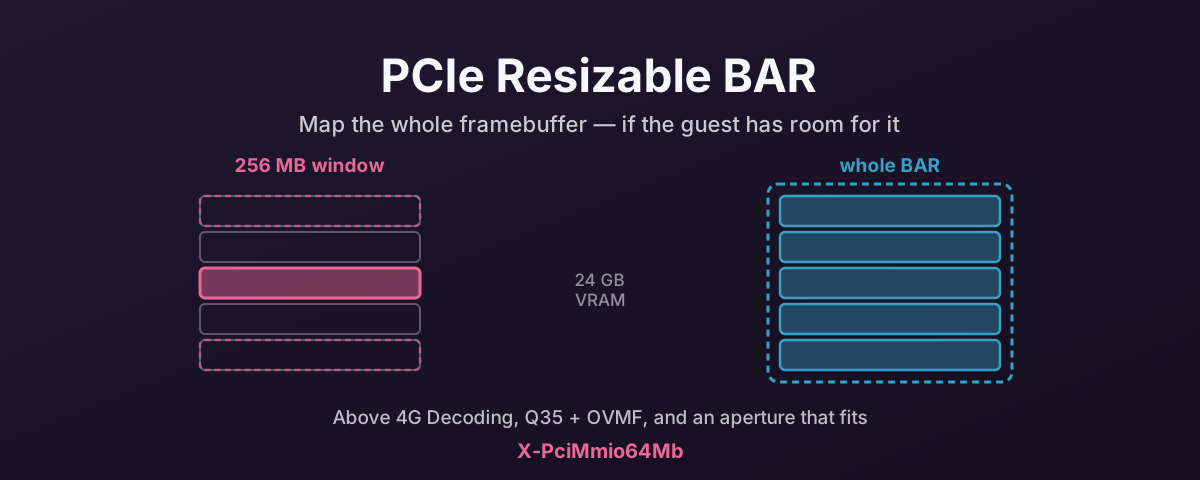
Graphics cards broke the arrangement. A modern card has 8, 12, 16 or 24GB of video memory, and the obvious thing to do is map all of it so the CPU can write anywhere in it. Fixed BARs could not express that, so the convention became a small window — usually 256MB — that the driver repoints over the framebuffer, copying through it in pieces. It works. It is just a daft amount of bookkeeping to reach memory you have already bought and fitted.
What Resizable BAR Changes
Resizable BAR is a PCIe capability that lets a BAR’s size be negotiated instead of fixed. The device advertises the sizes it can support, and the firmware or the operating system programs one of them.
For a GPU that means the whole framebuffer can be mapped at once.
The driver stops paging through a window and writes where it means to write.
The kernel reports the capability as Physical Resizable BAR, and it is vendor-neutral. An AMD card works with it on an Intel platform and vice versa.
What the Three Vendors Actually Do
The interesting part is that the vendors do not agree on how much it matters.
Intel Arc and Arc Pro — Intel Calls It Required
Intel is the emphatic one. Their guidance says Resizable BAR is “required to get a good experience with Intel® Arc™ hardware.” That is unusually strong language for a platform feature, and it shows how the Arc driver is built rather than a marketing choice.
On the symptom side, Intel describes the effect of turning it off in terms of consistency rather than averages: with “ReBAR off” you “will generally result in spikes that were already there getting bigger.” That is a frametime-stability argument, and it is the same shape of problem as ASPM’s effect on latency tails. The average hides it.
Intel lists 10th Generation and newer Intel Core processors, most Ryzen 3000 series and all Ryzen 5000 CPUs as supported platforms, and treats it as a motherboard BIOS feature you have to go and enable.
The practical upshot for Arc and Arc Pro is simple. If you have put an Arc card in a machine and performance is disappointing or uneven, check this before you check anything else. As such, it is not a tuning knob on those cards so much as a prerequisite.
NVIDIA — Ampere Onward, and Only Where It Helps
NVIDIA added support for GeForce RTX 30 Series cards and laptops in March 2021. Getting it working needed a supported VBIOS, a compatible CPU and motherboard, a motherboard firmware update, and a current driver. The RTX 3060 shipped with it; the 3060 Ti, 3070, 3080 and 3090 could need a firmware update to get it.
NVIDIA’s own performance framing is refreshingly unglamorous. They found “some titles benefit from a few percent, up to 12%” while “there are also titles that see a decrease in performance.”
Their response to that is the detail worth knowing: rather than leave it on globally, NVIDIA pre-tests titles and uses per-game profiles to enable Resizable BAR only where it measured as a gain. So on an NVIDIA card, “is ReBAR on?” has a per-application answer, and a benchmark that shows nowt may simply be a title the driver decided to leave alone.
AMD — Smart Access Memory Is the Same Thing
AMD’s branding for it is Smart Access Memory, introduced alongside the Radeon RX 6000 series and Ryzen 5000 CPUs. The marketing implies an AMD-CPU-plus-AMD-GPU pairing, and that is how it was launched, but the capability underneath is the standard PCIe one. Enable Resizable BAR in firmware with a Radeon card in an Intel machine and you get the same feature without the branding.
Radeon Pro W-series cards support it too. On older architectures — Vega and Polaris — support is patchier, and that is also where virtualisation trouble lives.
Resizable BAR and AI Work
This is where the feature gets misunderstood, so it is worth being clear about what it touches.
Resizable BAR changes how the CPU reaches GPU memory. That is the transfer path — staging model weights, pushing batches, reading results back. It does not touch the GPU’s own memory bandwidth, and it does not make a matrix multiply faster.
So the honest summary is that it affects the loading and feeding of a model, not the arithmetic. For a large model, the host-to-device copy at load time is a genuine cost, and a full-size BAR lets the CPU write straight into device memory instead of shuttling through a 256MB porthole. For the steady state of an inference run — where the weights are already resident and the work is compute-bound. Expect nowt.
Three specifics are worth knowing.
Arc Pro for AI inherits Intel’s verdict. If Intel says the card needs Resizable BAR for a good experience, that applies to a card running oneAPI or PyTorch just as much as one running a game. Arc and Arc Pro cards doing inference should have it enabled, full stop.
On NVIDIA, the number you want is BAR1. BAR1 is the host-visible window onto device memory, and it is what host-mapped allocations and GPUDirect RDMA go through:
# How much device memory is actually host-visible
nvidia-smi -q | grep -A3 "BAR1 Memory Usage"
A data-centre card is built with a large BAR1 already. On a desktop card, Resizable BAR is what makes that window big rather than tiny. If you are doing RDMA straight from a NIC into GPU memory, this is not a nicety.
Do not confuse this with ROCm’s requirement. AMD’s ROCm system requirements call for CPUs supporting PCIe atomics — “modern CPUs after the release of 1st generation AMD Zen CPU and Intel™ Haswell” — and say nothing about BAR sizing. Those are two different platform requirements that both live in the same BIOS menu, and people conflate them constantly. Check the one you actually need.
The failure mode that bites AI builds hardest is not performance at all, and it is covered below: several large-BAR GPUs in one machine can run the address space out.
What It Needs to Work
Four things, and they are all firmware-level:
- Resizable BAR enabled in the motherboard firmware. Often off by default.
- Above 4G Decoding enabled. A 24GB BAR cannot fit below the 4GB line, so the platform has to be willing to allocate address space above it. Turn this on even with no GPU present. It costs nothing.
- UEFI boot, with CSM off. Legacy compatibility mode and large BARs do not mix.
- Current firmware and drivers, particularly on the boards and cards from the 2020–2021 transition, where support arrived by update rather than at launch.
How to Check on Linux
Whether the card has the capability, and which sizes it offers:
# Substitute your card's address from lspci
lspci -vvs 0000:XX:00.0 | grep -A6 "Physical Resizable BAR"
The kernel also exposes this in sysfs, one file per resizable BAR:
cat /sys/bus/pci/devices/0000:XX:00.0/resource1_resize
That value is a bitmap of supported sizes, not a size.
Bit 0 means 1MB, bit 1 means 2MB, bit 2 means 4MB, and the size for a given bit is 2 ^ (bit + 20).
So 00000000000001c0 has bits 6, 7 and 8 set, meaning the BAR can be 64MB, 128MB or 256MB.
To see what is actually in force, read the assigned regions:
lspci -vvs 0000:XX:00.0 | grep -i Region
A card running with its full framebuffer mapped shows a region matching its VRAM size rather than a 256MB one.
Resizing by Hand
You can write the bit position yourself:
# bit 7 -> 2 ^ (7 + 20) = 128MB
echo 7 > /sys/bus/pci/devices/0000:XX:00.0/resource1_resize
The conditions attached are strict, and worth reading before trying it on a machine you care about.
Every driver must be unbound from the device first.
Peer devices under the same parent bridge may need soft-removing.
On a VGA device, writing a resize value tears down the low-level console drivers.
Anything holding the resourceN sysfs files open has to let go.
The kernel documentation is also blunt about the result: success is not guaranteed. The resize fails if there is no address space to place the larger BAR. Which takes you straight back to Above 4G Decoding.
When It Goes Wrong
dmesg says it cannot assign the BAR.
Messages in the shape of BAR 0: no space for [mem size ...] mean allocation failed, not that the card is faulty.
Above 4G Decoding is the first thing to check.
Several GPUs and one of them will not initialise. This is the multi-GPU and AI-rig failure. Four cards with 24GB BARs need 96GB of 64-bit MMIO space allocated, plus everything else, and not every consumer board’s firmware will do it. The symptom is that the machine is fine with two cards and falls over with four.
Performance went down. On NVIDIA that may be the driver’s own conclusion, given they enable it per title exactly because some workloads regress. On the others, measure both ways rather than assuming.
Nothing changed at all. The most likely outcome for a workload that was never limited by the CPU’s window into VRAM.
Passing a Large-BAR GPU Through to a VM
Worth flagging because it surprises people: a guest does not inherit the host’s memory map. The VM’s firmware builds its own 64-bit MMIO aperture, and OVMF’s default is far smaller than a modern GPU needs, so the card either fails to initialise or falls back to a small BAR. That is a Proxmox and QEMU topic rather than a GPU one, and it lives in the IOMMU tax article alongside the machine-type requirements from Always Use Q35, Not i440fx.
References
- Intel — Resizable BAR and Intel Arc Graphics — Intel’s own statement that it is required for a good experience on Arc, and the supported platform list
- NVIDIA — Resizable BAR support for GeForce RTX 30 Series — the requirements, the measured range, and the per-game profile approach
- AMD — Smart Access Memory — AMD’s branding and platform pairing
- Linux kernel sysfs-bus-pci ABI —
resourceN_resize— the bitmap, the2 ^ (bit + 20)sizing, and the unbind conditions - ROCm system requirements — the PCIe atomics requirement that gets confused with this one