The Problem
This came up during a customer engagement where we were designing a Proxmox VE deployment with NVMe passthrough for a latency-sensitive workload.
The customer had done their own benchmarking before the call.
On the host, fio against the NVMe drive reported 700K random read IOPS with sub-10µs completion latency.
Inside the VM, using the same drive with the same test, they were getting roughly half that.
They’d already checked the obvious things. The drive hadn’t changed. The firmware hadn’t changed. The PCIe slot hadn’t moved. They were starting to wonder whether passthrough was the wrong approach entirely.
It wasn’t. What they were seeing is the IOMMU tax. It catches folk out because nobody tells you about it before you’ve committed to the passthrough design. The good news is that most of the overhead is recoverable once you understand where it comes from.
Deep Dive
The Problems That Had to Be Solved
Giving a VM direct access to a physical PCIe device sounds straightforward. In practice, it’s one of the harder problems in systems virtualisation. A few things that work automatically on bare metal become dangerous when a device is shared between a host and a guest.
DMA Isolation
This is the fundamental problem.
PCIe devices don’t go through the CPU to read and write memory. They use Direct Memory Access. They write straight to physical RAM addresses. On bare metal, that’s fine. The device and the OS trust each other.
Under virtualisation, the guest VM has its own view of physical memory. The addresses the guest driver gives to the NVMe controller are guest physical addresses. They don’t map to the same locations in host RAM. If the device uses them directly, it reads and writes the wrong memory. That corrupts the host, other VMs, or both.
Worse, a malicious or buggy guest driver could deliberately program the device to DMA into any part of host memory. That’s effectively root access to the entire machine without ever exploiting a hypervisor bug.
The solution is the IOMMU — a hardware translation unit (Intel VT-d, AMD-Vi) that sits between every PCIe device and main memory. It maintains its own page tables, separate from the CPU’s. Every DMA request from the device passes through the IOMMU, which translates guest physical addresses to host physical addresses and blocks any access outside the guest’s allocated memory regions.
Without the IOMMU, safe passthrough is impossible. With it, the device is contained.
Device Grouping
The IOMMU doesn’t isolate individual devices. It isolates groups.
The PCIe specification defines Access Control Services (ACS) which govern whether devices on the same bus can talk to each other directly — peer-to-peer DMA — without going through the root complex where the IOMMU sits. If two devices share a PCIe switch that doesn’t enforce ACS, one device can DMA into the other’s memory space, bypassing the IOMMU entirely.
The kernel groups devices that can potentially reach each other without IOMMU enforcement into a single IOMMU group. If your NVMe controller shares a group with another device, passing through just the NVMe breaks the isolation model. The other device in the group could still be used as a side channel around the IOMMU.
Server-grade hardware with proper ACS support on every bridge and switch typically gives each device its own group. Consumer and workstation boards often lump multiple devices together because the PCIe root complex doesn’t implement ACS on every port.
Proxmox carries a kernel patch — pcie_acs_override — that tells the kernel to treat every device as isolated regardless of hardware ACS support.
It works in practice, but it’s lying to the kernel about the hardware topology.
On a production system, clean groups backed by actual hardware ACS are always preferable.
Interrupt Delivery
On bare metal, when an NVMe controller completes an IO operation, it fires an MSI-X interrupt directly to the CPU. The CPU handles it in a few hundred nanoseconds.
Under virtualisation, that interrupt has to reach the guest, not the host. The naive approach is to trap every interrupt in the hypervisor, trigger a VM exit, inject the interrupt into the guest, and resume. That works, but each VM exit costs 5–20µs. At high IOPS — hundreds of thousands of interrupts per second — the overhead is substantial.
The hardware solution is posted interrupts. Intel’s APICv and AMD’s AVIC allow the IOMMU to write the interrupt directly into the guest’s virtual APIC page without causing a VM exit at all. The guest sees the interrupt as if it came from bare-metal hardware. The overhead drops to a few hundred nanoseconds.
Not all platforms support posted interrupts. Older CPUs, some workstation chipsets, and some BIOS versions don’t expose the capability. When they’re absent, every interrupt goes through the slow path, and there’s no software workaround.
Device Reset
When a VM shuts down or crashes, the passed-through device needs to return to a clean, known state. Otherwise it can’t be re-assigned to another VM or reclaimed by the host.
On bare metal, the OS does an orderly shutdown of the device driver. Under passthrough, the guest might crash, the user might force-stop the VM, or the hypervisor might kill the process. The device could be mid-transfer with DMA operations in flight.
PCIe defines Function Level Reset (FLR) for this — a way to reset a single device function without affecting the rest of the bus. NVMe controllers generally support FLR and handle it well. GPUs are notoriously bad at it, but that’s a different article.
If FLR isn’t supported, the fallback is a secondary bus reset, which resets everything behind that PCIe bridge. If the bridge has other devices on it, they all get reset too. In the worst case, a full host reboot is the only way to reclaim the device.
Address Translation Overhead
The IOMMU solves the safety problem. As such, it is not optional. But it introduces a performance one.
Every DMA operation now passes through an extra level of address translation. The IOMMU has its own TLB — the IOTLB — and when it hits, the overhead is small. When it misses, the IOMMU has to walk its page tables, and that adds real latency to every affected IO operation.
This is the IOMMU tax. The rest of this article is about understanding where it comes from and how to minimise it.
BAR Mapping and Address Space
Every PCIe device exposes one or more Base Address Registers (BARs) that map the device’s internal registers and memory into the host’s MMIO address space. The host CPU accesses the device through these mappings. For passthrough to work, the hypervisor has to present these mappings correctly to the guest.
Traditionally, BAR sizes were fixed at boot by the BIOS and fitted within the legacy 32-bit MMIO window below 4GB. That worked when BARs were small. Modern GPUs have changed the picture. A 24GB framebuffer needs a 24GB BAR, which doesn’t fit in a 32-bit address space.
Resizable BAR (ReBAR) — also marketed as AMD Smart Access Memory (SAM) — is a PCIe capability that allows the BAR size to be renegotiated after boot. For GPUs, this is a significant feature. Instead of accessing the framebuffer through a 256MB window and paging through it in chunks, the host maps the entire VRAM at once.
For NVMe, the direct impact is smaller. NVMe controller BARs are typically 16KB to 64KB for the controller register set (BAR0). The NVMe specification defines a Controller Memory Buffer (CMB) that can expose a larger BAR for host-resident submission queues, but most drives don’t implement it. ReBAR doesn’t change NVMe throughput the way it does for GPUs.
The reason it matters in an NVMe passthrough context is the shared PCIe environment. If you’re passing through an NVMe drive alongside a GPU on the same host, the GPU’s resized BAR needs address space above the 4GB boundary. The BIOS, the IOMMU, and the virtual PCIe topology all need to accommodate that. Getting the address space allocation wrong means devices don’t initialise, and the NVMe passthrough fails alongside everything else.
Power Loss Exposure
On a virtual disk, the hypervisor and storage layer handle write ordering and crash consistency. With passthrough, the guest is talking directly to flash. If the host loses power mid-write, whatever the NVMe controller’s firmware does — or doesn’t do — with its write cache determines whether you lose data.
Enterprise NVMe drives carry power loss protection (PLP) capacitors that flush the write cache safely during a power failure. Consumer drives without PLP may not. With passthrough, there’s no hypervisor safety net between the guest and the hardware.
For a production workload, an enterprise drive with PLP isn’t optional.
Operational Trade-offs
Passthrough also removes capabilities that virtual disks provide.
A passed-through device is physically bolted to a specific host. The VM cannot be live-migrated while the device is attached. In a Proxmox cluster with HA, a node failure means the VM goes down and cold-starts on another node. There’s no seamless failover.
The drive is also invisible to vzdump and Proxmox Backup Server.
It won’t be included in VM snapshots or scheduled backups.
A separate backup strategy — guest-level, filesystem-level, or application-level — needs to be in place before the workload goes live.
How VFIO Passthrough Actually Works
When you pass a PCIe device through to a VM, the hypervisor hands the guest direct control of the device’s MMIO registers. The guest driver talks to the NVMe controller as if it were running on bare metal. That part is near-native. MMIO register access goes through Extended Page Tables (EPT on Intel, NPT on AMD) and typically completes without a VM exit.
The DMA path is where the cost appears. Every DMA operation goes through the IOMMU for address translation, and as described above, that translation has a price. Especially on IOTLB misses.
Why the Benchmarks Look Worse Than Reality
Here’s where most people go wrong with their testing.
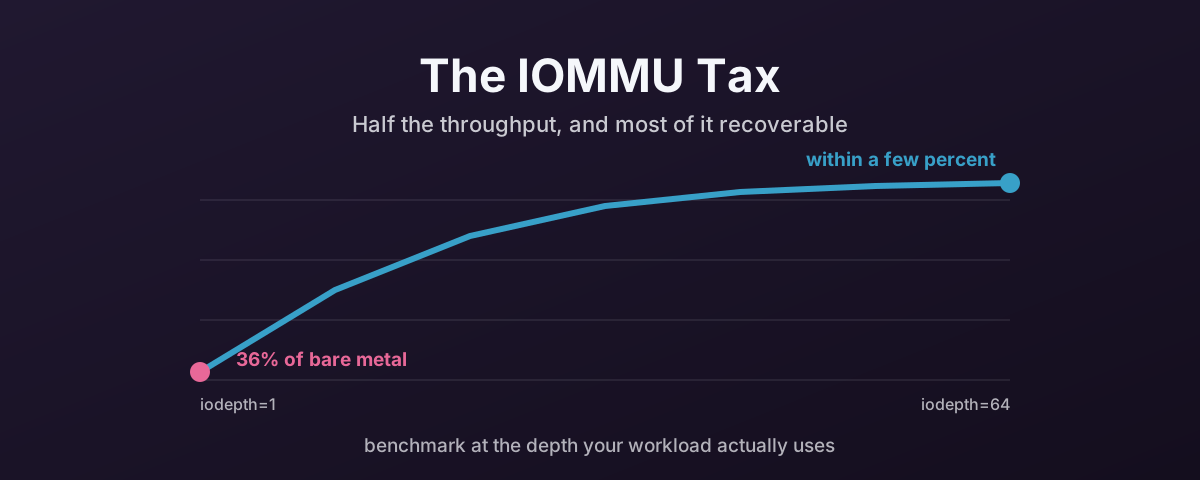
A Proxmox forum thread that prompted this article had users running fio with iodepth=1.
At that queue depth, fio submits one IO, waits for it to complete, then submits the next.
The test is just measuring per-IO latency.
Every microsecond of IOMMU overhead shows up in full.
The numbers from that thread tell the story clearly.
Bare metal completion latency averaged around 10µs.
Inside the VM, it averaged around 28µs.
That extra ~18µs per IO is the IOMMU translation overhead.
At iodepth=1, it directly halves throughput because throughput equals 1 / latency when there’s only one IO in flight.
Bump the queue depth to 32 or 64 — which is how NVMe drives are designed to operate — and the picture changes. With multiple IOs in flight, the IOMMU overhead is amortised across all of them. The controller processes completions while new translations are happening. Throughput recovers to within a few percent of bare metal.
The practical takeaway is this. If your workload runs at queue depths above 4, the IOMMU throughput penalty is likely negligible. That covers most database, virtualisation, and storage workloads. If your workload is latency-sensitive at low queue depths — certain real-time applications, synchronous metadata operations — you’ll feel it.
Run your benchmarks at realistic queue depths before concluding passthrough is too slow:
# Bare metal baseline — run on the host before binding to vfio-pci
fio --name=randread --ioengine=libaio --direct=1 --bs=4k \
    --iodepth=32 --numjobs=4 --rw=randread --size=1G \
    --filename=/dev/nvme0n1 --runtime=30 --time_based \
    --group_reporting

# Same test inside the VM after passthrough
fio --name=randread --ioengine=libaio --direct=1 --bs=4k \
    --iodepth=32 --numjobs=4 --rw=randread --size=1G \
    --filename=/dev/nvme0n1 --runtime=30 --time_based \
    --group_reporting
Compare the clat (completion latency) percentiles and the IOPS figures.
At iodepth=32 with four jobs, the gap should be single-digit percentage points, not 50%.
NUMA Alignment
This has its own article. See NUMA Alignment on Proxmox VE — Why It Matters and How to Get It Right.
The short version: on multi-socket systems, every PCIe device is wired to a specific socket. If the NVMe drive is on NUMA node 1 and the VM’s vCPUs are pinned to node 0, every DMA completion crosses the inter-socket link. That adds 50–100ns per operation. At high IOPS, the throughput difference between aligned and misaligned NUMA is 20–30%.
Check with cat /sys/bus/pci/devices/0000:XX:00.0/numa_node, then pin the VM’s vCPUs to cores on the same node with the affinity parameter in the VM config.
On single-socket systems, this isn’t a concern.
PCIe Active State Power Management (ASPM)
This has its own article. See PCIe ASPM and Why You Should Disable It for Passthrough.
The short version: ASPM allows PCIe links to enter low-power states when idle.
Under passthrough, the host still controls the physical link but the guest owns the device.
When the guest submits IO and the link is asleep, the wake-up time adds latency.
The symptom is a wide spread in your clat percentiles. The p99 might be 5–10x higher than the average while the mean looks fine.
Disable it on the host with pcie_aspm=off in the kernel command line.
Also add disable_idle_d3=1 to the vfio-pci module options if your NVMe controller has power state recovery issues. The Samsung 990 EVO Plus is a known offender.
MaxPayloadSize (MPS)
This has its own article. See PCIe MaxPayloadSize — A Free Performance Win for Passthrough.
The short version: PCIe devices transfer data in Transaction Layer Packets.
QEMU’s virtual root complex defaults to a 128-byte maximum payload.
Most devices support 256 or 512 bytes.
Adding pci=pcie_bus_perf to the host kernel command line sets MPS to the maximum each device’s parent bus allows.
It’s a small throughput improvement — low single-digit percentage — but it’s free with no downside.
Resizable BAR and MMIO Aperture
The BAR mapping problem described earlier has practical steps on both the BIOS and VM side.
First, enable Above 4G Decoding in the BIOS. This allows BARs to be mapped into address space above the 4GB boundary, which is required for any device with large BARs. Enable it even for NVMe-only passthrough. It has no downside and avoids problems if you add a GPU or other large-BAR device later.
If ReBAR is available in the BIOS, enable that too. It won’t affect NVMe performance directly, but it allows GPUs on the same host to use their full framebuffer mapping.
On the VM side, QEMU’s virtual Q35 root complex needs a large enough 64-bit MMIO window for the guest to see resized BARs. By default, OVMF allocates a relatively small window. For NVMe-only passthrough this is fine. NVMe BARs fit comfortably. But if the VM has both an NVMe and a GPU passed through, increase the MMIO aperture:
args: -fw_cfg name=opt/ovmf/X-PciMmio64Mb,string=65536
This tells OVMF to allocate 64GB of 64-bit MMIO space, enough for most GPU framebuffers alongside the NVMe controller’s small BAR.
QEMU’s ReBAR support has been improving but is still not seamless. Some AMD GPUs (Vega and newer) trigger driver errors (Code 43 in Windows) with ReBAR enabled under QEMU. If you hit that, disable ReBAR in the BIOS as a first step. NVMe passthrough won’t be affected either way.
For what Resizable BAR does on the GPU side of the fence, and why Intel treats it as mandatory on Arc while NVIDIA enables it per game, see PCIe Resizable BAR and Modern GPUs.
Interrupt Handling
The interrupt delivery problem described earlier has a practical tuning step. Posted interrupts (APICv on Intel, AVIC on AMD) may not be enabled by default.
Check whether they’re active:
# Intel — look for "Posted-Interrupts" in dmesg
dmesg | grep -i "posted"

# AMD — check AVIC support
dmesg | grep -i "avic"
On AMD EPYC systems, enable AVIC in the KVM module if it isn’t on by default:
# /etc/modprobe.d/kvm.conf
options kvm_amd avic=1
On Intel systems, APICv with posted interrupts is typically enabled automatically when VT-d is active.
If your platform doesn’t support posted interrupts, there’s no software workaround. It’s a hardware capability. But it’s worth verifying it’s actually turned on before assuming the slow path is unavoidable.
Interrupt Affinity and Queue Alignment
NVMe controllers use multiple submission and completion queue pairs. Typically one per CPU core. When the VM’s vCPUs don’t align with the physical cores handling the NVMe interrupts, completions have to cross cores via inter-processor interrupts. That adds latency.
Inside the guest, check how many IO queues the NVMe driver has created and how they’re mapped:
# List NVMe IO queues
cat /proc/interrupts | grep nvme

# Check affinity
for irq in $(grep nvme /proc/interrupts | awk '{print $1}' | tr -d ':'); do
    echo "IRQ $irq: $(cat /proc/irq/$irq/smp_affinity_list)"
done
Ideally, each NVMe IO queue’s interrupt should be affinitised to the vCPU that submits to that queue. Most modern NVMe drivers handle this automatically. But it’s worth verifying, especially if you’ve manually pinned vCPUs or reduced the vCPU count below the controller’s queue count.
Always Use Q35, Not i440fx
This deserves its own article. See Always Use Q35, Not i440fx.
The short version: i440fx presents a flat legacy PCI bus. Q35 presents a proper PCIe root complex. Passthrough devices on i440fx appear as legacy PCI, which breaks MSI-X multi-queue interrupt delivery. NVMe controllers need MSI-X for their queue-per-core architecture. Without it, all IO completions funnel through a single interrupt and you get a bottleneck at high IOPS that no amount of kernel tuning will fix.
In Proxmox 8.x and newer, Q35 is the default for new VMs. If you’re doing passthrough on an older VM that’s still i440fx, switch it. RHEL 10 has formally deprecated i440fx, and the wider KVM ecosystem is following.
Putting It All Together
Here’s a summary of the tuning steps in order of impact.
NUMA alignment — make sure the NVMe drive and the VM’s vCPUs are on the same NUMA node. This alone can account for a 20–30% throughput difference on multi-socket systems.
ASPM off — add pcie_aspm=off to the host kernel command line.
Eliminates latency jitter from PCIe link power state transitions.
Realistic queue depths — test at iodepth=32 or higher, not iodepth=1.
The IOMMU overhead that dominates at low queue depths is amortised at realistic depths.
Posted interrupts — verify APICv (Intel) or AVIC (AMD) is active. Reduces per-interrupt overhead from microseconds to nanoseconds.
MPS optimisation — add pci=pcie_bus_perf to the host kernel command line.
Sets MaxPayloadSize to the maximum the topology supports.
vfio-pci power management — add disable_idle_d3=1 if your NVMe controller has power state issues under passthrough.
A combined host kernel command line for a Proxmox node doing NVMe passthrough on an AMD EPYC system would look summat like:
GRUB_CMDLINE_LINUX_DEFAULT="quiet amd_iommu=on iommu=pt pcie_aspm=off pci=pcie_bus_perf"
For Intel:
GRUB_CMDLINE_LINUX_DEFAULT="quiet intel_iommu=on iommu=pt pcie_aspm=off pci=pcie_bus_perf"
When Passthrough Isn’t Worth It
Before going down this path, it’s worth asking whether you actually need NVMe passthrough at all.
VirtIO-SCSI and VirtIO-BLK with an NVMe-backed virtual disk are already very efficient. The overhead compared to passthrough is typically 5–10% on latency. The throughput difference is negligible for most workloads.
Passthrough makes sense when you need the guest OS to manage the device directly. That includes SMART monitoring, firmware updates, TRIM/discard control, and specific NVMe features like reservations. It also makes sense for latency-sensitive workloads where even a few microseconds matter. Certain database engines and real-time data ingest fall into that category.
For everything else, the operational trade-offs covered earlier — loss of live migration, loss of snapshots and backup integration — usually outweigh the small performance gain.
There’s nowt clever about choosing the harder path when the easier one does the job.
Verifying Your Changes
After applying the tuning steps, verify everything is working as expected:
# Host side — confirm IOMMU is in passthrough mode
dmesg | grep -i iommu

# Confirm ASPM is disabled
lspci -vv | grep -i "ASPM Disabled"

# Check MPS on the NVMe controller
lspci -vv -s XX:00.0 | grep MaxPayload

# Inside the VM — run the fio comparison
fio --name=randread --ioengine=libaio --direct=1 --bs=4k \
    --iodepth=32 --numjobs=4 --rw=randread --size=1G \
    --filename=/dev/nvme0n1 --runtime=30 --time_based \
    --group_reporting
Compare the VM results against your earlier bare-metal baseline.
At iodepth=32, you should see throughput within 5% of bare metal.
Completion latency averages should be within 10–15µs of the host figures.
If the gap is still large, check NUMA alignment first.
It’s the most commonly overlooked factor.
It also costs nothing but a config change, which makes it the best sort of problem to be left with.
References
- Linux kernel PCI documentation — MPS and MRRS tuning options — the authoritative source for
pcie_bus_perf,pcie_bus_safe, and related parameters - Proxmox VE Administration Guide — PCI(e) Passthrough — official Proxmox documentation on VFIO device passthrough configuration
- Proxmox Forum — NVMe Passthrough Performance — the community discussion that prompted this article