What ASPM Does
PCIe Active State Power Management (ASPM) allows PCIe links to enter low-power states when they’re idle. The PCIe specification defines several link states:
L0 is the fully active state. The link is up, both ends are powered, data can flow immediately.
L0s is a lightweight idle state. The link partially powers down. Recovery to L0 takes around 1–4µs depending on the hardware. Both ends can enter L0s independently.
L1 is a deeper idle state. Both ends of the link power down together. Recovery to L0 takes longer — typically 2–32µs, sometimes more. The exact recovery time depends on the device, the PCIe generation, and the platform.
L1.1 and L1.2 are substates of L1 introduced in PCIe 3.0. They reduce power further by turning off the PLL clock reference. Recovery from L1.2 can take 32–100µs. For a storage device that is not a rounding error. It is about as long as the read you were trying to do in the first place.
The idea is straightforward. If a PCIe link is idle for a few microseconds, transition it to a lower power state. When traffic resumes, wake it up. Save a bit of power in the meantime.
On a laptop or a desktop machine that spends most of its time doing nowt, ASPM saves real power. A few watts per link, adding up across all the PCIe devices in the system. On a server running IO-intensive workloads, the links are rarely idle long enough for ASPM to engage meaningfully.
Why It Causes Problems Under Passthrough
On bare metal, the OS and the device driver negotiate power management together. The NVMe driver knows when the link is about to go idle and when it’s about to submit new IO. The kernel’s PCIe subsystem coordinates link state transitions with the driver. Everything is in sync.
Under VFIO passthrough, that coordination breaks down.
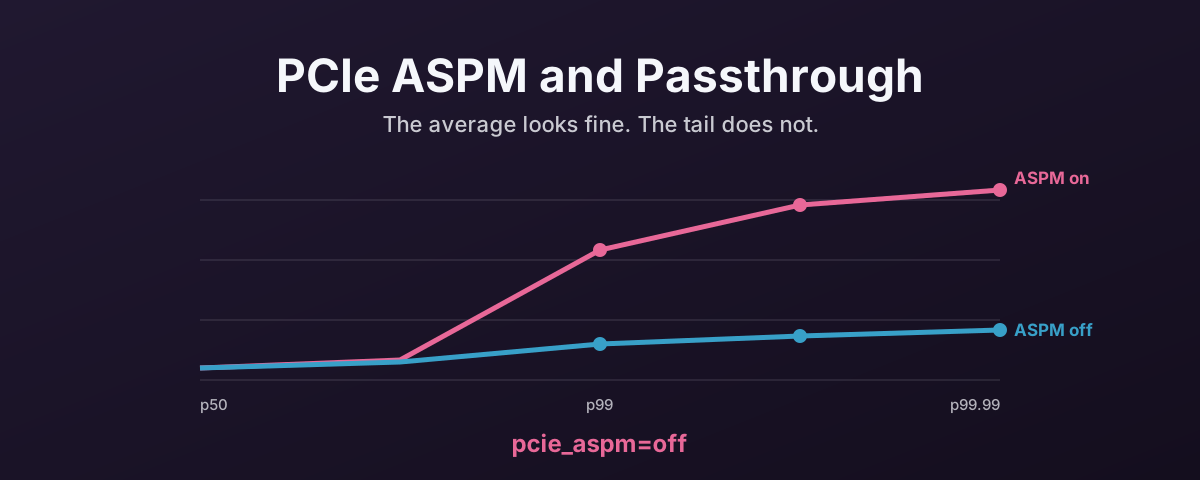
The host kernel still controls the physical PCIe link. The guest VM owns the device through VFIO, but it doesn’t control the link itself. The host’s PCIe subsystem sees the link go idle — because from the host’s perspective, no host-side driver is using it. It transitions the link to a low-power state. When the guest submits IO, the device needs the link back in L0. The recovery time shows up as added latency on that IO operation.
The result is inconsistent latency.
Most IOs complete at normal speed.
Some take much longer because they hit a link that’s in L1 or L1.2 and has to wake up first.
This shows up as a wide spread in your clat (completion latency) percentiles.
The average might look fine.
The p99 might be 5–10x higher.
This is hard to spot because the average throughput numbers can look fine. You only see the problem when you look at the tail latency. Many benchmarks don’t highlight it unless you ask for percentile output.
The VFIO-Specific Wrinkle
There is a wrinkle here that goes past the basic “host and guest fighting over link state” problem.
When a device is bound to vfio-pci on the host, the host kernel knows the device is in passthrough mode.
But the PCIe ASPM policy is applied at the link level, not the device level.
The host’s ASPM policy still applies to the physical link because the host still owns the PCIe topology.
VFIO doesn’t intercept or override ASPM transitions. It passes through the device’s BAR space and interrupts, but the link power management remains under host control. The guest has no mechanism to tell the host “keep this link in L0.”
Some newer hardware and kernel versions handle this better than others. As such, the safest approach is to take ASPM out of the picture entirely.
How to Disable It
Add pcie_aspm=off to the host kernel command line:
# Edit /etc/default/grub
GRUB_CMDLINE_LINUX_DEFAULT="quiet pcie_aspm=off"

# Update GRUB and reboot
update-grub
reboot
This prevents the host from putting any PCIe link into a low-power state. It applies globally. Every PCIe device on the host, not just the one being passed through.
Verify after reboot:
# Should show "ASPM Disabled" for all devices
lspci -vv | grep -i "ASPM"
The Power Cost
Disabling ASPM does increase idle power consumption. Each PCIe link that would otherwise be in L1 stays in L0, consuming a few hundred milliwatts more. Across a system with ten or fifteen PCIe devices, that might add up to 2–5 watts at idle.
For a server in a datacentre, 2–5 watts is rounding error on a power bill. For a home lab, it’s a fraction of what the CPU and memory are using. For a laptop, it matters. But you wouldn’t be doing VFIO passthrough on a laptop battery.
The trade-off is clear. A few watts of idle power versus unpredictable latency spikes on your passed-through devices. On any system doing passthrough, ASPM should be off.
Device-Level Power State Issues
ASPM controls the PCIe link power state. Devices also have their own power management — the PCIe D-states (D0 through D3).
When a device is in D3 (fully powered down), it’s not just the link that’s asleep. The device itself has stopped.
Under VFIO passthrough, the host’s vfio-pci driver can place the device into D3 when the VM isn’t running or when the host’s power management policy decides the device is idle.
Some NVMe controllers don’t handle the D3-to-D0 transition cleanly. They fail to come back cleanly, the guest loses the device, and the only way out is a VM restart or sometimes a host reboot.
The Samsung 990 EVO Plus is a well-known offender.
The fix is the disable_idle_d3 module option for vfio-pci:
# /etc/modprobe.d/vfio.conf
options vfio-pci disable_idle_d3=1
This prevents vfio-pci from placing any bound device into D3 when idle.
Like pcie_aspm=off, it’s a global setting. Every device bound to vfio-pci stays in D0.
That’s usually what you want for passthrough, where the guest should be the only thing controlling the device’s power state.
The disable_idle_d3 option is separate from ASPM.
ASPM controls the link.
D3 controls the device.
Both can cause problems independently.
For a clean passthrough configuration, disable both.
Per-Device ASPM Control
If you don’t want to disable ASPM globally — perhaps you have other PCIe devices on the host that benefit from power saving — you can control ASPM per-link via sysfs:
# Find the link's ASPM policy
cat /sys/bus/pci/devices/0000:XX:00.0/link/l1_aspm

# Disable ASPM for a specific link
echo 0 > /sys/bus/pci/devices/0000:XX:00.0/link/l1_aspm
This is more targeted but less reliable across reboots and kernel updates.
For most passthrough setups, the global pcie_aspm=off kernel flag is simpler and more predictable.
When ASPM Is Not the Problem
Not every latency jitter issue is ASPM.
If your clat percentiles are consistently high (not just the tail), the problem is more likely IOMMU translation overhead, NUMA misalignment, or an MPS mismatch.
ASPM specifically causes a bimodal pattern — most IOs are fast, a few are slow — because it only affects IOs that happen to arrive when the link is in a low-power state.
Check for ASPM first when you see:
- p99 latency 5x or more higher than the average
- Inconsistent
fioresults between runs - Latency that improves under sustained load but degrades during bursty workloads
If the latency is consistently bad regardless of load pattern, look elsewhere. ASPM is worth ruling out early because it is cheap to test. It is not the answer to every slow link, though, and chasing it when the numbers do not fit the pattern is an afternoon you will not get back.
References
- Linux kernel PCI documentation — ASPM parameters — kernel source covering
pcie_aspm=offand related options - Proxmox Forum — PCI Passthrough NVMe Unable to Change Power State — community thread covering
disable_idle_d3for Samsung NVMe controllers - Proxmox VE Wiki — PCI(e) Passthrough — official documentation on passthrough configuration