What NUMA Is
NUMA stands for Non-Uniform Memory Access. On a single-socket system, every CPU core accesses all of the system’s RAM through the same memory controller. Access time is the same no matter which core makes the request or where the data sits in physical memory.
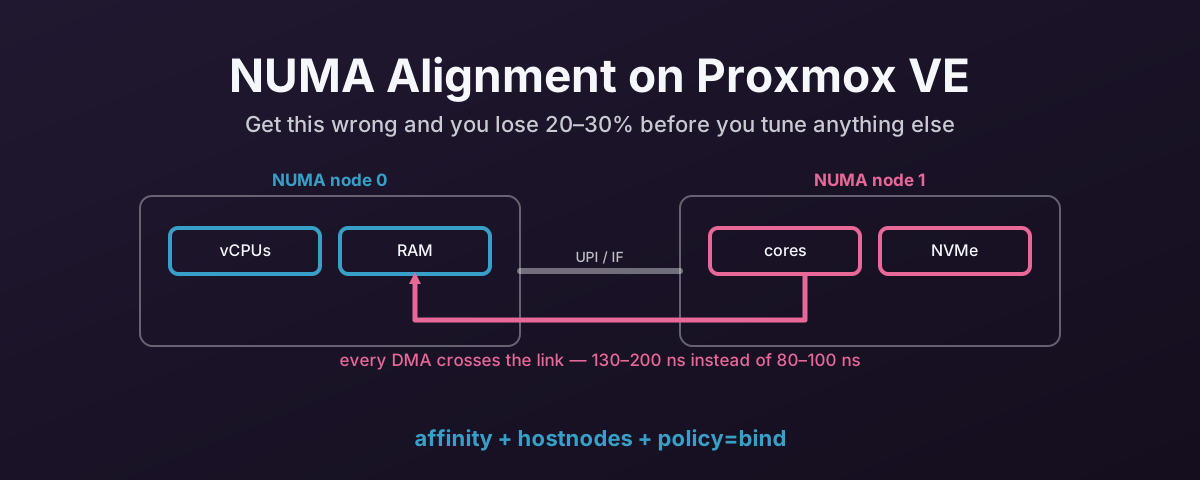
On a multi-socket system, each CPU socket has its own memory controller and its own bank of RAM. A core on socket 0 can access the RAM attached to socket 0 quickly — that’s local memory. It can also access the RAM attached to socket 1, but that request has to cross the inter-socket link (Intel UPI, AMD Infinity Fabric). That’s remote memory, and it’s slower.
The kernel calls each socket-and-its-local-memory a NUMA node. A dual-socket AMD EPYC system has at least two NUMA nodes. Some EPYC processors expose four NUMA nodes per socket (one per CCD), giving eight nodes on a dual-socket board.
The performance difference between local and remote memory access isn’t subtle. Local access is around 80–100ns. Remote access is around 130–200ns. That’s a 50–100% penalty per memory operation. On its own that is a very small number. Paid on every memory access for the life of the VM, it stops being small.
Why It Matters for Virtualisation
When Proxmox creates a VM, it allocates vCPUs and RAM. By default, those vCPUs can be scheduled on any physical core on any socket. The VM’s RAM can be allocated from any NUMA node’s memory pool.
If the scheduler puts a vCPU on socket 0 and the VM’s RAM is on socket 1, every memory access that vCPU makes crosses the inter-socket link. If the vCPUs bounce between sockets — which they will if they’re not pinned — the memory access pattern becomes a mess. Some accesses are local, some are remote, and the VM’s performance jitters to match.
For general workloads — a web server, a file server, a desktop VM — this is often liveable. The overhead is there but it’s spread across many operations and doesn’t dominate.
For IO-intensive workloads — databases, storage servers, anything doing heavy disk or network IO — the penalty compounds. Every DMA completion, every interrupt delivery, every buffer copy involves memory access. If those accesses are crossing sockets, the overhead adds up fast.
Why It Matters for Passthrough
PCIe devices are physically wired to a specific CPU socket. Each socket has its own PCIe root complex. The NVMe drive in slot 3 might be on socket 0’s PCIe lanes. The GPU in slot 5 might be on socket 1’s.
When a device performs DMA, the data goes into the memory attached to whatever NUMA node the IOMMU maps it to. If the VM’s RAM is allocated from the device’s local node, the DMA write goes straight to local memory. If the RAM is on the other node, every DMA operation crosses the inter-socket link.
For an NVMe drive doing hundreds of thousands of IOPS, that 50–100ns penalty per operation adds up.
At iodepth=32 with 4KB random reads, the throughput difference between aligned and misaligned NUMA can be 20–30%.
That’s before you’ve looked at IOMMU overhead, ASPM, MPS, or owt else.
The same applies to network cards, GPUs, and any other passed-through device. The device’s DMA traffic should land in local memory, and the vCPUs processing that traffic should be on the same node.
How to Check Your Topology
Find Which NUMA Node a Device Is On
# Replace 0000:XX:00.0 with your device's PCI address from lspci
cat /sys/bus/pci/devices/0000:XX:00.0/numa_node
This returns the NUMA node number.
If it returns -1, the kernel couldn’t determine the node. That sometimes happens with devices behind certain PCIe switches.
In that case, trace the PCIe topology manually with lspci -tv and match the root port to the socket.
See Your Full NUMA Layout
numactl --hardware
This shows you each NUMA node, how many CPU cores are on it, how much memory is attached, and the distance (relative cost) between nodes.
Example output from a dual-socket EPYC system:
available: 2 nodes (0-1)
node 0 cpus: 0 1 2 3 4 5 6 7 8 9 10 11 12 13 14 15
node 0 size: 131072 MB
node 1 cpus: 16 17 18 19 20 21 22 23 24 25 26 27 28 29 30 31
node 1 size: 131072 MB
node distances:
node   0   1
  0:  10  32
  1:  32  10
The distance table tells you the relative cost. 10 is local. 32 is remote. Higher numbers mean more hops. On four-node-per-socket EPYC setups, some node pairs have distances of 32 while others are 16, depending on which CCD they’re on.
Map Devices to Nodes
# List all PCI devices and their NUMA nodes
for dev in /sys/bus/pci/devices/*; do
    node=$(cat "$dev/numa_node" 2>/dev/null)
    echo "$(basename $dev) node=$node $(lspci -s $(basename $dev) 2>/dev/null | cut -d' ' -f2-)"
done
This gives you a complete picture of which devices are on which nodes. Look for your NVMe controllers, network cards, and any GPUs you’re passing through.
How to Align a VM in Proxmox
Pin vCPUs to the Correct Node
In the VM’s config file (/etc/pve/qemu-server/<vmid>.conf):
numa: 1
affinity: 0-15    # Adjust to match cores on the correct NUMA node
The affinity parameter pins the VM’s vCPUs to specific physical cores.
Set it to the range of cores on the same NUMA node as your passed-through device.
If your NVMe is on node 1 and node 1 has cores 16–31, set affinity: 16-31.
If the VM only needs 8 vCPUs, pin to a subset: affinity: 16-23.
Allocate Memory from the Correct Node
Enabling numa: 1 in the VM config tells Proxmox to present the VM with NUMA topology.
QEMU will attempt to allocate the VM’s memory from the NUMA node where the vCPUs are pinned.
For explicit control, you can set the NUMA topology in the VM config:
numa0: cpus=0-7,hostnodes=0,memory=16384,policy=bind
This tells QEMU to bind the VM’s first NUMA node (node 0 from the guest’s perspective) to host NUMA node 0, using cores 0–7 and 16GB of memory.
The policy=bind ensures memory is allocated strictly from that node rather than falling back to other nodes if the local pool is under pressure.
Verify the Pinning
After starting the VM, check that the vCPUs are actually running where you expect:
# Find the QEMU process
pgrep -a qemu | grep <vmid>

# Check CPU affinity of the process
taskset -cp <pid>

# Or check per-vCPU thread affinity
for tid in $(ls /proc/<pid>/task/); do
    echo "Thread $tid: $(taskset -cp $tid 2>/dev/null)"
done
Common Mistakes
Not Pinning at All
If you don’t set affinity, the VM’s vCPUs can be scheduled on any core.
The kernel’s scheduler will move them between nodes based on load balancing.
Every time a vCPU migrates from one node to another, any data it was working with in the old node’s cache becomes remote.
For general VMs this is acceptable. For passthrough VMs doing heavy IO, it’s not.
Pinning to the Wrong Node
Check the device’s NUMA node before you pin.
Don’t assume.
On some motherboards, the physical slot numbering doesn’t match the NUMA node assignment in an obvious way.
Always verify with cat /sys/bus/pci/devices/.../numa_node.
Over-Subscribing a Node
If you pin too many VMs to the same NUMA node, the cores on that node become over-subscribed and the local memory pool runs out. When memory overflows to the remote node, you get the worst of both worlds: pinned vCPUs with remote memory.
Balance your VM placement across nodes. If you have two NUMA nodes and four VMs, spread them evenly.
Forgetting Memory Allocation
Pinning vCPUs without also controlling memory allocation gives you half the benefit.
The vCPUs are on the right node but the memory might not be.
Use policy=bind or at minimum enable numa: 1 so QEMU’s allocation follows the CPU pinning.
Single-Socket Systems
On a single-socket system, everything is on NUMA node 0. There’s only one memory controller and one set of PCIe lanes. NUMA alignment isn’t a concern.
You can still set numa: 1 in the VM config — it won’t hurt anything — but it won’t help either.
One socket, one memory controller, nowt to align.
Save the effort for a box that has two.
As such, the performance gains described here apply only to multi-socket systems where the inter-socket link exists.
References
- Proxmox VE Administration Guide — CPU and NUMA Configuration — official documentation on vCPU pinning and NUMA options
- Linux kernel NUMA documentation — kernel memory policy reference
- AMD EPYC 7003 Series — BIOS & Workload Tuning Guide (doc 58002) — AMD’s documentation on NUMA-per-socket and CCD/CCX topology