Why This Has Been Expensive Until Now
VDI — Virtual Desktop Infrastructure — delivers a full desktop from a data centre or cloud instead of from the device in front of you. A user signs in from a laptop, a thin client or their own machine, and gets a familiar Windows or Linux desktop whose apps, files and processing all happen centrally.
The appeal for an IT team is that patching, access control and data protection all happen in one place, and people can reach the same desktop from anywhere.
The obstacle has never been the hypervisor. It has been the GPU.
Sharing one physical GPU between several desktops has been NVIDIA’s territory, and NVIDIA charges for the vGPU software that does the slicing. That licence is why VDI with hardware-accelerated graphics has mostly been the preserve of outfits with corporate budgets. Paying a yearly fee to switch on something the silicon can already do is a hard thing to be keen about.
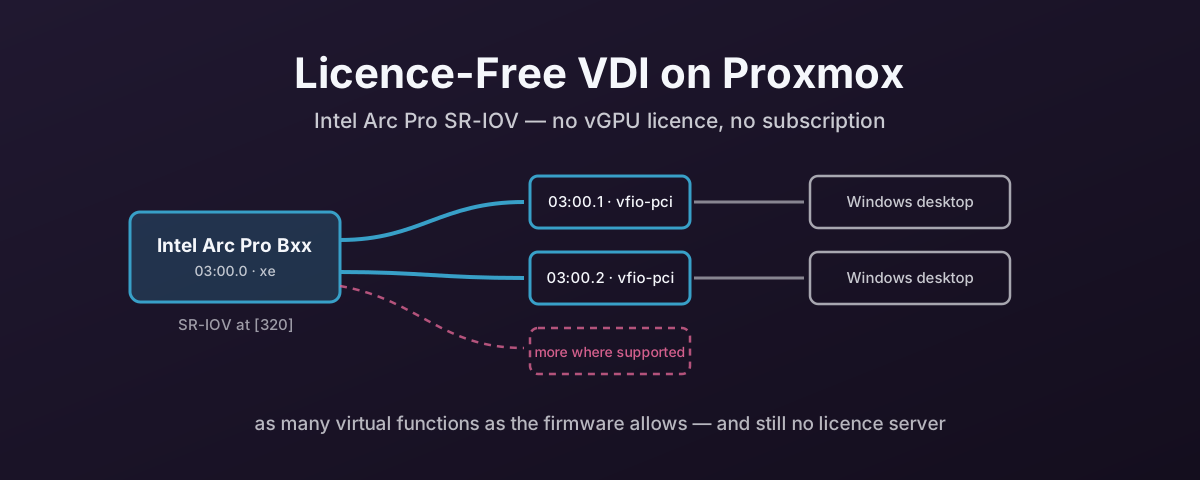
Intel changed the arithmetic with the Arc Pro line. These cards support hardware splitting through standard SR-IOV, which is a PCIe feature rather than a product. As such, there is no licence server, no subscription, and no separate vGPU software to buy.
So I got hold of an Intel Arc Pro B50 to see how cleanly it goes together with Proxmox. The short answer: the mechanism works exactly as advertised, and then firmware got in the way. Both halves are below.
The Elephant: You Need Windows First
Before any of this works, the card wants its firmware updating. Intel ships that update inside the Windows driver installer.
Which is awkward, because the reason you bought the card is to run it under Proxmox.
There is a way round it that needs nothing but Proxmox: build a Windows VM, pass the whole card through to it, let Windows update the firmware, then hand the card back to the host. It is a bootstrap loop, and it is worth knowing about before you plan the build rather than after.
Finding the Card
On the Proxmox host, lspci to locate it:
lspci
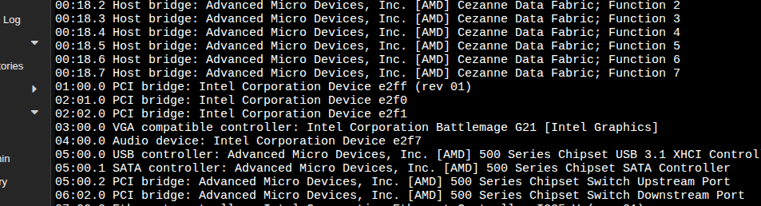
Here it is at 03:00.0, reported as Battlemage G21, the silicon behind the Arc Pro B50.
Note the address down. You will need it several times, and there is a separate audio function at 04:00.0 that comes with it.
Passing the Whole Card to a Windows VM
Add the card to a Windows VM as a raw PCI device.
In the VM’s hardware, that is a PCI Device entry: 0000:03:00 with pcie=1:
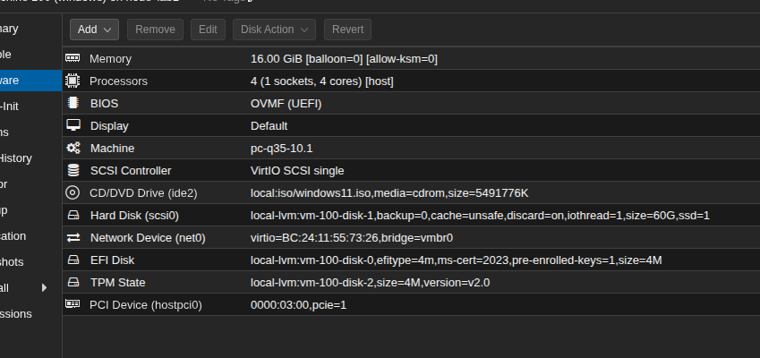
Worth noticing what else that VM is, because none of it is accidental: Q35 machine type, OVMF firmware, VirtIO SCSI single, and a TPM for Windows 11. Q35 in particular is not optional for this. A passed-through GPU on i440fx appears as a legacy PCI device, which is the wrong shape for a modern graphics driver. That is covered in Always Use Q35, Not i440fx.
Boot the VM and check Windows sees the card:
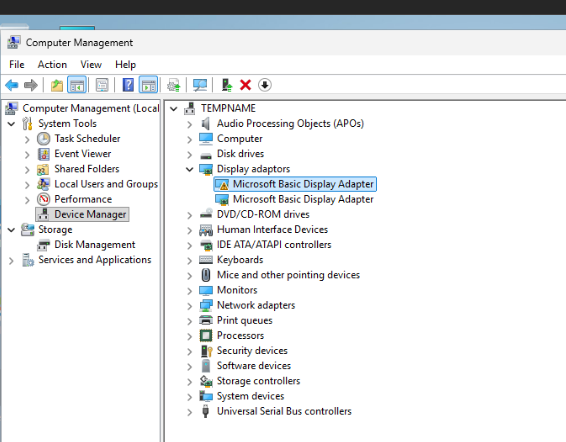
It appears as a Microsoft Basic Display Adapter because no driver is installed yet. That is the expected state, and it is enough. Windows has found the hardware.
Updating the Firmware
Get the current driver from Intel’s Arc Pro B50 download page.
At the time of writing that was version 32.0.101.8306 (Q4.25), for Windows 11 and Windows 10 22H2:
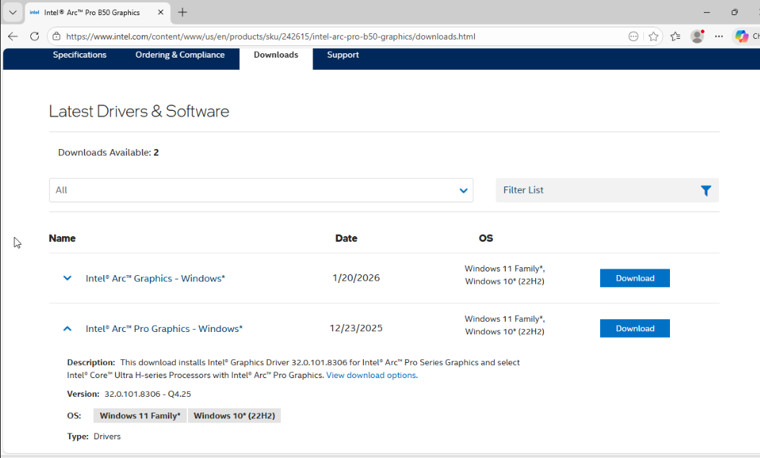
Install it, and let the firmware update run as part of the process rather than cancelling out early. That firmware step is the entire reason for this detour.
When it finishes, give the card back to the host and reboot, so it reinitialises fully under Proxmox.
Confirming SR-IOV Is There
Now ask the card what it can do:
lspci -v
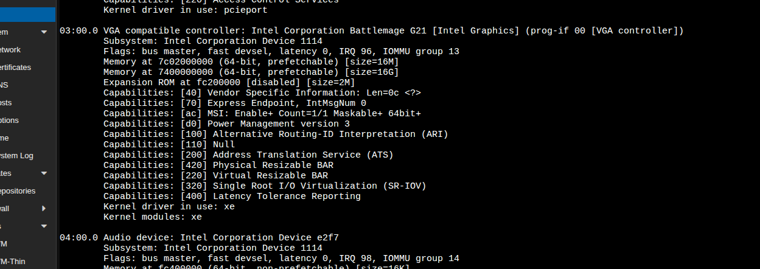
The line that matters:
Capabilities: [320] Single Root I/O Virtualization (SR-IOV)
That is the whole proposition in one line of lspci output, with no licence attached to it.
Three other things in that output are worth reading while you are there:
Kernel driver in use: xe— the card is on Intel’s newerxedriver rather thani915, which is what will be creating the virtual functions.[420] Physical Resizable BARand[220] Virtual Resizable BAR— the card supports resizable BARs, and so do its virtual functions. Worth knowing what that costs you in address space if you are passing several of them through: see PCIe Resizable BAR and Modern GPUs.IOMMU group 13— the card is in a group of its own, which is what you want for clean passthrough. Why that matters is in the IOMMU tax article.
Creating the Virtual Functions at Boot
Virtual functions are not persistent. Asking for them is a write to sysfs, so it has to happen on every boot.
tmpfiles.d is a tidy way to do that declaratively, rather than bolting a script onto a unit file:
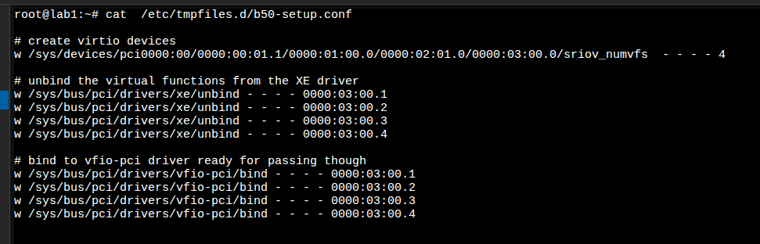
The file does three jobs in order.
Create the virtual functions, by writing the count to the physical function’s sriov_numvfs:
w /sys/devices/pci0000:00/0000:00:01.1/0000:01:00.0/0000:02:01.0/0000:03:00.0/sriov_numvfs - - - - 4
Unbind each new function from xe, because the host driver claims them as they appear and a guest cannot have a device the host is holding:
w /sys/bus/pci/drivers/xe/unbind - - - - 0000:03:00.1
w /sys/bus/pci/drivers/xe/unbind - - - - 0000:03:00.2
w /sys/bus/pci/drivers/xe/unbind - - - - 0000:03:00.3
w /sys/bus/pci/drivers/xe/unbind - - - - 0000:03:00.4
Bind them to vfio-pci, which is what makes them available to pass through:
w /sys/bus/pci/drivers/vfio-pci/bind - - - - 0000:03:00.1
w /sys/bus/pci/drivers/vfio-pci/bind - - - - 0000:03:00.2
w /sys/bus/pci/drivers/vfio-pci/bind - - - - 0000:03:00.3
w /sys/bus/pci/drivers/vfio-pci/bind - - - - 0000:03:00.4
Note the addresses: the physical function is 03:00.0 and the virtual functions come up as .1 through .4.
One detail about w that explains the ordering, and that will bite you if you get it wrong. systemd documents it as: “Write the argument parameter to a file, if the file exists.”
sriov_numvfs only exists once a driver has bound to the physical function, and the virtual function paths only exist once that write has happened.
So the sequence in the file is not stylistic. Each line depends on the one before it having taken effect.
Why Two, and Not Four
Driver 32.0.101.8306 — the one installed above — carries graphics firmware BMG__21,1162, and that is the release where Intel first officially enabled SR-IOV on Arc Pro.
Intel’s stated default for the B50 in that release is two virtual functions, each with an 8 GB VF Local Memory BAR.
Which makes the number arithmetic rather than policy. The B50 has 16 GB. At 8 GB per virtual function, two is all that fits.
There is a wrinkle worth knowing if you go looking for a workaround. Before official support existed, some people ran older firmware that exposed 12 virtual functions on a B50, and going back to driver 32.0.101.6979 restores that count.
Those 12 shared the same 16 GB, so each got a fraction of the memory mine get. Intel’s position is that two was chosen deliberately to give each function enough compute, capacity and bandwidth to behave predictably.
So the cap can be moved, but not by you. The maximum VF count and the VF Local Memory BAR size live in the IFWI, there is no public tool to change either, and the supported answer on a current stack is two.
How Many Desktops Each Card Gives You
The B50 is the small card in the family, and its two functions are the family’s low water mark. If the seat count is what you care about, buy further up the range.
The whole Battlemage Arc Pro line does SR-IOV. What differs is how many functions the firmware will carve out, and that follows the memory:
| Card | Memory | VFs on the current supported stack | Seen elsewhere |
|---|---|---|---|
| Arc Pro B50 | 16 GB | 2, at 8 GB VF BAR each — Intel’s documented default | 12 on pre-official firmware, via driver 32.0.101.6979 |
| Arc Pro B60 | 24 GB | 7 reported | 24 on an early ASRock firmware, cut to 7 by a later one |
| Arc Pro B60 Dual | 2 × 24 GB | 7 per GPU — two GPUs, so 14 from one slot | as above; the two halves are independent |
| Arc Pro B65 | 32 GB | no published count found | — |
| Arc Pro B70 | 32 GB | 7 reported, on firmware 8517 | 4 on earlier firmware |
Only the B50 row is Intel-documented. The B60 and B70 numbers are what people report from lspci, and they have moved more than once. The B60 in particular went from 24 down to 7 in a firmware update, which is the same kind of narrowing the B50 saw.
Nobody appears to have published a VF count for the B65 at all, so treat that row as unknown rather than as zero.
Two things follow from that table, and both matter more than any single number in it.
The VF count is a memory division, not a die feature. Intel’s rule is that a larger VF Local Memory BAR means fewer functions. That is why the 16 GB card gives two and the 32 GB cards give seven: nothing about the GPU’s shaders decides it.
Check the card you are about to buy, not the family. SR-IOV presence has varied between board vendors on the same chip — Sparkle’s B60 Blower initially shipped without the capability visible at all and only gained it after an igsc firmware update. Ask for lspci -v output from the exact model, or budget for a firmware update before you count on any of this.
The Dual B60 Is Two Cards Wearing One Bracket
Maxsun’s Arc Pro B60 Dual 48G Turbo is the interesting one for seat count, and the thing to understand is that the 48 GB is not a pool.
It is two B60 GPUs — two BMG-G21 dies — on one board, with 24 GB of GDDR6 wired to each, and no PCIe bridge chip between them. Both dies hang straight off the x16 gold fingers at PCIe 5.0 x8 each.
Which means the host has to split the slot for you. The card needs the primary x16 slot bifurcated to x8/x8, and most consumer boards do not enable that by default. It is a firmware setting you go looking for, in the same category as the IOMMU and ACS settings any of this needs.
Get that right and the operating system sees two separate GPUs, each with its own physical function and its own SR-IOV capability. So you get two lots of virtual functions from one slot — 14 seats if each die behaves like a single B60 — and the tmpfiles.d file above doubles up, one sriov_numvfs write per die.
Get it wrong and you see one GPU and half the card is invisible.
Worth being plain about what the 48 GB is not: a guest attached to a virtual function on the first die cannot reach the second die’s memory. This is two 24 GB cards in one physical space, which is exactly what you want for VDI seats and exactly what you do not want for one large model.
So: if two seats are enough, the B50 is a 70 W card that will do it. If you want seven, plan around a B70. If you want fourteen and have a board that will bifurcate, the dual B60 gets you there in one slot.
Can You Run AI On a Virtual Function?
Short answer: treat it as unsupported. Longer answer, because the reason matters and it is not the one you would guess.
These are marketed as AI cards and they are not pretending. The B50’s 128 XMX engines are rated at 170 peak TOPS, the B70 at 367, and Intel’s software story is real — vLLM serves models from 8B up to 120B on Arc Pro B-series, and IPEX-LLM and llama.cpp’s SYCL backend both run on them.
But look at how every one of those results is produced. vLLM’s own Arc Pro numbers come from a Docker container on bare metal, on systems with four and eight whole B60 cards doing tensor parallelism. Intel’s post does not mention SR-IOV or virtual functions once.
That pattern holds everywhere I looked. Intel scopes the SR-IOV use cases to virtualised remote desktop, guest OS graphics acceleration, and media encode and decode. Compute is not on that list, and I could not find a single published case of anyone running LLM inference inside a VM attached to a virtual function.
What people actually do is telling: they run the model in Docker on the host, and hand virtual functions to VMs for desktops. One person doing both at once reports simply that “VRAM gets pretty tight.”
Which is the real problem, and it is arithmetic rather than driver support.
A virtual function gets a fixed slice of local memory — 8 GB on the B50, set in firmware. That slice is the hard ceiling for weights plus KV cache in that guest, and it does not grow because the card has more. An 8B model at FP16 is around 16 GB of weights before you add any context at all, so it does not fit in a B50 virtual function on any driver. Quantise to Q4 and an 8B fits in about 4 GB, leaving a few GB for context — which works, but is a long way from what the card can do undivided.
So the two workloads compete for the same memory, and the split is decided in firmware before either of them starts.
If AI is the job, do not divide the card. Pass the whole thing through to one VM — the same hostpci0 passthrough used for the firmware update earlier in this post — or run the container on the host and skip virtualisation for that workload. Both give the model all 16 GB and the full XMX array.
If VDI is the job, virtual functions are right, and expect desktop graphics rather than an inference server behind each one. Hardware-accelerated desktops, video playback and encode work. That is what the mechanism is documented for.
Worth saying plainly: absence of published evidence is not proof it fails. The xe driver exposes compute through Level Zero and OpenCL, and it is entirely possible a VF-backed guest brings those up fine. But nothing from Intel says it is validated, no one appears to have shown it working, and the memory ceiling limits the payoff even if it does. That is not something to build a plan on.
What It Is Still Worth
Two virtual functions is two hardware-accelerated Windows desktops from one card, with no vGPU licence, no subscription and no licence server. On a hypervisor that costs nothing to run. That is enough to prove the approach works, which is the honest job for a B50. It is the bottom of the range.
For an actual VDI deployment I would be specifying the dual B60.
Fourteen functions from one slot — if each die behaves like a single B60 — puts it in the same seat-count territory as the NVIDIA cards sold for this workload, at a far lower price, and with nothing to license per user. That last part is the one that compounds. NVIDIA’s vApps, vPC and RTX vWS are all licensed per concurrent user, either as an annual subscription or as a perpetual licence that has to be bought alongside a five-year support and maintenance subscription. Every seat is a line item, and it comes round again. On the Intel side there is no equivalent line. You buy the card.
And the mechanism is the part that matters long term. SR-IOV on the GPU is a PCIe capability, not a product tier, so the tmpfiles.d file just grows to match whatever the card allows.
The shape is one sriov_numvfs write, then an unbind and a bind for each function — so two functions is five lines, and the nine above are four functions asked for on a card that delivers two. Seven functions is fifteen lines. A dual B60 is thirty, because each die is its own physical function and gets its own sriov_numvfs write.
Nowt else changes as you scale it. No licence server appears at any point in that file.
References
- Intel support — why the latest Arc Pro B50 firmware shows 2 SR-IOV VFs — the authoritative statement: SR-IOV officially enabled from graphics firmware
BMG__21,1162in driver32.0.101.8306, two VFs at an 8 GB VF Local Memory BAR each on the B50, and the maximum VF count and BAR size set at IFWI level with no public tool to change them - Intel Community — “Why did the latest Intel Arc Pro B50 firmware nerf SR-IOV VFs from 12 to 2?” — the 12-VF pre-official firmware, the
32.0.101.6979rollback that restores it, and Intel’s reasoning for the lower default - Level1Techs — B60 SR-IOV support in the Arc Pro drivers — field
lspcireports for the B60, theigscfirmware update that exposed the capability, and where the 24-then-7 figures come from - Level1Techs — B50, B60 or B70 for SR-IOV — the reported VF counts per card and per firmware, source for the B70 rows
- ASRock — Intel Arc Pro B65 Creator 32GB — the B65’s specifications: 32 GB GDDR6, 20 compute units, 160 XMX engines, 256-bit, PCIe 5.0
- MAXSUN — Arc Pro B60 Dual 48G Turbo — the vendor’s own statement that the card “uses PCIe 5.0 x8 + x8 interfaces and runs efficiently on consumer platforms that support PCIe x16 lane bifurcation”
- vLLM — Fast and affordable LLM serving on Intel Arc Pro B-Series — the AI story on these cards, and the fact that it is a Docker-on-bare-metal story across four and eight whole B60s, with no mention of SR-IOV or virtual functions
- Linux kernel — Intel Xe driver — the driver in use on the card, per
lspci -v tmpfiles.d(5)— thewline type, and its “if the file exists” condition that dictates the ordering above- NVIDIA Virtual GPU Software Packaging, Pricing and Licensing Guide — the licensed alternative this design avoids: vApps, vPC and RTX vWS all sold per concurrent user, as an annual subscription or as a perpetual licence bundled with five years of support and maintenance
- Proxmox VE — PCI(e) Passthrough — host-side passthrough requirements