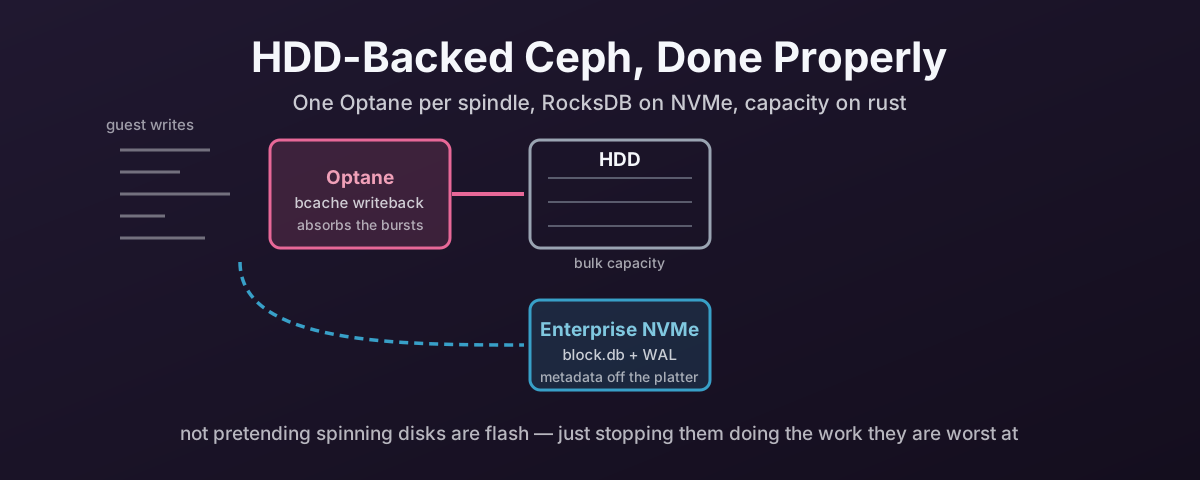
Why HDDs Are Back on the Menu
For years the advice was simple enough to fit on a sticky note: put it all on SSDs.
That advice was right, and it was also cheap. Neither is quite true now. NAND supply has tightened, AI demand has pushed flash pricing up, and high-capacity NVMe has become hard to justify for a cost-conscious Proxmox deployment — the kind that needs to be operational, reliable, and as inexpensive as honesty allows.
Enterprise HDDs are interesting again for the same reason they always were: capacity per pound, and nothing else comes close.
The catch is that everybody who has run VMs on spinning disks knows how badly it can go. That experience is real, and it is usually the architecture’s fault rather than the disks'.
Blaming the disks is easier, mind. It is also wrong, and it is expensive, because it talks people into buying flash they did not need.
Everything below assumes Proxmox with hyper-converged Ceph OSDs, because that is where the layout decisions actually bite.
The Problem Is Latency, Not Throughput
A modern enterprise HDD moves large sequential data perfectly well. That was never the bottleneck.
A 7.2k RPM enterprise drive delivers somewhere around 80 to 100 IOPS of random work, because every random operation waits on a head seek and a platter rotation. That number has barely moved in twenty years. It is mechanics, not electronics. An entry-level enterprise SSD is three or four orders of magnitude away from it.
Give the same drive sequential work and it is a useful device. The operation rate roughly doubles, to about 200 IOPS, but each of those operations now carries a large block because the head is already in the right place and can keep streaming. So you get real throughput, 150 to 250 MB/s of it, at a price per terabyte nothing else touches.
That is the important asymmetry, and it is not “HDDs are slow”. A spinning disk is good at sequential work and hopeless at random work, and the two numbers are close together only because the bounded thing is the operation count, not the bytes.
Which sets the whole design brief. You are not trying to make the disk faster. You cannot. You are trying to arrange for it to spend its time in the mode where it is already competent, and to keep the small random traffic away from it. As such, everything that follows is that one idea applied twice.
The problem is that virtual machines do not generate the workload HDDs are good at. They generate metadata updates, journal writes, small synchronous flushes, logging, filesystem housekeeping, and bursts of random activity from a dozen guests at once that arrive interleaved at the disk.
Ceph adds its own layer to this. Every write carries RocksDB metadata updates alongside the data. If all of that lands on raw spindles, the disks spend their time seeking instead of serving, and you get the symptom every administrator recognises: high I/O wait, sluggish guests, inconsistent responsiveness, and a cluster that feels far slower than its capacity sheet suggests.
Ceph’s own hardware guidance is blunt about where this leads. It warns to “consider carefully the ostensible cost-per-gigabyte advantage of larger HDDs, and the concomitant limitations of IOPS per TB”, and says drives above 8 TB “may be best suited for storage of large files / objects that are not at all performance-sensitive.”
Worth doing that arithmetic, because the drives that make this economic in the first place are large ones. 20 TB and up. A 20 TB drive still does its 80 to 100 random IOPS, because capacity buys you no operations whatsoever. So it offers about 4 to 5 random IOPS per terabyte, where an 8 TB drive manages roughly eleven, and a 2 TB drive forty.
By Ceph’s own measure, then, a 20 TB spindle is well inside the territory it tells you not to put performance-sensitive workloads on.
That is not an argument against buying them. It is the reason the rest of this post exists. The design below is exactly what makes a 20 TB spindle viable for VM storage, by arranging for the small random work never to reach it.
Move the Metadata Off the Spindle
The highest-value change to an HDD-backed cluster is to stop making the spindle store Ceph’s bookkeeping.
BlueStore keeps three things per OSD: the data itself on block, the RocksDB metadata database on block.db, and the write-ahead log on block.wal. By default all three live on the same device. Put block.db on NVMe instead and a large amount of small random I/O leaves the disk entirely.
Ceph’s hardware documentation puts it plainly: “HDD OSDs may see a significant write latency improvement by offloading WAL+DB onto an SSD.”
Use proper enterprise NVMe here, not consumer flash. The reason is not headline benchmark numbers. It is stable latency under sustained load, and power-loss protection. Ceph’s documentation is direct: “Enterprise-class SSDs are best for Ceph: they feature power loss protection (PLP)”, and “bargain client-class or off-brand SSDs are a false economy.”
Samsung PM9A3 and Micron 7450 Pro class drives are the sort of thing that belongs here. Under write pressure Ceph cares about consistency far more than peak numbers, and that is exactly what separates an enterprise drive from a fast consumer one.
Sizing block.db, and What Spillover Costs
Get the size wrong and the benefit quietly evaporates, because when block.db fills, RocksDB does not fail — it spills back onto the slow device, exactly where it would have been without the NVMe.
That is the worst of both worlds: you have bought the flash and you are still seeking on the spindle.
The current Ceph guidance:
| Workload | block.db as a fraction of block |
|---|---|
| RBD / block — VM disks | 1% to 2% |
| RGW / object | at least 4% |
| General recommendation when offloading WAL+DB | at least 2.5% |
Proxmox VM storage is the RBD row, so 1–2% is the honest planning figure, and 2.5% is a comfortable place to sit.
Run that against a 20 TB drive and the numbers get your attention:
block.db for one 20 TB OSD | |
|---|---|
| At 1% | 200 GB |
| At 2% | 400 GB |
| At 2.5% | 500 GB |
Take that with the RocksDB level steps below and 300 GB per OSD is the sensible landing spot. The useful step nearest the middle of the range.
Which changes what the shared metadata device actually is. Eight 20 TB OSDs want 2.4 TB of NVMe between them; fifteen of them, Ceph’s stated maximum behind one NVMe, want 4.5 TB. On drives this large it is DB capacity that decides how many OSDs sit behind one device, not the ratio. You will run out of gigabytes long before you run out of Ceph’s blessing.
There is one more wrinkle worth knowing, because it makes intuitive sizing wrong. RocksDB’s level structure means a DB partition can only fully use sizes that correspond to the sums of its levels — historically producing useful steps around 3 GB, 30 GB and 300 GB, with sizes in between offering nothing over the step below. Rounding 18 GB up to 30 GB is often free in practice; rounding it down to 20 GB buys you nothing over 3 GB in the worst case.
Check for spillover after the cluster has been running a while, not on day one. It is a slow-onset problem.
You Do Not Need a Separate WAL Device
This one saves a partition and a lot of fiddling.
If you specify a DB device and no explicit WAL device, Ceph puts the WAL on the fast device with the DB automatically. The documentation states that “whenever a DB device is specified but an explicit WAL device is not, the WAL will be implicitly colocated with the DB on the faster device.”
So “put the DB and WAL on NVMe” is the right goal, but it is one argument, not two. A separate block.wal only makes sense if you have a third, faster tier to put it on.
Turn Off the HDD Write Cache
Small, unglamorous, and easy to miss.
Ceph’s documentation notes that OSD performance “may be dramatically increased … by disabling this write cache” on HDDs. The volatile cache in the drive reorders and delays writes in ways that fight Ceph’s flush semantics, and turning it off usually makes things faster rather than slower.
It becomes mandatory rather than advisable once bcache is involved, which is the next section.
While you are in there: you do not need a RAID-capable HBA. Ceph says so directly: “You do not need an RoC (RAID-capable) HBA.” Give the OSDs the disks.
One Optane Per Spindle
Moving the metadata off the disk fixes the steady state. It does not fix bursts, because a burst of small synchronous writes still has to be acknowledged, and the spindle still acknowledges at spindle speed.
That is what bcache is for, and what makes it work here is Optane.
What matters is not capacity. It is behaviour under write load. Against NAND, Optane offers very low latency, very high endurance, and none of the garbage-collection cliffs that make an SSD’s write-cache performance unpredictable once it has been in service a while. Absorbing small, bursty, write-heavy traffic is the thing it is best in the world at.
The layout that matters: one Optane per HDD, each pair its own bcache device. Not one Optane shared across a shelf of disks.
The pairing is a deliberate choice, and it buys two things.
No contention. Each spindle gets a whole Optane’s latency and queue depth to itself, rather than queueing behind seven other OSDs’ bursts.
A failure domain Ceph already knows how to survive. A shared write cache holds dirty data for every OSD behind it, so losing it loses all of them at once; paired one-to-one, losing an Optane costs exactly one OSD. That distinction is the single most important consequence of this design, and it gets its own treatment in what you are trading away.
This Has To Be Optane. Not NAND.
The word “Optane” is not a brand preference or a nice-to-have here. Substituting a NAND NVMe — however expensive — builds something that wears out, and the reason is endurance.
Look at where the cache device sits. Because this design turns bcache’s sequential bypass off — the sequential_cutoff=0 in the rule below — every single write to that OSD passes through it: not just the bursts, all of it. That makes the cache the highest-duty-cycle device in the node, asked to absorb the write volume of an entire spinning disk for the life of the machine.
Endurance is quoted in drive writes per day, and the gap is not incremental:
| Device | Rated endurance |
|---|---|
| Optane P5800X | 100 DWPD |
| Optane P4800X | 30 DWPD |
| Write-intensive enterprise NAND, top of the range | around 10 DWPD |
| Mixed-use enterprise NAND | 3 DWPD or less |
| Mainstream enterprise NAND — PM9A3, 7450 Pro class | around 1 DWPD |
Optane is between ten and a hundred times the endurance of the NAND you would otherwise put there. Put a 1 DWPD drive in the one position that receives every write in the cluster and you have not built a cache, you have built a consumable.
It is worse than the table suggests, because NAND suffers write amplification internally and Optane does not. A NAND drive’s rated DWPD is what it takes at the interface; what its cells actually absorb is larger. Optane’s number needs no such asterisk.
Rebuilds are where that gets tested. Backfill pushes terabytes of writes through the surviving nodes in a compressed window, every byte of it across their cache devices — an endurance event, not merely a latency one, arriving exactly when you least want a second device to fail.
So the two flash tiers want different drives, for different reasons:
| Tier | Write volume | What the device needs |
|---|---|---|
| DB/WAL | small — RocksDB only | A fast enterprise NVMe. Low latency, high random IOPS, PLP. Enterprise NAND is the right technology; a PM9A3 or 7450 Pro is the right buy |
| Write cache | all of it | PLP and endurance in the tens of DWPD. NAND is the wrong technology at any price |
Buying one kind of drive for both jobs is the mistake this section exists to prevent — but do not read the first row as permission to economise, because low write volume is not low demand.
The DB/WAL device still has to be genuinely fast NVMe, for three reasons that have nothing to do with how many bytes cross it.
It serves every OSD behind it at once, so the queue it sees is four or fifteen sets of metadata traffic, not one disk’s worth.
Its latency lands directly on your clients. RocksDB lookups sit on the critical path for finding objects, for peering and for scrub, and they are small random reads. The workload where the gap between a fast NVMe and a mediocre one is widest. Every microsecond is multiplied by every OSD depending on it.
And compaction is bursty. RocksDB periodically rewrites its levels, turning steady churn into a concentrated spike of reads and writes. A device that copes with the average and stalls on the spike stalls every OSD behind it at the same moment.
Ceph’s own ratios are the tell. It allows three times as many OSDs behind an NVMe as behind a SATA SSD, and that is the interface and the device class talking, not the capacity. Use NVMe.
So: the cache device must be Optane, the DB/WAL device may be NAND, and neither position is where you save money.
Which Optane: A 32 GB M10 Would Often Do
None of that means the biggest Optane is the right one. The device you need is decided by your write workload — though as it turns out, the second-hand market may decide it for you regardless. The arithmetic still matters, because it tells you what you are over- or under-buying.
Start from what the cache is for. It holds a burst, not a disk. At writeback_percent=40 a 32 GB device gives roughly 13 GB of dirty buffer, which is a huge number of small synchronous writes.
So do not be put off by the ratio. A 32 GB module in front of a 20 TB disk is 0.16% of it, which sounds absurd until you remember it is a burst absorber rather than a working-set cache trying to hold hot data. A 375 GB device in front of the same disk is 1.9%, which is simply more headroom than you will use.
Which puts the cheap end of the range in play. Here is the little consumer module against the datacentre part, because the gap is not where people expect:
| Optane Memory M10 32 GB | Optane DC P4800X 375 GB | |
|---|---|---|
| Random read, 4K | 240,000 IOPS | 550,000 IOPS |
| Random write, 4K | 65,000 IOPS | comparable to read |
| Sequential read | 1,200 MB/s | 2,400 MB/s |
| Sequential write | 290 MB/s | 2,000 MB/s |
| Typical latency | — | under 10 µs |
| Endurance | 365 TBW | 12.3 PBW — 30 DWPD |
| Interface | PCIe 3.0 x2, M.2 2280 | PCIe 3.0 x4, U.2 or AIC |
Look at the write IOPS row first. The little M10 does 65,000 random writes a second; the spindle behind it does 80. Even the cheapest Optane is roughly 650 times the disk it is caching, so on the performance axis the argument is over before it starts. The DC part’s extra IOPS have nowhere to go when there is one 7.2k disk downstream.
The row that decides the purchase is endurance, where the gap is 34×. Turned into a daily budget over a five-year life:
| Device | Sustainable writes per day, over five years |
|---|---|
| M10 32 GB — 365 TBW | about 200 GB/day |
| P4800X 375 GB — 12.3 PBW | about 6.7 TB/day |
Under 200 GB of writes a day and a 32 GB M10 sees out the build. At twice that you get two and a half years. Properly write-heavy and the DC part earns its price — not for the IOPS, which you cannot use, but for the thirty-odd times more writing it tolerates.
So measure rather than guess. nvme smart-log on an existing cache device gives you data_units_written; sample it a week apart, divide, and compare against the rated TBW of whatever you are considering. bcache keeps its own totals under /sys/block/bcacheN/bcache/stats_total/ if you would rather read it there.
Two caveats on the M10. Its random figures are quoted over an 8 GB span rather than the full device, so on a cache you intend to run substantially full, treat them as the optimistic end. And it is a consumer part carrying no enterprise PLP claim — Optane’s media is written in place with no DRAM buffer in the write path, which is why these modules behave far better on sudden power loss than consumer NAND would, but “behaves well in practice” is not a specification. If you want the guarantee in writing, buy a DC-series part.
The Floor Is Bandwidth, Not Capacity — Skip the 16 GB Modules
There is a second constraint, independent of everything above, and it disqualifies the cheapest part in the range.
The cache has to be faster than the disk sequentially, or it is a throttle. The 16 GB M10 is not, and it is the module you will be most tempted by because it is nearly free:
| Sequential write | |
|---|---|
| Optane Memory M10 16 GB | 150 MB/s |
| Optane Memory M10 32 GB | 290 MB/s |
| Optane DC P4800X 375 GB | 2,000 MB/s |
| A 7.2k enterprise HDD | 150–250 MB/s |
Read the first and last rows together. A 16 GB module writes sequentially at about the same speed as the spinning disk it is supposed to be accelerating, and slower than a good one. It remains tremendously faster for random work — 35,000 random write IOPS against the disk’s 80 — but on a sequential stream it is at best a wash and at worst a ceiling below what the bare disk managed unaided.
And this design guarantees you meet that ceiling, because turning off the sequential bypass sends everything through the cache, making the cache’s own sequential write bandwidth the hard ceiling for the whole OSD. Recovery is where it bites hardest: backfilling a 20 TB OSD is about as sequential as this workload gets, and capping it at 150 MB/s makes an already slow rebuild slower.
So the M10 line has a floor at 32 GB, and it is a bandwidth floor rather than a capacity one. The capacity arithmetic said 32 GB was ample; the bandwidth arithmetic rules out 16 GB regardless of how little you needed to store. Both tests have to pass, and the cheap part fails the one people do not check.
Whatever you are considering, put its sequential write figure next to 250 MB/s before you buy it.
Buying a Product Nobody Makes Any More
Optane is discontinued. Intel wound the business down in 2022, writing off $559 million of inventory and ending development. There is no new production and no restock; the total supply only goes down from here.
Which raises an obvious question, because there is a surprising amount of it for sale. Understanding where it comes from tells you what you are buying.
It is OEM service-spares inventory being liquidated. The big three server makers stocked Optane as spare parts to support the platforms they sold it in. Those platforms have gone end-of-life and dropped off support, so the spares backing them became dead stock overnight — warehouses of parts for machines nobody is contractually obliged to fix any more. That inventory is what is flowing onto AliExpress and the refurbishers.
Two consequences, and both are good news.
A lot of it is unused rather than pulled. Service spares sat on a shelf waiting for a failure that never came, so the wear figure on arrival is often effectively zero — not “a few years of light duty” but never written. Verify rather than trust: nvme smart-log gives you percentage_used and data_units_written, and on genuine spares stock those should be startlingly low. Anything showing real wear is a pull being sold as something else, though even then the endurance headroom means a used Optane can have more life left than a brand-new NAND drive of the same capacity.
It explains which capacities you will find. OEM spares were stocked for servers, which means datacentre parts. Here is the full range, and note where the flagship starts:
| Part | Capacities | Form |
|---|---|---|
| Optane Memory M10 | 16, 32, 64 GB | M.2 2280, consumer |
| Optane SSD 800P | 58, 118 GB | M.2 2280, consumer |
| Optane SSD P1600X | 58, 118 GB | M.2 2280, datacentre boot and cache part |
| Optane SSD DC P4801X | 100, 200, 375 GB | M.2 110 mm or U.2 |
| Optane SSD DC P4800X | 375 GB at its smallest, 750 GB, 1.5 TB | U.2 or add-in card |
| Optane SSD P5800X | 400 GB, 800 GB, 1.6 TB | U.2 or add-in card |
In theory the small M.2 parts are the elegant answer — the M10, the 800P, the P1600X and the 100 GB P4801X all do the job, and cheaply. In practice the market does not have them, because nobody warehoused desktop accelerator modules as server spares. What is listed is 375 GB and upwards, P4800X-class hardware.
So plan on buying more capacity than the role needs, because that is what is for sale. It is not a bad outcome. Overbuying a cache device lands you on 30 DWPD and sub-10 µs latency when your workload demanded a fraction of either, and for a 20 TB spindle you intend to keep for years, that is the right way to err. It does mean the entry price is higher than the arithmetic suggests, and that the sizing above becomes a check against under-buying rather than a shopping list.
Three things to plan for, since this is a liquidation rather than a supply chain:
Buy your spares with the build. A finite pool is being cleared. When a device fails in three years you will not be ordering a replacement, you will be hunting one — so cost the spares in now, while the stock is there.
Expect OEM firmware and check the namespace. Parts from a vendor’s spares programme often carry that vendor’s firmware and may arrive formatted to an LBA size or with metadata settings suiting whatever they were stocked for. Confirm with nvme id-ns before you build on it, and be ready to nvme format to a plain 4096-byte format.
There is no warranty, no support, and no more firmware updates. Intel’s own support notice covers what the wind-down means for devices already in service, which is the position anything you buy is already in. Verifying that the part which arrived is the part in the listing is on you.
bcache Does Not Replace the DB/WAL Offload
Worth stating explicitly, because it is the obvious place to try to save money and it does not work: you still need block.db on NVMe. Both layers, not one or the other.
The Optane is a write cache. That is all it is. It shortens the acknowledgement path for writes heading towards the disk, and it does nothing else.
RocksDB does not only write. Ceph reads its metadata constantly — to find objects, to service peering, to answer scrubs — and a write cache offers a read exactly nothing once the data has been flushed out of it. Nor does the cache remove the metadata traffic; it defers and batches it, so every RocksDB update still arrives at the spindle eventually, competing for the same seeks. And compaction turns modest churn into far more device traffic than the writes that caused it.
So the two changes fix different problems and neither substitutes for the other:
| What it fixes | What it does not | |
|---|---|---|
block.db on NVMe | metadata lives on flash — reads and writes both, permanently off the spindle | nothing for a burst of guest writes |
| Optane via bcache | burst acknowledgement latency for data writes | nothing for metadata reads; only defers metadata writes |
Skip the DB offload and keep the Optane, and RocksDB is back on the platter with its reads served at 80 IOPS. Skip the Optane and keep the DB offload, and the steady state is decent but bursts still stall at spindle speed.
The udev Rule, Line by Line
bcache’s tunables live in sysfs, and sysfs resets them every time the device is registered — which is every boot. So they belong in a udev rule rather than a script somebody has to remember to run:
# /etc/udev/rules.d/99-bcache.rules
ACTION=="add|change", SUBSYSTEM=="block", KERNEL=="bcache*", \
  ATTR{bcache/cache_mode}="writeback", \
  ATTR{bcache/sequential_cutoff}="0", \
  ATTR{bcache/congested_read_threshold_us}="0", \
  ATTR{bcache/writeback_rate}="81920", \
  ATTR{bcache/writeback_rate_minimum}="20480", \
  ATTR{bcache/writeback_percent}="40"
KERNEL=="bcache*" matches every bcache device on the node, so one rule covers all the pairs. ACTION=="add|change" means it reapplies whenever a device appears or is re-attached, not just at boot.
What each setting is doing, and why:
cache_mode=writeback — the entire point. In the default writethrough, a write is not acknowledged until it reaches the HDD, so the cache does nothing for write latency. In writeback, the Optane acknowledges and the spindle catches up later.
sequential_cutoff=0 — by default bcache detects sequential I/O and routes it straight past the cache once it passes 4 MB, on the theory that the backing disk handles sequential fine. Zero disables that bypass so everything is cached. On a hyper-converged node that is the right call: what looks sequential to one bcache device stops being sequential at the platter once several OSDs interleave, and you want every write acknowledged at Optane speed regardless. It does carry one obligation, though — with no bypass, the cache device’s own sequential write bandwidth becomes the ceiling for the whole OSD, which is why the 16 GB modules are disqualified.
congested_read_threshold_us=0 — bcache watches its own cache-device latency and starts bypassing the cache when it judges it congested, defaulting to 2000 µs for reads. Optane does not get congested the way NAND does, so this is bcache second-guessing a device it has mismeasured. Zero switches the tracking off.
writeback_rate=81920 and writeback_rate_minimum=20480 — the background flush rate, in sectors per second, so roughly 40 MB/s target with a 10 MB/s floor. A PD controller moves the actual rate between them. The target is set near what a spindle can absorb sequentially, and the floor stops the controller throttling flush towards zero and letting dirty data pile up indefinitely. Both are starting points rather than constants — how to change them is below.
writeback_percent=40 — how much of the cache bcache will let sit dirty before pushing back hard, against a default of 10. Forty gives you a much deeper burst buffer. It also means up to 40% of that Optane holds the only copy of data in the system, which is the trade-off, and it is the reason the one-per-spindle layout matters. This is the value most worth revisiting once you have watched a real workload.
Changing the Fill and Flush Values Later
The 40% and the two rates above are the values running here, not universal constants. They are the first thing you will want to move once you have watched a real workload, so it is worth knowing that there are two places to change them, doing two different things.
sysfs changes it now. The udev rule changes it next boot. You want both, and in that order.
Change it live, on one device:
echo 30 > /sys/block/bcache0/bcache/writeback_percent
Or across every pair on the node:
for d in /sys/block/bcache*/bcache; do
  echo 30 > "$d/writeback_percent"
done
The flush rate works the same way. Both values are in sectors per second, so these halve the target and the floor:
for d in /sys/block/bcache*/bcache; do
  echo 40960 > "$d/writeback_rate"
  echo 10240 > "$d/writeback_rate_minimum"
done
That takes effect immediately and survives exactly until the device is re-registered. The kernel documentation is explicit that these settings “do not persist across reboot” — which is the entire reason the udev rule exists.
Once you are happy with a value, edit the rule and reload it without rebooting:
udevadm control --reload
udevadm trigger --subsystem-match=block --action=change
This is where ACTION=="add|change" earns its keep. The trigger fires a change event at devices that are already present, so the rule reapplies to a running node instead of waiting for the next boot. Had the rule matched add alone, that command would do nothing.
Then read the values back, because a typo in a udev rule fails silently:
grep . /sys/block/bcache*/bcache/writeback_percent
Knowing Which Way To Move Them
Do not tune this from first principles — bcache exposes what you need under the same sysfs directory.
dirty_data is the one to watch: how much data is currently sitting in the cache and nowhere else. The docs describe it as “continuously updated unlike the cache set’s version, but may be slightly off”, which is fine for this purpose. Sample it through a normal working day and a backup window.
cache_hits, cache_misses and cache_hit_ratio tell you whether the cache is being used, with the caveat that “a partial hit is counted as a miss”. bypassed counts IO that went past the cache entirely — with sequential_cutoff=0 that should be close to flat, so a growing number means something is still routing around it.
All of those come as running totals plus versions that decay over the past day, hour and five minutes, which makes the short-window ones far more useful for spotting a problem than the lifetime figure.
From there:
| Symptom | Knob | Direction |
|---|---|---|
| Bursts stall — writes hit spindle latency mid-burst | writeback_percent | up, for a deeper buffer |
| More data exposed on the cache than you are comfortable with | writeback_percent | down |
dirty_data pinned at the ceiling during ordinary work | writeback_rate | up — the buffer is not the problem, drainage is |
| Background flush competing with guest reads on the spindle | writeback_rate | down |
dirty_data creeping up over days rather than hours | writeback_rate_minimum | up, so the controller cannot throttle to a crawl |
If dirty_data sits pinned at the ceiling no matter what you do, neither knob is the answer — the cluster is writing faster than the spindles can absorb, and the honest fixes are more spindles or fewer writes.
One file to leave alone: writeback_running. Setting it off stops writeback entirely, and the documentation says it is “only meant for benchmarking”. On a production OSD it means dirty data accumulates until the cache is full and never drains.
What You Are Trading Away
Most write-ups of this design stop at the good news. These are the parts that will actually hurt you, and every one of them is worth knowing before you build rather than after.
Losing either flash device destroys the OSD. Not stops it — destroys it. Both devices hold state that exists nowhere else: block.db holds the RocksDB that makes sense of block, and a writeback cache holds every write not yet flushed. The kernel documentation does not hedge on the second one: “In writeback mode you’ll lose data if something happens to your SSD.” Either way the OSD does not come back, it gets re-created and backfilled.
So these are the same class of risk, and it is worth being clear about that rather than treating the cache as the scary one. The Optane is not a more dangerous device than the NVMe. Two things separate them, and neither is severity per OSD.
The first is blast radius, and it is the entire justification for the pairing. One Optane per spindle means a cache failure costs one OSD — a single-disk loss, which is exactly the event a replicated pool exists to absorb, and which Ceph handles without anyone being paged. The DB/WAL device is shared, so losing it costs every OSD behind it at once, which is a correlated failure replication does not protect you from. Same failure, one device versus five.
The second is how the failure presents, and this one is an operational trap. When a cache dies in writeback the backing device stops and returns I/O errors, which is fine — Ceph marks the OSD down and gets on with it. The bad case is a reboot where the backing device comes up without its cache attached. It then looks like a mountable filesystem that is simply missing every dirty write, which is corrupt rather than merely stale. A missing block.db fails loudly and the OSD refuses to start; a missing cache can fail quietly and let you mount the wreckage. Treat a bcache backing device as unmountable without its cache, and never let anything helpfully mount it for you.
bcache does not guarantee power-safe writeback by itself. This is where the HDD write cache stops being an optimisation and becomes a requirement — turn it off, and run a kernel recent enough to have the FUA handling, so synchronous writes are honoured through the stack rather than acknowledged early somewhere in the middle. A cache device without power-loss protection compounds the problem, because it can lose data it has already reported safe.
Which makes the DB/WAL ratio the number that matters. Ceph allows 4–5 HDD OSDs per SATA SSD and no more than 15 per NVMe, and warns about “balancing the risk of reducing costs by placing too many responsibilities into too few failure domains.” Unlike the cache tier there is no pairing available to contain this one — sharing is the point of the device.
On 20 TB drives that is the whole conversation, because the rebuild is huge. One failed OSD is 20 TB to backfill; at the 150–250 MB/s a spindle sustains, throttled so recovery does not starve the guests, you are looking at well over a day of degraded operation for a single disk. Lose a shared DB device carrying five of them and there is 100 TB to move.
So the ratio is not really a cost decision. It is a decision about how long you are prepared to run degraded, and how much rebuild traffic the cluster can carry while still serving VMs.
The design depends on a device nobody makes any more. This is the one with no technical answer. Optane is the right part for the cache position and nothing current replaces it — NAND cannot take the write volume, and the CXL-based memory Intel pivoted towards is not a drop-in for a block cache. So the mitigation is commercial rather than clever, it is covered above, and the honest summary is that this architecture has an end date somewhere out in the future.
None of this makes an HDD cluster an all-flash cluster. Sustained random write traffic that outruns the flush rate will fill the cache, and once it is full you are writing at spindle speed with extra layers in the path. This design absorbs bursts and removes metadata overhead. It does not manufacture IOPS.
What It Adds Up To
Three tiers, each doing the one thing it is best at — and all three are required:
- Optane absorbs random write bursts, one device per spindle. It has to be Optane, because every write crosses it and NAND endurance is wrong for that position
- A fast enterprise NVMe holds RocksDB and the WAL, shared across a handful of OSDs at a ratio you chose deliberately rather than accepted
- HDDs provide bulk capacity, freed of both metadata and bursts
The point is not to pretend spinning disks are flash. It is to stop sending them the work they are worst at, so the capacity you actually paid for is usable.
That is the whole trick, and there is nowt clever about it. Put each job on the device that is good at it, and stop paying twice for the ones that are not.
For a hyper-converged Proxmox cluster that needs multi-terabyte capacity without all-flash pricing, that is a defensible design. Built properly it feels far faster than raw HDDs, it fails in ways Ceph is built to handle, and the money goes where it changes the outcome.
Two related things worth reading alongside this: the sector-size work in 4Kn, 512e and 512n matters a great deal for what the spindles do with the writes that reach them, and if you are building this on direct-attached nodes, the switchless mesh covers the network side of a small Ceph cluster.
References
- Ceph — Hardware Recommendations — the IOPS-per-TB warning on large HDDs, “HDD OSDs may see a significant write latency improvement by offloading WAL+DB onto an SSD”, the 4–5 HDD per SATA SSD and ≤15 per NVMe ratios, power-loss protection on enterprise SSDs, disabling the HDD write cache, and not needing an RoC HBA
- Ceph — BlueStore Configuration Reference —
block.dbat 1–2% ofblockfor RBD and at least 4% for RGW, the 2.5% general recommendation, spillover back onto the primary device, the RocksDB level sizes behind the 3/30/300 GB steps, and the WAL being implicitly colocated with the DB - Linux kernel — bcache admin guide — the cache modes,
sequential_cutoffand its 4 MB default, the 2000 µs read congestion default,writeback_ratein sectors per second, thewriteback_percentPD controller, thedirty_data/cache_hit_ratio/bypassedcounters and their decaying day, hour and five-minute versions, the warning thatwriteback_runningis “only meant for benchmarking”, the statement that these settings “do not persist across reboot”, and “in writeback mode you’ll lose data if something happens to your SSD” - Intel — Optane Memory M10 32 GB specifications — 365 TBW, 240,000 random read and 65,000 random write IOPS at 4K over an 8 GB span, 1200/290 MB/s sequential, PCIe 3.0 x2
- Intel — Optane Memory M10 16 GB specifications — the 150 MB/s sequential write and 35,000 random write IOPS that put this part below a spinning disk on sequential throughput
- PC Perspective — Optane SSD DC P4800X performance — the 375 GB part’s 550K random 4K read IOPS, 2400/2000 MB/s sequential, sub-10 µs typical latency, and 12.3 PBW at 30 DWPD
- ServeTheHome — Optane DC P4801X 100GB M.2 review — the small-capacity datacentre M.2 parts, for the capacity ladder
- StorageReview — Intel Optane SSD P5800X — the 100 DWPD rating, the P4800X’s 30 DWPD, and the comparison against NAND enterprise drives topping out around 10 DWPD for write-intensive parts and 3 or less for mixed-use
- Bcache — ArchWiki — the practical failure modes, including a backing device coming up without its cache after a reboot, and the power-safety requirements around the HDD write cache and FUA
- Intel — Optane business update — the wind-down, and what it means for warranty and support on devices already in service, which is the position anything you buy on the recycler market is already in