What Your Customer Sees When Your VM Boots
You sell virtual machines under your own name. A customer powers one on, and the first thing on the screen is somebody else’s logo.
That is a stock Proxmox VM. Nothing is broken, and Proxmox are doing nothing wrong: it is their product and their name, they wrote the firmware and the interface it appears in, and they are entitled to put it there, the same way a server vendor puts its badge on the front of the box. It just is not yours.
The logo is just the start.
This is what a stock UEFI guest reports on Proxmox’s current firmware, pve-edk2-firmware 4.2026.08-1, read from inside the guest with dmidecode:
| Where the guest looks | What it reads | Whose name |
|---|---|---|
| Boot screen | the Proxmox logo | Proxmox |
| Firmware vendor (SMBIOS type 0) | Proxmox distribution of EDK II | Proxmox |
| Firmware version | 4.2026.08-1 | Proxmox’s package version |
| System manufacturer (type 1) | QEMU | QEMU |
| Product name (type 1) | Standard PC (Q35 + ICH9, 2009) | QEMU |
| Chassis manufacturer (type 3) | QEMU | QEMU |
| Baseboard (type 2) | not present at all | nobody |
| Management web interface | the Proxmox logo, top left | Proxmox |
The boot logo does not stop at the firmware, either. UEFI firmware hands the image it drew to the operating system through an ACPI table called BGRT, the Boot Graphics Resource Table, which exists to say “an image was drawn on the screen during boot”1, and the operating system then draws it again on its own boot screen. The Fisher-Price OS (Windows) puts it above its spinner, and Microsoft calls BGRT “the standard interface that Windows uses to access the logo”2. Fedora’s default Plymouth theme does the same on Linux3. So a guest on Proxmox’s firmware shows Proxmox’s logo twice before anybody has logged in.
None of this is hard to change.
Keeping it changed is.
The next apt full-upgrade will quietly put half of it back, and the half it does not put back is the half that ought to worry you, which is what most of this post is about.
The MSDM table in that hand-over is not branding at all. It carries a licence key, and moving one into a VM has its own post: Moving an OEM Licence Into a Proxmox VM.
Everything Under /usr/share Belongs to apt
One rule decides every choice below. A file a package installed is the package’s file. Edit it in place and the next upgrade of that package overwrites your edit without a word, because as far as dpkg is concerned it is only putting its own file back where it left it.
So each piece of branding has to live somewhere apt does not own. A Proxmox node has three such places, and each costs something different:
| Where it lives | How it gets there | Survives an upgrade | What it costs you |
|---|---|---|---|
The VM config in /etc/pve | smbios1, and args for everything else | Yes, config is never touched by a package | args is root only, and is not shown in the GUI |
| A file dpkg has been told to leave alone | dpkg-divert | Yes, the package’s copy goes to a .distrib name instead | Upgrades no longer reach the file, which matters when the file is firmware |
| Your own directory, outside the package tree | /usr/local, referenced from args | Yes, no package owns it | It has to be put on every node yourself |
Debian’s own description of a diversion is the clearest: “a way of forcing dpkg not to install a file into its location, but to a diverted location”4. That covers the web interface. For the firmware it is one of two options, and the more dangerous one.
The Chassis Is a Handful of Strings and a Permission Check
SMBIOS is the table a machine uses to describe itself: who made it, what model it is, its serial number, what the board and the case are5.
dmidecode reads it, every asset inventory tool you have ever pointed at a network reads it, the Fisher-Price OS (Windows) system information panel reads it, and so do most of the licence checks that decide whether a piece of software will run on a given machine at all.
On a VM, QEMU writes it.
Hence QEMU and Standard PC in the table above.
Type 1 through smbios1
Proxmox exposes one SMBIOS structure in the VM config: type 1, System Information, as smbios16.
It takes manufacturer, product, version, serial, sku, family and uuid.
The catch is in qemu-server, not the docs.
Every field except uuid has to match a base64 pattern, [A-Za-z0-9+\/]+={0,2}, so a plain value with a space in it is refused outright.
Real strings get base64-encoded with base64=1 set, and qemu-server decodes them again before it builds the QEMU command line7.
The GUI’s SMBIOS editor does this on every save, with the comment “smbios values can be arbitrary, so encode and mark config as such”8.
On the command line it is your job:
b() { printf %s "$1" | base64 -w0; }
qm set 9000 --smbios1 "uuid=$(qm config 9000 | sed -n 's/.*uuid=\([0-9a-f-]*\).*/\1/p'),base64=1,\
manufacturer=$(b 'Example Cloud Ltd'),product=$(b 'EC Compute Instance'),\
version=$(b '2026.10'),family=$(b 'General Purpose'),sku=$(b 'ec-gp-4c16g')"
Note the uuid going back in.
It is the guest’s machine identity, and whatever you pass to --smbios1 is stored as the whole option, so read it first and keep it.
Brand the template, not each VM.
A Proxmox clone gets a freshly generated UUID and keeps every other smbios1 field, so every clone comes out with its own identity and your strings9, with one exception, below.
Types 0, 2, 3 and 11 through args
smbios1 stops at type 1.
The firmware vendor, the baseboard, the chassis and the OEM strings all go through args, the line Proxmox passes straight to QEMU, which its own documentation calls “for experts only”6.
QEMU’s -smbios option takes the fields for each type10:
args: -smbios 'type=0,vendor=Example Cloud Ltd,version=EC-FW 1.0,date=10/04/2026,uefi=on' -smbios 'type=2,manufacturer=Example Cloud Ltd,product=EC Virtual Board,version=1.0' -smbios 'type=3,manufacturer=Example Cloud Ltd,version=1.0,asset=EC-ASSET-123,sku=ec-gp' -smbios 'type=11,value=example-cloud:instance=123'
Booted on QEMU with those lines, the guest’s dmidecode reads:
| Structure | Field | Stock | Branded |
|---|---|---|---|
| Type 0 | Vendor | Proxmox distribution of EDK II | Example Cloud Ltd |
| Type 0 | Version | 4.2026.08-1 | EC-FW 1.0 |
| Type 1 | Manufacturer | QEMU | Example Cloud Ltd |
| Type 1 | Product Name | Standard PC (Q35 + ICH9, 2009) | EC Compute Instance |
| Type 1 | Family | not specified | General Purpose |
| Type 2 | Manufacturer | structure absent | Example Cloud Ltd |
| Type 2 | Product Name | structure absent | EC Virtual Board |
| Type 3 | Manufacturer | QEMU | Example Cloud Ltd |
| Type 3 | Asset Tag | not specified | EC-ASSET-123 |
| Type 11 | String 1 | structure absent | example-cloud:instance=123 |
Four traps turned up on the way. All four are silent.
Supplying type 0 drops “UEFI is supported”.
OVMF writes its own type 0 only when QEMU has not supplied one; the loop that walks QEMU’s tables sets NeedSmbiosType0 = FALSE the moment it meets a type 011.
Your vendor string replaces Proxmox’s, which is the point.
But QEMU’s type 0 replaces OVMF’s firmware characteristics as well, and without uefi=on the line “UEFI is supported” disappears from dmidecode.
Put it back with uefi=on.
For UEFI guests there is a better home for the vendor string anyway, inside the firmware itself, further down.
The chassis type cannot be set.
QEMU’s type 3 takes manufacturer, version, serial, asset and sku, and nothing else10.
It stays Other.
Two definitions of one type merge, and the later one wins.
qemu-server puts its -smbios type=1 early on the command line and your args at the very end12, so a second -smbios type=1,manufacturer=… in args does not throw the first away: QEMU merged them field by field, the manufacturer came from args, and the UUID stayed where smbios1 put it.
That matters for the fourth trap.
The two halves have different owners.
qemu-server checks permissions option by option.
smbios1 sits with the hardware options and needs VM.Config.HWType, while args falls through to the catch-all at the bottom, which says “only root can set”13.
The board, the chassis, the firmware vendor and the OEM strings are yours alone.
Type 1 is not.
Anyone you have given hardware rights to can rewrite it, and on a hosted product that may well be the customer.
If the manufacturer string matters, set it in args too. The later definition wins.
The Serial Number Is Already in the Config
Most of what belongs in type 1 is already sitting in the VM config. The name makes a good serial number, because qemu-server only accepts a DNS name there14: short, printable, never a comma in it, and the one thing about the VM a customer will recognise.
| Type 1 field | Taken from | For a 4-core, 16 GiB VM called web-01, tagged production;web |
|---|---|---|
| Serial Number | name | web-01 |
| SKU Number | cores × sockets, and memory | ec-4c16g |
| Family | the first entry in tags | production |
| UUID | the smbios1 UUID it already has | unchanged |
| Manufacturer, Product | your own fixed strings | Example Cloud Ltd, EC Compute Instance |
Two things stay out.
The node changes on every migration, and vmgenid is meant to change: its whole job is telling the guest it has been restored from a snapshot or built from a template15.
Neither is an identity.
#!/bin/bash
# /usr/local/sbin/ec-smbios VMID: rebuild smbios1 from the VM's own config.
set -euo pipefail
id=$1
cfg=$(qm config "$id" --current)
get() { sed -n "s/^$1: //p" <<<"$cfg"; }
b() { printf %s "$1" | base64 -w0; }

name=$(get name)
[ -n "$name" ] || { echo "VM $id has no name to use as a serial" >&2; exit 1; }
cores=$(get cores); sockets=$(get sockets); vcpu=$(( ${cores:-1} * ${sockets:-1} ))
mem=$(get memory); mem=${mem#current=}; mem=${mem%%,*}; mem=${mem:-512}
(( mem % 1024 )) && size="${mem}m" || size="$(( mem / 1024 ))g"
tag=$(get tags); tag=${tag%%;*}
uuid=$(get smbios1 | grep -o 'uuid=[0-9a-fA-F-]*' | cut -d= -f2 || true)
uuid=${uuid:-$(cat /proc/sys/kernel/random/uuid)}

s="uuid=$uuid,base64=1,manufacturer=$(b 'Example Cloud Ltd'),product=$(b 'EC Compute Instance')"
s+=",serial=$(b "$name"),sku=$(b "ec-${vcpu}c${size}")"
[ -n "$tag" ] && s+=",family=$(b "$tag")"
qm set "$id" --smbios1 "$s"
The defaults are qemu-server’s own, one core, one socket and 512 MiB16, so a config that leaves them out still gets a true SKU.
Run against the config in the table, with qm stood in by a script that served it, the line it wrote went to QEMU decoded the way qemu-server decodes it, and the guest’s dmidecode read back web-01, ec-4c16g, production and the UUID it already had.
A VM with no name is refused rather than given an empty serial.
The obvious home for this is a hookscript.
It is the wrong one.
qemu-server runs the pre-start hook inside the config lock it took to start the VM, and builds the QEMU command line from the config it loaded before the hook ran17.
A hook that rewrites the serial changes the next start, not this one.
So run it from your provisioning, at the four points its inputs change: create, clone, rename and resize.
Clone is the one that bites.
A clone keeps every smbios1 field but the UUID9, so skip it and every VM built from web-template reports the template’s name as its serial.
The Boot Logo Lives in Two Different Places
Which logo a guest shows depends on its firmware. The two firmwares Proxmox ships get it from completely different places:
SeaBIOS (bios: seabios, the default) | OVMF (bios: ovmf, UEFI) | |
|---|---|---|
| Where the logo comes from | a JPEG QEMU hands over at boot | a bitmap compiled into the firmware |
| Proxmox’s file | /usr/share/qemu-server/bootsplash.jpg, 640×480 | Logo.bmp, 400×120, 8 bit, built into OVMF_CODE_4M*.fd |
| Owning package | qemu-server | pve-edk2-firmware-ovmf |
| Change it per VM | args: -boot splash=… | args pointing the VM at other firmware |
| Change it without rebuilding anything | yes | no |
| Reaches the guest OS through BGRT | no | yes |
SeaBIOS: a JPEG on the command line
qemu-server puts the same -boot option on every VM it starts, menu=on,strict=on,reboot-timeout=1000,splash=/usr/share/qemu-server/bootsplash.jpg18.
QEMU’s documentation says the picture is shown “when option splash=sp_name is given and menu=on, If firmware/BIOS supports them. Currently Seabios for X86 system support it”10.
OVMF takes nothing from it but splash-time, which it uses as the boot menu timeout, and there is no reference to the splash file anywhere in OvmfPkg19.
Replacing it is one line in the VM config:
args: -boot splash=/etc/pve/branding/splash.jpg
A second -boot does not fight the first.
QEMU merges it the same way it merges -smbios, the later value wins, and with two splash files given the screenshot showed the second.
/etc/pve is the right home for the file, because it is the cluster filesystem and every node sees the same splash, and its 1 MiB per-file limit is nowhere near a 640×480 JPEG20.
The image itself has to meet three conditions, and getting any of them wrong costs you the logo or its colours:
| Condition | Why | What happens otherwise |
|---|---|---|
| JPEG or 24-bit BMP | QEMU checks the file before the VM starts | splash file … format not recognized; must be JPEG or 24 bit BMP |
| Baseline JPEG, 4:2:0 chroma | SeaBIOS’s decoder handles nothing else21 | ERR_NOT_SEQUENTIAL_DCT or ERR_NOT_YCBCR_221111, and a blank screen |
| 640×480, like Proxmox’s own | SeaBIOS asks the VGA BIOS for a mode of exactly the picture’s size | no matching mode, no splash |
Most image tools write baseline 4:2:0 by default, so the usual way to lose the logo is one of the “save for web” options that quietly switches on progressive encoding, which looks identical in every image viewer you own and leaves SeaBIOS drawing nothing at all.
The colour trap
This one cost an afternoon. The same JPEG, rendered by two builds of SeaBIOS 1.17.0, comes out in two different colours:
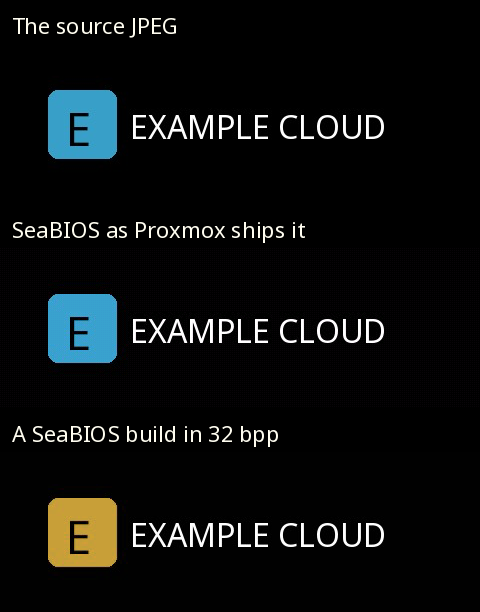
It is in SeaBIOS’s jpeg.c.
The 24 bits-per-pixel writer has a little-endian branch that puts blue in the first byte of each pixel, and the 32 bits-per-pixel writer, PIC_32, has no such branch and writes red there instead21.
On a little-endian framebuffer that swaps red and blue.
Blue comes out gold, and orange would come out blue.
Which writer runs depends on the video mode the VGA BIOS offers:
| Firmware | VBE mode for 640×480 | Bits per pixel | Colours |
|---|---|---|---|
QEMU upstream’s prebuilt SeaBIOS 1.17.0, as pve-qemu-kvm 11.0.3-4 ships it | 0x111 | 16 | right, quantised to 65,536 |
Fedora 44’s own seabios 1.17.0-10 build | 0x142 | 32 | red and blue swapped |
The mode numbers are SeaBIOS’s own table22, and the Proxmox row was checked against the very blobs in the package: byte-identical to QEMU’s prebuilt rel-1.17.0-0-gb52ca86e094d.
So on Proxmox your colours are right, but there are only 65,536 of them, and a subtle gradient will band.
And if your logo ever comes up in the wrong colours on some other hypervisor, it is not your JPEG.
The UEFI Logo Is Compiled Into the Firmware
UEFI guests are the harder half, and on a modern Proxmox they are most guests.
There is no splash option to override.
The logo is a bitmap inside the firmware image, and Proxmox’s build puts it there with one line in debian/rules:
debian/setup-build-stamp:
	cp -a debian/Logo.bmp MdeModulePkg/Logo/Logo.bmp
That copies their 400×120, 8-bit Logo.bmp over the TianoCore one before edk2 is built23.
The same file sets the firmware vendor as a build-time constant, PcdFirmwareVendor=L"Proxmox distribution of EDK II", which is where the type 0 vendor in the first table comes from23.
New logo, new firmware.
The way to get one that behaves exactly like Proxmox’s is to build it exactly the way Proxmox does: their tree at the tag that matches the package they ship, their patches, their flags, and one bitmap swapped.
pve-edk2-firmware 4.2026.08-1 pins edk2 at 2970e56, which is the upstream edk2-stable202608 tag23.
git clone https://git.proxmox.com/git/pve-edk2-firmware.git
cd pve-edk2-firmware
git checkout f37039e52d228a7844a90aa2aaf1e161ebd04fcd   # 4.2026.08-1
git submodule update --init --recursive
cd edk2
QUILT_PATCHES=../debian/patches quilt push -a
cp /path/to/your/Logo.bmp MdeModulePkg/Logo/Logo.bmp
. ./edksetup.sh && make -C BaseTools

F="-DNETWORK_HTTP_BOOT_ENABLE=TRUE -DNETWORK_IP6_ENABLE=TRUE -DNETWORK_TLS_ENABLE
   -DSECURE_BOOT_ENABLE=TRUE -DPVSCSI_ENABLE=TRUE -DTPM2_ENABLE=TRUE
   --pcd PcdUninstallMemAttrProtocol=TRUE -DFD_SIZE_4MB"
P=(--pcd "PcdFirmwareVendor=LExample Cloud Ltd\\0"
   --pcd "PcdFirmwareVersionString=L4.2026.08-1+ec1\\0")

build -a IA32 -a X64 -t GCC -p OvmfPkg/OvmfPkgIa32X64.dsc $F "${P[@]}" -b RELEASE
cp Build/Ovmf3264/RELEASE_GCC/FV/OVMF_CODE.fd OVMF_CODE_4M.fd
rm -rf Build/Ovmf3264
build -a IA32 -a X64 -t GCC -p OvmfPkg/OvmfPkgIa32X64.dsc $F -DSMM_REQUIRE=TRUE "${P[@]}" -b RELEASE
cp Build/Ovmf3264/RELEASE_GCC/FV/OVMF_CODE.fd OVMF_CODE_4M.secboot.fd
The flags are lifted from debian/rules as it stands at that commit.
Mind the vendor string: their Makefile writes it in double quotes, make’s shell strips them, and edk2 receives it bare, so that is how it is passed here, and quoting it a second time is a build error.
Keep the bitmap at 400×120 and 8 bits like theirs and nothing else on the boot screen moves.
You need both images.
qemu-server boots any Q35 VM with a 4M EFI disk on OVMF_CODE_4M.secboot.fd, the build with SMM required, and uses the plain OVMF_CODE_4M.fd only for i440fx24.
On a current Proxmox the secboot one is what nearly every UEFI guest runs.
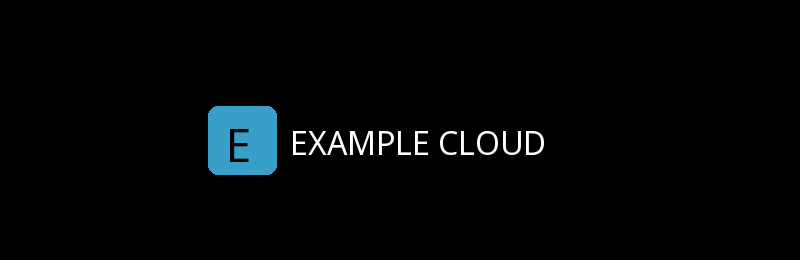
Built that way, with nothing changed from Proxmox’s tree but the bitmap and two strings, the SMM image boots like this:
And the guest’s own view of its firmware changes with it, without a single -smbios option on the command line:
| Read inside the guest | Proxmox’s 4.2026.08-1 | Rebuilt from the same tree |
|---|---|---|
| Firmware vendor | Proxmox distribution of EDK II | Example Cloud Ltd |
| Firmware version | 4.2026.08-1 | 4.2026.08-1+ec1 |
| “UEFI is supported” | listed | listed |
| ACPI tables | BGRT, WSMT and the rest | the same set |
That makes the build-time vendor the better answer for UEFI guests.
It is OVMF’s own type 0, so the UEFI bit stays put without anybody having to remember uefi=on.
The args route for type 0 is for SeaBIOS guests, and for anyone not rebuilding firmware at all.
Two Ways to Hand the New Firmware to a VM
qemu-server hardcodes where it looks for firmware: OVMF.pm holds a table of paths under /usr/share/pve-edk2-firmware/, keyed by machine type and Secure Boot options, and there is no option anywhere in the VM config, the GUI or the API that chooses a different file24.
Two routes are left.
Route A: divert it on every node. Tell dpkg that Proxmox’s two code images now belong somewhere else, and put yours where they were:
D=/usr/share/pve-edk2-firmware
for f in OVMF_CODE_4M.fd OVMF_CODE_4M.secboot.fd; do
  dpkg-divert --package example-branding --add --rename --divert "$D/$f.distrib" "$D/$f"
  install -m 0644 "/root/branding/$f" "$D/$f"
done
From its next start, every UEFI VM on the node boots your firmware. No VM config changes at all.
Route B: point chosen VMs at it.
Keep the images in your own directory and override the firmware one VM at a time.
Since moving to -blockdev, qemu-server attaches the code image as a block node called pflash0 and names it in -machine24, and QEMU merges a second -machine the same way it merges -boot, so args can add a node of its own and point pflash0 at that instead:
args: -blockdev driver=raw,node-name=brandcode,read-only=on,file.driver=file,file.filename=/usr/local/share/example-branding/OVMF_CODE_4M.secboot.fd -machine pflash0=brandcode
That was tested the long way round.
Proxmox’s secboot firmware was attached as pflash0 exactly the way qemu-server does it, with SMM on, and then that args line was added after it, and the guest booted the branded image with both the logo and the vendor string, which is where the screenshot above came from.
| Route A, divert | Route B, per-VM args | |
|---|---|---|
| Which VMs get it | every UEFI VM on the node | only VMs you set it on |
| Proxmox’s files | moved to .distrib | untouched |
| VM config | unchanged | an args line, root only |
| Machine type must match | handled, both images are diverted | your job: secboot image for Q35 |
| Undo | dpkg-divert --remove --rename | delete the line |
| Migration | target node must be diverted too | target node must have the file |
The code image is about 3.5 MB, against a 1 MiB per-file limit in pmxcfs20.
As such it cannot go in /etc/pve, and whichever route you take, it has to be put on every node.
Migrate a VM to a node without it and you get one of two results, depending on the route: Proxmox’s own firmware and logo back again under route A, or under route B a VM that will not start at all because QEMU cannot open a file that is not there.
The Upgrade That Leaves You Behind
A diversion is the right tool for a logo. Firmware is different.
A diversion means Proxmox’s upgrades no longer reach the file. That is exactly what you asked for. It is also exactly what stops edk2 security fixes reaching your guests: Proxmox’s changelog for 4.2026.08-1 opens “Besides many bug and security fixes” and goes on to list a fix for CVE-2024-1374525, and a branded build from the release before has none of it. Nothing tells you.
That was tested, not assumed.
In a Debian trixie container with Proxmox’s repository, pve-edk2-firmware-ovmf 4.2025.05-3 went in, both code images were diverted, and the package was upgraded to 4.2026.08-1:
| After the upgrade | Result |
|---|---|
dpkg-query -W pve-edk2-firmware-ovmf | 4.2026.08-1 |
| Proxmox’s new image | installed as OVMF_CODE_4M.fd.distrib, hash changed |
| The branded image | unchanged, still built from 4.2025.05-3 |
| Anything on the console about it | nothing, until the hook below |
So add a hook.
apt runs a list of DPkg::Post-Invoke commands after every dpkg run26.
Record which Proxmox version you built from, and compare after each one:
cat > /usr/local/sbin/example-branding-check <<'EOF'
#!/bin/sh
built=$(cat /usr/local/share/example-branding/ovmf.built-from 2>/dev/null)
now=$(dpkg-query -W -f '${Version}' pve-edk2-firmware-ovmf 2>/dev/null)
[ "$built" = "$now" ] && exit 0
echo "W: branded OVMF was built from pve-edk2-firmware-ovmf $built, Proxmox now ships $now." >&2
echo "W: guests still boot the old firmware. Rebuild before the next VM restart." >&2
exit 0
EOF
chmod +x /usr/local/sbin/example-branding-check
echo 'DPkg::Post-Invoke { "/usr/local/sbin/example-branding-check"; };' \
  > /etc/apt/apt.conf.d/80example-branding
On that same upgrade it printed:
W: branded OVMF was built from pve-edk2-firmware-ovmf 4.2025.05-3, Proxmox now ships 4.2026.08-1.
W: guests still boot the old firmware. Rebuild before the next VM restart.
It exits 0 deliberately.
apt aborts if a Post-Invoke command fails26, and a branding check is no reason to leave a node half upgraded.
A loud warning will do.
One more thing. Restarts. A guest only picks up new firmware when its QEMU process restarts, so a rebuild means a stop and start from Proxmox rather than a reboot from inside the guest, which is exactly how Proxmox’s own firmware updates reach a running VM as well. They just do not need you to remember a rebuild first.
Or Leave Proxmox’s Firmware Alone
Every logo route so far changes the firmware, and the last section is the bill for that. There is one that does not, and it was prototyped for this post.
A PCI device in QEMU can carry an option ROM, any file you name with romfile=27, and OVMF runs the EFI driver it finds there.
Proxmox’s build runs it whether it is signed or not: OVMF sets PcdOptionRomImageVerificationPolicy to 0x00, always execute28.
OVMF draws its own logo late in boot device selection29 and builds the BGRT only at ReadyToBoot, the moment before it hands over to a boot loader.
And edk2’s BGRT driver takes a replacement image through EDKII_BOOT_LOGO2_PROTOCOL, rebuilding the table at ReadyToBoot whenever the image has changed30.
That is all it needs.
The driver waits for ReadyToBoot at TPL_NOTIFY, which runs ahead of the BGRT driver’s own TPL_CALLBACK handler, clears the screen, draws its logo and hands the same image over.
Built, it is one 8 KB file, attached with one line:
args: -device pci-testdev,romfile=/etc/pve/branding/brandrom.rom
At 8 KB it sits well inside the 1 MiB pmxcfs limit20, so unlike a 3.5 MB firmware image it can live in /etc/pve and follow the VM to every node.
It was tested against Proxmox’s own firmware, straight out of pve-edk2-firmware-ovmf 4.2026.08-1: OVMF_CODE_4M.secboot.fd with Microsoft’s keys pre-enrolled in OVMF_VARS_4M.ms.fd, on Q35 with SMM, and booted through Fedora’s signed shim so that Secure Boot was on and enforcing:
| Read from the guest | Without the ROM | With the ROM |
|---|---|---|
SecureBoot variable | 1 | 1 |
| On screen | Proxmox’s logo | Proxmox’s for about 250 ms, then yours |
| BGRT image, 400×120 at 440,340 | Proxmox’s, SHA-256 be5afe4b… | the ROM’s, SHA-256 6c494576… |
| Firmware files changed | none | none |

The last row is the point. Proxmox’s firmware is untouched, so their next security release reaches your guests with the next restart, and none of the previous section applies.
It is not free:
| Cost | Why |
|---|---|
| Proxmox’s logo shows for about a quarter of a second | OVMF draws it before any option ROM driver gets the screen; only a rebuild avoids that |
| The guest sees one more PCI device, with no driver | the ROM has to ride on a device, and pci-testdev is QEMU’s do-nothing one |
| Type 0 still says Proxmox | the vendor string is compiled in; set it through args with uefi=on, as above |
| Root only | it is an args line |
And the finding underneath it wants saying plainly.
An unsigned driver ran in firmware on a guest with Microsoft’s keys enrolled and Secure Boot enforcing, because Proxmox’s OVMF does not check option ROMs.
Here that is useful.
It also means that on this firmware Secure Boot checks boot loaders, not whatever the VM’s hardware config attaches, and since only root writes args, that is a question about who holds root on your nodes.
It is a prototype. It has run on QEMU 10.2.2 with Proxmox’s firmware, not yet on a Proxmox node, and what follows is source, not a product:
github.com/damo2929/RebrandPCIRom: the option ROM driver, logo converter and container build.
The Web Interface Is Two Packages
The logo at the top left of the web interface is not in pve-manager.
Workspace.js asks for a proxmoxLogoSvg component with the prefix pwt, and that lives in proxmox-widget-toolkit, which the Backup Server and the Mail Gateway share31.
Only the tab icons are in pve-manager:
| What | File | Package |
|---|---|---|
| Header logo, drawn at 200×35 | /usr/share/javascript/proxmox-widget-toolkit/images/proxmox_logo.svg | proxmox-widget-toolkit |
| Browser tab icon | /usr/share/pve-manager/images/favicon.ico | pve-manager |
| 128×128 icon, also the touch icon | /usr/share/pve-manager/images/logo-128.png | pve-manager |
All three are plain files, so this is a job for dpkg-divert, and here the cost from the last section does not apply at all, because a logo has no security fixes to miss and nobody’s guest is any less safe for a node still serving last month’s favicon.
divert() {
  dpkg-divert --package example-branding --add --rename --divert "$1.distrib" "$1"
  install -m 0644 "$2" "$1"
}
divert /usr/share/javascript/proxmox-widget-toolkit/images/proxmox_logo.svg /root/branding/logo.svg
divert /usr/share/pve-manager/images/favicon.ico   /root/branding/favicon.ico
divert /usr/share/pve-manager/images/logo-128.png  /root/branding/logo-128.png
Tested in the same container, against real packages:
| Step | Result |
|---|---|
Divert on proxmox-widget-toolkit 5.2.9, install own SVG | Proxmox’s SVG renamed to proxmox_logo.svg.distrib |
| Upgrade to 5.2.10 | own SVG still in place, Proxmox’s 5.2.10 copy in .distrib |
dpkg --verify proxmox-widget-toolkit | no complaints, dpkg knows about the diversion |
apt-get install --reinstall proxmox-widget-toolkit | own SVG still in place |
dpkg-divert --remove --rename | Proxmox’s original back, byte for byte |
Two things stay Proxmox’s.
The header image is drawn in a fixed 200×35 box, so draw your SVG to that shape or it gets squeezed.
And the alt text says Proxmox and the image links to https://www.proxmox.com, both written into the JavaScript component rather than a file you can divert31.
Changing those means patching a minified bundle that breaks on every upgrade.
Not worth it over alt text.
What Proxmox’s licence and trademark ask of you
Proxmox VE is licensed under the AGPL version 332, and section 13 of that licence is the network clause: “if you modify the Program, your modified version must prominently offer all users interacting with it remotely through a computer network … an opportunity to receive the Corresponding Source of your version”33. Does swapping three images count as modifying the Program? That is for a lawyer. The cheap answer is to put your images and the divert script somewhere public and link it from the login page. It costs nowt and it settles the question.
The trademark side is clearer. Proxmox’s media kit says “Don’t alter the logo or incorporate the logo or symbol into your logo”34. So replace theirs outright with your own, never a recoloured or reworked version of it, and keep Proxmox out of your product’s name.
Your Name on It Means Your Maintenance
Branding a VM is cheap. A handful of SMBIOS strings, a JPEG, a bitmap and three images in a web interface: an afternoon’s work, most of it spent finding out where things live.
Keeping it is the job. It is also the part that gets skipped.
The SMBIOS strings and the splash look after themselves, because they live in config that no package will ever touch, and the web interface logo looks after itself because dpkg has been told about it. The firmware does not. The day you put your logo into a firmware image, you took over a piece of somebody else’s release process, and Proxmox build, test and ship new firmware with security fixes in it which their customers get with the next upgrade, and yours get when you get round to rebuilding.
That trade is fine made knowingly. A hosting company whose guests boot firmware two releases behind because the logo mattered more than the changelog has not built a product. It has built a sticker.
If your name is on the boot screen, the firmware behind it is yours to keep current, whoever wrote it. Nobody will check. That is exactly why it has to be done.
UEFI Forum, ACPI Specification 6.6, §5.2.23 Boot Graphics Resource Table — “The Boot Graphics Resource Table (BGRT) is an optional table that provides a mechanism to indicate that an image was drawn on the screen during boot”. Archived copy; the live page returns 403 to automated requests. ↩︎
Microsoft Learn, Boot screen components — “This is the standard interface that Windows uses to access the logo.” ↩︎
Fedora Project, Changes/FlickerFreeBoot — “a new plymouth theme which incorporates the firmware’s bootsplash image”; Fedora’s plymouth.spec makes
bgrtthe default theme. ↩︎Debian, dpkg-divert(1), trixie — “File diversions are a way of forcing dpkg(1) not to install a file into its location, but to a diverted location.” ↩︎
DMTF, DSP0134 System Management BIOS Reference Specification 3.10.0 — type 1 System Information, type 2 baseboard, type 3 “the system’s mechanical enclosure(s)”, type 11 “free-form strings defined by the OEM”. ↩︎
Proxmox VE, qm.conf(5) —
smbios1: “Specify SMBIOS type 1 fields”;args: “Arbitrary arguments passed to kvm … this option is for experts only.” ↩︎ ↩︎qemu-server,
src/PVE/QemuServer.pm, thesmbios1format and command-line builder — every field butuuidhas the pattern[A-Za-z0-9+\/]+={0,2}; values are decoded whenbase64is set. ↩︎pve-manager,
www/manager6/Parser.js,printQemuSmbios1— “smbios values can be arbitrary, so encode and mark config as such”. ↩︎qemu-server,
src/PVE/API2/Qemu.pm, clone — “auto generate a new uuid”, the othersmbios1fields are kept. ↩︎ ↩︎QEMU, System Emulation, Invocation —
-smbiosfields per type;-acpitable“For file=, take whole ACPI table from the specified files, including all ACPI headers”;-boot“Currently Seabios for X86 system support it.” ↩︎ ↩︎ ↩︎edk2-stable202608,
OvmfPkg/SmbiosPlatformDxe/SmbiosPlatformDxe.c— OVMF adds its own type 0 only whenNeedSmbiosType0is still set after walking QEMU’s tables. ↩︎qemu-server,
src/PVE/QemuServer.pm, custom args —argsare split and pushed onto the end of the command line. ↩︎qemu-server,
src/PVE/API2/Qemu.pm, config permission checks —smbios1is a hardware-type option needingVM.Config.HWType; the fallback “catches args, lock, etc.” and dies with “only root can set”. ↩︎qemu-server,
src/PVE/QemuServer.pm, thenameoption —format => 'dns-name'. ↩︎qemu-server,
src/PVE/QemuServer.pm,vmgenid— “notify the guest operating system when the virtual machine is executed with a different configuration (e.g. snapshot execution or creation from a template)”. ↩︎qemu-server,
src/PVE/QemuServer/Memory.pm— memorydefault => 512;coresandsocketsdefault to 1 inQemuServer.pm. ↩︎qemu-server,
src/PVE/QemuServer.pm,vm_start—lock_configat line 5457,exec_hookscript($conf, $vmid, 'pre-start', 1)at 5581, andconfig_to_commandat 5634 with the same$conf, not reloaded in between. ↩︎qemu-server,
src/PVE/QemuServer.pm,-boot—menu=on,strict=on,reboot-timeout=1000,splash=/usr/share/qemu-server/bootsplash.jpg. ↩︎edk2-stable202608,
OvmfPkg/Library/QemuBootOrderLib/QemuBootOrderLib.c— OVMF readsetc/boot-menu-wait, thesplash-timevalue, and nothing else from-boot. ↩︎pve-cluster,
src/pmxcfs/memdb.h—#define MEMDB_MAX_FILE_SIZE (1024 * 1024) // 1 MiB. ↩︎ ↩︎ ↩︎SeaBIOS,
src/jpeg.c—PICwrites blue first on little-endian,PIC_32at line 946 writes red first with no endian branch;ERR_NOT_SEQUENTIAL_DCTandERR_NOT_YCBCR_221111are the only formats refused. ↩︎ ↩︎SeaBIOS,
vgasrc/svgamodes.c— mode0x111is 640×480 at 16 bits,0x142is 640×480 at 32. ↩︎pve-edk2-firmware,
debian/rulesat 4.2026.08-1 —cp -a debian/Logo.bmp MdeModulePkg/Logo/Logo.bmp, thePcdFirmwareVendorstring and the OVMF build flags. ↩︎ ↩︎ ↩︎qemu-server,
src/PVE/QemuServer/OVMF.pm— the hardcoded firmware table under/usr/share/pve-edk2-firmware/, the SMM choice, and thepflash0block node. ↩︎ ↩︎ ↩︎pve-edk2-firmware,
debian/changelog— 4.2026.08-1: “Besides many bug and security fixes … fix CVE-2024-13745”. ↩︎Debian, apt.conf(5), trixie — “Pre-Invoke, Post-Invoke: This is a list of shell commands to run before/after invoking dpkg(1) … should any fail APT will abort.” ↩︎ ↩︎
QEMU v11.0.3,
hw/pci/pci.c—DEFINE_PROP_STRING("romfile", PCIDevice, romfile), a property every PCI device has. ↩︎edk2-stable202608,
OvmfPkg/OvmfPkgIa32X64.dsc—gEfiSecurityPkgTokenSpaceGuid.PcdOptionRomImageVerificationPolicy|0x00, the platform file Proxmox builds. ↩︎edk2-stable202608,
OvmfPkg/Library/PlatformBootManagerLib/BdsPlatform.c—BootLogoEnableLogo (), called fromPlatformBootManagerAfterConsole. ↩︎edk2-stable202608,
BootGraphicsResourceTableDxe.c—SetBootLogo2at line 239 copies the image; the ReadyToBoot handler at 417 uninstalls and reinstalls the table “If BGRT data change happens”. ↩︎proxmox-widget-toolkit,
src/Logo.js—proxmoxLogoSvg, 200×35,alt: 'Proxmox', linking to proxmox.com; used from pve-managerWorkspace.jswithprefix: 'pwt'. ↩︎ ↩︎Proxmox VE wiki, FAQ — “Proxmox VE code is licensed under the GNU Affero General Public License, version 3.” ↩︎
GNU Affero General Public License v3, §13 Remote Network Interaction — quoted in full in the text above. ↩︎
Proxmox, Media kit — “Don’t alter the logo or incorporate the logo or symbol into your logo.” ↩︎