Three Ways a Drive Can Present Itself
A drive has two block sizes, and the difference between them is the whole story.
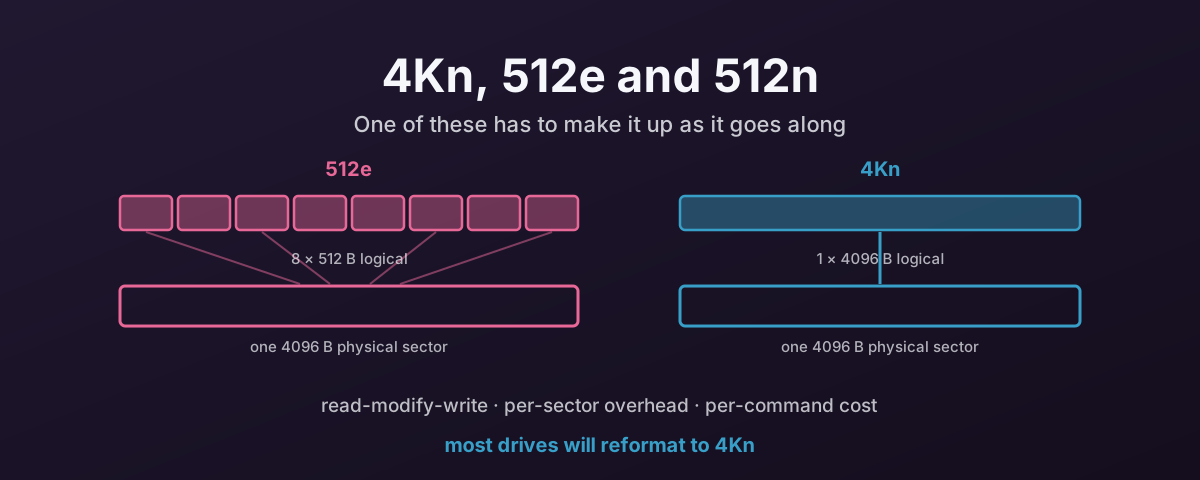
The physical sector is what the medium actually works in — the smallest unit the drive can read or write without doing extra work. The logical block is what the drive tells the host it works in — the unit the host addresses.
There are three combinations in the wild.
512n — native 512. Both sizes are 512 bytes. This is the old world: pre-2010 hard drives, and nowt you would buy new today at any size worth having.
512e — 512-byte emulation. The physical sector is 4096 bytes, but the drive reports 512-byte logical blocks and translates in firmware. This exists for one reason: compatibility with operating systems, bootloaders and applications that assumed 512 forever. Sensible enough as engineering, and the root of very nearly all the trouble that follows.
4Kn — native 4K. Both sizes are 4096 bytes. The drive tells the truth, the host addresses it in the unit the medium uses, and no translation layer sits in between.
What 512e Does On Every Unaligned Write
A read is cheap in all three cases. The drive reads the 4K sector and hands back whichever 512-byte slice you asked for.
Writes are where the fiction gets expensive.
If the host writes a single 512-byte logical block, the drive cannot write 512 bytes. The medium has no such unit. So it does this instead:
- Read the whole 4096-byte physical sector.
- Merge the 512 bytes of new data into it.
- Write the whole 4096-byte sector back.
That is a read-modify-write, and it turns one small write into a read plus a write. On a spinning disk that means waiting for the platter to come round again. A full rotation at 7,200rpm is something like 8ms you did not budget for. On flash the cost is different in kind, and it does not go away when the write finishes. That one has its own section below.
Misalignment is the version of this that bites hardest. If a partition starts at an odd 512-byte offset — the classic being the old 63-sector convention — then every 4K filesystem write straddles two physical sectors. That is not one read-modify-write, it is two, on every single write, forever, until somebody repartitions the drive.
Write Amplification on Flash
On a hard drive the read-modify-write costs you a rotation and then it is over. On flash it costs you drive life, and that is a bill you pay once and keep paying.
Write amplification is the ratio of what actually got written to the NAND against what the host asked to write. A ratio of 1.0 would mean the drive wrote exactly what it was given. It is never 1.0, because flash cannot overwrite in place: the drive programs a fresh page, marks the old one stale, and garbage collection later relocates the surviving pages so a whole block can be erased. Those relocations are writes too.
512e adds an avoidable layer on top of that, and the reason is a detail worth stating clearly: the drive’s translation layer maps in units of around 4 KB no matter what logical block size it advertises. A drive reporting 512-byte blocks is still tracking 4 KB units internally.
So a 512-byte write from the host becomes, inside the drive: read the 4 KB mapping unit, merge in the 512 bytes, program a new 4 KB unit. 4096 bytes reach the NAND so that 512 bytes could change. Eight times the write, for that write.
Misalignment is less dramatic per write and worse in total. A 4 KB write that straddles two mapping units dirties both of them, so 8 KB is programmed for 4 KB of data. That is 2× amplification on every single write, permanently, until the partition table is fixed.
The knock-on effects are what make this matter rather than just being untidy:
- More NAND writes means garbage collection runs more often, and its relocations are themselves amplification.
- An SLC write cache fills sooner, so the drive drops to its slower steady state earlier and sustained write throughput falls.
- Program/erase cycles are consumed in proportion to what reached the NAND, not to what the host sent. Double the amplification and you have halved the drive’s life for the same workload.
- Endurance ratings — TBW, DWPD — are quoted against host writes. Amplification eats that margin quietly, and the drive wears out ahead of the warranty arithmetic you did when you bought it.
Direct and Synchronous Writes Are the Worst Case
Most of the time the page cache hides all of this. The kernel accumulates small writes, merges them, and issues 4 KB or larger IO to the drive, so the read-modify-write never happens.
Two flags remove that protection, and applications that care about durability set both.
O_DIRECT bypasses the page cache.
There is now nothing between the application and the drive to coalesce a 512-byte write into something sector-sized.
O_SYNC or O_DSYNC requires the write to be on stable media before the call returns.
That stops the drive absorbing the write into a volatile buffer and combining it with its neighbours later.
Put them together and each 512-byte write is a complete read-modify-write cycle that has to finish now, on its own, with nothing to amortise it against. That is where amplification on a 512e drive approaches its theoretical 8×, and it is exactly the pattern a database commit log, a ZFS ZIL or a Ceph BlueStore WAL produces.
Power-loss protection is what rescues this on enterprise hardware. A drive with PLP can acknowledge a synchronous write once it is in a capacitor-backed DRAM buffer, which is durable, and still coalesce internally before programming NAND. A consumer drive without PLP has to reach the flash before it may answer, so it pays the full cost per write. One more reason PLP is not optional for this kind of workload.
In Proxmox the cache mode decides which of these you get:
cache=noneisO_DIRECT— the PVE default, and the right choice for all-flash HA. The host page cache is out of the path, so guest write patterns reach the drive as the guest issued them.cache=directsyncisO_DIRECTplusO_DSYNC— every write synchronous. It is a niche setting for dedicated database-log drives and unusable for general workloads.
On a 512e backing device, cache=directsync with a guest committing in 512-byte records is about the least efficient arrangement available: no host coalescing, no drive coalescing, and a read-modify-write per commit.
And here is the part that makes 4Kn structural rather than merely preferable.
O_DIRECT requires the offset, length and buffer to be aligned to the drive’s logical block size.
On a 512e drive that is 512 bytes, so a 512-byte direct write is legal and the drive quietly pays for it.
On 4Kn the logical block is 4096, so the smallest direct write the kernel will accept is 4 KB.
The pathological pattern stops being something you have to avoid and becomes something the stack cannot express.
Overhead on the Medium
The second cost is structural, and it is the reason Advanced Format exists at all.
A sector is not just its data. On a hard drive each one carries a sync mark so the head knows where the sector begins, a gap so consecutive sectors do not run into each other, an address marker, and an ECC field to correct read errors.
With 512-byte sectors you pay all of that eight times for every 4K of data. With one 4K sector you pay it once.
That has two consequences, and the second matters more than the first:
- Some of the platter that was overhead becomes usable capacity. This was the industry’s stated motivation during the Advanced Format transition, in the low single-digit percentages.
- The ECC field can be much larger for the same total overhead. One strong code protecting 4096 bytes corrects far more than eight weak codes protecting 512 bytes each. As areal density climbed, that stopped being a nicety and became the only way to keep error rates acceptable.
Flash has no sync marks or rotational gaps, but the same logic applies a level up: NAND is programmed in pages, pages are far larger than 512 bytes, and the drive’s mapping tables have an entry per addressable unit. Smaller logical blocks mean more metadata to track the same capacity.
Overhead in the Host: Commands and Interrupts
The third cost is the one people miss, because it is not on the drive at all.
The logical block size sets the floor on how small an IO can be. On a 512-byte logical drive, a filesystem or an application is free to issue a 512-byte write, and each one is a complete IO: a command built and submitted, a doorbell write, a completion queue entry, and an interrupt to say it finished.
Every one of those has a fixed cost that does not care how much data was involved. Move 4KB as eight 512-byte commands and you pay that cost eight times. Move it as one 4K command and you pay it once.
Two honest qualifications, because this is where the argument is usually overstated.
For large IO, the logical block size changes nothing about the command count. A single command can describe many blocks, so a 1MB sequential write is one command whether the blocks are 512 bytes or 4K. The saving is real only where small IO is being issued.
Where small IO is being issued, though, the effect is not subtle: each of those eight requests is one the kernel has to build, schedule and complete, each with its own MSI-X interrupt and user-to-kernel transition, and at high queue depths that is how you get an interrupt storm. Inside a VM it is worse again, because every one of those interrupts is also a guest context switch.
And modern NVMe controllers coalesce interrupts, so the interrupt count is not simply the command count. The submission and completion work per command remains, though, and at a few hundred thousand IOPS the per-command CPU cost is a measurable fraction of a core. This is the same arithmetic as posted interrupts in the passthrough series — small fixed costs multiplied by a very large number.
4Kn, Sector Metadata and Hardware RAID
Going to a 4096 + 0 format has a consequence that catches people out, and it lands squarely on hardware RAID.
Some RAID controllers and storage arrays do not use plain 512 or 4096-byte sectors at all. They format drives to an extended size — 520 or 528 bytes, or the 4K equivalents like 4104, 4160 and 4224 — because those extra bytes per sector are where the controller keeps its own metadata. That is T10-PI/DIF protection information, or vendor integrity data, stored inline with the very data it describes.
A 4096 + 0 format has nowhere to put it. The sector is data, end to end, and that is the entire point of choosing it.
So a controller that wants inline metadata has three options, and none of them are free:
- Refuse the drive.
- Reformat it back to an extended format, undoing the 4Kn work you just did.
- Keep its metadata somewhere else on the drive.
The third is where flash punishes you. Metadata written separately from the data it describes is a second write, at a different offset, landing in a different mapping unit. Another NAND page programmed for every one you actually meant to write. That is the amplification from the section above, reintroduced deliberately, in order to carry integrity metadata that the drive could have held inline for nowt if you had left it in an extended format.
You cannot have both. Either the sector carries the controller’s metadata, or it carries only your data.
Which Is Why Flash Has Rather Undermined the Case for Hardware RAID
The rest of this is judgement rather than mechanism, so take it as that.
A hardware RAID controller is firmware RAID running on a dedicated processor. The “hardware” is a CPU, some DRAM and a battery. Not a fundamentally different way of computing parity. What it historically bought you was a battery-backed write cache and parity offload, and on flash both arguments have weakened badly. Enterprise NVMe already has a power-loss-protected cache of its own, and the controller becomes a bandwidth ceiling in front of devices that can each saturate several gigabytes per second.
It also costs you things you now actively want:
- Device state disappears. SMART detail, wear indicators and the vendor logs that let you compute write amplification are all behind an opaque abstraction.
- No end-to-end checksums. A controller verifies parity, which detects a missing drive, not a wrong answer from a present one. ZFS and Ceph checksum the data itself and can tell you which copy is wrong — silent corruption a controller passes straight through. As such, the controller is solving the wrong problem.
- Vendor metadata on the drives ties the array to a controller family, which is its own kind of unreliable when the controller is what fails.
- Parity RAID does its own read-modify-write on partial-stripe writes, stacking on top of everything in the sections above.
For Ceph this is not even a preference. Proxmox’s own hyper-converged guidance is that disks must be presented in HBA or pass-through mode, not behind a RAID controller, and ZFS wants exactly the same thing for the same reasons.
So the arrangement that follows from all of this is: an HBA rather than a RAID controller, drives formatted 4Kn with zero metadata, and redundancy plus checksums done by ZFS or Ceph, which can actually tell you when a drive lied. If something in your estate genuinely needs an extended sector format, that is a deliberate either/or to settle while the drives are still empty. Not something to discover after the OSDs are built.
Where 512e Actually Bites
It would be dishonest to claim 512e ruins a modern system, because usually it does not.
A current Linux stack reads the physical sector size, aligns partitions to it — parted and sfdisk both do this by default now — and uses 4K filesystem blocks.
In that configuration the host issues 4K-aligned 4K IO, the drive never needs a read-modify-write, and 512e costs you close to nowt.
The problems are specific:
- Misaligned partitions, usually inherited from an old install or a cloned image. Two read-modify-writes on every write.
- ZFS with
ashift=9on a 512e drive, because ZFS believed the reported 512. Every record write becomes a read-modify-write, and you cannot changeashiftafter the fact — the pool has to be rebuilt. - Applications that write 512-byte records with O_DIRECT, bypassing the page cache’s coalescing. Some databases and a lot of bespoke software do this.
- Anything that trusts the logical size to be the real one. That is the actual harm in the emulation: it hands out a number that is wrong, and things downstream make decisions with it.
4Kn removes the whole category. The drive cannot lie about a sector size it does not have.
It is worth being straight about the size of the prize, though. Seagate’s own guidance is that 4Kn is clearly worth chasing when the stack is fully optimised for 4K and you are counting every IOPS — a tuned all-flash tier, say. Below that, on a correctly aligned modern Linux, the performance difference for aligned IO is often small. The other argument is fleet consistency: a uniformly 4Kn estate has no mixed-format surprises in it, and nobody has to remember which drives lie.
Most Drives Can Be Converted — If the Vendor Allows It
This is the part that gets missed: 512e is often a format setting, not a property of the hardware. A great many enterprise SAS and SATA drives, and most enterprise NVMe, ship reporting 512 bytes and will happily reformat to 4Kn.
All of the following destroy every byte on the device. There is no in-place conversion.
NVMe — nvme-cli
Look at what the namespace supports first:
# Lists each LBA format and marks which one is in use
nvme id-ns -H /dev/nvme0n1 | grep -i "lbaf\|data size"
You want a format with Data Size 4096 and Metadata Size 0, marked as best and not currently in use. Then apply it:
# -l/--lbaf selects the LBA format index from the list above
nvme format /dev/nvme0n1 --lbaf=1 --force
The metadata size matters as much as the data size. Some factory formats reserve extra bytes per sector — 520, or 4160 — to carry end-to-end T10-PI/DIF protection metadata. If nothing in your stack consumes that, it is padding on every sector, so pick the zero-metadata format and be rid of it. Choosing a metadata-bearing format by accident also gets you a drive that behaves differently from the one you meant to create, and combining a sector-size change with a PI change can force a slow full format rather than a fast one.
For a whole host’s worth of drives, loop it. This needs shopt -s extglob for the extended globs, and it selects only formats that are 4096/0 and not in use:
shopt -s extglob

for dev in /dev/nvme+([0-9])n+([0-9]); do
    # Skip anything that is not actually there
    [ -e "$dev" ] || continue

    # An LBA format with 4096-byte data, 0-byte metadata, marked Best, not in use
    lbaf=$(nvme id-ns -H "$dev" \
        | grep -P '(?=.*Metadata Size: 0)(?=.*Data Size: 4096)(?=.*Best)(?!.*in use)' \
        | awk '{found=$3} END {print (found != "" ? found : -1)}')

    if [ "$lbaf" != "-1" ]; then
        echo "Formatting $dev using LBA Format: $lbaf"
        nvme format --force --lbaf="$lbaf" "$dev"
    else
        echo "Skipping $dev: no matching LBA format found."
    fi
done
Two things in there are doing more work than they look.
The glob matches namespaces — nvme0n1, nvme12n3 — and deliberately does not match partitions like nvme0n1p1, because the pattern ends after the digits following the n. That is the difference between reformatting a namespace and doing something unrecoverable to a running system.
And the selection only ever converts a drive that actually offers what you asked for. Anything else falls through to -1 and is skipped, which covers three separate cases:
- The drive only offers 512. No 4096-byte format exists, so there is nothing to convert to and the loop leaves it alone. It does not try, and it does not fail halfway.
- The drive is already 4Kn. The 4096/0 format is the one in use, and
(?!.*in use)excludes it — so a second run over the same host is a no-op. No needless reformat of every drive. - The only 4096 formats carry metadata. A 4096 + 8 format does not satisfy
Metadata Size: 0, so the loop will not quietly hand you a T10-PI drive you did not ask for.
In other words it fails closed. When it is unsure, it skips.
One portability note: those lookaheads need GNU grep’s -P (PCRE) mode. On a system where grep is something else, the pattern matches nothing and every drive is skipped. Annoying, but at least it errs in the safe direction.
Read the loop before you run it, all the same.
Where it does match, it reformats without further prompting. nvme format --force does not ask twice.
It belongs in provisioning, on a machine whose drives hold nothing, never on a host with a live OSD, pool or VM disk.
On FreeBSD the equivalent is nvmecontrol, where -f is the format index:
nvmecontrol format -f 1 nvme0ns1
SAS and SATA — openSeaChest
Seagate’s openSeaChest is cross-platform, open source, and works on other vendors’ drives too.
# Find the handle
openSeaChest_Format --scan

# Ask the drive which sector sizes it will accept
openSeaChest_Format -d /dev/sg1 --showSupportedFormats

# Convert. The confirmation string is deliberately hard to type by accident.
openSeaChest_Format -d /dev/sg1 --setSectorSize 4096 \
    --confirm this-will-erase-data-and-may-render-the-drive-inoperable
That confirmation phrase is not me being dramatic. It is the literal string the tool requires, and the “may render the drive inoperable” part is real. A low-level format interrupted by a power cut can leave a drive needing another format before it will work at all.
Underneath, the operation differs by transport: SAS and SCSI use Format Unit, SATA uses Set Sector Configuration Ext — the fast-format path — and NVMe uses NVM Format. For a SAS drive you can drive Format Unit directly, and note that this option takes the shorter confirmation string:
openSeaChest_Format -d /dev/sg1 --formatUnit 4096 --poll \
    --confirm this-will-erase-data
Two different options, two different confirmation strings — get them the wrong way round and the tool refuses.
Where the drive supports a fast format, the sector size changes in seconds rather than hours; the drive then does its integrity and background work afterwards, and writing your real data onto it reduces that background time. A full format writes zeroes end to end and can take many hours to days on a large spinning disk.
openSeaChest_Format -d /dev/sg1 --setSectorSize 4096 --fastFormat \
    --confirm this-will-erase-data-and-may-render-the-drive-inoperable
SCSI — sg_format
For anything that speaks SCSI, sg3_utils will do the same job:
# --size requires --format; expect hours on a large spinning disk
sg_format --format --size=4096 /dev/sdb

# Fast format where the drive supports it — seconds instead of hours
sg_format --format --size=4096 --ffmt=1 /dev/sdb
sg_format gives you a 15-second countdown before it commits, which --quick skips.
Its documentation also warns of a specific failure worth knowing: if the block-size change succeeds but the format then fails, the drive can end up in a “format corrupt” state and needs another format to recover.
Before You Convert Anything
- Check the boot path. A 4Kn drive as a boot device needs UEFI and an OS that supports it. Modern Linux is fine. Older Windows is not, and some hardware RAID controllers still refuse 4Kn entirely.
- Do it before the drive holds anything. Retrofitting means evacuate, convert, restore.
- Do one, then check. Convert a single drive, confirm the reported sizes, then do the rest.
- Expect hours on a spinning disk without fast format. Do not start a low-level format on a machine you need back soon.
Checking What You Have
# LOG-SEC is what the host addresses, PHY-SEC is what the medium uses
lsblk -o NAME,MODEL,SIZE,LOG-SEC,PHY-SEC

# The same, from sysfs
cat /sys/block/sda/queue/logical_block_size
cat /sys/block/sda/queue/physical_block_size

# SMART states both, and this is the clearest 512e signature there is
smartctl -a /dev/sda | grep -i "sector size"
512 bytes logical, 4096 bytes physical is a 512e drive.
Matching numbers mean native — 512n if both are 512, 4Kn if both are 4096.
And check the partitions actually line up:
parted /dev/sda align-check optimal 1
ZFS, Ceph and Virtual Disks
ZFS — set ashift=12 explicitly when creating a pool, and do not rely on the drive’s reported size, because on 512e it will tell you 9 and be wrong. It cannot be changed later.
Ceph — BlueStore’s minimum allocation size should be 4 KB on flash. Modern Ceph defaults to 4096, but older builds defaulted higher — around 16 KB on SSD and 64 KB on HDD — and that suits RBD VM disks badly, because they issue many small random 4 KB writes and a 4 KB write landing in a 16 or 64 KB allocation unit both amplifies the write and wastes the remainder on padding. It is fixed when the OSD is created, so it has to be set before creating or rebuilding:
ceph config set global bluestore_min_alloc_size_ssd 4096 # new or rebuilt OSDs only
There is a matching bluestore_min_alloc_size_hdd. Existing OSDs keep whatever they were built with, so changing it means rebuilding them.
Virtual disks — a guest sees whatever the hypervisor presents, not the underlying drive, so a 4Kn drive under a VM still hands the guest 512-byte blocks unless you say otherwise. Keeping the stack 4K end to end means telling QEMU to present 4K, which in Proxmox is a raw argument line in /etc/pve/qemu-server/<vmid>.conf:
args: -global scsi-hd.physical_block_size=4k -global scsi-hd.logical_block_size=4096
That line is what actually forces QEMU into 4Kn for those disks — -global applies it to every scsi-hd device on the VM, so the guest is told 4096 for both logical and physical block size and partitions and aligns accordingly.
Do not quote the whole string. Proxmox parses args: with Text::ParseWords::shellwords, so this:
args: "-global scsi-hd.physical_block_size=4k -global scsi-hd.logical_block_size=4096"
collapses into a single argument — the quotes are honoured and stripped, and QEMU is handed one long unparseable option rather than four. Unquoted, the same line splits into -global, scsi-hd.physical_block_size=4k, -global, scsi-hd.logical_block_size=4096, which is what you want. It is an easy mistake to make because quoting is the right instinct on a command line, and the failure — a VM that will not start, complaining about the option — does not point back at the quotes.
Do this before installing the guest OS. Changing a disk’s block size under an already-installed system can leave it unbootable, because the partition layout and bootloader were written for 512-byte sectors. Note also that args: is an expert escape hatch outside the GUI’s management, and the interaction with live migration and snapshots is worth re-checking against current Proxmox documentation.
When the Guest Says 512 and the Host Says 4K
This is the case worth understanding properly, because it is what you get by default after doing all the work above.
QEMU presents 512-byte logical blocks to the guest unless told otherwise, whatever the backing device is. So you can convert every drive in the host to 4Kn, and the VMs on top will still be told 512 — and they will believe it.
The guest then partitions on 512-byte boundaries because it may, and issues 512-byte IO because it may. But the host device now genuinely has a 4096-byte logical block, and it will not accept a 512-byte write. Something has to reconcile the two, and that something is the host: QEMU reads the surrounding 4 KB, merges the guest’s 512 bytes into it, and writes the whole thing back.
You have not removed the emulation. You have moved it off the drive’s firmware and into your hypervisor, where it costs host CPU and a bounce buffer instead of drive cycles.
With cache=none this is not a soft penalty either. O_DIRECT against a 4Kn device requires 4 KB-aligned offsets and lengths, so a sub-4K guest write cannot simply be passed through — the alignment has to be fixed up in QEMU before the IO is issued at all.
And the misalignment case comes back one layer up. A guest partitioned on 512-byte granularity puts its 4 KB filesystem writes at offsets that straddle two host 4 KB blocks, so each one becomes two read-modify-writes on the host. Same failure as a misaligned partition on a bare 512e drive, except now it is happening inside a VM where nobody is looking for it.
So the rule is: if the host is 4Kn, present 4K to the guest as well, and do it before the OS goes on.
The exception is guest support, which is the whole reason 512e exists:
- Linux guests handle 4Kn without fuss.
- Windows supports 4Kn for data volumes from Windows 8 and Server 2012 onward, and booting from 4Kn wants UEFI.
- Anything older — Windows 7 and back — cannot do 4Kn at all. For those, a 512-presenting virtual disk is the price of running them, and the host will do the reconciling. If that matters, keep those guests on storage where it costs you least rather than on your fastest tier.
Check what the guest actually ended up with, from inside the guest:
lsblk -o NAME,LOG-SEC,PHY-SEC
512 there on a 4Kn host means the reconciliation above is happening on every unaligned write.
References
- OpenZFS — Workload Tuning —
ashift, why2^ashiftis the smallest possible IO on a vdev, and the observation that “many devices misreport their sector sizes” nvme-formatman page —--lbaf,--namespace-id,--sesand--forcesg_formatman page —--sizewith--format, the fast-format option, and the format-corrupt warning- openSeaChest — Seagate’s open-source drive utilities, including
--setSectorSizeand--showSupportedFormats - openSeaChest wiki — Format, Fast Format, And Sector Sizes — which transport uses which command, and when fast format applies
nvmecontrol(8)— the FreeBSD equivalent- Linux block layer documentation — how the kernel models logical and physical block sizes