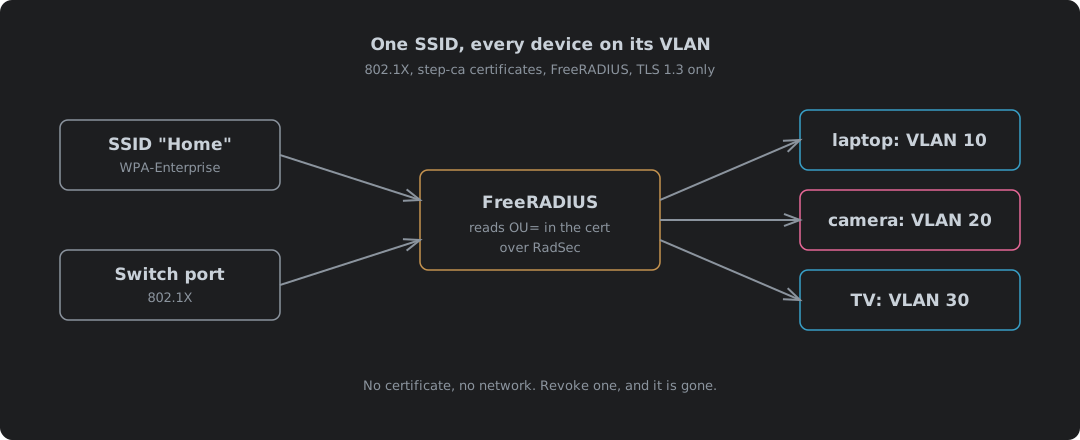
One Password For The Whole House
A WiFi password is shared by everything that has ever joined. The laptops, the phones, the TV, the doorbell camera running firmware nobody has updated since it was fitted, the guest who was given it at Christmas, and every phone that guest has owned since. All of them sit on the same network. Every one of them can talk to every other one.
Splitting that up the usual way means more SSIDs. One for staff, one for IoT, one for guests, each with its own password and its own VLAN. It works. Then a password leaks, and you are walking round every device on that SSID with a new one, which is exactly the job that never gets done.
A spare wired port is worse. No password at all. Plug in and you are on whatever VLAN the port was set to.
802.1X with certificates turns that round. Each device carries its own certificate and proves what it is before a single packet gets through, and then the network, not the device and not whoever handed out the password, decides where it goes. One SSID. Every switch port the same. The laptop lands on the staff VLAN, the camera on the IoT VLAN, and a device you have never issued a certificate to lands nowhere.
| One shared password | One SSID per VLAN | 802.1X, one SSID | |
|---|---|---|---|
| Who gets in | Anyone who has the password | Anyone who has that SSID’s password | Only a device holding a certificate you issued |
| Which VLAN | All on one | Whichever SSID they joined | Whatever the RADIUS server says for that device |
| Locking out one lost device | Change the password everywhere | Change that SSID’s password everywhere | Revoke one certificate |
| Wired ports | Open | Open | Same check as WiFi |
| SSIDs to broadcast | 1 | One per VLAN | 1 |
That is what this post builds. step-ca issues the certificates and writes each device’s role into them, FreeRADIUS checks each certificate against the CA and its revocation list, reads the role out of it and answers with a VLAN, and the switch or the access point puts the device where it has been told. The kit is Netgear or TP-Link, talking to FreeRADIUS over TLS where it can. It all ran here before any of it went near real kit: the CA and the RADIUS server in containers, and the switch port and the WiFi network in simulators.
Four Parts, And Only One Of Them Decides
802.1X names three roles1. The supplicant is the device asking to join. The authenticator is the switch port or the access point. The authentication server is RADIUS. Add the CA that issued the certificates and that is the whole system.
The switch and the AP decide nothing. They relay. Until the device has authenticated, the port passes EAP and nothing else. The authenticator wraps that EAP in RADIUS, sends it to the server, and acts on the answer. An Access-Accept opens the port. If the Accept carries tunnel attributes, the port or the WiFi client goes on the VLAN they name. RFC 3580 fixes which three attributes those are, borrowed from RADIUS’s tunnel attributes23:
| Attribute | Value | Meaning |
|---|---|---|
Tunnel-Type | VLAN (13) | This tunnel is a VLAN |
Tunnel-Medium-Type | IEEE-802 (6) | On an 802 network |
Tunnel-Private-Group-Id | "10" | The VLAN ID, sent as a string |
So the brand of switch matters less than you would think. The decision lives on a box you run. Every vendor that does dynamic VLAN reads the same three attributes. The RFC is plain that the VLAN ID is “encoded as a string”3, which is why it is in quotes.
Why Certificates, And Why TLS 1.3 Only
There are several EAP methods, and most of the ones in use are a password wrapped in TLS. That works for a person. It is useless for a camera, which has nobody to type anything, and a password shared by a thousand cameras is the WiFi password again.
| Method | What proves the device | If the device trusts the wrong server | Locking out one device |
|---|---|---|---|
| EAP-TLS | Its own certificate and private key | The server learns the certificate, which is public anyway | Revoke the certificate |
| PEAP with MS-CHAPv2 | A username and password | The server captures a handshake that can be cracked back to the password | Change the password |
| EAP-TTLS with PAP | A username and password | The server is sent the password itself | Change the password |
That middle column is why EAP-TLS. MS-CHAPv2 has been broken for over a decade. Microsoft’s own advisory says that “an attacker who obtained the MS-CHAP v2 authentication traffic could then use the exploit code to decrypt a user’s credentials”4. Wrapping it in PEAP only protects it if every device checks who it is talking to, and as the devices section shows, plenty of them do not. With EAP-TLS there is no secret in the exchange to steal. The private key never leaves the device5. Nothing to crack.
TLS 1.2 puts the certificate on the air
EAP-TLS over TLS 1.2 has a flaw that is easy to miss. The device sends its certificate before the encryption starts. In the clear. Anyone listening to the WiFi can read it, and since this post writes the device’s role into the certificate, they can read that too.
Measured here, by searching every EAP message the device sent for the device’s name and its role:
| Run | TLS | Device name in the clear | Role OU=staff in the clear |
|---|---|---|---|
Identity laptop1 | 1.2 | Yes | Yes |
Identity laptop1 | 1.3 | Yes, in the identity | No |
Identity anonymous | 1.3 | No | No |
TLS 1.3 fixes it. RFC 9190 says that with TLS 1.3 “the use of privacy is mandatory and does not cause any additional round trips”6. The outer identity still goes in the clear, so it should not name the device either. The RFC recommends an anonymous identity6. Nothing here needs a real one, because FreeRADIUS reads who the device is from the certificate. With anonymous on the outside, the last row is what an eavesdropper gets: nowt.
So this build runs TLS 1.3 only. FreeRADIUS is pinned to it at both ends. A device that cannot speak it does not get on. That has a cost, and it is counted in the devices section rather than hidden. FreeRADIUS’s own config still tells you to cap at 1.2, in capitals, because “most EAP supplicants WILL NOT DO TLS 1.3 PROPERLY”7. Credit where it is due: that config is the most honest documentation in this whole post, and nearly every trap below is written down in it somewhere if you read the comments. On a network where you choose the devices, that is a reason to choose better devices.
Putting The Role In The Certificate
The VLAN is decided by what the device is, and the certificate is where that goes. step-ca can write it there with a template, the same mechanism the client certificates post uses for the CRL distribution point. Starting the CA itself is covered in step-ca in a container, and this carries on from there with a CA named Home Network CA.
Each device certificate gets its role in the organisational unit (OU) of its subject. The template takes the role from the request and refuses anything that is not on the list8:
{{- $roles := list "staff" "iot" "media" }}
{{- if not (has .Insecure.User.role $roles) }}
  {{- fail "role must be one of staff, iot or media" }}
{{- end }}
{
  "subject": {
    "commonName": {{ toJson .Subject.CommonName }},
    "organizationalUnit": {{ toJson .Insecure.User.role }}
  },
  "sans": {{ toJson .SANs }},
  "keyUsage": ["digitalSignature"],
  "extKeyUsage": ["clientAuth"],
  "crlDistributionPoints": ["http://ca.home.example/1.0/crl"]
}
Give it a provisioner of its own, so devices never come off the general-purpose admin one, with a year as the longest certificate it will sign:
step ca provisioner add network --type JWK --create \
  --x509-max-dur 8760h --x509-default-dur 24h \
  --x509-template templates/device.tpl
--x509-template copies the template into ca.json rather than pointing at the file, so editing device.tpl afterwards changes nothing until you run step ca provisioner update network --x509-template templates/device.tpl again. Then issue each device’s certificate with its role:
step ca certificate laptop1 laptop1.crt laptop1.key \
  --provisioner network --not-after 8760h --set role=staff
$ openssl x509 -in laptop1.crt -noout -subject -ext extendedKeyUsage
subject=OU=staff, CN=laptop1
X509v3 Extended Key Usage:
    TLS Web Client Authentication
A missing role or an unknown one gets nothing:
$ step ca certificate norole norole.crt norole.key --provisioner network
The request could not be completed: role must be one of staff, iot or media.
.Insecure.User is called insecure because it is whatever the requester sends. Here that is fine. The network provisioner has a password, only you hold it, and anyone who can sign with it can already make any certificate they like, so a role they typed in themselves gives them nothing extra.
The RADIUS server needs a certificate as well, so devices can check who they are talking to. It comes from the admin provisioner like any other server certificate, and lives the default 24 hours, renewed by step ca renew --daemon the way the step-ca post does for any service that cannot do ACME. Devices check the name and the CA, not the serial. A daily renewal changes nothing for them.
| Certificate | Provisioner | Lifetime | Extended key usage | Carries |
|---|---|---|---|---|
radius.home.example | admin | 24 hours, renewed daily | Server and client | The name devices check |
laptop1 | network | 1 year | Client only | OU=staff |
cam1 | network | 1 year | Client only | OU=iot |
tv1 | network | 1 year | Client only | OU=media |
switch1, ap1 | nas | 1 year | Client only | OU=nas, for RadSec; see below |
FreeRADIUS: Deciding The VLAN
FreeRADIUS 3.2.10, in the project’s own container image. Three pieces of config do the work: the EAP module, a policy that picks the VLAN, and a list of exceptions.
The EAP module
Only EAP-TLS, only TLS 1.3, and the CRL checked on every login:
eap {
	default_eap_type = tls

	tls-config tls-common {
		certificate_file = ${certdir}/eaptls/radius.crt
		private_key_file = ${certdir}/eaptls/radius.key
		ca_path = ${certdir}/eaptls/ca
		ca_file = ${certdir}/eaptls/ca/root_ca.crt

		check_crl = yes
		ca_path_reload_interval = 300

		tls_min_version = "1.3"
		tls_max_version = "1.3"
	}

	tls {
		tls = tls-common
	}
}
| File | Holds |
|---|---|
radius.crt | The server certificate, then step-ca’s intermediate, as step ca certificate writes it |
radius.key | Its private key; like everything here, readable by the freerad user or FreeRADIUS will not start |
ca/ | The root, the intermediate and the intermediate’s CRL, hashed with openssl rehash ca/ |
That middle row stopped the first start here, though not for the key: Permission denied on the root certificate, because every file had come out of the CA readable by its owner only. FreeRADIUS runs as freerad, so all three need to be readable by it.
check_crl = yes checks the device’s certificate against the intermediate’s CRL. It does not check the intermediate itself, so unlike nginx in the client certificates post, FreeRADIUS needs no root CRL. check_all_crl turns that on if you want it7. ca_path_reload_interval matters more than it looks, and has a section of its own below.
The policy
Every certificate this CA has ever issued would pass the TLS check. The web servers that got theirs over ACME included. So the policy throws out anything not made for this job: no client-auth usage, or no role, and it is rejected.
vlan_by_certificate {
	if (&TLS-Client-Cert-X509v3-Extended-Key-Usage-OID !~ /1\.3\.6\.1\.5\.5\.7\.3\.2/) {
		reject
	}

	device_vlan

	if (!&reply:Tunnel-Private-Group-Id) {
		if (&TLS-Client-Cert-Subject =~ /\/OU=([^\/]+)/) {
			switch "%{1}" {
				case "staff" {
					update reply { &Tunnel-Private-Group-Id := "10" }
				}
				case "iot" {
					update reply { &Tunnel-Private-Group-Id := "20" }
				}
				case "media" {
					update reply { &Tunnel-Private-Group-Id := "30" }
				}
				case {
					reject
				}
			}
		}
		else {
			reject
		}
	}

	update reply {
		&Tunnel-Type := VLAN
		&Tunnel-Medium-Type := IEEE-802
	}
}
That goes in policy.d/vlan, and one line, vlan_by_certificate, goes at the top of the post-auth section of sites-available/default. Post-auth is where the certificate’s details are available, once the TLS handshake has finished9.
The exceptions list
The role decides most devices. Not all. The list is for the few it should not: a camera that has started behaving oddly and wants quarantining before you work out why, or a device lent out for a week. It is a passwd module reading a two-column file, keyed on the certificate’s common name:
passwd device_vlan {
	filename = ${modconfdir}/device_vlan/devices
	format = "*TLS-Client-Cert-Common-Name:=Tunnel-Private-Group-Id"
	delimiter = ","
}
# certificate CN,VLAN
cam1,99
The = in front of the attribute puts it in the reply rather than the check items10. Moving a device is one line in a text file, with no certificate to reissue and nothing to touch on the device.
| VLAN | Role | What lives there |
|---|---|---|
| 10 | staff | Laptops and phones you trust |
| 20 | iot | Cameras, sensors, anything that phones home |
| 30 | media | TVs and streamers |
| 99 | List only | Quarantine: internet at most, nothing local |
Proving It Before You Touch A Switch
eapol_test comes with wpa_supplicant and plays a device and a switch at once, talking straight to the RADIUS server. Use it first. When something does not work later, you will know which half to look at.
network={
    key_mgmt=WPA-EAP
    eap=TLS
    phase1="tls_disable_tlsv1_3=0"
    identity="anonymous"
    ca_cert="/etc/pki/home/root_ca.crt"
    domain_match="radius.home.example"
    client_cert="/etc/pki/home/laptop1.crt"
    private_key="/etc/pki/home/laptop1.key"
}
eapol_test -c laptop1.conf -a 192.0.2.10 -s <shared secret>
The answers, from FreeRADIUS’s own debug log:
(8) Sent Access-Accept
(8)   Tunnel-Private-Group-Id = "10"
(8)   Tunnel-Type = VLAN
(8)   Tunnel-Medium-Type = IEEE-802
| Device | Role in certificate | On the list | Answer | VLAN |
|---|---|---|---|---|
laptop1 | staff | No | Accept | 10 |
cam1 | iot | 99 | Accept | 99 |
tv1 | media | No | Accept | 30 |
laptop2 | staff, revoked | No | Reject, certificate revoked | None |
radius.home.example | None | No | Reject, no role | None |
laptop1 with TLS 1.3 left off | staff | No | Reject, protocol version | None |
That last row is worth knowing before you go live. wpa_supplicant 2.11 still ships with TLS 1.3 switched off for EAP, described as “experimental - disabled by default”11. Leave out the phase1 line and a perfectly good laptop is refused.
A switch port, simulated
eapol_test skips the switch. To see the switch’s half, hostapd has a wired driver that turns a Linux interface into an 802.1X port. A virtual cable joins it to a wpa_supplicant playing the laptop, and it points at the same FreeRADIUS.
interface=port1
driver=wired
ieee8021x=1
use_pae_group_addr=1
auth_server_addr=192.0.2.10
auth_server_port=1812
auth_server_shared_secret=<shared secret>
The port’s view of a good laptop and a revoked one:
port1: CTRL-EVENT-EAP-SUCCESS2 4a:42:cf:cf:09:5a
port1: AP-STA-CONNECTED 4a:42:cf:cf:09:5a
port1: STA 4a:42:cf:cf:09:5a IEEE 802.1X: authorizing port

port1: CTRL-EVENT-EAP-FAILURE2 de:d8:8c:88:6e:f2
port1: IEEE 802.1X: Force disconnection of de:d8:8c:88:6e:f2 after EAP-Failure in 10 ms
Switch on its dynamic VLAN handling and it reports the VLAN it was given, vlan=10 for the laptop and vlan=99 for the quarantined camera, then says it could not add dynamic VLAN interface. That is a Linux port being honest: it can open and shut, but it cannot move itself onto a VLAN. A managed switch does that part in hardware, and that is the half the vendors’ settings below cover.
Revocation: The CRL FreeRADIUS Ignores On A HUP
A lost laptop is the case all this exists for. Revoke it at the CA. The admin provisioner signs a revocation token for the serial number, which works without the laptop’s key, because you will not have the laptop:
SERIAL=$(step certificate inspect laptop2.crt --format json | jq -r .serial_number)
TOKEN=$(step ca token "$SERIAL" --revoke --provisioner admin)
step ca revoke "$SERIAL" --token "$TOKEN" --reason "laptop lost"
Certificate with Serial Number 306546036599704679037436836531698019860 has been revoked.
step-ca rebuilds its CRL straight away when generateOnRevoke is on, set up the way the client certificates post shows. Copy it into FreeRADIUS’s ca/ directory and the laptop is out. Except it is not. It walked straight back on.
| What was done after the new CRL landed on disk | Revoked laptop |
|---|---|
| Nothing | Still gets on |
kill -HUP | Still gets on. The log says HUP - No files changed. Ignoring |
Waited past ca_path_reload_interval | Refused, certificate revoked |
| Restarted FreeRADIUS | Refused, certificate revoked |
A HUP reloads configuration files, and a CRL in ca_path is not one of them, so FreeRADIUS checks its list of config files, finds none changed, and carries on with the old CRL in memory. What does pick it up is ca_path_reload_interval. It is off in the default config. Set it below 300 seconds and FreeRADIUS overrides you at start-up:
ca_path_reload_interval is set too low, reset it to 300
So 300 it is. A revocation takes effect within five minutes of the new CRL landing. Fetch it on a timer, as the client certificates post already does for nginx, into this directory instead. Restart FreeRADIUS if five minutes is too long for the device you just lost.
The CRL can also lock everybody out at once. Both ways round, then. Both of these were tested with good certificates:
| CRL state | What FreeRADIUS says | Who gets on |
|---|---|---|
| Current | Nothing | Every good device |
Missing from ca/ | error 3 : unable to get certificate CRL | Nobody |
| Past its next-update time | error 12 : CRL has expired | Nobody |
step-ca’s CRL lasts 24 hours by default. If the timer that fetches it stops, every device on the network fails the next day. allow_expired_crl exists to soften that7. Do not use it. A network that lets everyone in because a list went stale has stopped checking anything, and as such the fix is to watch the timer, not to switch the check off.
RADIUS Is Still MD5 And A Shared Secret
Everything so far protects the conversation between the device and FreeRADIUS. EAP-TLS runs end to end, and the switch or AP in the middle cannot read it. The RADIUS packet carrying it is another matter.
Classic RADIUS is UDP with a shared secret, and the secret is used through MD5, which would matter a good deal less if the packet carried nothing of value, but the Access-Accept for a WiFi client carries the keys to that client’s traffic. MS-MPPE-Recv-Key and MS-MPPE-Send-Key are the master key the AP uses to encrypt that client’s traffic, and RFC 2548 protects them with b(1) = MD5(S + R + A) and an XOR, where S is the shared secret12. There is no forward secrecy in that. Capture the RADIUS traffic today, get the secret next year from a config backup or a switch’s running config, and every captured key decrypts, along with the WiFi traffic it protected.
So the question is not whether the secret is long enough. It is why the keys to the wireless network are crossing the wire under MD5 at all. They need not.
| Threat | Plain RADIUS over UDP | With Message-Authenticator required | RadSec, TLS 1.3, mutual certificates |
|---|---|---|---|
| Forged Access-Accept (BlastRADIUS) | Possible on requests without EAP, MAB included | Stopped | Stopped |
| WiFi keys read from a capture | Anyone who ever learns the secret | Same | Needs the TLS session keys, which are never stored |
| A box on the management network posing as a switch | Needs only the secret | Same | Needs a certificate with the nas role, from a known address |
| Who sees which device logged in | Anyone on the path | Same | Nobody |
BlastRADIUS, and the line that stops it
BlastRADIUS, CVE-2024-3596, lets an attacker in the path between switch and server turn a reject into an accept by attacking the MD5 that signs the response13. The fix is the Message-Authenticator attribute on every request and every response13. RFC 3579 has always required it on anything carrying EAP14, so EAP-TLS was never the soft spot. MAB was, because a MAC address check carries no EAP and plenty of switches sent it without.
FreeRADIUS 3.2.10 requires it out of the box, with require_message_authenticator = yes in radiusd.conf. Tested here with a hand-built MAB request:
| Request | Answer |
|---|---|
No Message-Authenticator | No reply. Logged as Packet does not contain required Message-Authenticator attribute |
With Message-Authenticator | An answer, Access-Reject for an unknown MAC |
Leave that setting as it is. The config warns that setting it and limit_proxy_state both to no “will allow MITM attackers to create fake Access-Accept packets to the NAS”15.
That closes the forgery. It does nothing for the keys.
RadSec: RADIUS Inside TLS 1.3
The highest standard available is RadSec, RADIUS carried over TLS with a certificate at each end16. The switch or AP proves who it is with a certificate, FreeRADIUS proves who it is with its own, and the whole RADIUS conversation, keys included, sits inside TLS 1.3 with forward secrecy. The IETF is moving it to the standards track; the draft that would replace the 2012 experimental RFC “Has enough positions to pass”17.
The switches and APs get certificates from step-ca like everything else, from a third provisioner whose template stamps OU=nas and nothing else, which means a device certificate cannot be used to pose as a switch, and a switch certificate, carrying no role the VLAN policy recognises, cannot be used to get on the network either.
listen {
	ipaddr = *
	port = 2083
	type = auth
	proto = tcp
	virtual_server = default
	clients = radsec

	tls {
		certificate_file = ${certdir}/eaptls/radius.crt
		private_key_file = ${certdir}/eaptls/radius.key
		ca_path = ${certdir}/eaptls/ca
		ca_file = ${certdir}/eaptls/ca/root_ca.crt

		require_client_cert = yes
		check_crl = yes
		ca_path_reload_interval = 300

		verify {
			tmpdir = ${run_dir}
			client = "${raddbdir}/nas-only.sh %{TLS-Client-Cert-Filename}"
		}

		tls_min_version = "1.3"
		tls_max_version = "1.3"
	}
}

clients radsec {
	client switch1 {
		ipaddr = 192.0.2.21
		proto = tls
		secret = radsec
	}
}
#!/bin/sh
# Accept a RadSec client certificate only if step-ca issued it with the nas role.
openssl x509 -in "$1" -noout -subject -nameopt compat | grep -q '/OU=nas/'
The secret really is the word radsec. Honestly. Over TLS it does nothing, and FreeRADIUS’s own example says “TLS clients MUST have the shared secret set to “radsec””18. Two things that look natural do not work, both found the hard way. check_cert_cn = %{client:shortname} expands to nothing at handshake time, so every switch is refused with Certificate CN (switch1) does not match specified value (); hence the verify script. And the listener will not start under freeradius -X, which turns threads off: Threading must be enabled for TLS sockets to function properly. Debug it with freeradius -fxx -l stdout instead.
The simulated switch port from earlier, rebuilt to use RadSec, against the same tests:
| Switch presents | From | Result |
|---|---|---|
switch1, OU=nas | Its listed address | TLS 1.3 up; laptop1 authorised on VLAN 10, revoked laptop2 refused |
laptop1’s certificate | The switch’s address | Refused in the handshake; the verify script returns 1 |
switch1, OU=nas | An unlisted address | Ignoring request … from unknown client |
Which kit can do it
| Authenticator | RadSec | Notes |
|---|---|---|
| hostapd 2.11 | Yes, if built with it | CONFIG_RADIUS_TLS=y is commented out in its defconfig19. Alpine’s package leaves it off and refuses the config: unsupported RADIUS type 'TLS'. Built with it, it worked first time |
| TP-Link Omada APs and switches | From Controller 6.1, with current firmware | “Added support for RadSec (RADIUS over TLS) to secure SSID, MAC-Based, and 802.1X authentications on both APs and Switches”20 |
| TP-Link Omada RADIUS proxy | No | The controller’s own proxy “does not support the RadSec feature”21 |
| Netgear M4250 and M4350 | Not documented | The CLI manual has no mention of RadSec, and caps the shared secret: “The secret must be an alphanumeric value not exceeding 16 characters”22 |
| Netgear WAX and WBE APs | Not documented | The manuals describe the RADIUS port as UDP, and the default secret as sharedsecret23 |
Can I ask why a switch sold as fully managed in 2026 cannot talk to its RADIUS server over TLS? Not who decided it. What in the process let it ship that way, when TP-Link’s controller, hostapd and a free proxy all can. Sixteen random alphanumeric characters is about 95 bits, which is not what gets cracked. The point is that it is the only protection on offer: no TLS option, an MD5 scheme from 1999 guarding the WiFi keys, and an AP that ships with the secret set to the word sharedsecret. On Netgear kit, radsecproxy is not optional.
radsecproxy, for kit that only speaks UDP
Where the switch or AP cannot do RadSec, put radsecproxy next to it. It takes UDP RADIUS in and sends RadSec out24, so the plain hop is the few metres of management VLAN between the switch and the proxy, not the whole path to the server:
ListenUDP *:1812

tls stepca {
    CACertificateFile  /etc/radsecproxy/root_ca.crt
    CertificateFile    /etc/radsecproxy/radsecproxy.crt
    CertificateKeyFile /etc/radsecproxy/radsecproxy.key
    TlsVersion TLS1_3
}

client switches {
    host 192.0.2.32/27
    type udp
    secret <long random secret>
    RequireMessageAuthenticator on
}

server freeradius {
    host radius.home.example
    port 2083
    type tls
    tls stepca
    secret radsec
    certificateNameCheck on
}

realm * {
    server freeradius
}
Use the name. Not the address. With host 10.89.0.100 the proxy refused the server, correctly: No subjectaltname matching address 10.89.0.100. With the name it came up as TLSv1.3 with cipher TLS_AES_256_GCM_SHA384, and the same devices got the same answers through it: laptop1 VLAN 10, cam1 99, tv1 30, laptop2 rejected. A request with no Message-Authenticator stopped at the proxy: ignoring request from client switches … missing required message-authenticator.
Keep that UDP hop honest. Short, and fenced. The switch’s management address and the proxy sit on a management VLAN that no client VLAN can route to, and the firewall says so.
The CRL fetch too
The CRL is signed, so nobody can forge one. They can replay an older one that is still in date, though, which hides a revocation made since. Fetch it from step-ca over HTTPS with its own root pinned, rather than over plain HTTP:
curl -fsS --cacert /etc/freeradius/certs/eaptls/ca/root_ca.crt --tlsv1.3 \
  -o /tmp/crl.der https://ca.home.example:9000/1.0/crl
Against any other root the same command fails with curl’s exit 60, and FreeRADIUS keeps the list it has.
Where it is going
RFC 9765, RADIUS/1.1, removes MD5 from RADIUS entirely when it runs over TLS: “the RADIUS shared secret is no longer used, and all MD5-based packet authentication and attribute obfuscation methods are removed”25. It is Experimental. FreeRADIUS 3.2 has it behind a build flag, --with-radiusv11, “for testing interoperability”26, and the official 3.2.10 image is not built with it; the option is not in the binary. RadSec with TLS 1.3 is the highest standard you can deploy today, and RADIUS/1.1 is where it goes next.
The Switch: Netgear And TP-Link
Every managed switch worth having does 802.1X with dynamic VLANs, and the settings come down to the same five things whatever the badge says. The difference between these two is in the detail, and one detail on the TP-Link side changes how you cable a desk.
| Setting | Netgear M4250 and M4350 | TP-Link Omada switches |
|---|---|---|
| RADIUS server | Security > Management Security > RADIUS > Server Configuration27 | A RADIUS Profile in the Omada controller28 |
| 802.1X on | Security > Port Authentication > Basic > 802.1X Configuration: Dot1x Admin Mode, Authentication Admin Mode27 | Authentication > 802.1X, Authentication Type “Port Based”28 |
| VLAN from RADIUS | VLAN Assignment Mode, “The default is Disable”27 | “enable ‘VLAN Assignment’”28 |
| Missing VLAN | Not created unless Dynamic VLAN Creation Mode is on, also off by default27 | “the switch will create the related VLAN automatically”29 |
| Access ports | Control Mode Auto | 802.1X Control mode Auto28 |
| Uplinks, the RADIUS server’s port, AP ports | Force Authorized | 802.1X left off: “Keep 802.1X authentication disabled on ports connected to the authentication server, the internet and the management computer”29 |
Create the VLANs on the switch first either way. A VLAN that exists because a login conjured it is a VLAN nobody configured, and nobody put a firewall rule on.
One VLAN per port on TP-Link
TP-Link’s own guide says “VLAN Assignment takes effect only when the control type is Port Based”29. Port based means the first device to authenticate sets the VLAN for the whole port. Put a desk switch or a phone with a PC plugged through it on that port, and the second device rides in on the first one’s VLAN without ever being asked for a certificate, which on a staff port means anything plugged into the back of that phone is on staff.
So on TP-Link: one device per access port. Nothing between the wall and the device. Netgear’s MAC-based mode authenticates each device on a port separately; the GS710TUP manual describes it as allowing “multiple supplicants connected to the same port”30.
MAB, for the printer that cannot do any of this
Some kit has no 802.1X client at all. MAC Authentication Bypass lets the switch send the device’s MAC address to RADIUS as both username and password, and both vendors support it with 802.1X on the same port. Netgear tries 802.1X first and falls back: “if a client tries 802.1X authentication… and authentication fails, the interface proceeds with MAB authentication”27. TP-Link sends the MAC as “12 hexadecimal digits, all lowercase and no punctuation”29.
A MAC address is not an identity. Anyone can set their network card to the printer’s MAC in one command, from a laptop they carried in, while standing next to the printer whose cable they have just borrowed. So MAB gets a list of its own, and the policy will only ever hand it the IoT VLAN or quarantine:
mab {
	if (!&EAP-Message && &User-Name =~ /^[0-9a-f]{12}$/ && &User-Password == &User-Name) {
		mab_vlan
		if (ok && &reply:Tunnel-Private-Group-Id =~ /^(20|99)$/) {
			update control { &Auth-Type := Accept }
			update reply {
				&Tunnel-Type := VLAN
				&Tunnel-Medium-Type := IEEE-802
			}
		}
		else {
			reject
		}
	}
}
That goes first in authorize, with a passwd module called mab_vlan reading mac,vlan lines exactly like the device list. The certificate policy is wrapped in if (&EAP-Message) so it leaves MAB alone. Tested:
| MAB request | List entry | Answer |
|---|---|---|
aabbccddeeff | 20 | Accept, VLAN 20 |
112233445566 | None | Reject |
ccddeeff0011 | 10, the staff VLAN | Reject. The policy will not put a MAC on staff, whatever the list says |
Somebody spoofing the printer gets the printer’s VLAN and nothing more. That is the most a MAC address should ever buy.
The Omada switch settings above were also checked against a simulated Omada Software Controller, 6.2.14.11, in a container with no hardware behind it. Its English interface strings name every setting used here: the RadSec option, where “a TLS-encrypted transmission tunnel will be established between the client and the RADIUS server”, “Enable VLAN Assignment for Wireless Network”, “Require Message-Authenticator”, “Limit Proxy-State”, and the client certificate and key import for RadSec. A controller configures; it passes no traffic, so this proves the settings exist in that version and nothing more. Netgear has nothing equivalent to run, so its column is from Netgear’s own manuals and was not tested here.
The Access Point: One SSID, Every VLAN
The access point is where the single SSID pays off. One WPA-Enterprise network, and each client is put on the VLAN RADIUS names for it. The AP tags that client’s traffic with its VLAN and sends it up the cable, so the switch port feeding the AP must carry every VLAN RADIUS might hand out, tagged. Leave one off and the device authenticates perfectly and never gets an address.
One SSID, simulated
Before trusting either vendor’s word for it, the whole thing ran on simulated radios. Linux’s mac80211_hwsim makes virtual WiFi cards that do real WPA-Enterprise. This machine’s kernel does not ship the module, so the test booted the same kernel in a small KVM virtual machine and loaded it there, from Fedora’s own signed package, with hostapd 2.11 as the access point and three wpa_supplicant stations in their own network namespaces31:
interface=wlan0
driver=nl80211
ssid=Home
ieee8021x=1
wpa=2
wpa_key_mgmt=WPA-EAP
rsn_pairwise=CCMP
ieee80211w=1
auth_server_addr=192.0.2.10
auth_server_port=1812
auth_server_shared_secret=<shared secret>
dynamic_vlan=2
vlan_tagged_interface=trunk0
vlan_bridge=brvlan
dynamic_vlan=2 means “required”: a login with no VLAN in the answer is refused rather than dropped on a default. Each station logged in as anonymous over TLS 1.3, and the AP’s own log shows what RADIUS told it:
wlan0: STA 02:00:00:00:01:00 RADIUS: VLAN ID 10
wlan0: STA 02:00:00:00:02:00 RADIUS: VLAN ID 99
wlan0: STA 02:00:00:00:03:00 RADIUS: VLAN ID 30
WPA: group state machine entering state GTK_INIT (VLAN-ID 10)
WPA: group state machine entering state GTK_INIT (VLAN-ID 30)
WPA: group state machine entering state GTK_INIT (VLAN-ID 99)
| Station | Certificate | VLAN | Bridge | Its own gateway | The TV’s VLAN |
|---|---|---|---|---|---|
laptop1 | OU=staff | 10 | brvlan10 | Reachable | No answer |
cam1 | OU=iot, on the list | 99 | brvlan99 | Reachable | |
tv1 | OU=media | 30 | brvlan30 | Reachable |
The group key lines are the part people miss. Broadcast and multicast frames on WiFi are encrypted with a group key shared by everyone on the network, and if all three VLANs shared one, the camera could read the laptop’s broadcasts off the air whatever the switch thought. hostapd keeps a separate group key per VLAN, and the log shows it starting one for each. The same run in WPA3-Enterprise, WPA-EAP-SHA256 with management frame protection required, gave the same three VLANs and the same three group keys.
| Setting | Netgear WAX and WBE | TP-Link Omada EAP |
|---|---|---|
| Security | WPA2 Enterprise or WPA3 Enterprise | WPA2-Enterprise or WPA3-Enterprise, including an only mode with CCMP-128 |
| VLAN from RADIUS | Dynamic VLAN, Enable23 | “Enable VLAN Assignment for Wireless Network”28 |
| No VLAN in the answer | Client goes on the SSID’s own VLAN23 | Not documented; FreeRADIUS here never sends an Accept without one |
| RADIUS transport | UDP only, so radsecproxy | RadSec from Controller 6.1 with current firmware20 |
Two Netgear details are worth knowing before they bite. A client the RADIUS server gives no VLAN to is “automatically assigned the VLAN ID that you configured for the SSID”23, so set the SSID’s own VLAN to quarantine, not to staff; FreeRADIUS here always sends one, but the fallback should fail closed anyway. And dynamic VLAN “is mutually exclusive with a captive portal, NAT mode, wireless client isolation, and a multicast DNS (mDNS) gateway”23, so a guest portal on the same SSID is out.
WPA3-Enterprise on the WAX620 is the 192-bit mode: “the encryption is automatically set to GCMP256”32, with management frame protection required. Clients that cannot do GCMP-256 will not join it. Test your oldest device before you switch, the same as for TLS 1.3.
The Devices, And The Check Everybody Skips
Every device needs three things: its own certificate and key, the root certificate, and the name of the RADIUS server it should expect. Most guides cover the first two. Leave owt out of the third and it still works, which is the problem.
The third is what stops a device trusting the wrong server. Here, a fake RADIUS server was stood up twice: once with a perfectly valid certificate from the same CA, issued to ha.home.example, and once with a self-signed certificate. A laptop was pointed at each with three different client settings:
| Client checks | Real server | Same CA, other name | Self-signed |
|---|---|---|---|
| The CA and the server name | Connects | Refused, Domain mismatch | Refused |
| The CA only | Connects | Connects | Refused |
| Nothing | Connects | Connects | Connects |
Look at the middle row. Your CA signs a certificate for every web server in the house. A device that checks only the CA will trust any of them as its RADIUS server, so anyone who gets hold of one of those keys, from a forgotten test box or a web server nobody has patched, can stand up an access point with your SSID and your devices will join it without a murmur. With EAP-TLS they hand over no password, but they are on the attacker’s network and trusting it. TLS 1.3 does not change this; the same three rows came back under 1.3. Only the name check does.
Android got there first. The “Do not validate” option was removed “for security reasons”33, although it notes that “saved enterprise configurations that are set up to turn off server certificate validation aren’t affected”33. An old phone can still be carrying one.
| Linux (NetworkManager) | macOS, iOS, iPadOS | Android | |
|---|---|---|---|
| Certificate and key | 802-1x.client-cert, 802-1x.private-key | Identity payload in a configuration profile | Installed as a Wi-Fi certificate |
| Root certificate | 802-1x.ca-cert | Certificate payload, trusted through PayloadCertificateAnchorUUID34 | CA certificate field |
| Server name | 802-1x.domain-match35 | TLSTrustedServerNames34 | Domain field; setDomainSuffixMatch in the API36 |
| TLS 1.3 | 802-1x.phase1-auth-flags tls-1-3-enable | TLSMinimumVersion and TLSMaximumVersion "1.3"; the maximum defaults to "1.2"34 | setMinimumTlsVersion(TLS_V1_3), from API level 34, where the device supports it36 |
On Linux the whole thing is one command. It was checked with nmcli --offline, which prints the connection it would make without touching the running system:
nmcli connection add type wifi con-name Home ifname '*' ssid Home \
  wifi-sec.key-mgmt wpa-eap 802-1x.eap tls 802-1x.identity anonymous \
  802-1x.ca-cert /etc/pki/home/root_ca.crt \
  802-1x.domain-match radius.home.example \
  802-1x.client-cert /etc/pki/home/laptop1.crt \
  802-1x.private-key /etc/pki/home/laptop1.key \
  802-1x.private-key-password-flags not-required \
  802-1x.phase1-auth-flags tls-1-3-enable
For a wired port it is the same with type ethernet and no SSID. Apple’s maximum TLS version defaulting to 1.2 is the trap on that side: a profile that leaves it out builds a Mac that this network refuses.
What TLS 1.3 only costs
The honest limit of this build is the devices that cannot do it. A camera or a TV with an embedded supplicant from years back may manage EAP-TLS over 1.2 and never 1.3, and there is no setting on your side that fixes that. The TLS version is agreed before FreeRADIUS has seen the certificate, so it cannot make an exception for the IoT role.
So test each device before you buy it. Not after. Point it at a 1.3-only FreeRADIUS and read the log: recv TLS 1.3 Handshake, ClientHello or protocol version tells you all you need. A device that fails goes on a wired port with MAB, or does not go on the network. Weakening the whole network to suit the worst thing on it is how the shared password started.
The Complete Config, File By File
Everything above is cut down to the lines that make each point. This is the lot. Every file here ran in the lab, from an empty step-ca and a stock FreeRADIUS tree through to a laptop on VLAN 10, and the copies below are those same files with the lab’s addresses swapped for the ones in the table. Take them as one download, eap-tls-configs.tar.gz, or a file at a time from the links.
| Name | Address | What it is |
|---|---|---|
ca.home.example | By name only | step-ca, port 9000 |
radius.home.example | 192.0.2.10 | FreeRADIUS, RadSec on 2083 |
radsecproxy | 192.0.2.11 | radsecproxy, UDP in, RadSec out |
switch1, ap1 | 192.0.2.21, 192.0.2.31 | Kit that speaks RadSec |
| UDP-only kit | 192.0.2.32 to .63 | Through radsecproxy; the Linux AP below is ap2 on .33 |
| File | Goes in | Its job |
|---|---|---|
step-ca/templates/device.tpl | /home/step/templates/ in the CA | Role into the OU, client auth only |
step-ca/templates/nas.tpl | /home/step/templates/ in the CA | OU=nas, for RadSec |
step-ca/setup.sh | Run once in the CA | Adds the network and nas provisioners |
step-ca/issue.sh | Run where step trusts the CA | Every certificate, and the revocation recipe |
freeradius/install.sh | Run from freeradius/ | Puts the rest in place |
freeradius/mods-available/eap | RADDB/mods-available/ | EAP-TLS, TLS 1.3, CRL checked |
freeradius/mods-available/device_vlan | RADDB/mods-available/ | Reads the per-device list |
freeradius/mods-available/mab_vlan | RADDB/mods-available/ | Reads the MAB list |
freeradius/mods-config/device_vlan/devices | RADDB/mods-config/device_vlan/ | Certificate name to VLAN |
freeradius/mods-config/device_vlan/mab | RADDB/mods-config/device_vlan/ | MAC address to VLAN |
freeradius/policy.d/vlan | RADDB/policy.d/ | Picks the VLAN for a certificate |
freeradius/policy.d/mab | RADDB/policy.d/ | Picks the VLAN for a MAC, 20 or 99 only |
freeradius/sites-available/default.patch | Applied to RADDB | Calls the two policies |
freeradius/sites-available/tls | RADDB/sites-available/ | RadSec listener and its clients |
freeradius/nas-only.sh | RADDB/ | Lets in OU=nas certificates only |
freeradius/clients.conf | RADDB/ | UDP for testing on the box itself |
systemd/radius-crl-refresh | /usr/local/sbin/ | Fetches and checks the CRL |
systemd/radius-crl-refresh.service | /etc/systemd/system/ | Runs it |
systemd/radius-crl-refresh.timer | /etc/systemd/system/ | Every hour |
systemd/radius-cert-renew.service | /etc/systemd/system/ | Renews the server certificate |
radsecproxy/radsecproxy.conf | /etc/radsecproxy.conf | UDP in, RadSec out |
hostapd/hostapd-wired.conf | /etc/hostapd/ | A Linux 802.1X switch port |
hostapd/hostapd-wifi.conf | /etc/hostapd/ | A Linux access point, one SSID |
clients/wpa_supplicant-wired.conf | The device | Wired login |
clients/wpa_supplicant-wifi.conf | The device | WiFi login |
clients/nmcli.sh | The device | The same, through NetworkManager |
FreeRADIUS lives in a different place on each distribution, and its files do not care which, because every path inside them is built from the config directory. install.sh takes that directory as RADDB. It was run on all three below, and FreeRADIUS’s own config check, -XC, passed on each. Only the official image went on to run every test in this post; on the other two that check is the whole of the evidence, in a container, so SELinux on a real Fedora box was not part of it.
| Official image | Debian 13 | Fedora | |
|---|---|---|---|
| FreeRADIUS | 3.2.10 | 3.2.7 | 3.2.8 |
RADDB | /etc/freeradius | /etc/freeradius/3.0 | /etc/raddb |
| Runs as | freerad | freerad | radiusd |
| Service | The container | freeradius | radiusd |
| Tested | Everything in this post | install.sh and -XC | install.sh and -XC |
The two systemd units name /etc/freeradius and the freeradius service. On Debian or Fedora, change both to match the table. Nothing else moves.
step-ca
The device template is the one in Putting The Role In The Certificate, line for line, with a comment on top. The nas template is the same idea with the role fixed:
{{- /* Certificates for switches, access points and radsecproxy, used
       for RadSec. OU=nas is what FreeRADIUS checks for; it maps to no
       VLAN, so a nas certificate cannot get a device on the network. */ -}}
{
  "subject": {
    "commonName": {{ toJson .Subject.CommonName }},
    "organizationalUnit": "nas"
  },
  "sans": {{ toJson .SANs }},
  "keyUsage": ["digitalSignature"],
  "extKeyUsage": ["clientAuth"],
  "crlDistributionPoints": ["http://ca.home.example/1.0/crl"]
}
setup.sh adds both provisioners. Run it once inside the step-ca container. It prompts for a password for each, and the CRL block it prints goes into ca.json by hand:
#!/bin/sh
# Run inside the step-ca container, as the step user, once.
# Adds the two provisioners this post uses. Each asks for a password for
# its own key; keep both.
set -e

step ca provisioner add network --type JWK --create \
  --x509-max-dur 8760h --x509-default-dur 24h \
  --x509-template /home/step/templates/device.tpl

step ca provisioner add nas --type JWK --create \
  --x509-max-dur 8760h --x509-default-dur 24h \
  --x509-template /home/step/templates/nas.tpl

# Then add this block at the top level of /home/step/config/ca.json and
# restart the container:
#
#   "crl": {
#     "enabled": true,
#     "generateOnRevoke": true,
#     "cacheDuration": "24h",
#     "idpURL": "http://ca.home.example/1.0/crl"
#   }
issue.sh makes every certificate in this post, and keeps the revocation recipe from the revocation section as a comment for the day you need it. That recipe was run against this CA too, on a laptop2 made for the purpose:
#!/bin/sh
# Issue the certificates. Run anywhere the step CLI trusts the CA.
set -e

# The RADIUS server: default 24 hours, renewed daily by radius-cert-renew.service.
step ca certificate radius.home.example radius.crt radius.key --provisioner admin

# Devices: a year each, the role decides the VLAN.
step ca certificate laptop1 laptop1.crt laptop1.key --provisioner network --not-after 8760h --set role=staff
step ca certificate cam1    cam1.crt    cam1.key    --provisioner network --not-after 8760h --set role=iot
step ca certificate tv1     tv1.crt     tv1.key     --provisioner network --not-after 8760h --set role=media

# Switches, APs and radsecproxy, for RadSec.
step ca certificate switch1     switch1.crt     switch1.key     --provisioner nas --not-after 8760h
step ca certificate ap1         ap1.crt         ap1.key         --provisioner nas --not-after 8760h
step ca certificate radsecproxy radsecproxy.crt radsecproxy.key --provisioner nas --not-after 8760h

# A lost device: revoke by serial, no key needed.
#   SERIAL=$(step certificate inspect laptop2.crt --format json | jq -r .serial_number)
#   TOKEN=$(step ca token "$SERIAL" --revoke --provisioner admin)
#   step ca revoke "$SERIAL" --token "$TOKEN" --reason "laptop lost"
FreeRADIUS
Run install.sh from the freeradius directory of the download. It copies the files in, patches the default site, and makes the links. That is all it does:
#!/bin/sh
#  Puts these files into a stock FreeRADIUS 3.2 tree. Run from this
#  directory. RADDB is /etc/freeradius on the official image,
#  /etc/freeradius/3.0 on Debian and Ubuntu, /etc/raddb on Fedora.
set -eu
RADDB=${RADDB:-/etc/freeradius}

cp mods-available/eap mods-available/device_vlan mods-available/mab_vlan "$RADDB/mods-available/"
mkdir -p "$RADDB/mods-config/device_vlan"
cp mods-config/device_vlan/devices mods-config/device_vlan/mab "$RADDB/mods-config/device_vlan/"
cp policy.d/vlan policy.d/mab "$RADDB/policy.d/"
cp sites-available/tls "$RADDB/sites-available/"
cp clients.conf "$RADDB/"
install -m 0755 nas-only.sh "$RADDB/nas-only.sh"
patch -d "$RADDB" -p0 --forward < sites-available/default.patch

for m in eap device_vlan mab_vlan; do
	ln -sfn ../mods-available/$m "$RADDB/mods-enabled/$m"
done
ln -sfn ../sites-available/tls "$RADDB/sites-enabled/tls"

#  The certificates go in $RADDB/certs/eaptls: radius.crt, radius.key,
#  and ca/ holding root_ca.crt, intermediate_ca.crt and the CRL. All of
#  it readable by the user FreeRADIUS runs as: freerad, or radiusd on
#  Fedora.
mkdir -p "$RADDB/certs/eaptls/ca"
The patch is two lines in the stock default site. It was made against 3.2.10 and applies to 3.2.7 and 3.2.8 with nothing worse than an offset:
freeradius/sites-available/default.patch
--- sites-available/default
+++ sites-available/default
@@ -301,6 +301,9 @@
 #  Make *sure* that 'preprocess' comes before any realm if you
 #  need to setup hints for the remote radius server
 authorize {
+	#  MAC Authentication Bypass, policy.d/mab.
+	mab
+
 	#
 	#  Take a User-Name, and perform some checks on it, for spaces and other
 	#  invalid characters.  If the User-Name appears invalid, reject the
@@ -810,6 +813,9 @@
 #  Once we KNOW that the user has been authenticated, there are
 #  additional steps we can take.
 post-auth {
+	#  The VLAN for a certificate login, policy.d/vlan.
+	vlan_by_certificate
+
 	#
 	#  If you need to have a State attribute, you can
 	#  add it here.  e.g. for later CoA-Request with
mods-available/eap replaces the stock one. All of it:
#  EAP for 802.1X: EAP-TLS only, TLS 1.3 only, CRL checked on every login.
#  Replaces the stock mods-available/eap. mods-enabled/eap links to it.
eap {
	default_eap_type = tls
	timer_expire = 60
	ignore_unknown_eap_types = no
	max_sessions = ${max_requests}

	tls-config tls-common {
		#  The server certificate followed by step-ca's intermediate,
		#  exactly as "step ca certificate" writes it.
		certificate_file = ${certdir}/eaptls/radius.crt
		private_key_file = ${certdir}/eaptls/radius.key

		#  Root, intermediate and the intermediate's CRL, hashed with
		#  "openssl rehash". radius-crl-refresh keeps the CRL current.
		ca_path = ${certdir}/eaptls/ca
		ca_file = ${certdir}/eaptls/ca/root_ca.crt

		check_crl = yes
		#  A HUP does not reload a CRL. This does, at 300 s, the minimum.
		ca_path_reload_interval = 300

		tls_min_version = "1.3"
		tls_max_version = "1.3"
		cipher_list = "DEFAULT"
		ecdh_curve = ""

		cache {
			enable = no
		}

		verify {
		}
	}

	tls {
		tls = tls-common
	}
}
policy.d/vlan is the policy from earlier with the if (&EAP-Message) wrapper the MAB section mentions:
#  Called first in post-auth. Picks the VLAN for a certificate login:
#  the per-device list first, then the role in the certificate's OU.
vlan_by_certificate {
	#  Certificate logins only. MAB is decided in authorize.
	if (&EAP-Message) {
		#  Only certificates made for this job: client auth, and a role.
		if (&TLS-Client-Cert-X509v3-Extended-Key-Usage-OID !~ /1\.3\.6\.1\.5\.5\.7\.3\.2/) {
			reject
		}

		#  1. The per-device list wins.
		device_vlan

		#  2. Otherwise the role in the certificate decides.
		if (!&reply:Tunnel-Private-Group-Id) {
			if (&TLS-Client-Cert-Subject =~ /\/OU=([^\/]+)/) {
				switch "%{1}" {
					case "staff" {
						update reply { &Tunnel-Private-Group-Id := "10" }
					}
					case "iot" {
						update reply { &Tunnel-Private-Group-Id := "20" }
					}
					case "media" {
						update reply { &Tunnel-Private-Group-Id := "30" }
					}
					case {
						reject
					}
				}
			}
			else {
				reject
			}
		}

		update reply {
			&Tunnel-Type := VLAN
			&Tunnel-Medium-Type := IEEE-802
		}
	}
}
policy.d/mab is the policy in the MAB section, and mods-available/device_vlan and nas-only.sh are as shown earlier, all three with a comment added. The MAB list’s module and the two lists:
freeradius/mods-available/mab_vlan
#  MAC Authentication Bypass: MAC address to VLAN, for kit with no
#  802.1X client. The mab policy only accepts VLAN 20 or 99 from here.
#  mods-enabled/mab_vlan links to it.
passwd mab_vlan {
	filename = ${modconfdir}/device_vlan/mab
	format = "*User-Name:=Tunnel-Private-Group-Id"
	delimiter = ","
}
freeradius/mods-config/device_vlan/devices
# Certificate CN,VLAN. Overrides the role in the certificate.
# cam1 is quarantined while it is looked at.
cam1,99
freeradius/mods-config/device_vlan/mab
# MAC (12 hex digits, lowercase, no punctuation),VLAN. 20 or 99 only.
aabbccddeeff,20
sites-available/tls replaces the stock RadSec example. The verify temporary directory is ${run_dir}, which already exists and belongs to the user FreeRADIUS runs as, so there is nothing to create:
freeradius/sites-available/tls
#  RadSec: RADIUS over TLS 1.3 on port 2083, for switches, access
#  points and radsecproxy. Replaces the stock sites-available/tls;
#  sites-enabled/tls links to it. Requests go to the default site.
listen {
	ipaddr = *
	port = 2083
	type = auth
	proto = tcp
	virtual_server = default
	clients = radsec

	limit {
		max_connections = 16
		lifetime = 0
		idle_timeout = 30
	}

	tls {
		certificate_file = ${certdir}/eaptls/radius.crt
		private_key_file = ${certdir}/eaptls/radius.key
		ca_path = ${certdir}/eaptls/ca
		ca_file = ${certdir}/eaptls/ca/root_ca.crt

		require_client_cert = yes
		check_crl = yes
		ca_path_reload_interval = 300

		#  Only certificates from step-ca's nas provisioner.
		verify {
			#  Where FreeRADIUS writes the certificate for the script to read.
			tmpdir = ${run_dir}
			client = "${raddbdir}/nas-only.sh %{TLS-Client-Cert-Filename}"
		}

		tls_min_version = "1.3"
		tls_max_version = "1.3"
		cipher_list = "DEFAULT"
		ecdh_curve = ""

		cache {
			enable = no
		}
	}
}

#  One entry per switch, AP and proxy, by management address. Over TLS
#  the secret does nothing, and FreeRADIUS requires it to be "radsec".
clients radsec {
	client switch1 {
		ipaddr = 192.0.2.21
		proto = tls
		secret = radsec
	}
	client ap1 {
		ipaddr = 192.0.2.31
		proto = tls
		secret = radsec
	}
	client radsecproxy {
		ipaddr = 192.0.2.11
		proto = tls
		secret = radsec
	}
}
clients.conf replaces the stock one and lets in eapol_test on the box itself and nothing else. Switches and APs come in over RadSec or through the proxy:
#  UDP clients. Kit talks RadSec (sites-available/tls) or goes through
#  radsecproxy, so plain RADIUS is only for testing on this host with
#  eapol_test. Replaces the stock clients.conf.
client localhost {
	ipaddr = 127.0.0.1
	proto = *
	secret = CHANGE-ME-test-only
	require_message_authenticator = yes
	nas_type = other
}
Check the config first. Then start it in the foreground, with threads on so RadSec works:
freeradius -XC
freeradius -fxx -l stdout
Keeping it current
radius-crl-refresh fetches the CRL with the root pinned, and refuses one that is not signed by the intermediate or is already out of date, so a bad fetch leaves the old list in place. It never swaps a good list for junk:
#!/bin/sh
# Fetch step-ca's CRL over HTTPS with the root pinned, and put it where
# FreeRADIUS reads it. FreeRADIUS picks it up within ca_path_reload_interval.
# Installed as /usr/local/sbin/radius-crl-refresh.
set -eu

CA_URL="${CA_URL:-https://ca.home.example:9000}"
DIR="${DIR:-/etc/freeradius/certs/eaptls/ca}"
TMP=$(mktemp -d)
trap 'rm -rf "$TMP"' EXIT

curl -fsS --cacert "$DIR/root_ca.crt" --tlsv1.3 -o "$TMP/crl.der" "$CA_URL/1.0/crl"
openssl crl -inform DER -in "$TMP/crl.der" -out "$TMP/crl.pem"

# Refuse a list that is not signed by our intermediate, or already stale.
openssl crl -in "$TMP/crl.pem" -noout -CAfile "$DIR/intermediate_ca.crt" 2>&1 | grep -q 'verify OK'
next=$(date -d "$(openssl crl -in "$TMP/crl.pem" -noout -nextupdate | cut -d= -f2)" +%s)
[ "$next" -gt "$(date +%s)" ]

install -m 0644 "$TMP/crl.pem" "$DIR/intermediate.crl.pem.new"
mv -f "$DIR/intermediate.crl.pem.new" "$DIR/intermediate.crl.pem"
openssl rehash "$DIR"
systemd/radius-crl-refresh.service
[Unit]
Description=Fetch step-ca's CRL for FreeRADIUS
Wants=network-online.target
After=network-online.target

[Service]
Type=oneshot
ExecStart=/usr/local/sbin/radius-crl-refresh
systemd/radius-crl-refresh.timer
[Unit]
Description=Fetch step-ca's CRL for FreeRADIUS every hour

[Timer]
OnBootSec=1min
OnUnitActiveSec=1h
RandomizedDelaySec=5min
Persistent=true

[Install]
WantedBy=timers.target
The server certificate lives 24 hours, so it renews itself. Renewal here kept the key and both files’ permissions, which matters because FreeRADIUS reads them as freerad. It restarts FreeRADIUS rather than sending a HUP. Same reason as the CRL:
systemd/radius-cert-renew.service
#  Keeps FreeRADIUS's 24-hour server certificate renewed, and restarts
#  FreeRADIUS on each renewal so it loads the new one. Once, as root:
#    step ca bootstrap --ca-url https://ca.home.example:9000 --fingerprint <root fingerprint>
#    chgrp freerad radius.key && chmod 0640 radius.key
#  Renewal rewrites radius.crt and keeps the key and both files' modes.
[Unit]
Description=Renew FreeRADIUS's server certificate from step-ca
Wants=network-online.target
After=network-online.target

[Service]
ExecStart=/usr/bin/step ca renew --daemon \
  --exec "systemctl restart freeradius" \
  /etc/freeradius/certs/eaptls/radius.crt /etc/freeradius/certs/eaptls/radius.key
Restart=on-failure
RestartSec=5min

[Install]
WantedBy=multi-user.target
radsecproxy
# radsecproxy beside switches and APs that only speak UDP RADIUS.
# Takes UDP in on the management VLAN, sends RadSec over TLS 1.3 out.

ListenUDP *:1812

LogLevel 3
LogDestination file:///var/log/radsecproxy.log

tls stepca {
    CACertificateFile  /etc/radsecproxy/root_ca.crt
    CertificateFile    /etc/radsecproxy/radsecproxy.crt
    CertificateKeyFile /etc/radsecproxy/radsecproxy.key
    TlsVersion TLS1_3
}

# The kit that only speaks UDP, from 192.0.2.32 to .63 on the management
# VLAN. Netgear caps the secret at 16 alphanumeric characters, so use all
# 16, random:
#   openssl rand -base64 32 | tr -dc 'A-Za-z0-9' | head -c 16
client switches {
    host 192.0.2.32/27
    type udp
    secret CHANGE-ME-16chars
    RequireMessageAuthenticator on
}

server freeradius {
    host radius.home.example
    port 2083
    type tls
    tls stepca
    secret radsec
    certificateNameCheck on
}

realm * {
    server freeradius
}
hostapd
A Linux box standing in for a switch port, talking RadSec. This is the file the simulated port ran:
# A Linux box as an 802.1X wired port, talking RadSec to FreeRADIUS.
# Needs hostapd built with CONFIG_DRIVER_WIRED=y and CONFIG_RADIUS_TLS=y.
interface=eth1
driver=wired
ieee8021x=1
use_pae_group_addr=1
eap_reauth_period=3600
nas_identifier=switch1

auth_server_addr=192.0.2.10
auth_server_port=2083
auth_server_type=TLS
auth_server_shared_secret=radsec
auth_server_ca_cert=/etc/hostapd/root_ca.crt
auth_server_client_cert=/etc/hostapd/switch1.crt
auth_server_private_key=/etc/hostapd/switch1.key

logger_syslog=-1
logger_syslog_level=2
And for an access point. This one goes through radsecproxy over UDP, the way a Netgear AP would, and is the file the simulated radios ran:
# A Linux access point: one WPA2/WPA3-Enterprise SSID, each client on the
# VLAN RADIUS names. This one talks UDP to radsecproxy, like the Netgear
# APs. For RadSec, build hostapd with CONFIG_RADIUS_TLS=y and use the
# auth_server_* block from hostapd-wired.conf instead.
interface=wlan0
driver=nl80211
ssid=Home
country_code=GB
hw_mode=g
channel=6

ieee8021x=1
eapol_version=2
wpa=2
# WPA-EAP for WPA2-Enterprise; WPA-EAP-SHA256 with ieee80211w=2 for WPA3-Enterprise.
wpa_key_mgmt=WPA-EAP WPA-EAP-SHA256
rsn_pairwise=CCMP
ieee80211w=1
nas_identifier=ap2
own_ip_addr=192.0.2.33

auth_server_addr=192.0.2.11
auth_server_port=1812
auth_server_shared_secret=CHANGE-ME-16chars
radius_require_message_authenticator=1

# 2 = required: no VLAN in the answer means no network.
dynamic_vlan=2
vlan_naming=1
vlan_tagged_interface=eth0
vlan_bridge=brvlan

ctrl_interface=/run/hostapd
logger_syslog=-1
logger_syslog_level=2
The devices
nmcli.sh is the command in the devices section and its wired twin. Without NetworkManager, wpa_supplicant takes these:
clients/wpa_supplicant-wired.conf
# Linux client, wired 802.1X. Run: wpa_supplicant -D wired -i eth0 -c this-file
ctrl_interface=/run/wpa_supplicant
ap_scan=0
network={
    key_mgmt=IEEE8021X
    eapol_flags=0
    eap=TLS
    phase1="tls_disable_tlsv1_3=0"
    identity="anonymous"
    ca_cert="/etc/pki/home/root_ca.crt"
    domain_match="radius.home.example"
    client_cert="/etc/pki/home/laptop1.crt"
    private_key="/etc/pki/home/laptop1.key"
}
clients/wpa_supplicant-wifi.conf
# Linux client, WiFi, without NetworkManager. TLS 1.3, anonymous identity,
# and the server name checked.
ctrl_interface=/run/wpa_supplicant
network={
    ssid="Home"
    key_mgmt=WPA-EAP WPA-EAP-SHA256
    ieee80211w=1
    eap=TLS
    phase1="tls_disable_tlsv1_3=0"
    identity="anonymous"
    ca_cert="/etc/pki/home/root_ca.crt"
    domain_match="radius.home.example"
    client_cert="/etc/pki/home/laptop1.crt"
    private_key="/etc/pki/home/laptop1.key"
}
What each file was tested against
| Files | Run against | Result |
|---|---|---|
step-ca/ | step-ca 0.30.2, a new CA | All 7 certificates issued with their roles; laptop2 issued and revoked by the recipe |
freeradius/ | 3.2.10, installed by install.sh | laptop1 VLAN 10, cam1 99, tv1 30, a nas certificate refused; MAB aabbccddeeff VLAN 20, an unknown MAC refused |
radius-crl-refresh | step-ca over TLS 1.3 | CRL installed and hashed; the revoked laptop refused inside five minutes, with no restart |
radius-cert-renew.service | step ca renew 0.30.2 | Certificate renewed; key and permissions untouched |
radsecproxy.conf | radsecproxy 1.11.2 | EAP-TLS through it accepted; MAB with Message-Authenticator VLAN 20, without it dropped |
hostapd-wired.conf | hostapd 2.11, built with RadSec | VLANs 10, 99 and 30 over TLS 1.3 |
hostapd-wifi.conf, wpa_supplicant-wifi.conf | Simulated radios, through radsecproxy | Three stations on one SSID, VLANs 10, 99 and 30; the client file as written and a WPA3-only station both joined |
wpa_supplicant-wired.conf | eapol_test 2.11 | The same answers as the table further up |
| systemd units | systemd-analyze verify | No complaint but the two programs not being installed here |
What Locks Everyone Out
Every one of these was hit or tested while building this, apart from the missing VLAN on a trunk, which needs a real switch to show. Nearly all of them fail closed. That is the right way to fail, and still a bad morning.
| Fault | What you see | Fix |
|---|---|---|
| CRL expired or missing | Every device refused; CRL has expired or unable to get certificate CRL | Fetch the CRL on a timer and monitor it |
| New CRL not picked up | A revoked device still gets on | ca_path_reload_interval = 300, or restart FreeRADIUS |
| Client has TLS 1.3 off | protocol version, device refused | tls_disable_tlsv1_3=0, tls-1-3-enable or the Apple profile keys |
Certificate files not readable by freerad | FreeRADIUS will not start, Permission denied | Make them readable by freerad, the key only by it |
| Certificate with no role | Refused by policy | Reissue through the network provisioner with --set role= |
| VLAN not on the switch or the AP’s trunk | Device authenticates, gets no address | Create the VLAN and tag it on every trunk the device can reach |
| Wrong RADIUS shared secret | No answer; FreeRADIUS logs invalid Message-Authenticator! (Shared secret is incorrect.) and the switch retries until it gives up | Same secret in clients.conf and on the switch or AP |
| Device not checking the server name | Nothing. It works, and it would also work with an impostor | Set the server name on every device |
| Request without Message-Authenticator | Silently dropped; the switch retries and gives up | Turn it on at the switch, or put radsecproxy in front |
RadSec listener under freeradius -X | Threading must be enabled for TLS sockets | freeradius -fxx -l stdout |
| hostapd built without RadSec | unsupported RADIUS type 'TLS' | Build with CONFIG_RADIUS_TLS=y, or use radsecproxy |
| radsecproxy given the server’s address | No subjectaltname matching address | Use radius.home.example |
Why Is This Not On Every Corporate Network By Default?
Nothing in this post is new. EAP-TLS was published in October 199937. The VLAN attributes followed in September 20033. Both switch makers above document dynamic VLAN in their own manuals, and the CA, the RADIUS server and the proxy are open source and cost nothing. Go the commercial route and the same thing becomes a line item: Cisco puts “RADIUS authentication, authorization, and accounting, including 802.1X, MAC authentication bypass” in ISE’s Essentials tier, licensed by “concurrent active endpoints”, where an endpoint can be one of the “printers, fax machines, or other types of network devices”38 on the network. Either way, the capability has been sitting in the kit for more than twenty years.
So why does a corporate network in 2026 still run on a password everybody shares?
Can I ask why so many admins and MSPs simply do not bother? Not who. What lets it carry on. There are three honest answers, because there are three cases.
Some do not know. Which is the failing, not the excuse. Knowing what your own switch can do is not something that happens to you. Making sure you know is the job, and the manual that says so is a free download.
Some know, and leave it. The shared password works. Nobody raises a ticket about it. A certificate per device is a set of chores with nothing to show for them until the day a laptop goes missing, and as such it never wins a place on the list. For an MSP the sums are plainer still: a flat network with one password is cheaper to support, no contract measures it, and the client never asks. The MSP series goes through where those incentives lead, and this is the same pattern on a smaller bill. This is the case the question is aimed at: the admin who has the switch that does it, has read this far, and keeps the shared key because nobody will make them justify it.
Some genuinely cannot, yet. The printer with no supplicant, the TV that will not do TLS 1.3, the line-of-business box its vendor will not update. That is a real constraint and the answer is yes, it is defensible: MAB onto a fenced VLAN, the reason written down, and a date next to it for when the box goes.
The failing is not having a gap. Everybody has gaps. It is running a corporate network across one you never went and closed, on kit that shipped able to close it.
Everybody ran a shared password once. Keeping one on a corporate network by choice is the part that is not defensible.
Why Cyber Essentials Does Not Ask For It
Because it was never meant to. Cyber Essentials is the government-backed baseline, and “a growing number of organisations require suppliers to be certified to bid for work”39. It is built against “the most common internet based cyber security threats”39, and its requirements are explicit about where it stops. Wireless kit is out of scope where an attacker cannot reach it from the internet, because “the Cyber Essentials scheme isn’t concerned with attacks that can only be launched within the signal range of the wireless device”40. Its five controls are firewalls, secure configuration, security updates, user access control and malware protection40. None of them asks who is allowed onto the network in the first place. The nearest it gets is “change any default or guessable account passwords”40, and a WiFi key printed on the reception desk is not an account.
VLANs do appear in it, once. A “sub-set” of an organisation, one “segregated from the rest of the organisation by a firewall or VLAN”40, can be assessed on its own. So the only place the scheme meets a VLAN is as a way to draw the line round less of the network.
On its own terms that is fair. It is a floor against attacks from the internet, and it says so. The trouble is what happens to a floor once it has a certificate on the wall. It becomes the target, then the ceiling, and a business can pass it with every device on one flat network behind a password the cleaner knows. Anyone walking past the building with a laptop is inside the threat model that matters and outside the one that was assessed.
A Password Is A Promise Nobody Keeps
What struck me, building this, is how little of it was hard. Every trap in it was written down somewhere, in a config comment or a vendor manual, and every one of them gave way to an afternoon in a lab.
And still the house runs on a WiFi password written on a fridge. Not because the alternative is hard, but because the password is the default, and the default never has to justify itself. Everybody knows it is shared. Everybody knows it leaks. Nobody changes it, because changing it means walking round every device in the place with the new one, so it stays the same for years, through every guest, every lodger and every phone that went to a recycling bin with it still saved, and it lets in everybody who has ever had it.
A certificate per device is a different idea of what the network is for. The network should know what a thing is, not just that somebody once typed the right word into it. That is a standard you hold yourself to with nobody checking, which is the only kind worth having. The camera does not get to sit next to the laptop because it happened to be on the same SSID. It sits where you put it, on kit you own, under a rule you wrote and can read. When it misbehaves, it moves with one line in a text file. When it goes missing, one command shuts it out.
The trade is chores. A CRL with a timer behind it, certificates with a date in the diary, devices tested before they are bought. That is the cost, and it is the right way round: you pay in effort you can see, instead of in a password that has been quietly letting people in for years.
RFC 3748 — Extensible Authentication Protocol (EAP) — EAP and the peer, authenticator and authentication server roles it runs between. ↩︎
RFC 2868 — RADIUS Attributes for Tunnel Protocol Support — defines the tunnel attributes that RFC 3580 reuses for VLANs. ↩︎
RFC 3580 — IEEE 802.1X RADIUS Usage Guidelines — section 3.31, “Tunnel-Type=VLAN (13) Tunnel-Medium-Type=802 Tunnel-Private-Group-ID=VLANID”, and “the VLANID integer value is encoded as a string”. ↩︎ ↩︎ ↩︎
Microsoft Security Advisory 2743314 — “An attacker who obtained the MS-CHAP v2 authentication traffic could then use the exploit code to decrypt a user’s credentials.” ↩︎
RFC 5216 — The EAP-TLS Authentication Protocol — mutual certificate authentication over EAP. ↩︎
RFC 9190 — EAP-TLS 1.3 — “TLS 1.3 also encrypts certificates and some of the extensions. When using EAP-TLS with TLS 1.3, the use of privacy is mandatory and does not cause any additional round trips”; section 2.1.7 recommends anonymous NAIs in the identity response. ↩︎ ↩︎
FreeRADIUS 3.2.10 — mods-available/eap —
check_crl,check_all_crl“Check if intermediate CAs have been revoked”,allow_expired_crl, and “most EAP supplicants WILL NOT DO TLS 1.3 PROPERLY”. ↩︎ ↩︎ ↩︎Smallstep — Certificate templates — user data passed with
--setis available to the template as.Insecure.User; always wrap values intoJson. ↩︎FreeRADIUS 3.2.10 — dictionary.freeradius.internal — the
TLS-Client-Cert-*attributes the policy reads, includingTLS-Client-Cert-SubjectandTLS-Client-Cert-X509v3-Extended-Key-Usage-OID. ↩︎FreeRADIUS 3.2.10 — mods-available/passwd — “Attributes marked as ‘=’ are added to reply_items instead of default configure_items”. ↩︎
wpa_supplicant — wpa_supplicant.conf — “tls_disable_tlsv1_3=0 - enable TLSv1.3 (experimental - disabled by default)”, and
domain_match, the “Constraint for server domain name”. ↩︎RFC 2548 — Microsoft Vendor-specific RADIUS Attributes —
MS-MPPE-Send-KeyandMS-MPPE-Recv-Key, encrypted as “b(1) = MD5(S + R + A) c(1) = p(1) xor b(1)”, where S is the shared secret. ↩︎BlastRADIUS — CVE-2024-3596; the recommended mitigation is “to mandate that clients and servers always send and require Message-Authenticator attributes for all requests and responses”. ↩︎ ↩︎
RFC 3579 — RADIUS Support For EAP — “the Message-Authenticator attribute MUST be used to protect all Access-Request, Access-Challenge, Access-Accept, and Access-Reject packets containing an EAP-Message attribute.” ↩︎
FreeRADIUS 3.2.10 — radiusd.conf —
require_message_authenticatorandlimit_proxy_state; setting both to “no” “will allow MITM attackers to create fake Access-Accept packets to the NAS!” ↩︎RFC 6614 — TLS Encryption for RADIUS — RadSec, May 2012, Experimental. ↩︎
IETF — RadSec: RADIUS over TLS and DTLS — intended status Proposed Standard, obsoleting RFC 6614 and RFC 7360; IESG state “Has enough positions to pass” when checked on 13th October 2026. ↩︎
FreeRADIUS 3.2.10 — sites-available/tls — the RadSec listener,
require_client_cert,proto = tls, and “TLS clients MUST have the shared secret set to “radsec””. ↩︎hostapd 2.11 source —
hostapd/defconfig: “Include support fo RADIUS/TLS into the RADIUS client”,#CONFIG_RADIUS_TLS=y. ↩︎TP-Link — Omada Software Controller 6.1 release note — “Added support for RadSec (RADIUS over TLS) to secure SSID, MAC-Based, and 802.1X authentications on both APs and Switches”, requiring the latest AP and switch firmware. ↩︎ ↩︎
TP-Link Omada — 802.1X configuration — RADIUS Proxy: “It does not support the RadSec feature”; with RadSec, “it is recommended to disable Require Message-Authenticator”. ↩︎
Netgear — M4250 and M4350 CLI manual —
radius server key: “The secret must be an alphanumeric value not exceeding 16 characters”; no mention of RadSec. ↩︎Netgear — WAX630 user manual — “Enter the number of the UDP port on the access point that is used to access the RADIUS server”, and “By default, the password is sharedsecret.” ↩︎ ↩︎ ↩︎ ↩︎ ↩︎
radsecproxy — “made to be able to deploy RadSec (RADIUS over TLS) so that all RADIUS communication across network links could be done using TLS, without modifying existing RADIUS software”. Tested here with 1.11.2. ↩︎
RFC 9765 — RADIUS/1.1 — April 2025, Experimental: “the RADIUS shared secret is no longer used, and all MD5-based packet authentication and attribute obfuscation methods are removed.” ↩︎
FreeRADIUS 3.2.10 — ChangeLog — RADIUS/1.1 is “Disabled by default, can be enabled by passing
--with-radiusv11to the configure script. For now, this is for testing interoperability.” ↩︎Netgear — M4250 user manual — VLAN Assignment Mode, “The default is Disable”; Dynamic VLAN Creation Mode; Authentication Order, “if a client tries 802.1X authentication (based on the user and client credentials) and authentication fails, the interface proceeds with MAB authentication.” The M4350 manual has the same text. ↩︎ ↩︎ ↩︎ ↩︎ ↩︎
TP-Link Omada — Dynamic VLAN with the VLAN Assignment function of RADIUS — switches: Authentication Type “Port Based”, “enable ‘VLAN Assignment’”, “make sure the 802.1X Control mode is Auto”; access points: “Enable VLAN Assignment for Wireless Network” in the RADIUS profile. ↩︎ ↩︎ ↩︎ ↩︎ ↩︎
TP-Link — Configuration guide for 802.1X VLAN assignment and MAB — “VLAN Assignment takes effect only when the control type is Port Based”; missing VLANs are created automatically; MAB sends the MAC as “12 hexadecimal digits, all lowercase and no punctuation”. ↩︎ ↩︎ ↩︎ ↩︎
Netgear — GS710TUP user manual — MAC-based port control “allows multiple supplicants connected to the same port”. ↩︎
hostapd — hostapd.conf — dynamic VLAN “parsed from following RADIUS attributes based on RFC 3580 and RFC 2868”;
dynamic_vlan“2 = required; reject authentication if RADIUS server does not include VLAN ID”;vlan_tagged_interfaceandvlan_bridge. Read from the hostapd 2.11 package. ↩︎Netgear — WAX620 user manual — WPA3 Enterprise: “the encryption is automatically set to GCMP256”. ↩︎
Pixel Phone Help — Connect to Wi-Fi networks — “The ‘Do not validate’ setting option used in EAP-PEAP, EAP-TLS and EAP-TTLS configurations has been removed for security reasons.” ↩︎ ↩︎
Apple — WiFi.EAPClientConfiguration —
TLSTrustedServerNames, “If a server presents a certificate that isn’t in this list, the system doesn’t trust it”;TLSMaximumVersiondefaults to1.2. ↩︎ ↩︎ ↩︎NetworkManager — 802-1x settings —
domain-match: “Constraint for server domain name”, plusca-cert,client-cert,private-keyandphase1-auth-flags. ↩︎Android Developers — WifiEnterpriseConfig —
setDomainSuffixMatch;TLS_V1_3“Added in API level 34”, withWifiManager.isTlsV13Supported()saying “whether or not TLS v1.3 is supported”. ↩︎ ↩︎RFC 2716 — PPP EAP TLS Authentication Protocol — the original EAP-TLS specification, October 1999, since replaced by RFC 5216. ↩︎
Cisco — ISE licences — Essentials covers “RADIUS authentication, authorization, and accounting, including 802.1X, MAC authentication bypass and easy connect”; “Concurrent active endpoints refer to the total number of supported users and devices… printers, fax machines, or other types of network devices.” ↩︎
NCSC — About Cyber Essentials — “A growing number of organisations require suppliers to be certified to bid for work”; it protects against “the most common internet based cyber security threats”. ↩︎ ↩︎
NCSC — Cyber Essentials: Requirements for IT Infrastructure v3.3 — April 2026. Wireless devices are out of scope where they cannot be attacked from the internet: “the Cyber Essentials scheme isn’t concerned with attacks that can only be launched within the signal range of the wireless device”; the five technical controls; “change any default or guessable account passwords”; a sub-set “is part of the organisation whose network is segregated from the rest of the organisation by a firewall or VLAN”. ↩︎ ↩︎ ↩︎ ↩︎