Everything in this post was run against a NetBox 4.7.2 on my own desk, with a real estate loaded into it: one site, one cabinet, fourteen devices, cabled, powered and addressed across three customers. Every screenshot is that instance, and every error message is one I actually got.
It goes in the order you would meet it. What the thing is, why you would want one, the fork you will hear about within a week of searching, how to stand one up, the order you have to fill it in, and then what you get back out. The customisation and extension work is at the end, because none of it makes sense until you have seen the shape of what you are extending.
What NetBox Is
NetBox is a database with a very specific opinion about what a network is made of, and a web application on top of it. It is a Django application on PostgreSQL, it has been open source under Apache 2.0 since DigitalOcean released it in June 2016, and the project is stewarded today by NetBox Labs alongside a team of volunteer maintainers.12
Underneath that it is 149 models across ten applications, reached through 146 REST endpoints and one GraphQL endpoint. Counted from the instance I built for this, rather than read off a feature page:
| Application | Models | Application | Models |
|---|---|---|---|
| dcim | 56 | virtualization | 7 |
| extras | 23 | tenancy | 6 |
| ipam | 18 | wireless | 3 |
| circuits | 11 | users | 7 |
| vpn | 10 | core | 8 |
Fifty-six of those are DCIM, the physical layer: sites, locations, racks, device types, devices, and every kind of port, bay and cable termination a device can have. Eighteen are IPAM. The rest cover circuits, tunnels and IKE policies, virtual machines and clusters, wireless links, tenancy, and the machinery that makes the whole thing extensible.
The count is not the point. The joins are, and the fastest way to see that is the screen NetBox is best known for.
Start with the cabinet, because it is the screen that sells the thing.
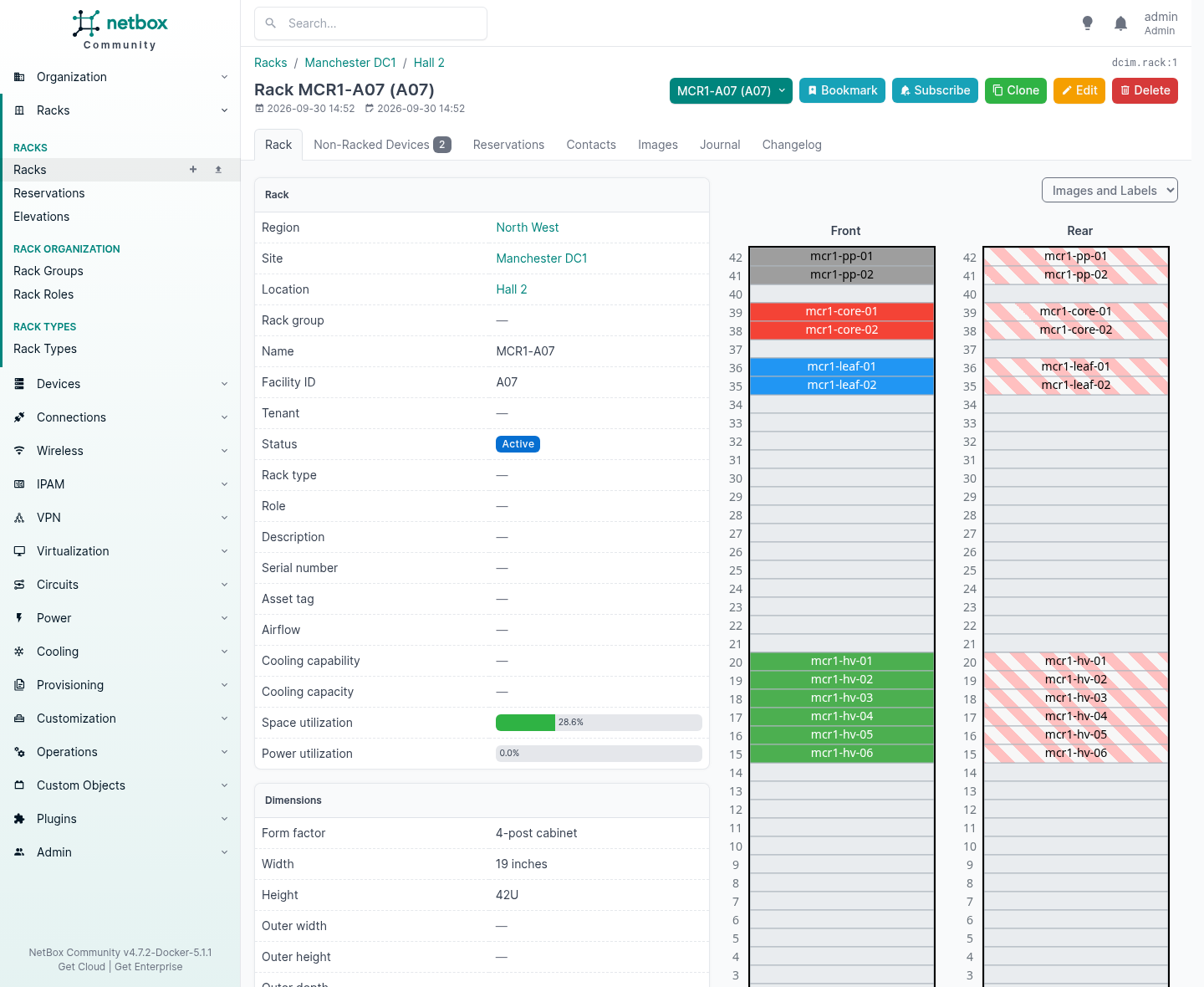
That elevation is drawn from the data, not uploaded. Each device is there because something says it occupies those rack units, facing that way, and the colours come from the role you gave it. Space utilisation reads 28.6% because NetBox worked it out. Nobody maintains that number.
Two things follow from it that are worth more than the picture.
You can ask which units are free, and get an answer you can act on. You can also reserve units before anything is installed in them, which is the difference between selling space you have and selling space you think you have.
What it deliberately will not do
A product that knows what it is not is rarer than one that does everything badly, and NetBox’s own documentation is blunt about it. It does not provide network monitoring, DNS service, RADIUS, configuration management or facilities management.1
More importantly it holds the desired state of your network, not its operational state, and the documentation says automated import of live network state is “strongly discouraged”, because every record should be vetted by a human first.1
That is the decision everything else rests on, and it is the one people argue with. The argument goes: surely a source of truth should be the truth, so discover the network and load it in. The answer is that a discovered network tells you what is there, and what is there includes every mistake anybody has ever made. A switch port left in the wrong VLAN in 2021 is a fact. It is not an intention.
NetBox holds the intention. Your monitoring holds the reality. The interesting number is the difference between them, and you cannot compute a difference from one input.
The other tenet is stated just as plainly: given a choice between a relatively simple eighty per cent solution and a much more complex complete one, take the simple one.1 You will feel that the first time you want to model something it does not model, and there is a whole run of sections near the end about what to do when you hit it.
| NetBox does | NetBox does not |
|---|---|
| Record what should be there | Poll what is there |
| Hold the intended VLAN for a port | Tell you the port is down |
| Say which customer a prefix belongs to | Bill them for it |
| Render a device’s configuration from a template | Push it to the device |
| Track the circuit, the provider and the commit | Monitor the circuit |
| Say which rack a device is in, and which U | Open the cabinet |
Read that right-hand column as a list of tools you still need. Read it wrong and you will try to make NetBox into all of them, which is how a source of truth becomes another system nobody trusts.
Why You Need One
Ask a managed service provider where the authoritative record of a customer’s network lives, and you will get an answer. Ask two of their engineers separately and you will get two.
One will point at a spreadsheet. One will point at a diagram last saved by somebody who left in 2023. Somebody else will say the firewall config is the documentation, which is at least honest, because a config does describe what a box is doing. It just does not describe why, or who asked for it, or which of the four customers behind that box is paying for the rule.
The failure is never the day you notice the record is wrong. It is the day somebody needs it.
| The moment | What you have to produce | What it costs when you cannot |
|---|---|---|
| A renewal conversation | An itemised account of what the monthly charge buys | The competitor’s quote is itemised, because they went and counted |
| An engineer hands their notice in | Everything they knew, written down | Six months of finding out, one ticket at a time |
| A customer leaves | A description of their own estate | Three weeks to assemble it, and a reference they will give honestly |
| An auditor asks a scope question | Which systems hold personal data, and where they physically are | A regulator told something that later turns out not to be true |
| A migration needs pricing | A count of what is actually there | You bid on an estimate and eat the difference |
None of those are exotic. They are Tuesday.
What you get out of it is not documentation. Documentation is a thing you write and then stop maintaining. What you get is a database that refuses to hold a contradiction, and which answers questions nobody thought to ask it in advance. There is a cabinet further down this post that turns out to be 28.6 per cent full of kit and 90.7 per cent full of power. Nobody set out to find that. It fell out of entering a wattage on a device type once.
The honest caveat comes with it, and the last section is about that. A record is only worth what it costs you to keep right. But the alternative is a business that cannot describe itself, and the first person to find that out is usually a customer.
The Other One: Nautobot
You will run into this within about a week of searching, so it is worth knowing what happened.
In 2021, Network to Code forked NetBox and called the result Nautobot. Not a soft fork or a distribution: a hard fork that has diverged for five years. Its own v1.0 release notes describe it as “a divergent fork of NetBox 2.10”, the repository was created on 19th February 2021 and v1.0.0 landed on 26th April 2021.3
Their stated reasons are on their own blog and worth reading in their words rather than mine. Three things drove it. They wanted to sell enterprise support: “We need to offer high-touch support models with Service Level Agreements (SLAs) we can guarantee. We need flexibility to offer Long-term Support (LTS) for customers who can’t upgrade at the pace of a fast moving open source project.” They wanted the source of truth to sit at the centre of an automation platform rather than serve documentation. And “there became a growing divergence in our vision about what a Source of Truth for networking should look like and how to get there”.4
That first reason needs its date attached, because it has stopped being true. In February 2021 there was no company behind NetBox to sell you anything. NetBox Labs was not founded until 2023, spun out of NS1 after IBM acquired it, co-founded by NetBox’s own lead maintainer.5
And it is not a third party who built a business on somebody else’s project. NetBox Labs is the custodian of NetBox: the project’s own documentation says “the open source project is stewarded by NetBox Labs and a team of volunteer maintainers”.1 They sell NetBox Enterprise for self-managed installs, host it for you as NetBox Cloud, and offer 24/7 support.6
So “you cannot buy support for NetBox” was a fair thing to say when Network to Code forked, and is not a fair thing to say now. Both projects have a commercial company behind them that will sign something, and in NetBox’s case that company is the one stewarding the project.
The line most people miss is the next one, and it is the reason this is not a grubby story: “the NetBox project team suggested that we should consider forking.”
That is about as civilised as a fork gets. Two groups wanted different things, said so over a long period, and split rather than fighting over one codebase. Both halves are still Apache 2.0. Nobody took anything they were not entitled to take.
What the fork was actually for
Nautobot 1.0’s release notes list what it added relative to NetBox 2.10, and the list tells you the argument better than any blog post:3
| What Nautobot added in 2021 | Where NetBox is now |
|---|---|
| GraphQL support | NetBox has it |
| Git integration as a data source | NetBox has it, as synchronized data sources |
| Single sign-on | NetBox has it |
| Secrets | NetBox has it via a plugin |
| Scripts and reports consolidated into Jobs | NetBox is moving scripts out to a plugin in 4.7 |
| Custom fields on all models | NetBox has broad custom field support |
| Data validation plugin API | NetBox has custom validation rules |
| Customisable statuses, as database objects | NetBox statuses are still a Python choice set |
| User-defined relationships between models | NetBox has no equivalent |
| UUID primary keys | NetBox uses integer keys |
| Plugin API enhancements | NetBox’s plugin framework has grown a lot since |
Most of the top half has converged. Several things Nautobot shipped in 2021 arrived in NetBox afterwards, which is what usually happens when two projects are solving the same problems in public.
The bottom three have not converged, and they are architectural rather than cosmetic. I checked both codebases today rather than trusting the 2021 notes.
Nautobot’s Status is a database model, described in its own source as a “Model for database-backend enum choice objects”, so a status is a row somebody can add in the UI. NetBox’s statuses come from a Python choice set, which is why the section above adds one by editing configuration.py and restarting. Nautobot has Relationship and RelationshipAssociation models, so you can define a relationship between two existing object types without writing code. NetBox’s answer to that problem is a plugin, which is the last run of sections in this post. And Nautobot’s primary keys are UUIDs, where NetBox’s are integers.
They also did the thing they forked to do. As of today Nautobot is publishing 3.2.x and 2.4.x on the same day, which is a genuine long-term maintenance line running alongside current, and that was one of the three stated reasons.
Which one
The honest numbers first. NetBox has 21,625 stars and 3,133 forks; Nautobot has 1,617 and 422.7 Both were pushed to within the last two days, both are Apache 2.0, and both now have a commercial company behind them selling support and hosting.
That gap is not a verdict on quality. It reflects a five year head start and the fact that most people needing a source of truth find NetBox first. But it does decide the thing that usually matters more than features, which is how many plugins, integrations, Ansible modules, forum answers and colleagues you will find for the one you pick.
So: if you want an inventory and a source of truth that other systems read, and you want the biggest ecosystem and the easiest hiring, the answer is NetBox, and that is what the rest of this post is about. If your reason for wanting a source of truth is specifically to drive automation from it, or you want statuses and relationships defined by your team rather than by a configuration file and a restart, go and look at Nautobot properly before you decide.
Do not let anybody sell you either one on support alone. Both sides have that covered now, and the differences that will still be there in five years are the ones in the table above.
What you should not do is pick one because somebody told you the other is dead. Neither is, and both were still shipping releases this week.
Getting One Running
Two routes, and I ran both of them for this. Containers if you want it working in twenty minutes, packages on a host if it is going to be load bearing.
The container stack
The community maintains netbox-docker, which is the quick answer:8
git clone -b release https://github.com/netbox-community/netbox-docker.git
cd netbox-docker
tee docker-compose.override.yml <<'EOF'
services:
  netbox:
    ports:
      - 8000:8080
EOF
docker compose pull
docker compose up
That gives you the application, PostgreSQL, Redis and a background worker, wired together. I built the same thing by hand under podman so I could see the parts, and the parts are worth knowing because two of them catch people:
| Container | Doing what | If you leave it out |
|---|---|---|
netbox | The Django application behind gunicorn | nothing works |
postgres | The database, 15 or later | nothing works |
redis / valkey | Two databases: one for tasks, one for caching | nothing works |
netbox-worker | rqworker, which drains the task queue | webhooks never fire, background jobs never run, and nothing warns you |
netbox-housekeeping | The periodic tidy-up | change log records never expire |
That fourth row is the one. Everything looks healthy without a worker. Event rules queue up and sit there.
Two things bit me on first run and neither is in an error message you would search for.
The first migration takes a long time. Not a minute. On this machine it was several, because NetBox 4.7 replaces django-mptt with PostgreSQL ltree and rebuilds every hierarchical table on the way through. The container just sits there applying migrations. Leave it alone.
Without API_TOKEN_PEPPERS you cannot create a v2 API token, and the only sign is a warning in the log:
UserWarning: API_TOKEN_PEPPERS is not defined. v2 API tokens cannot be used.
Set at least one, at least fifty characters, before you go looking for why the API rejects you.
On a host, from the packages
The documented route is tested on Ubuntu 24.04. I ran it end to end on a clean one, and it landed on this:
| Component | What 24.04 gave me | What NetBox 4.7 needs |
|---|---|---|
| PostgreSQL | 16.15 | 15 or later |
| Redis | 7.0.15 | 6.0 or later |
| Python | 3.12.3 | 3.12, 3.13 or 3.14 |
| Django | 6.1.1 | comes with NetBox |
| NetBox | v4.7.2 |
Those minimums are NetBox’s own, and 4.7 raised both the PostgreSQL and the Redis floor.9
The whole job is five steps.
# 1. the services
sudo apt install -y postgresql redis-server
sudo -u postgres psql -c "CREATE DATABASE netbox;"
sudo -u postgres psql -c "CREATE USER netbox WITH PASSWORD 'something-you-generated';"
sudo -u postgres psql -c "ALTER DATABASE netbox OWNER TO netbox;"
sudo -u postgres psql -d netbox -c "GRANT CREATE ON SCHEMA public TO netbox;"

# 2. the build dependencies
sudo apt install -y python3 python3-pip python3-venv python3-dev build-essential   libxml2-dev libxslt1-dev libffi-dev libpq-dev libssl-dev zlib1g-dev git

# 3. the application, at a release tag rather than at main
sudo mkdir -p /opt/netbox && cd /opt/netbox
sudo git clone https://github.com/netbox-community/netbox.git .
sudo git checkout v4.7.2
sudo adduser --system --group netbox
sudo chown -R netbox /opt/netbox/netbox/media/ /opt/netbox/netbox/scripts/ /opt/netbox/netbox/reports/

# 4. the configuration: five values, no more
cd /opt/netbox/netbox/netbox/
sudo cp configuration_example.py configuration.py
python3 /opt/netbox/netbox/generate_secret_key.py   # run it twice
sudo $EDITOR configuration.py

# 5. let the upgrade script do the rest
sudo /opt/netbox/upgrade.sh
Those five values are ALLOWED_HOSTS, DATABASES, REDIS, SECRET_KEY and API_TOKEN_PEPPERS. Generate the last two separately and do not reuse one for the other. As such, run the key generator twice and paste the results into different lines.
upgrade.sh builds the virtual environment, installs every Python dependency, runs the migrations, builds the documentation for offline use and collects the static files. When it finishes on a fresh box it prints a warning that looks alarming and is not:
WARNING: No existing virtual environment was detected. A new one has
been created. Update your systemd service files to reflect the new
Python and gunicorn executables. (If this is a new installation,
this warning can be ignored.)
Then a superuser, and it runs:
source /opt/netbox/venv/bin/activate
cd /opt/netbox/netbox && python3 manage.py createsuperuser
For anything real, put gunicorn in front of it rather than runserver. The configuration and the unit files are already in the repository, which is the detail worth knowing because people write their own:
sudo cp /opt/netbox/contrib/gunicorn.py /opt/netbox/gunicorn.py
sudo cp -v /opt/netbox/contrib/*.service /etc/systemd/system/
sudo systemctl daemon-reload
sudo systemctl enable --now netbox netbox-rq
netbox.service runs gunicorn on 127.0.0.1:8001, netbox-rq.service runs the worker, and nginx or Apache goes in front to terminate TLS and serve /static. Two services, and the second one is the same worker the container stack needs.
The Order You Have To Fill It In
A fresh NetBox is an empty database with opinions, and the first hour with one is usually spent finding out what those opinions are. You go to add a device, and it will not let you.
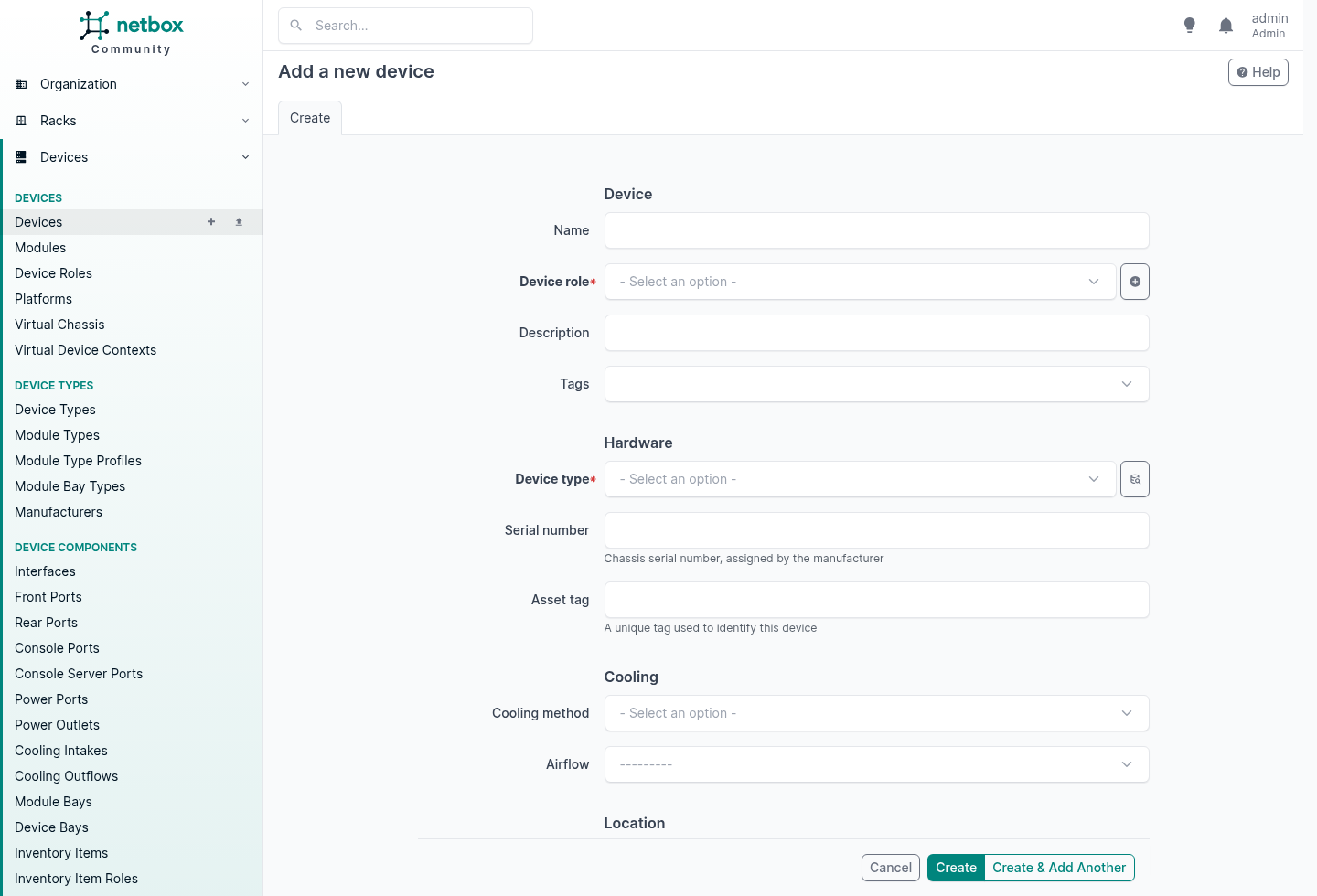
Those red asterisks are the whole lesson. NetBox will not record a thing before the things it hangs off exist, and it is not being awkward: a device with no type is a row that cannot answer any of the questions a device is for.
So rather than guess, I asked the model which foreign keys are actually mandatory, and then tried to break each rule through the API to see what comes back.
POST /api/dcim/device-types/   no manufacturer
  {"manufacturer": ["This field is required."]}
POST /api/dcim/devices/        no device type
  {"device_type": ["This field is required."]}
POST /api/dcim/interfaces/     no device
  {"device": ["This field is required."]}
POST /api/ipam/aggregates/     no RIR
  {"rir": ["This field is required."]}
POST /api/circuits/circuits/   no provider, no type
  {"provider": ["This field is required."], "type": ["This field is required."]}
POST /api/virtualization/virtual-machines/   nothing at all
  {"__all__": ["A virtual machine must be assigned to a site, cluster, or device."]}
Every one refused, and said exactly which thing was missing. Here is the same information as a list of prerequisites:
| To create | Required first | Optional, but you want it first |
|---|---|---|
| Tenant | nothing | a Tenant group |
| Region, Site group | nothing | a parent of the same kind, they nest |
| Site | nothing | a Region, a Site group, a Tenant |
| Location | a Site | a parent Location, a Tenant |
| Rack type | a Manufacturer | |
| Rack | a Site | a Location, Rack group, Rack role, Rack type, Tenant |
| Device type | a Manufacturer | |
| Device role | nothing | a parent Device role, they nest |
| Device | a Device role, a Device type, a Site | a Rack and position, a Platform, a Tenant |
| Interface, and every other component | a Device | |
| Cable | two things to terminate on | a Tenant |
| Aggregate | an RIR | a Tenant |
| VLAN | nothing | a VLAN group, a Role, a Tenant |
| Prefix | nothing | a Site, a VLAN, a Role, a VRF, a Tenant |
| IP address | nothing | an Interface to assign it to, a Tenant |
| Circuit | a Provider and a Circuit type | a Tenant |
| Circuit termination | a Circuit | a Site to land on |
| Cluster | a Cluster type | a Cluster group, a Site, a Tenant |
| Virtual machine | a Site, a Cluster or a Device | a Platform, a Tenant |
| VM interface | a Virtual machine |
The second column is the one that costs you. Prefixes, IP addresses, VLANs and tenants require nothing at all, so nothing stops you creating them on day one in any order you like. Whether they are any use is a different question, because an address with no interface behind it is a row in a list, and a device with no tenant is a device you will be editing again later.
The order to actually work in
That gives a sequence. Work down it and nothing ever refuses you.
First, the things everything else hangs off. None of these are exciting and all of them are cheap to get wrong.
- Tenant groups, then tenants. Do these before anything else. Twenty-eight models take a tenant, including Site, Location and Rack, so if the customers do not exist yet you cannot stamp them on as you go and you will be bulk-editing later.
- Regions and site groups. Both optional, both nest inside themselves, and they are independent of each other. Regions are for geography, site groups for function, and you can use one, both or neither.
- Sites. The root of nearly everything. A site requires nothing, which is why it is the first thing you can actually create.
- Locations. These need a site, and they nest, so a hall containing rows containing pods is one model three deep.
- Rack roles and rack groups. Both optional. Rack groups are flat and sit alongside locations as a second axis, which is handy for rows and pods.
- Manufacturers, then rack types. A rack type needs a manufacturer. Skip rack types if you are not modelling the cabinets themselves.
- Racks. These need a site. If you also give one a location, that location has to belong to that site, and NetBox checks.
Then the hardware catalogue, not the hardware. Before you can add a single device you need manufacturers, device types, device roles and, in practice, platforms.
- Manufacturers. You may already have some from step 6, because rack types need them too. Module types do as well.
- Device types, each needing a manufacturer.
- Device roles, which nest, and platforms.
This is the step people skip, and it is the step that decides how much typing the rest of the job takes. A device type carries its own interfaces, ports and bays as templates, so every device you create from it arrives with the right components already on it. Get the type right once and racking forty of them is forty names.
Platform is the odd one in that list, because a device does not strictly require one. Do it now anyway. It is what carries the config template and the NAPALM driver later, and going back to set it on an estate is the same evening you would have spent on tenants.
Then the kit itself.
- Devices. Role, type and site are all required. Rack and position are optional, and if you give them they have to be consistent with the site.
- Components, if the device type did not already supply them.
- Cables, between the components.
Then addressing, because an address wants an interface to live on and the interface only exists after step 12.
- RIRs, then aggregates.
- Prefix and VLAN roles, VRFs, VLAN groups then VLANs.
- Prefixes, then the individual IP addresses.
Then the commercial layer.
- Providers, provider accounts and circuit types.
- Circuits, then terminate them onto sites.
And the virtual estate, which mirrors the physical one.
- Cluster types and cluster groups, then clusters.
- Virtual machines, which need a site, a cluster or a device, then their interfaces.
Steps 1 to 10 are an afternoon and they feel like admin. There is nowt glamorous in any of it. They are also the afternoon that decides whether step 11 takes a morning or a fortnight.
The rules that bite later
Required fields are the easy half, because they fail immediately and tell you why. The ones that catch people out are the consistency rules, which only fire once you have enough data to contradict yourself:
device at Leeds, put in a Manchester rack
  {"rack": ["Rack MCR1-A07 (A07) does not belong to site Leeds Edge."]}
device at Leeds, in a Manchester location
  {"location": ["Location Hall 2 does not belong to site Leeds Edge."]}
rack at Leeds, in a Manchester location
  {"__all__": ["Assigned location must belong to parent site (Leeds Edge)."]}
a second device in a unit that is already taken
  {"position": ["U39.0 is already occupied or does not have sufficient
                 space to accommodate this device type: MX204 (1.0U)"]}
That last one is the one I would point at if somebody asked why bother with any of this. NetBox knows the device is 1U, knows what is in the cabinet, and will not let you record two things in the same space. Your spreadsheet will let you do that all afternoon and never say a word, and you will find out when somebody is stood in the hall with a box in their hands.
None of these are configurable and none of them should be. They are the difference between a record and a wish.
Using It: What Each Screen Gives You
With the estate loaded, here is what you actually get back out of it. Everything below is that same instance: one cabinet, fourteen devices, cabled and addressed across three customers.
A device is its components
Click into one of those hypervisors and the interesting tab is not the summary, it is the interfaces.
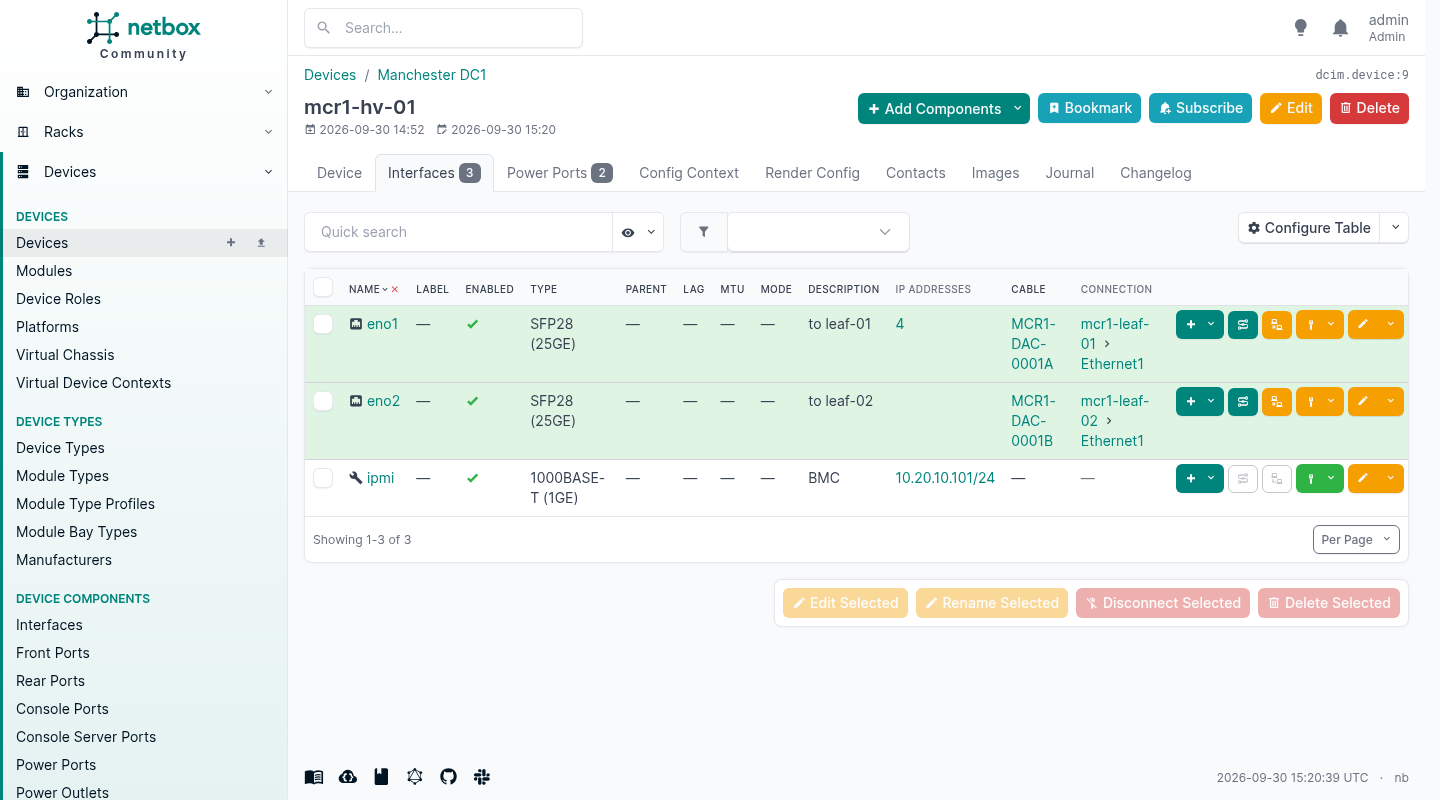
Read across one row. The interface, its speed, what you wrote about it, the address on it, the label on the cable, and the port on the far end. That is one query, and it is the answer to the question everybody actually asks, which is “what is this plugged into”.
Note where the address sits. It is on eno1, not on the server. That sounds like pedantry right up until you have a box with a management interface, two data interfaces and a loopback, and somebody asks which address answers for it. A model that hangs addresses off devices cannot tell you. This one can, and it can also hold the perfectly ordinary case of four addresses on one interface.
Follow the cable
Cables terminate on components, not on devices. An interface at one end, an interface at the other, or a front port, a rear port, a power outlet, a circuit termination. That is the detail the whole feature rests on, and it is why the interface list above could print the far end in its own column without being told.
Model a cable device to device and you have drawn a picture. Terminate it on the ports and NetBox can walk it.
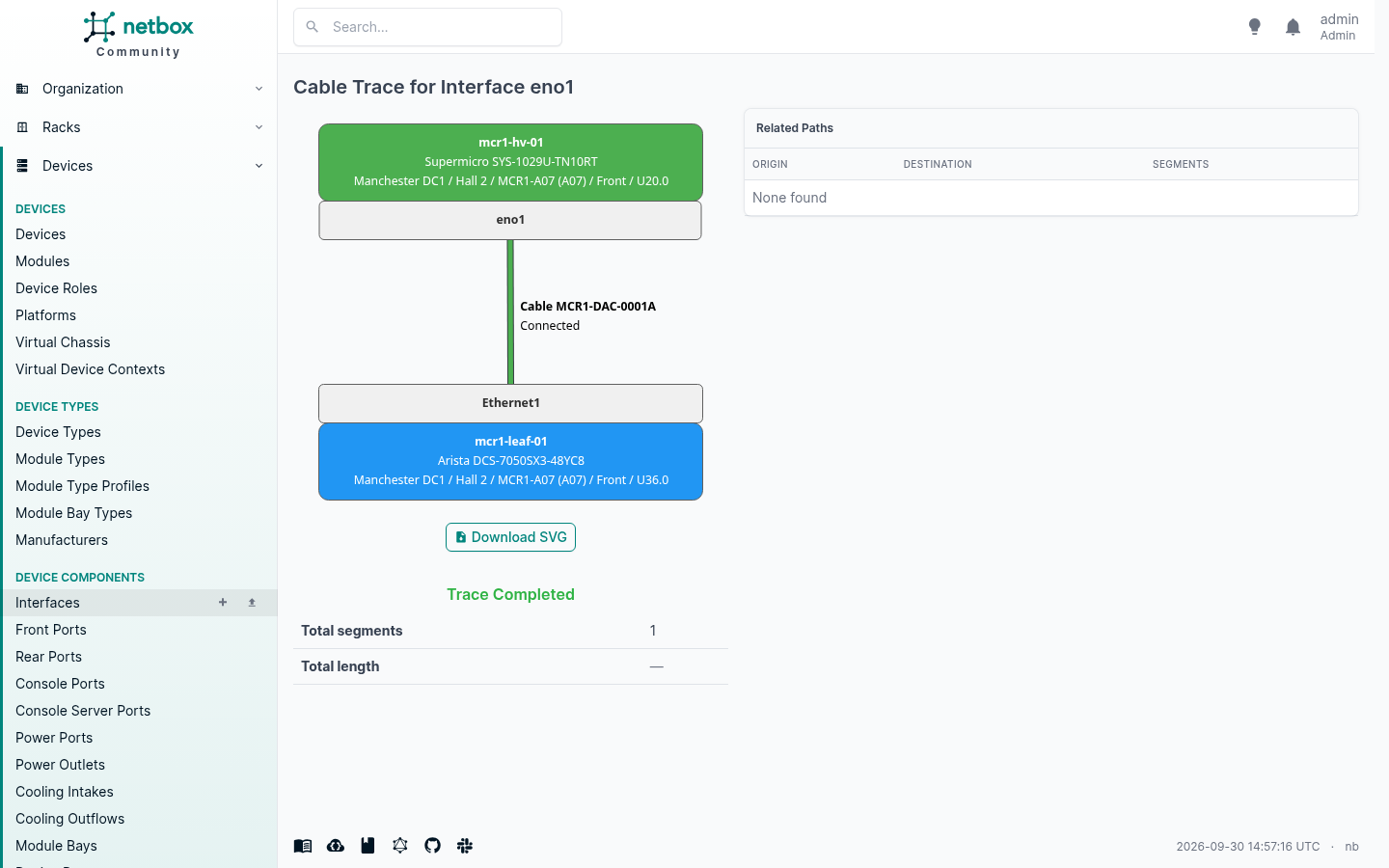
One hop here, because it is a direct attach cable. Put patch panels in the middle and it walks them, panel by panel, and tells you what is on the far end of a run through three cabinets. That is the job that otherwise involves a torch and somebody holding the other end of a tone probe.
The trace also prints the full location of each end. Site, hall, cabinet, face, rack unit. If you have ever been on a call trying to tell a remote hands engineer which box to look at, that line is the whole value.
Addresses, as a tree rather than a tab
IPAM is the half people arrive for.
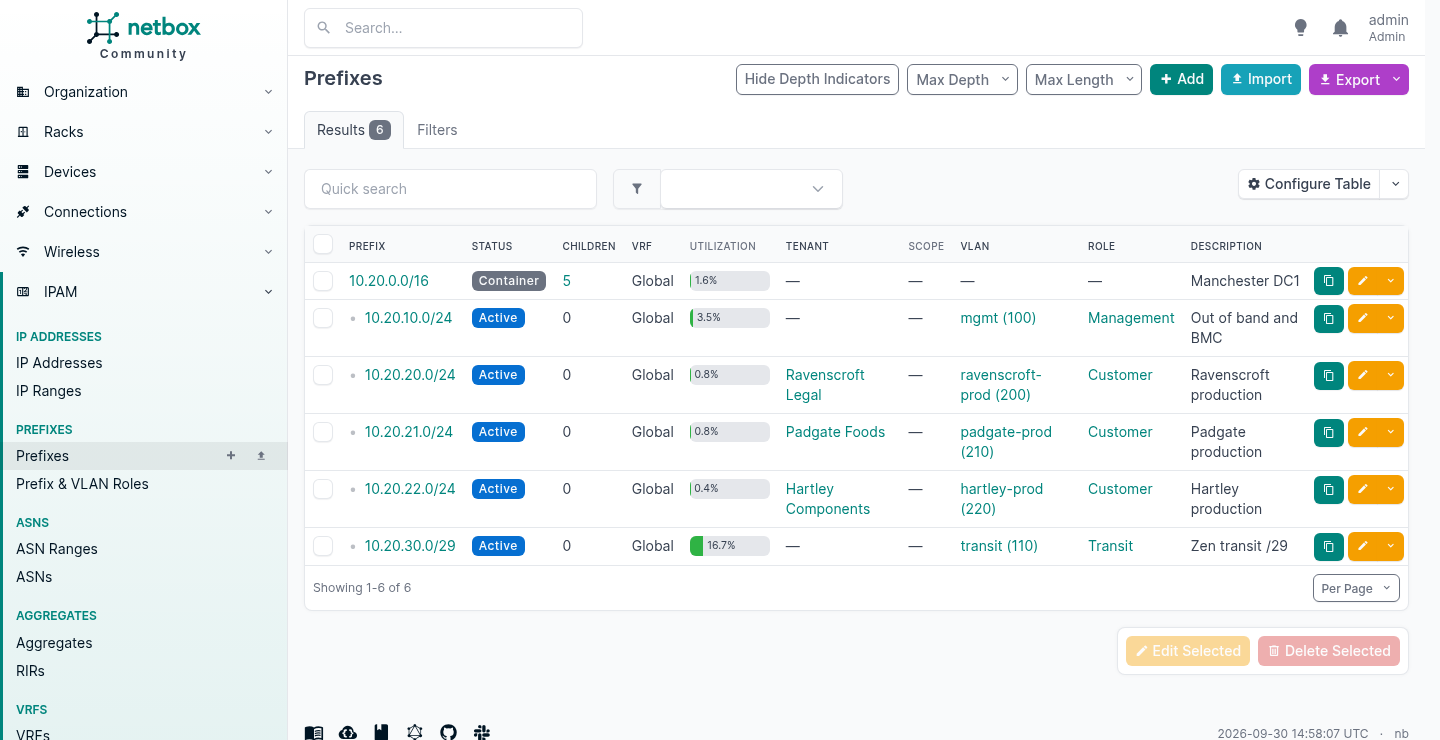
The indentation is computed from the addresses themselves. You do not tell NetBox that 10.20.20.0/24 sits inside 10.20.0.0/16, it works that out, and it will keep working it out when somebody adds a /26 in the middle of it next year.
Every row carries the things you actually filter by: the VLAN it maps to, the role, and the customer it belongs to. Utilisation is computed too.
Open one and you get the addresses in it, and the gaps.
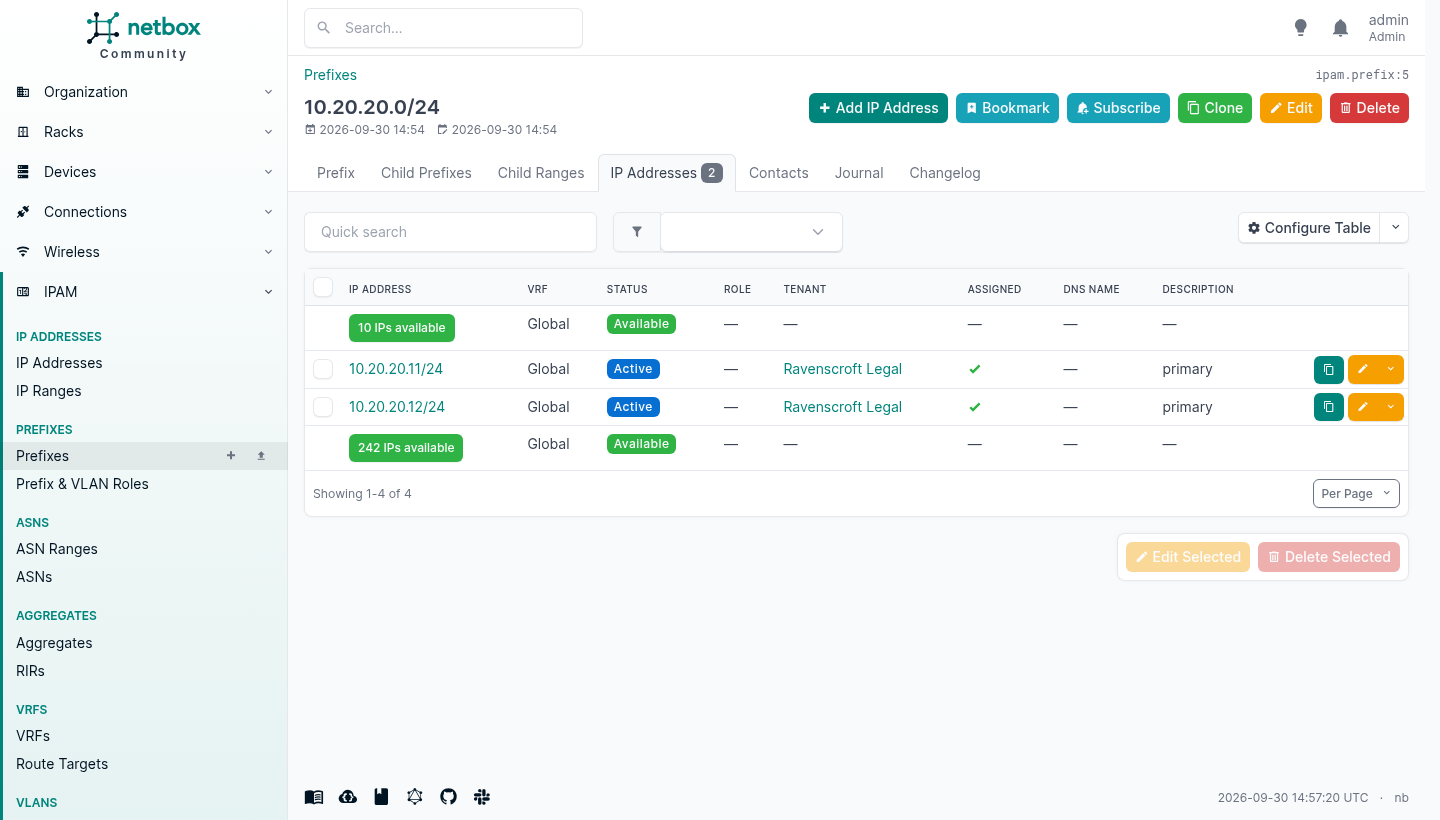
Those green rows are the free space, shown in line with the used space. There is an API call that hands you the next free address out of a prefix, which is the one piece of IPAM automation that pays for itself immediately, because it is the thing people otherwise do by squinting at a spreadsheet and hoping.
An interface takes as many addresses as you like, of both families, and you nominate one of each as the device’s primary.
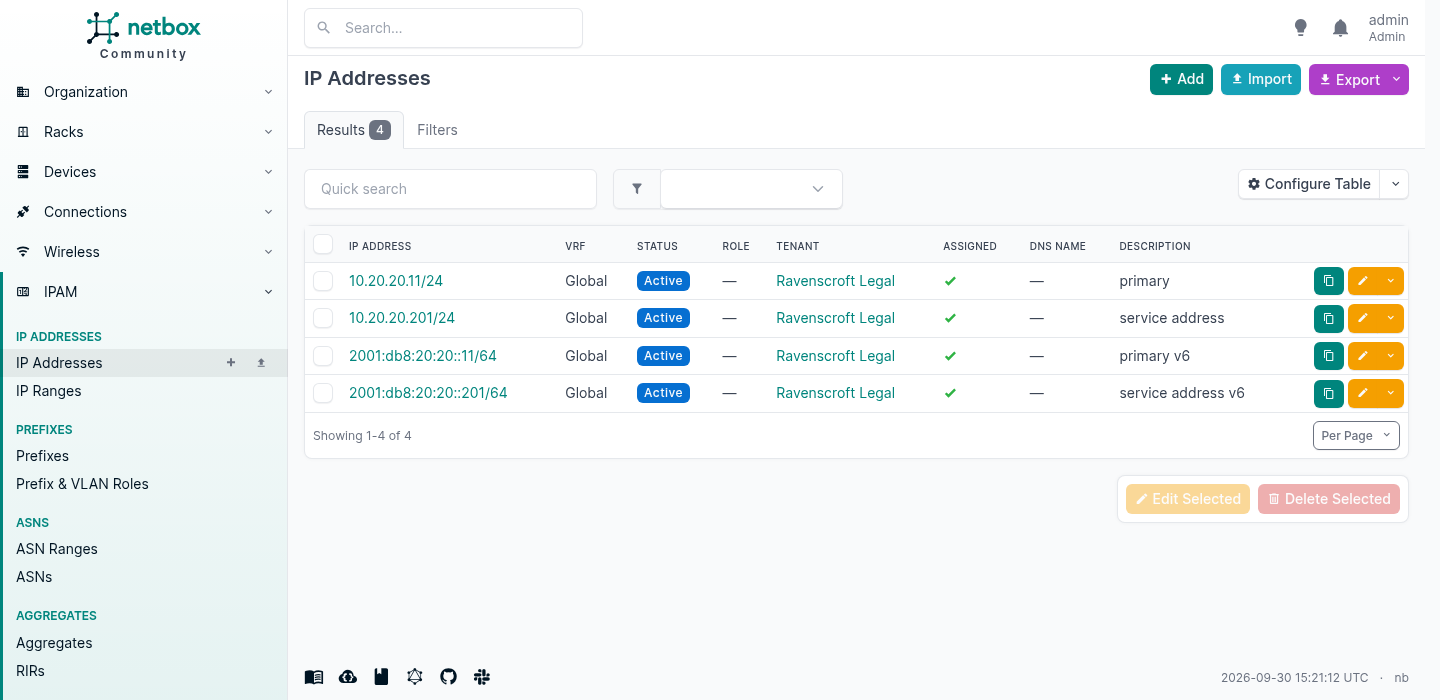
Two IPv4 and two IPv6 on one port, which is an ordinary Tuesday and something a device-centric model cannot express at all.
Enter addresses with the mask of the network they are on, not as a /32. NetBox will accept 10.20.20.11/32 and file it under the right prefix, because containment is worked out from the host address. What it will not do is second-guess you afterwards: the mask is stored exactly as typed and handed back to whatever reads it, so a /32 on a LAN address renders a /32 into the device configuration. The place that bites is three months later in a config template, not today in the form.
One install, three customers
Most objects in NetBox can be assigned to a tenant. An enterprise uses that for business units. If you sell managed services, you create one per customer.
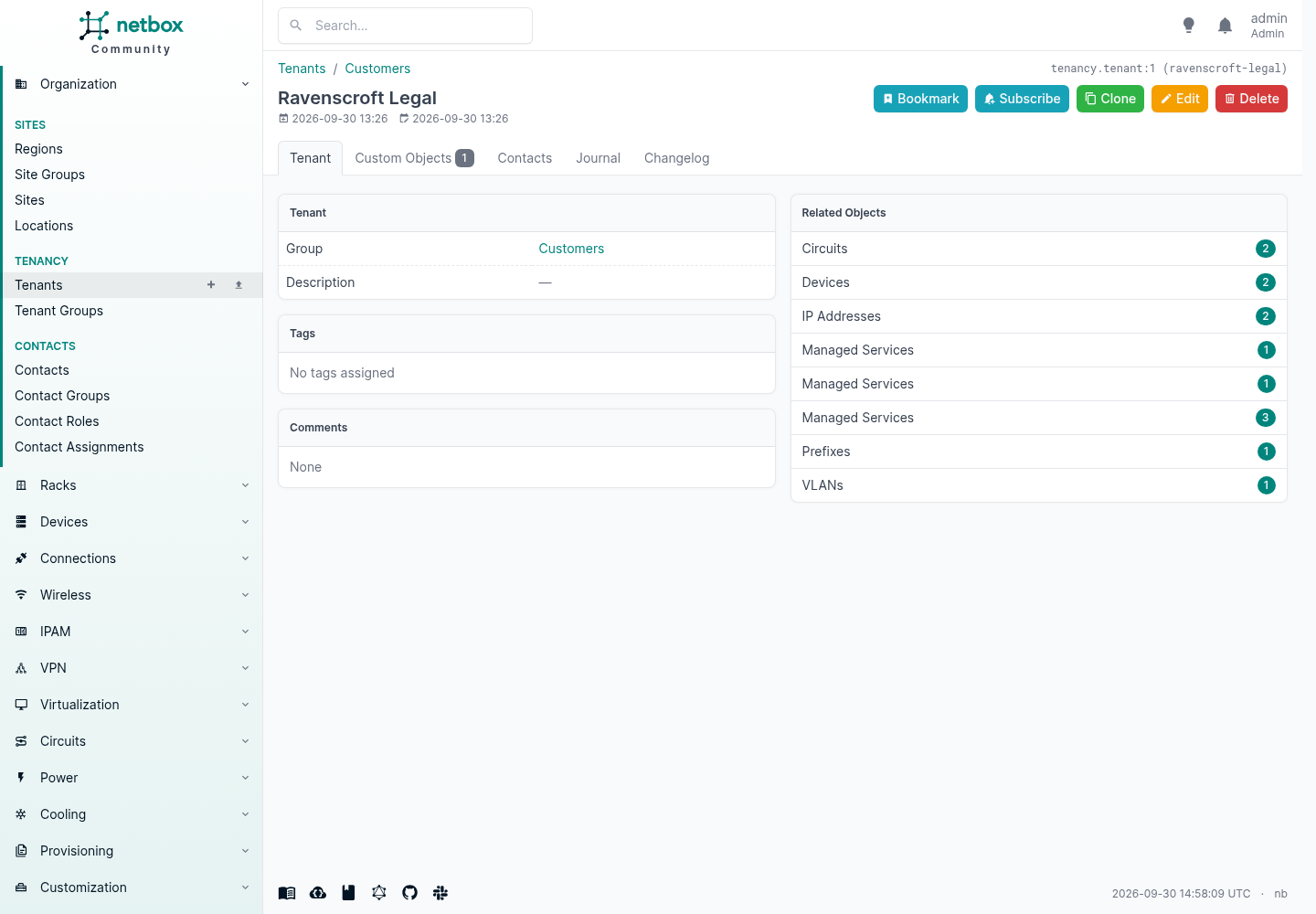
That panel on the right is the answer to “what does this customer have”, and it assembled itself. No report, no spreadsheet, no asking the engineer who built it.
It is worth being careful about what tenancy means, because getting it wrong on day one is a year of unpicking later. A tenant means the object is dedicated to that customer. A router that serves only them gets their tenant. A firewall serving four of them does not belong to any of them, so it gets none, and the relationship goes somewhere else. More on that further down, because it is the point where most people find they need to add something of their own.
Put The Numbers On The Device Type
This is the step that separates an inventory from something that answers questions, and it costs about ten minutes per device type.
A device type can carry its weight and, through its power port templates, its power draw. Put those on the type once and every device you ever create from it inherits them. Leave them off and NetBox will happily tell you a cabinet is 28.6% full and nothing else.
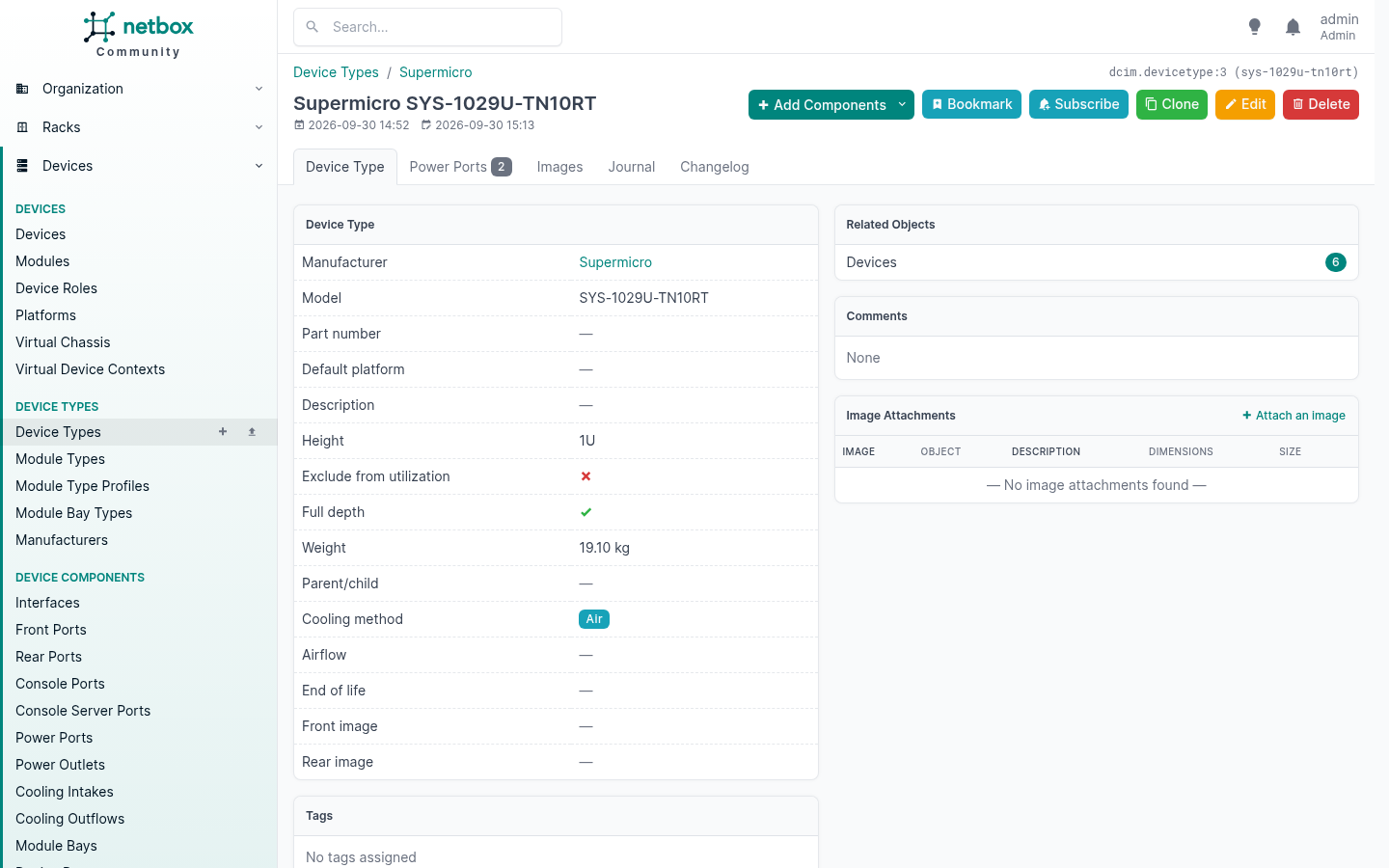
I put weight on all five types here, gave each one two power port templates with a maximum and an allocated draw, gave the PDU type an inlet and twelve outlets, then created a power panel and two feeds into the cabinet and cabled the lot up: every device’s PSU1 to PDU A, every PSU2 to PDU B, and each PDU’s inlet to its feed.
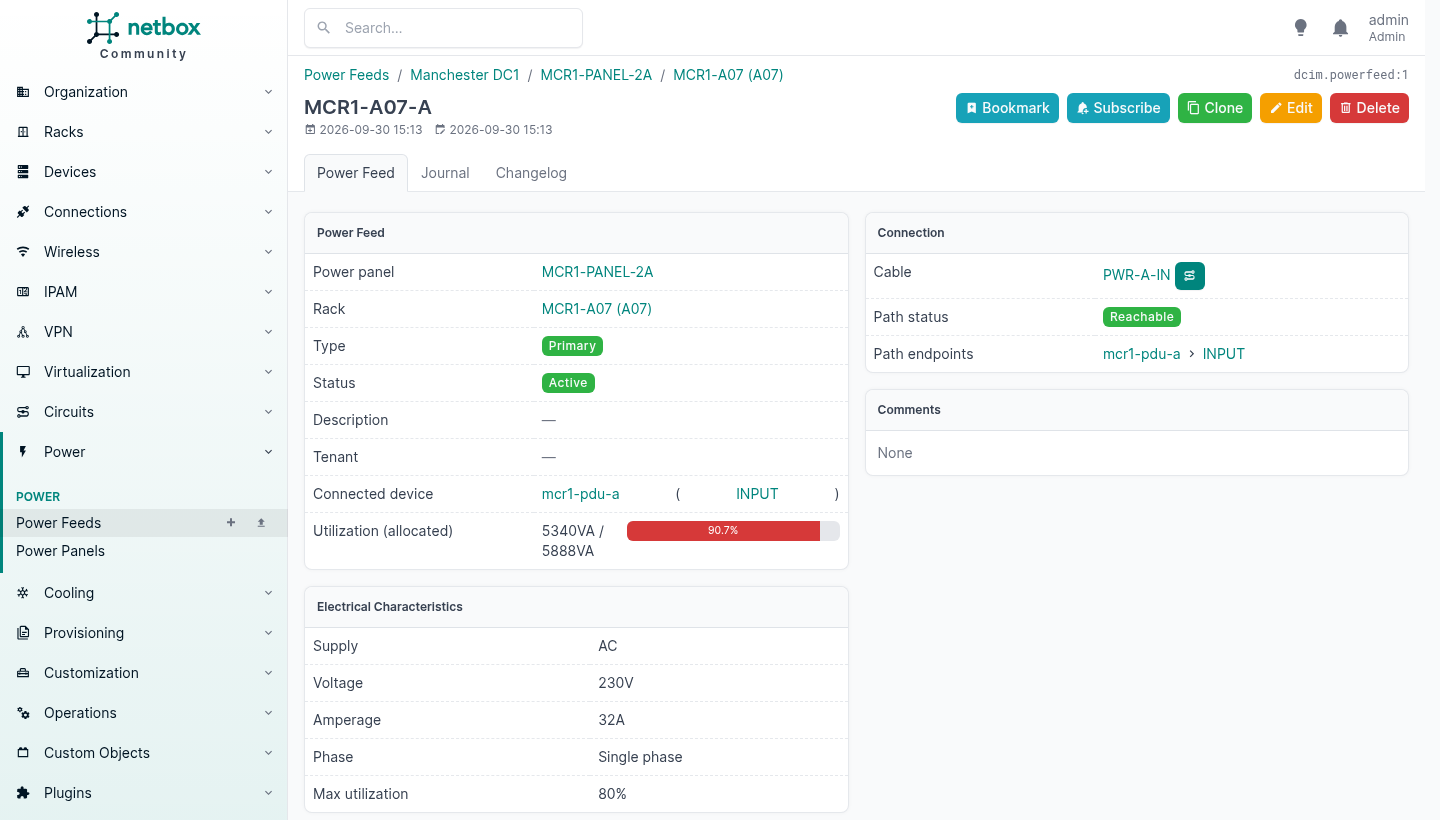
Then the rack page changes completely.
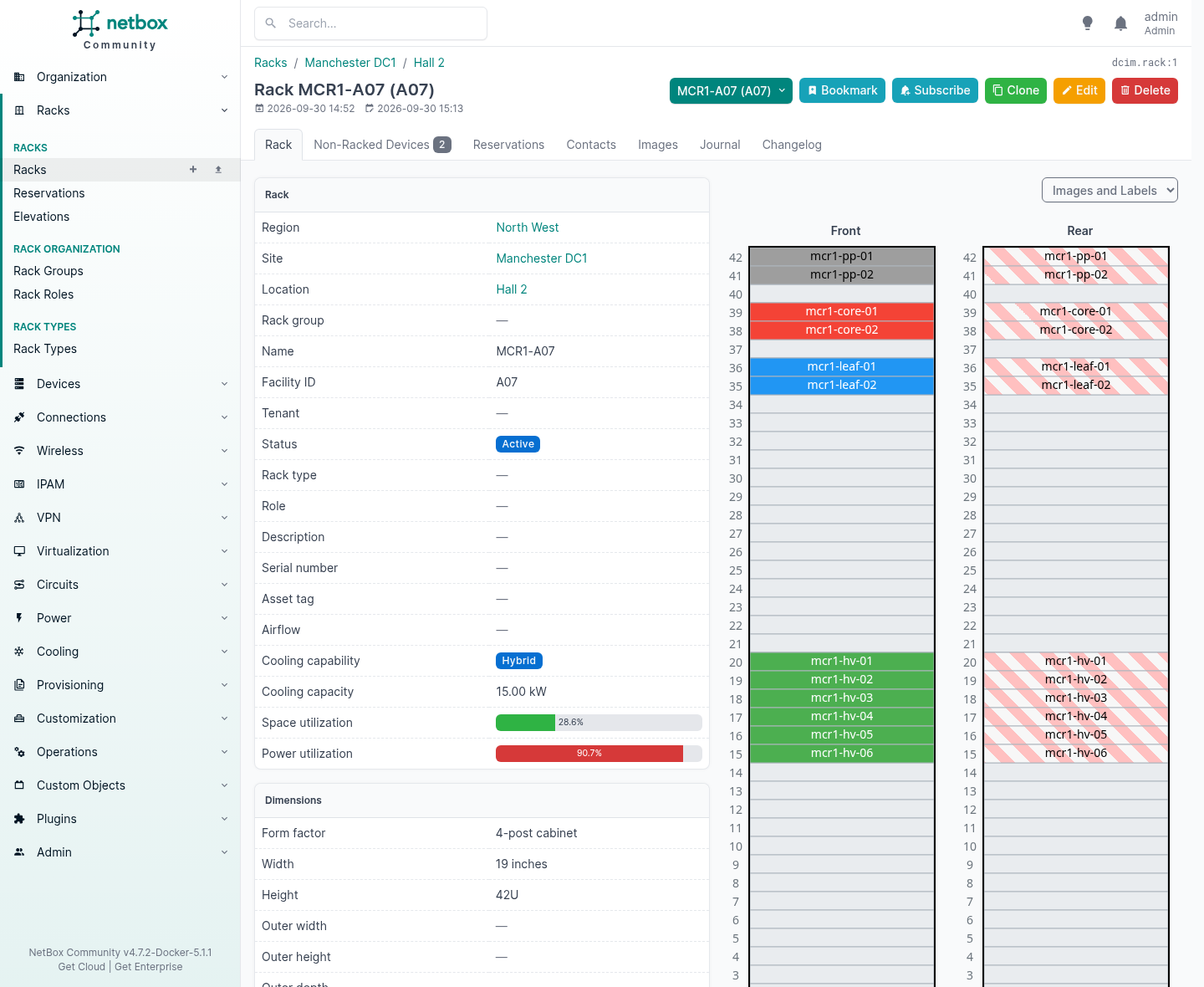
Space utilisation 28.6%. Power utilisation 90.7%.
That cabinet is one third full of kit and nearly out of power, and that is a fact about your estate that no spreadsheet will ever volunteer. It is also the fact that decides whether the next order gets racked there or somewhere else, and it fell out of data you entered once, on the types.
Two things that will leave it reading zero
I got 0.0% at first, twice, and both causes are worth knowing because neither produces an error.
The outlets have to reference the inlet. A power outlet on a PDU has a power_port field pointing at the upstream port on the same device. Leave it blank and the chain is broken: NetBox has no way to know that those twelve outlets are fed by that inlet, so nothing aggregates.
Leave the inlet’s draw fields empty. This is the counter-intuitive one. NetBox only computes a power port’s draw from what is plugged into it if both its own draw fields are blank:
if self.allocated_draw is None and self.maximum_draw is None:
    ...aggregate the downstream power ports...
# otherwise
return {'allocated': self.allocated_draw or 0, ...}
I had helpfully set maximum_draw: 7400 on the PDU inlet, because that is what the PDU is rated at. NetBox therefore believed me, took allocated_draw as unset, and reported zero. Clear both and it works it out:
mcr1-pdu-a INPUT -> allocated 5340 VA, maximum 8480 VA, across 12 outlets
mcr1-pdu-b INPUT -> allocated 5340 VA, maximum 8480 VA, across 12 outlets
feed MCR1-A07-A: available 5888 VA   (230 V x 32 A x 80% max utilisation)
RACK power utilisation: 90.7 %
RACK weight: 166.6 kg of 900 kg
So the rule is: put real numbers on the leaves, and leave the intermediate ports blank so NetBox can add them up. An administratively defined value always wins over the computed one, which is correct behaviour and exactly the wrong thing to do on a PDU.
Cooling, which is new
Version 4.7 added cooling to DCIM, and it arrived with the half that is getting expensive. A rack carries a cooling capability of air, hybrid or liquid and a capacity in kilowatts; a device type carries a cooling method. Above that sit cooling sources for the chillers and CRAC units, cooling feeds representing a loop out to a rack, and intake and outflow components on the devices themselves for cold plates and manifolds.
The cabinet above reads Hybrid, 15.00 kW, because I told the rack so. If you are taking delivery of liquid cooled kit this year, that is a model for the thing you are currently keeping in a spreadsheet.
One Install, Many Customers
Tenancy is the reason a provider can run one NetBox rather than one per customer, and it is worth understanding what it does and, more importantly, what it does not.
Twenty-eight of NetBox’s models carry a tenant field. Sites, locations, racks and rack reservations. Devices, cables and virtual device contexts. Prefixes, IP addresses, ranges, aggregates, VLANs, VLAN groups, VRFs, route targets, ASNs. Circuits and circuit groups. Clusters and virtual machines. Tunnels, L2VPNs, wireless LANs and links. Power feeds and cooling feeds.
That is every billable noun. Set it consistently and “what does this customer have” stops being an investigation.
But a tenant is a label, not a lock. It says the object is dedicated to that customer. It does not stop anybody who can log in from reading the lot, which is fine inside one company and no use at all the moment a customer has an account.
Two things follow, and the second is the one people get wrong.
A tenant means dedicated. A router that serves only one customer gets their tenant. A firewall serving four of them does not belong to any of them, so it gets nothing, and you record the relationship on the thing you actually sold instead. Forcing a tenant onto shared kit makes every report built on tenancy quietly wrong.
And access is a separate mechanism entirely.
Permissions are where the isolation lives
NetBox’s object permissions take a JSON constraint, and the constraint is a Django ORM filter. It narrows the queryset before anything is built from it, so every view, export, API call and search is narrowed with it.
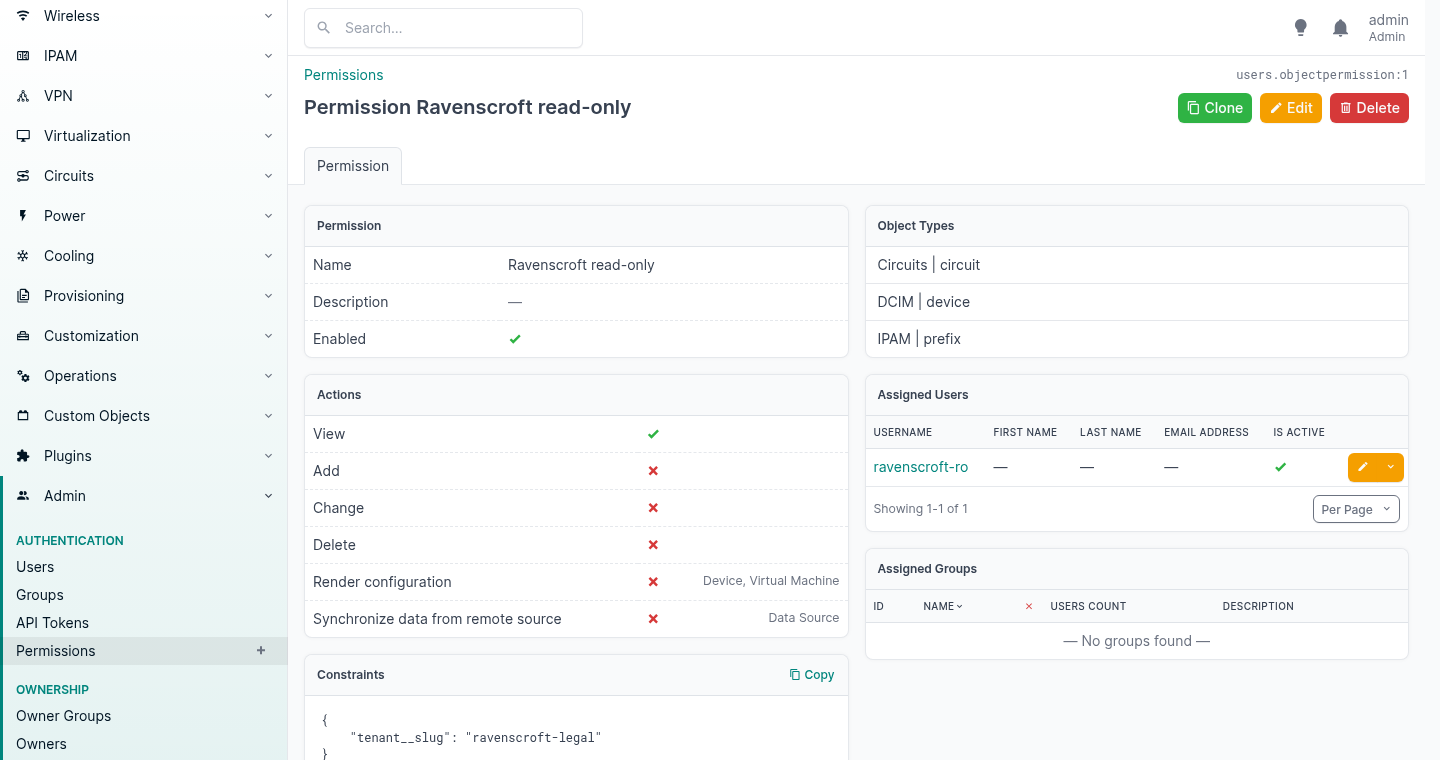
Three fields do the work. The object types it applies to, the actions it grants, and that constraint at the bottom. Everything else is bookkeeping.
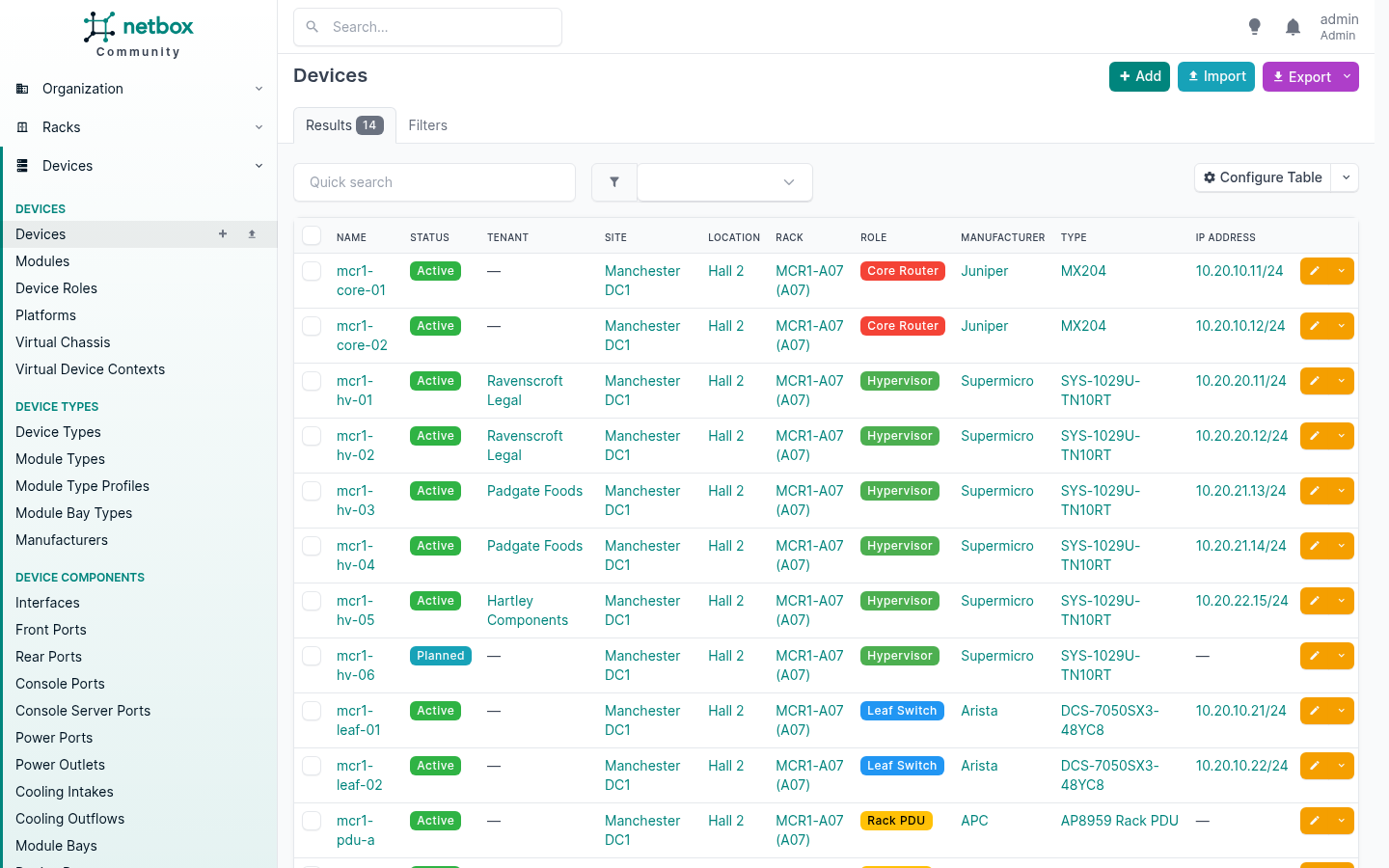
Here is the device list as an administrator.
And here is the same URL, same install, signed in as the customer.
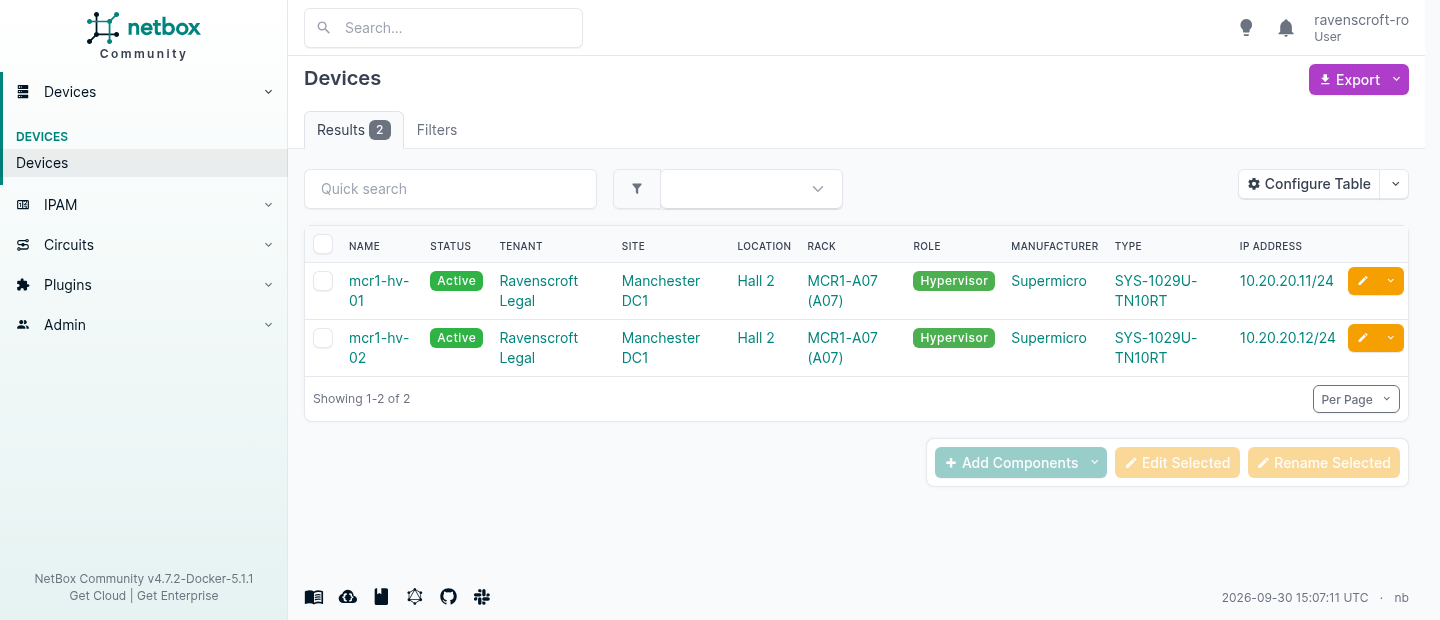
Two rows instead of fourteen, and look at the left-hand menu. It has collapsed to the four things that account is allowed to touch. Nobody configured that. The navigation is built from the same permissions, so a customer never sees a link to something that would refuse them.
The two ways it says no
This is the detail worth knowing, because the two refusals mean different things and both are deliberate.
| The customer’s token asks for | It gets |
|---|---|
/api/dcim/devices/ | 200, one row of two |
/api/dcim/devices/1/, their own | 200 |
/api/dcim/devices/2/, somebody else’s | 404 |
/api/tenancy/tenants/ | 403 |
/api/dcim/sites/, never granted | 403 |
| no token at all | 403 |
404 means the type is yours but that row is not. The constraint removed it from the queryset, so as far as the request is concerned it does not exist. A 403 there would confirm it does, and let a curious customer count your estate by walking the IDs.
403 means the type was never yours. Tenants and sites were never granted, so they refuse outright, and the customer cannot enumerate who else is on the platform.
Then let them write
Read-only is the easy case. The real question is whether a customer with edit rights can be trusted with them, so I granted change under the same constraint and went looking for the way out.
| Attempt | Result |
|---|---|
| Edit their own device | 200, saved |
| Edit another customer’s device | 404 |
| Edit their own device, moving it to the other customer’s tenant | 403 |
| Delete their own device | 403, delete was never granted |
The third row is the one that matters. Reassigning your own device to somebody else’s tenant is the obvious escape, because the object is inside your constraint when the request arrives and outside it afterwards. NetBox evaluates the constraint against the state the object would be left in, so it refuses. I read the device back rather than trusting the status code, and the tenant had not moved.
That is the hole most home-grown multi-tenancy leaves open, and it is normally found by a customer rather than by a test.
Variables That Need To Inherit
Here is the distinction people get wrong, and getting it right saves a lot of editing.
A custom field is a value on one object. You set it per object, and it stays there. Good for a fact about the thing itself: an asset tag, a support contract number, a commissioning date.
A config context is a value attached to a characteristic, which everything matching that characteristic inherits. Good for a variable that should cascade: your NTP servers, your syslog targets, your SNMP community, your DNS domain, your management VLAN, your backup window.
If you find yourself setting the same custom field to the same value on forty devices, you wanted a config context.
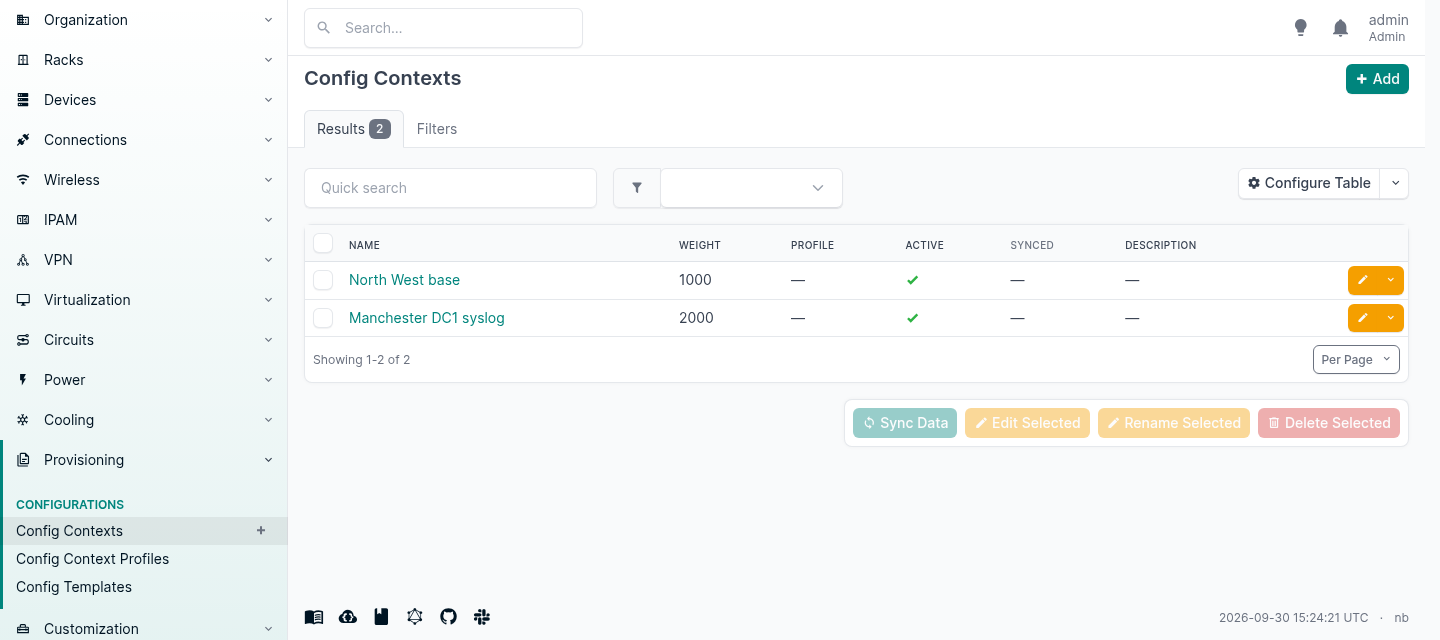
A context is arbitrary JSON, and it can be attached to a region, site group, site, location, device type, role, platform, cluster, cluster type, cluster group, tenant group, tenant or tag. Tenant is in that list, which for a provider means a fact true of one customer everywhere follows them onto every device you ever add for them.
The merge is per key, and weight decides who wins each one.
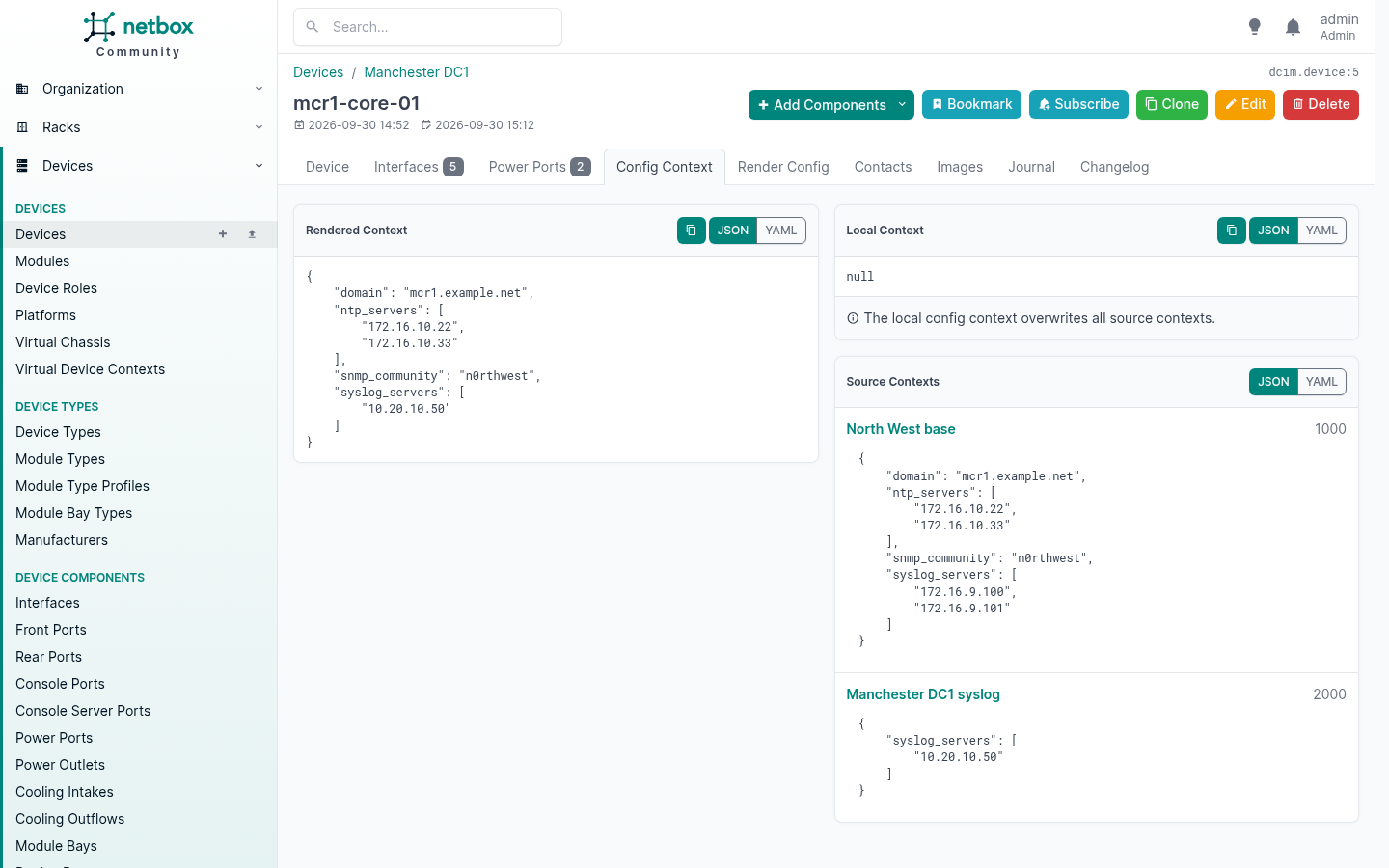
Read the right-hand panel against the left. The region supplies four keys at weight 1000. The site supplies one key at weight 2000. The rendered context keeps the region’s domain, NTP servers and community untouched, and takes the site’s syslog server, because that is the only key anything contested.
You write the exception, not a fresh copy of everything with the exception in it. That is the whole value, and it is why this scales where a per-device variable file does not.
Local context beats everything above it
The inheritance stack has a top, and it is the object itself. Local context data on a device wins over every source context that applies to it, whatever their weights.
I set this on mcr1-core-01:
{"syslog_servers": ["10.20.10.99"], "note": "this box logs somewhere else"}
and its rendered context became:
{
  "note": "this box logs somewhere else",
  "domain": "mcr1.example.net",
  "ntp_servers": ["172.16.10.22", "172.16.10.33"],
  "snmp_community": "n0rthwest",
  "syslog_servers": ["10.20.10.99"]
}
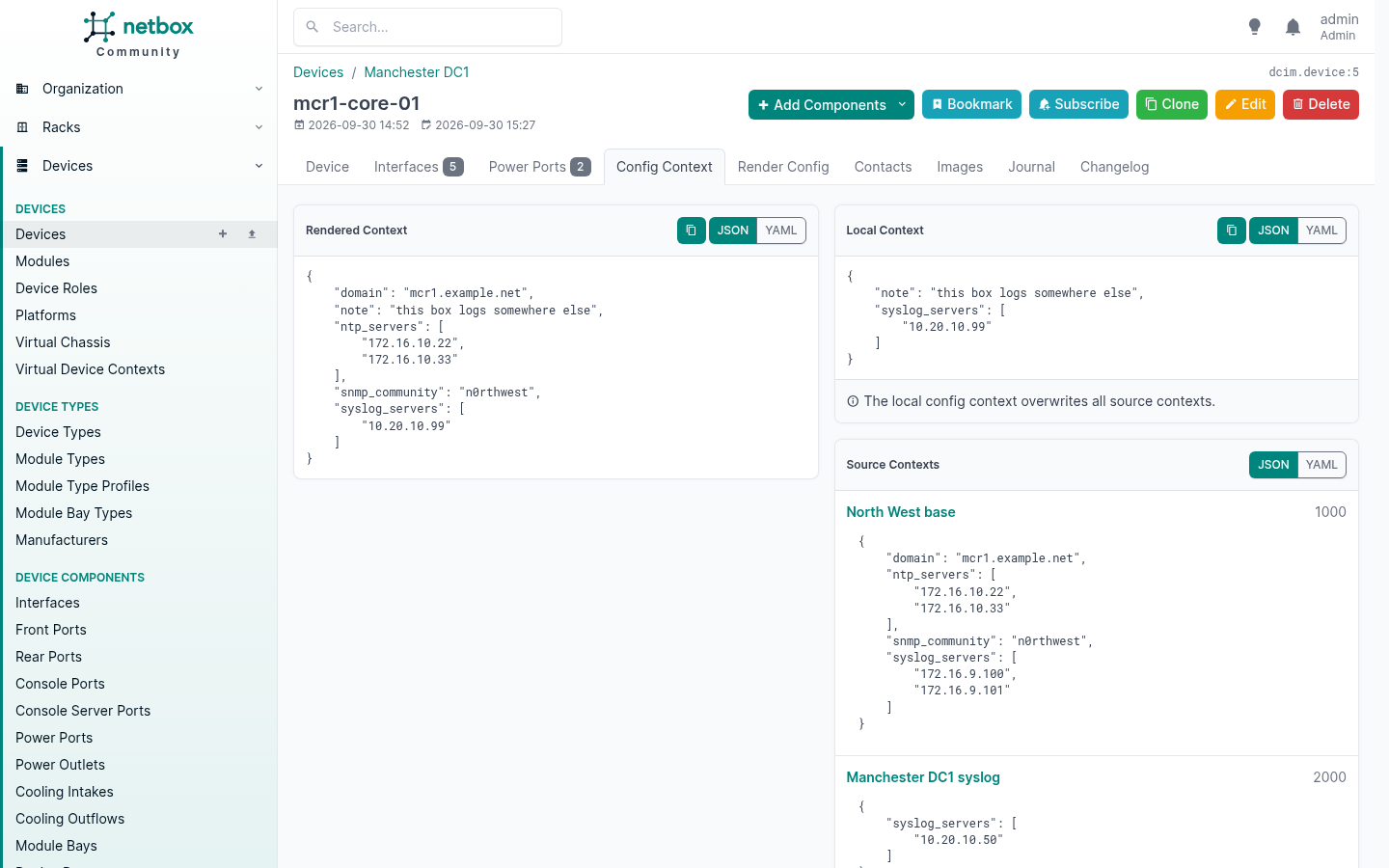
The local syslog server beat both the site override at weight 2000 and the region at weight 1000. Everything it said nothing about still inherited, so the domain, the NTP servers and the community came through untouched, and the new key was simply added.
That is the escape hatch for the one box that is genuinely different, and the panel tells you plainly that it overwrites all source contexts. If you find yourself using it on many devices rather than one, you have found a characteristic those devices share and you wanted a context scoped to it.
Three traps
An unscoped context is global. Create one and forget to assign it to anything, and it applies to every device and virtual machine you have. That is documented behaviour and occasionally what you want. It is also silent.
Keys cannot have hyphens if you want to reach them simply. Context data is JSON so ntp-servers is perfectly legal, but Jinja variable names are not JSON keys. {{ ntp-servers }} is parsed as a subtraction and raises UndefinedError: 'ntp' is undefined. Write {{ ntp_servers }} against hyphenated data and you get an empty string, HTTP 200, and no warning anywhere. Use underscores in the keys and the obvious template works.
A profile can stop the typos. A config context profile groups related contexts and enforces a JSON schema on their data at save time. I gave one a schema requiring syslog_servers as an array of IPv4 strings, then made the two mistakes people actually make:
{"syslog-server": ["10.1.1.1"]}          singular, by accident
  400  Data does not conform to profile schema:
       'syslog-servers' is a required property

{"syslog_servers": [...], "syslog_port": 99999}
  400  Data does not conform to profile schema:
       99999 is greater than the maximum of 65535
Rejected where somebody made them, rather than four hundred devices later.
Rendering The Configuration
Context data plus a Jinja template gives you a configuration file. The device is in scope as device, its merged context is in scope as ordinary variables, and you can walk its components.
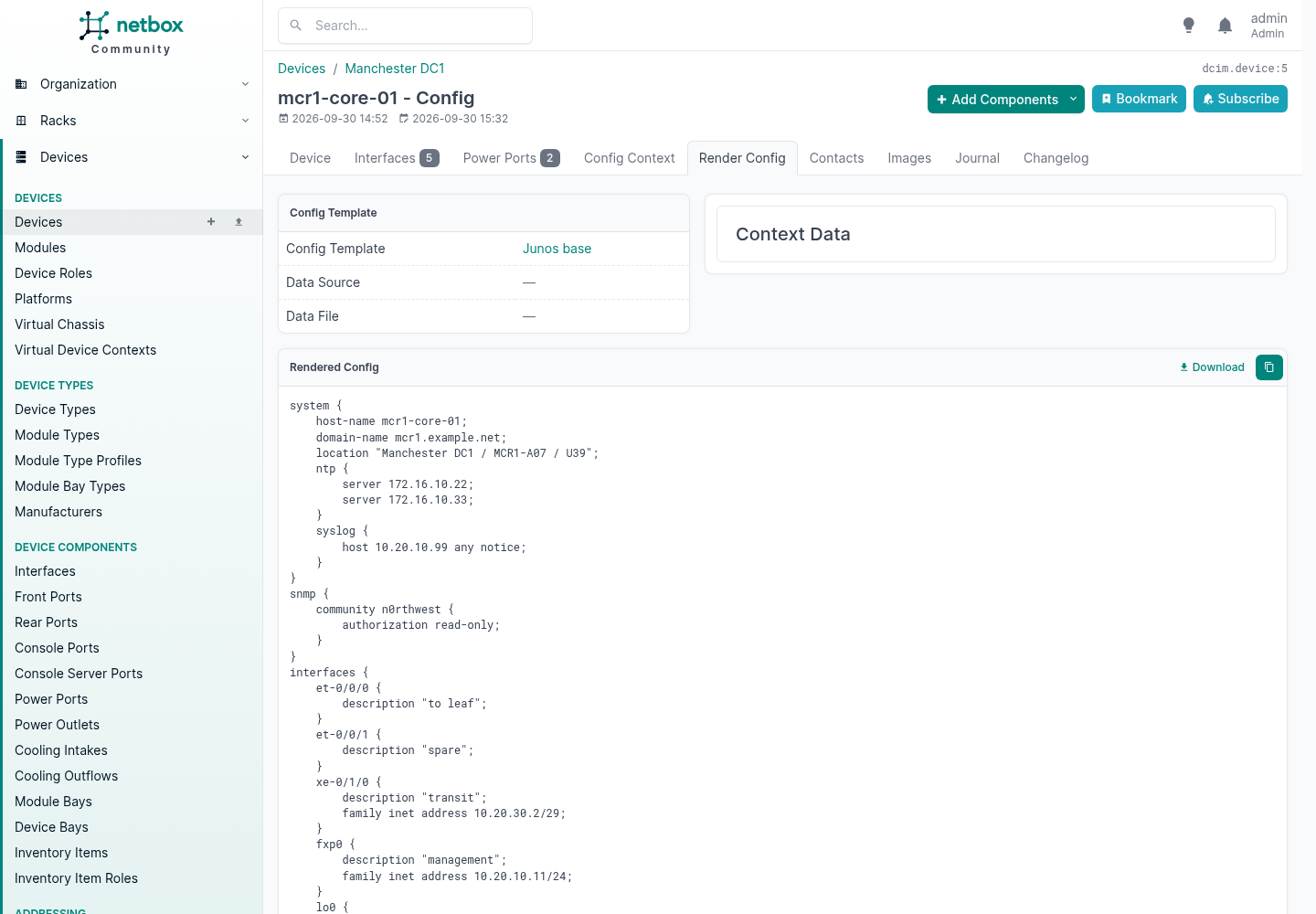
Everything on that page came from somewhere different, and that is the point:
| Line | Where it came from |
|---|---|
host-name mcr1-core-01 | the device |
domain-name mcr1.example.net | the regional config context |
location "Manchester DC1 / MCR1-A07 / U39" | the site, the rack and the position in it |
server 172.16.10.22 | the regional context, weight 1000 |
host 10.20.10.99 any notice | the device’s own local context, beating both the site and the region |
family inet address 10.20.10.11/24 | the address on that interface, with its mask as typed |
The template is resolved device, then role, then platform, and the request fails if none of the three has one. So you assign a template to a platform once, and every device running that software renders from it unless its role or the device itself says otherwise. That is what a platform is for: the operating system or vendor software family, not the hardware.
NetBox renders. It does not push. Getting the output onto the box is your automation’s job, and the day a template bug would otherwise have reconfigured four hundred devices, you will be glad those are two different systems.
Plugins
A plugin is a Django application installed alongside NetBox. It can add models, add pages, extend both APIs, inject content into existing templates, add navigation, add background job queues and load further Django apps. There is very little it cannot do, because underneath it is just Django.
Installing one is four commands and a restart:
source /opt/netbox/venv/bin/activate
pip install netbox-topology-views netbox-qrcode
# add the package names to PLUGINS in configuration.py, then
python3 manage.py migrate
python3 manage.py collectstatic --no-input
sudo systemctl restart netbox netbox-rq
On the container stack the same packages go in plugin_requirements.txt and you rebuild the image. Either way, pin the versions and check the compatibility matrix first, because a plugin that has not caught up with a NetBox release will refuse to start the whole application rather than disabling itself.
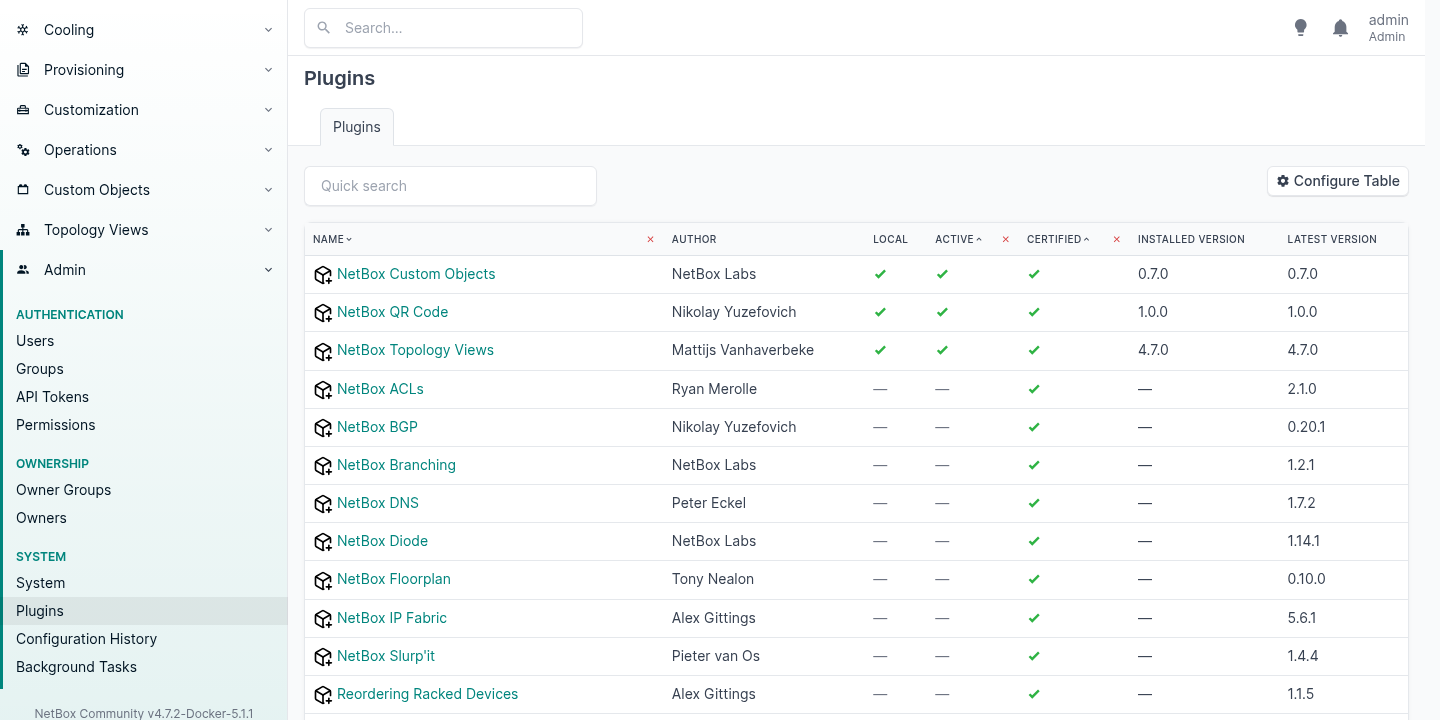
The published catalogue lists 31. These are the ones worth knowing about, with the licence each one actually ships under:
| Plugin | What it does | Licence |
|---|---|---|
| DNS | Zones, records and name servers as a source of truth | MIT |
| BGP | Sessions, communities and routing policies | Apache 2.0 |
| Topology Views | Graphical topology maps built from your cables | Apache 2.0 |
| Floorplan | Graphical site and location maps | LGPL 3.0 |
| QR Code | Codes on racks, devices and cables, for asset labels | Apache 2.0 |
| ACLs | Access lists and rules | Apache 2.0 |
| Prometheus SD | Serves Prometheus its host list straight from NetBox | MIT |
| Documents | Documents attached to circuits and devices | Apache 2.0 |
| Lifecycle | Hardware end of life, licences and contracts | Apache 2.0 |
| Contract | Contracts and invoices | MIT |
| Reorder Rack | Drag and drop rack units | Apache 2.0 |
| Branching | Isolated, mergeable branches of your data | NetBox Limited Use |
| Custom Objects | New object types, defined in the UI | NetBox Limited Use |
Prometheus SD is the honest shape of the whole idea. NetBox knows what exists, so let NetBox tell the monitoring system, and stop maintaining a second list of hosts that drifts.
One thing to know before you build on the last two rows. NetBox itself is Apache 2.0 and has been since DigitalOcean released it in 2016, and the project is stewarded today by NetBox Labs alongside a team of volunteer maintainers.21 NetBox Branching and NetBox Custom Objects are not: they ship under the NetBox Limited Use License 1.0, which grants use “only as part of a NetBox installation obtained from NetBox Labs or a NetBox distributor authorized by NetBox Labs, and only for your own internal use”, and which does not grant the right to use the software “to provide a managed service or software products that includes, integrates with, or extends NetBox in a way that competes with any product or service of NetBox Labs”. If you installed NetBox Community from GitHub and you run it on behalf of customers, read the terms yourself before you put a schema behind them.10 NetBox’s own installation guide recommends both plugins without mentioning it.11
Custom Fields
A custom field adds an attribute to an existing model. Values are stored as JSON alongside each object, so there is no migration and no restart, and there are thirteen types including object and multi-object references to other NetBox records.
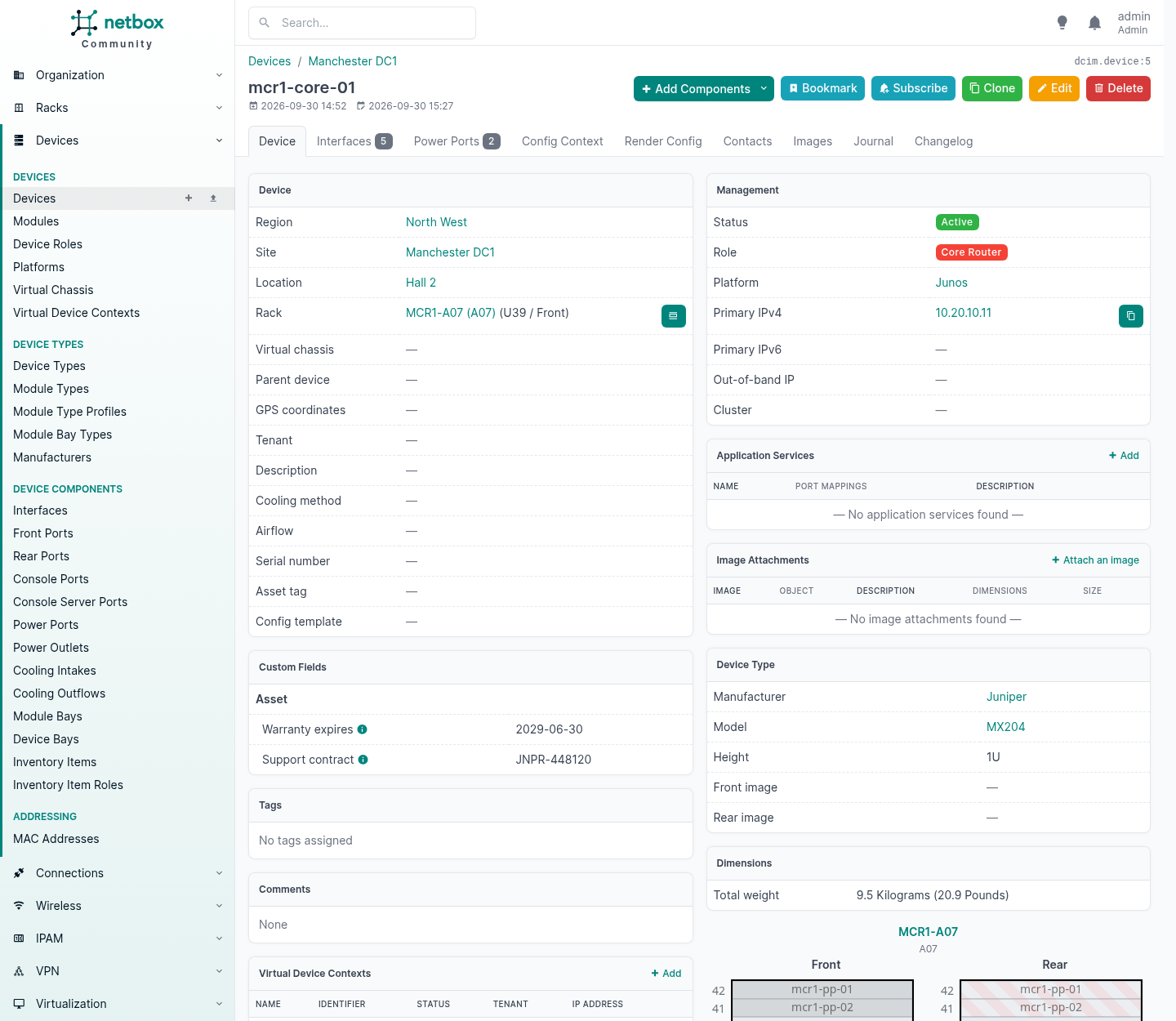
Two fields there, grouped under an “Asset” heading that I chose. Note the Dimensions panel to the right of them: 9.5 kg, which nobody typed on this device. It came from the device type.
Custom fields are validated, and it is worth knowing that they are, because it is a real difference from the route below. I gave the contract field a regular expression and the API enforced it:
PATCH {"custom_fields": {"support_contract": "nonsense"}}
  {"__all__": ["Invalid value for custom field 'support_contract':
                Value must match regex '^[A-Z]{2,4}-[0-9]{6}$'"]}
Two things changed in 4.7 that matter at scale. Creating a field with a default value, or deleting a field, has to rewrite the stored data of every object it applies to, so on a large table that work is handed to a background job and the field reports “provisioning” or “deleting” while it runs. A field is live only while active: during either operation it does not appear on objects, in forms, in filters or in either API. That needs a worker running, or it sits in that state indefinitely.
Use a custom field when you are adding a fact about the thing itself. Use a config context when the value should cascade. Use the next section when the thing you need does not exist.
Custom Select Menus, And Overriding What Ships
Two different mechanisms live under this heading and they solve different problems. One is for your own fields. The other rewrites NetBox’s.
A choice set, for your own select field
A custom field of type “selection” draws its options from a choice set, which is an object you manage in the UI like anything else. So “support tier” becomes a real dropdown rather than free text somebody will spell three ways.
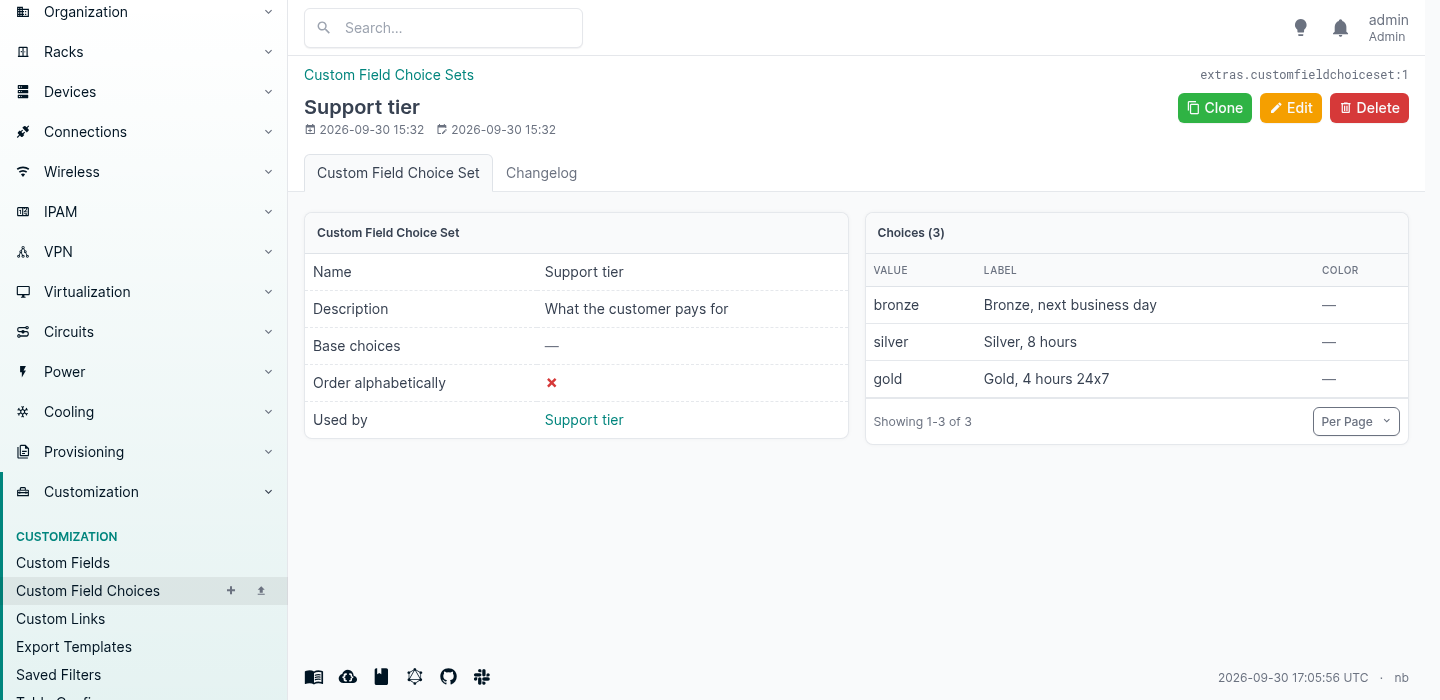
It is enforced, including through the API:
PATCH {"custom_fields": {"support_tier": "platinum"}}
  {"__all__": ["Invalid value for custom field 'support_tier':
                Invalid choice (platinum) for choice set Support tier."]}
Choice sets are shared, so one set can back the same field on several models, and changing the list in one place changes it everywhere.
FIELD_CHOICES, for NetBox’s own fields
This is the one people do not know exists. Several of NetBox’s built-in choice fields can be extended or replaced from configuration.py, including device status, site status, rack status, circuit status and plenty more.12
Append a plus sign to add to what ships. Leave it off to replace the list outright.
FIELD_CHOICES = {
    # add to what NetBox ships with
    'dcim.Device.status+': (
        ('burn-in', 'Burn-in', 'cyan'),
        {'value': 'awaiting-rma', 'label': 'Awaiting RMA', 'color': 'orange',
         'description': 'Faulty, with the vendor'},
    ),
    # replace the stock list outright
    'dcim.Site.status': (
        ('surveyed', 'Surveyed', 'purple'),
        ('building', 'Building out', 'orange'),
        ('active', 'Active', 'green'),
        ('closing', 'Closing', 'red'),
    ),
}
I put exactly that on this instance. Device status came back with the seven stock values and my two:
offline, active, planned, staged, failed, inventory, decommissioning,
burn-in, awaiting-rma
and site status came back with only mine, the stock list gone:
surveyed, building, active, closing
A choice can be a plain tuple of value, label and colour, or a dictionary which also takes a description shown as a subtitle in the form. And they behave like native values everywhere, because as far as the rest of NetBox is concerned they are native values:
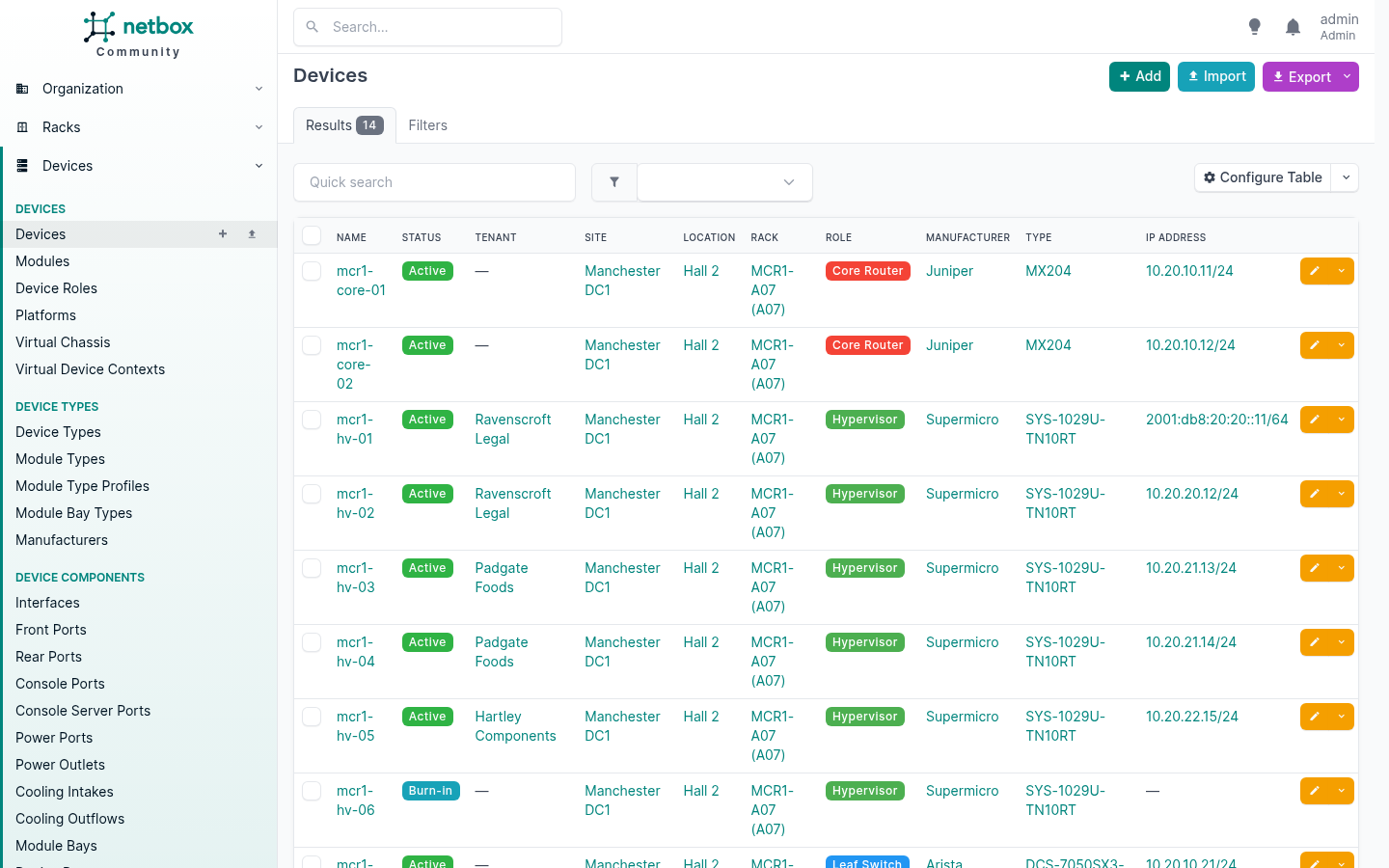
That badge is my status, in my colour, sorting and filtering like any other.
Three things worth knowing before you use it.
Replacing deletes the stock values from the menu, not from the database. Any object already holding one of them keeps it, but the value is no longer offered and will not be a valid choice next time somebody edits that object. If you replace a list, check nothing is sitting on a value you just removed.
It lives in the configuration file, so it needs a restart and it is not something a UI user can change. For a provider that is the right way round: the set of statuses your business recognises is a governance decision, not a Tuesday afternoon one.
Extend before you replace. The stock values are what every plugin, script and integration expects to see. Appending costs nothing. Replacing is a decision you own forever.
Custom Objects
Here is a real gap. NetBox models clusters, virtual machines and virtual disks. It does not model the datastore those disks actually live on, and for anybody running Proxmox or VMware that is the object that connects the storage you bought to the workload that uses it.
The Custom Objects plugin lets you define a new object type from the UI or the API, without writing any code. So:
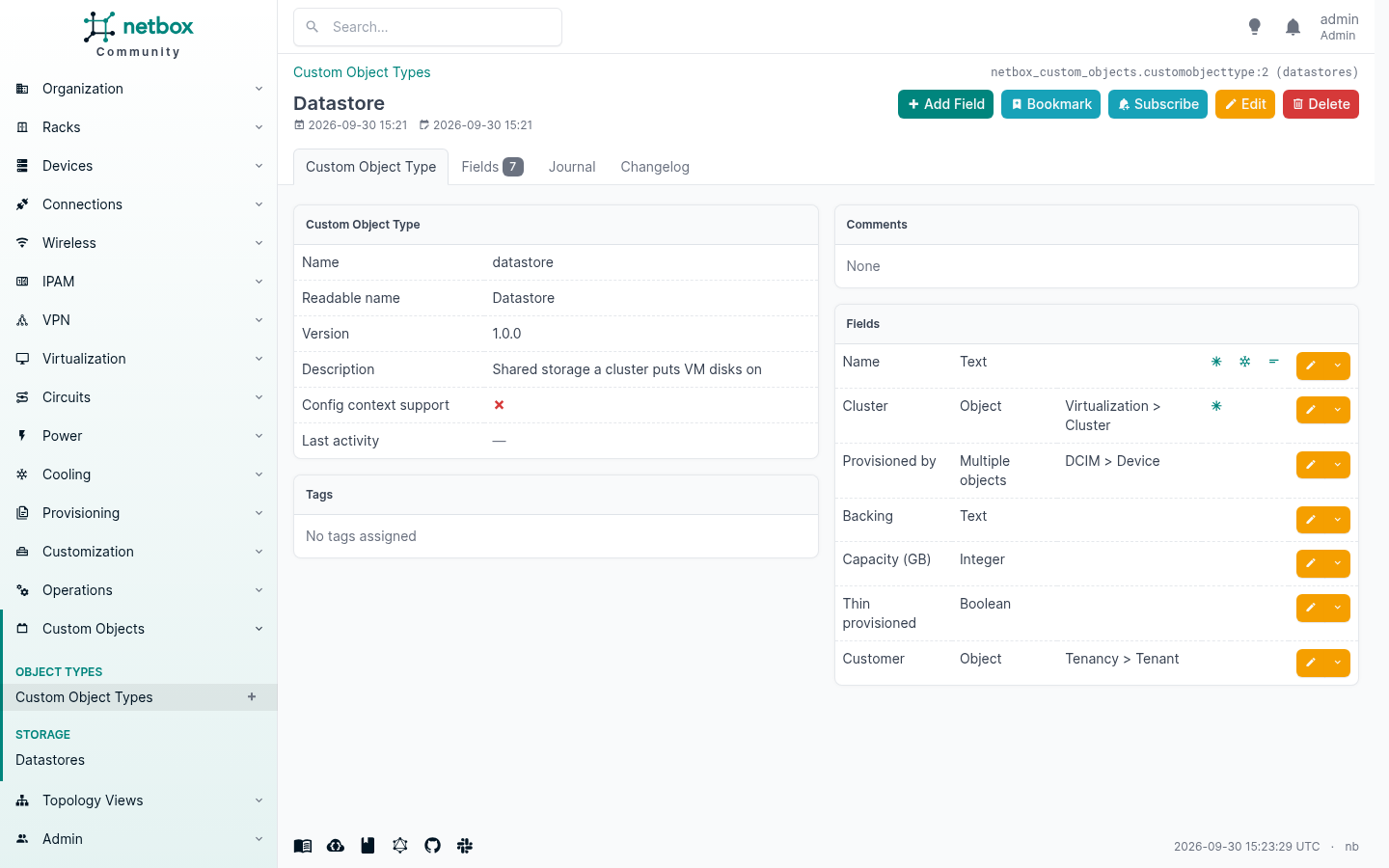
Seven fields, two of which are the whole point. cluster is a single object reference to a real NetBox cluster, set to protect so nobody can delete a cluster out from under its storage. provisioned_by is a multi-object reference to the devices that actually serve it.
That gives you a first-class object with its own navigation entry, list view, filters, import and export:
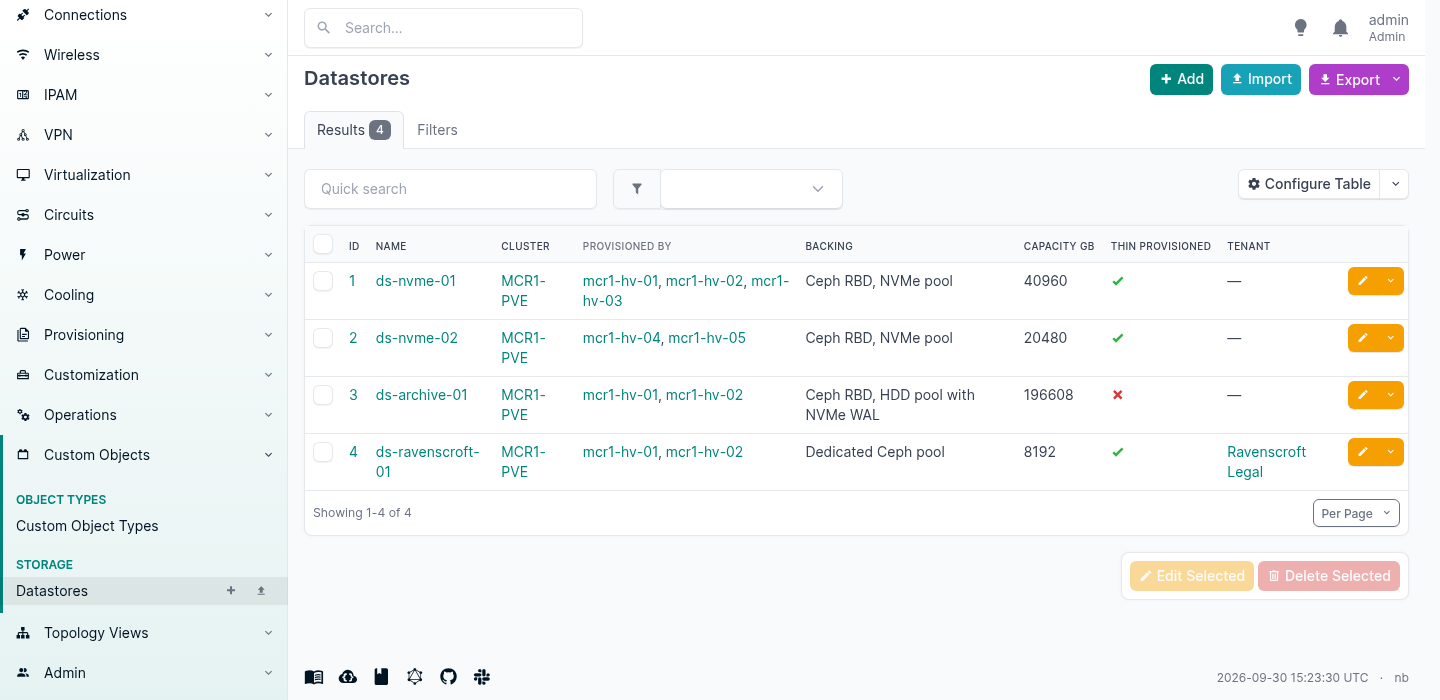
And because the references are real, the relationship shows up from the other end too. Open the cluster and the datastores are listed against it.
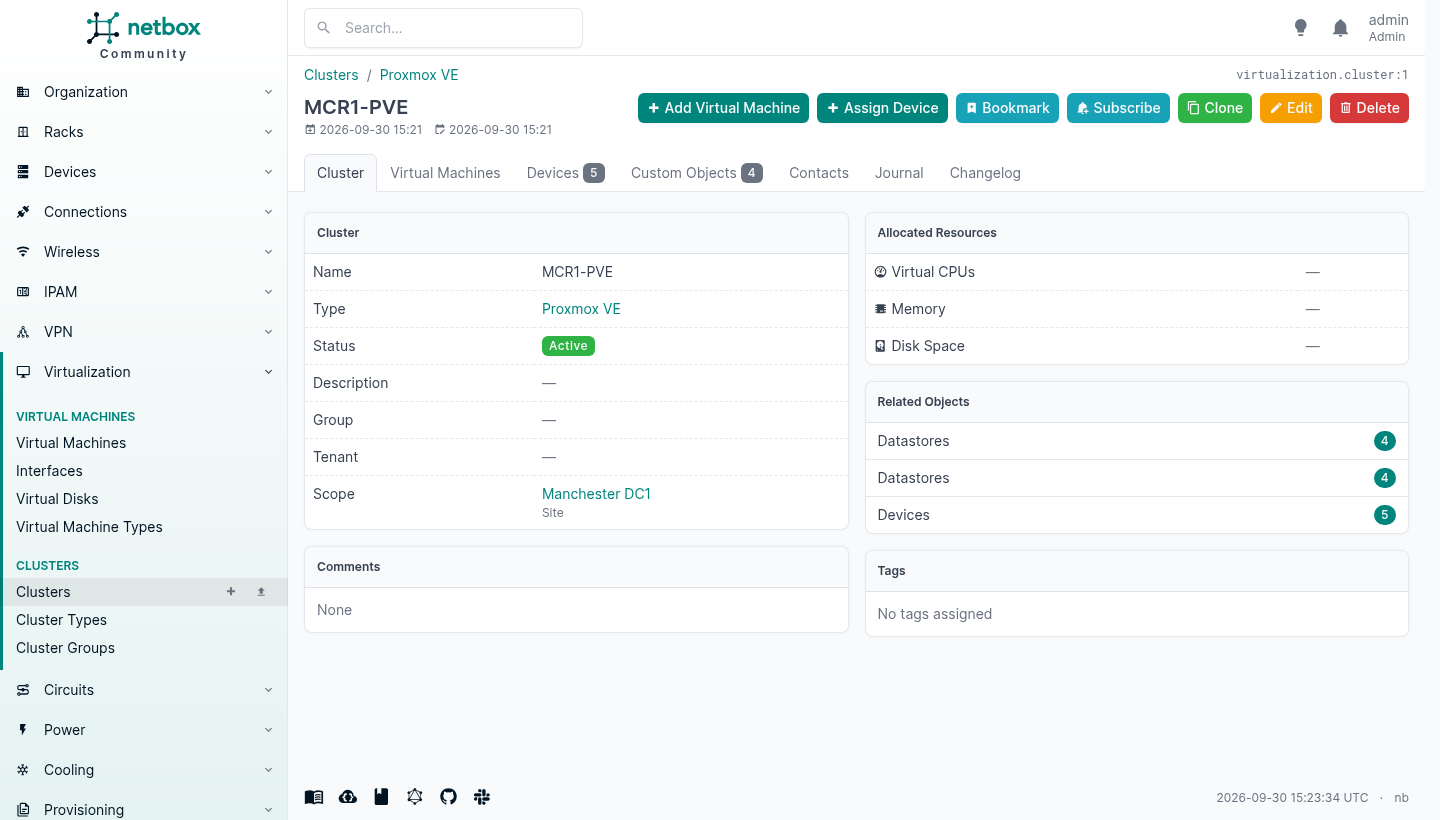
A custom object type inherits most of what makes a NetBox object a NetBox object: list and detail views, a navigation entry, REST endpoints, full-text search, change logging, journaling, tags, bookmarks, import and export, event rules and notifications. None of that had to be written.
It is also not a JSON blob pretending to be a table. The plugin issues real DDL, and what appears in PostgreSQL is a real table with real constraints:
                    Table "public.custom_objects_2"
     Column      |   Type   | Nullable |     Default
-----------------+----------+----------+------------------
 id              | bigint   | not null | identity
 name            | varchar  |          |
 cluster_id      | bigint   |          |
 backing         | varchar  |          |
 capacity_gb     | bigint   |          |
 thin_provisioned| boolean  |          |
Indexes:
    "custom_objects_2_name_key" UNIQUE CONSTRAINT, btree (name)
Foreign-key constraints:
    ... FOREIGN KEY (cluster_id) REFERENCES virtualization_cluster(id) ON DELETE RESTRICT
The protect I asked for became ON DELETE RESTRICT, and it works: deleting that cluster comes back 409 naming what depends on it.
Two things to know before you rely on it
The validation is on the form, not on the API. This is the one that would catch an automation. I declared required, a regular expression and numeric bounds on the fields of a custom object type, and then wrote to them through the REST API:
| What I declared | What I sent | Result |
|---|---|---|
validation_regex | a value matching nothing | 201 Created |
required: true | the field omitted entirely | 201 Created |
validation_minimum: 1 | a negative number | 201 Created |
unique: true | a duplicate | 400, rejected |
on_delete_behavior: protect | delete the referenced object | 409, rejected |
The two that held are the two that became database constraints. The rest exist only on the web form, so a person typing is constrained and a nightly sync is not. Compare that with the core custom field further up, where the same regular expression was enforced through the API. Until that changes, put anything an invoice depends on behind a real constraint.
Deleting a type drops a table. Deleting a field drops a column. That is DDL from a web form, executed by whoever has the permission, and the documentation says as much.13 Restrict who can delete these.
When to write a real plugin instead
If the object matters, if automation writes to it, and if you would be upset to find rubbish in it, write the model yourself. A minimal NetBox plugin is a PluginConfig, a model, a serializer, a viewset, a table, a form, a few views and a URL map, and it comes to under two hundred lines of mostly declarations. Subclassing PrimaryModel gets you tags, custom fields, change logging, journaling, export templates and ownership for free, and every constraint you put on the model is enforced everywhere, because NetBox’s own serializer machinery runs it.
There is a cookiecutter template and a full plugin tutorial maintained by the community. Start from those rather than from a blank directory.
And it is whatever licence you choose, which nobody can change later.
Custom Validation, And Validation Classes
Everything above is about recording what is there. This is about refusing to record what should not be.
NetBox validates every object before it writes it, and you can add rules of your own on top. There are three mechanisms, they all live in configuration.py, and between them they cover almost anything a house standard needs.
One: plain rules, no code
A validator can be a plain mapping of field names to conditions. No Python, and it is portable between installs because it is just data.
CUSTOM_VALIDATORS = {
    'dcim.site': (
        {'description': {'required': True}},
    ),
    'dcim.device': (
        {'name': {'regex': r'^[a-z0-9]+-[a-z]+-([0-9]{2}|[a-z])$'}},
    ),
}
The available conditions are min, max, min_length, max_length, regex, required, prohibited, eq and neq. You can reach into a related object with a dotted path, so region.name on a site is fair game, and you can match on request.user.username although the documentation quite rightly tells you to use permissions for that instead.
Both of those rules fire immediately:
POST a site with no description
  {"__all__": ["Custom validation failed for description:
                ['This field must not be empty.']"]}

POST a device named "Server1"
  {"__all__": ["Custom validation failed for name: ['Enter a valid value.']"]}
That second one is a naming standard, enforced. Not written on a wiki page, not in somebody’s head, not a thing the new starter gets told off about in a review three weeks later. The database will not take it.
Two: a validator class, when the rule is a sentence
Plain rules check one field against a constant. Real house rules are usually conditional: this matters only when that. For those you subclass CustomValidator, override validate(), and call fail().
I put three in a module at /opt/netbox/netbox/house_rules.py:
from extras.validators import CustomValidator


class BillableKitNamesItsCustomer(CustomValidator):
    """Anything in a role we sell has to say whose it is."""
    BILLABLE_ROLES = {'hypervisor'}

    def validate(self, instance, request):
        role = getattr(instance, 'role', None)
        if role and role.slug in self.BILLABLE_ROLES and not instance.tenant:
            self.fail(
                f"A {role} is billable kit, so it must name the customer it belongs to.",
                field='tenant',
            )


class RackedDeviceNeedsAPosition(CustomValidator):
    """A device in a rack with no rack unit is a device nobody can find."""
    def validate(self, instance, request):
        if instance.rack and instance.position is None:
            if instance.device_type and instance.device_type.u_height:
                self.fail(
                    "A device in a rack needs a rack unit. Somebody has to find it.",
                    field='position',
                )
and wired them up by dotted path:
CUSTOM_VALIDATORS = {
    'dcim.device': (
        {'name': {'regex': r'^[a-z0-9]+-[a-z]+-([0-9]{2}|[a-z])$'}},
        'house_rules.BillableKitNamesItsCustomer',
        'house_rules.RackedDeviceNeedsAPosition',
    ),
    'ipam.prefix': (
        'house_rules.CustomerPrefixNeedsATenant',
    ),
}
Note that a model takes a tuple of validators, plain rules and classes mixed freely, and they all run. Even a single validator has to be passed as an iterable, which is an easy five minutes to lose.
Then the rules do what they say:
POST a hypervisor with no tenant
  {"tenant": ["A Hypervisor is billable kit, so it must name
              the customer it belongs to."]}

POST a device into a rack with no position
  {"position": ["A device in a rack needs a rack unit.
                Somebody has to find it."]}

POST a prefix with role "customer" and no tenant
  {"tenant": ["A customer prefix must be assigned to a tenant."]}

POST a leaf switch with no tenant
  accepted, because a leaf switch is not in BILLABLE_ROLES
Because fail() takes a field, the message lands on the right box in the form rather than at the top of the page, which is the difference between a rule people learn and a rule people resent.
That is also the answer to the gap in the custom objects section. The validation there existed only on the web form. A CustomValidator runs in the model layer, so it applies to the UI, the REST API, GraphQL mutations, bulk imports and anything a script does. There is one place to write the rule and no way round it.
Three: protection rules, for deletion
CUSTOM_VALIDATORS guards writes. PROTECTION_RULES guards deletes, and it takes exactly the same two forms.
PROTECTION_RULES = {
    'dcim.device': (
        {'status': {'eq': 'offline'}},
    ),
}
That says a device can only be deleted when it is offline. Which produces:
DELETE an active device
  {"detail": "Deletion is prevented by a protection rule:
              [\"Custom validation failed for status:
                ['Ensure this value is equal to offline.']\"]"}

set it to offline, then DELETE
  204 No Content
Two keystrokes of friction between somebody and a live device, and it is the cheapest insurance in the whole application. Make the decommissioning process the thing that unlocks the delete button.
The one that will catch you
Existing data is not checked until you next touch it. Adding a rule does not go back and validate what is already there. It sits quietly until somebody saves an object that breaks it, and then they get an error about a decision they had nothing to do with.
I watched it happen. mcr1-hv-06 was created before I wrote any of this, as a hypervisor with no tenant. It sat there perfectly happily. Then I edited its description:
PATCH {"description": "touching it to trigger revalidation"}
  {"tenant": ["A Hypervisor is billable kit, so it must name
              the customer it belongs to."]}
The edit had nothing to do with the tenant. The rule fired anyway, because validation runs on the whole object.
That is correct behaviour and it is also how a new rule turns into a support ticket. Before you turn one on, run a query for the objects that would fail it and fix them first. The API makes that easy: the rule is a filter, so ask for the devices with that role and no tenant, and you have your list.
Turn the rule on afterwards. Then it only ever catches new mistakes, which is what it is for.
Driving It From Ansible
A source of truth nothing reads will rot. The netbox.netbox collection is how most people stop that happening, and it works in both directions: NetBox tells Ansible what exists, and Ansible tells NetBox what it built.
It is at version 3.23.0, licensed GPL-3.0, and has been pulled from Galaxy over 13.4 million times. It carries 91 modules and one inventory plugin.14 Everything below was run against the same instance, from a container with nothing in it but ansible-core 2.21.4, pynetbox 7.8.0 and the collection.
The inventory is a query, not a file
This is the half that pays for itself on the first afternoon. nb_inventory builds your Ansible inventory out of NetBox directly:
plugin: netbox.netbox.nb_inventory
api_endpoint: http://netbox:8080
token: "{{ lookup('env', 'NETBOX_TOKEN') }}"
config_context: false
group_by:
  - sites
  - device_roles
  - tenants
  - racks
device_query_filters:
  - has_primary_ip: true
That produces this, with nobody maintaining a host list:
@sites_manchester-dc1:      @device_roles_hypervisor:
  |--mcr1-core-01             |--mcr1-hv-01
  |--mcr1-core-02             |--mcr1-hv-02
  |--mcr1-hv-01               |--mcr1-hv-03
  |--mcr1-hv-02               |--mcr1-hv-04
  ...                         |--mcr1-hv-05
@racks_MCR1-A07:            @tenants_ravenscroft-legal:
  |--mcr1-core-01             |--mcr1-hv-01
  |--mcr1-core-02             |--mcr1-hv-02
  ...                       @tenants_padgate-foods:
@device_roles_core-router:    |--mcr1-hv-03
  |--mcr1-core-01             |--mcr1-hv-04
  |--mcr1-core-02           @tenants_hartley-components:
                              |--mcr1-hv-05
Look at the right-hand column. Because tenancy is set on the devices, you get a group per customer for free, so --limit tenants_ravenscroft-legal runs a play against exactly one customer’s kit. Add a device in NetBox and it is in the group on the next run. Decommission one and it is gone. Nobody edits anything.
Each host arrives carrying what NetBox knows about it:
ansible_host     "2001:db8:20:20::11"
primary_ip4      "10.20.20.11"
primary_ip6      "2001:db8:20:20::11"
device_roles     ["hypervisor"]
sites            ["manchester-dc1"]
racks            ["MCR1-A07"]
tenants          ["ravenscroft-legal"]
device_types     ["sys-1029u-tn10rt"]
manufacturers    ["supermicro"]
status           {"label": "Active", "value": "active"}
Twenty-two keys in total, and one of them is worth noticing before it surprises you. ansible_host is the IPv6 address, because that device has a primary v6 set. I checked it against two others that only have v4 and they came back v4, so the rule is that the plugin prefers v6 where a primary v6 exists. Which is correct, and is also the sort of thing you would rather discover now than while wondering why a play is connecting over a path you had not thought about.
Writing back
The modules are the other direction, and the one worth having is IP allocation, because NetBox knows what is free and your playbook does not.
- name: Rack the device
  netbox.netbox.netbox_device:
    netbox_url: "{{ nb_url }}"
    netbox_token: "{{ nb_token }}"
    data:
      name: mcr1-hv-07
      device_type: SYS-1029U-TN10RT
      device_role: Hypervisor
      site: Manchester DC1
      rack: MCR1-A07
      position: 14
      face: Front
      tenant: Hartley Components
    state: present

- name: Let NetBox pick the next free address out of the customer prefix
  netbox.netbox.netbox_ip_address:
    netbox_url: "{{ nb_url }}"
    netbox_token: "{{ nb_token }}"
    data:
      prefix: 10.20.22.0/24
      tenant: Hartley Components
      assigned_object:
        device: mcr1-hv-07
        name: eno1
    state: new
Note what is not in there. No IP address. You name the prefix and NetBox hands back the next free one:
TASK [Let NetBox pick the next free address out of the customer prefix] ****
changed: [localhost]

"device   : mcr1-hv-07  (created)"
"interface: eno1  (created)"
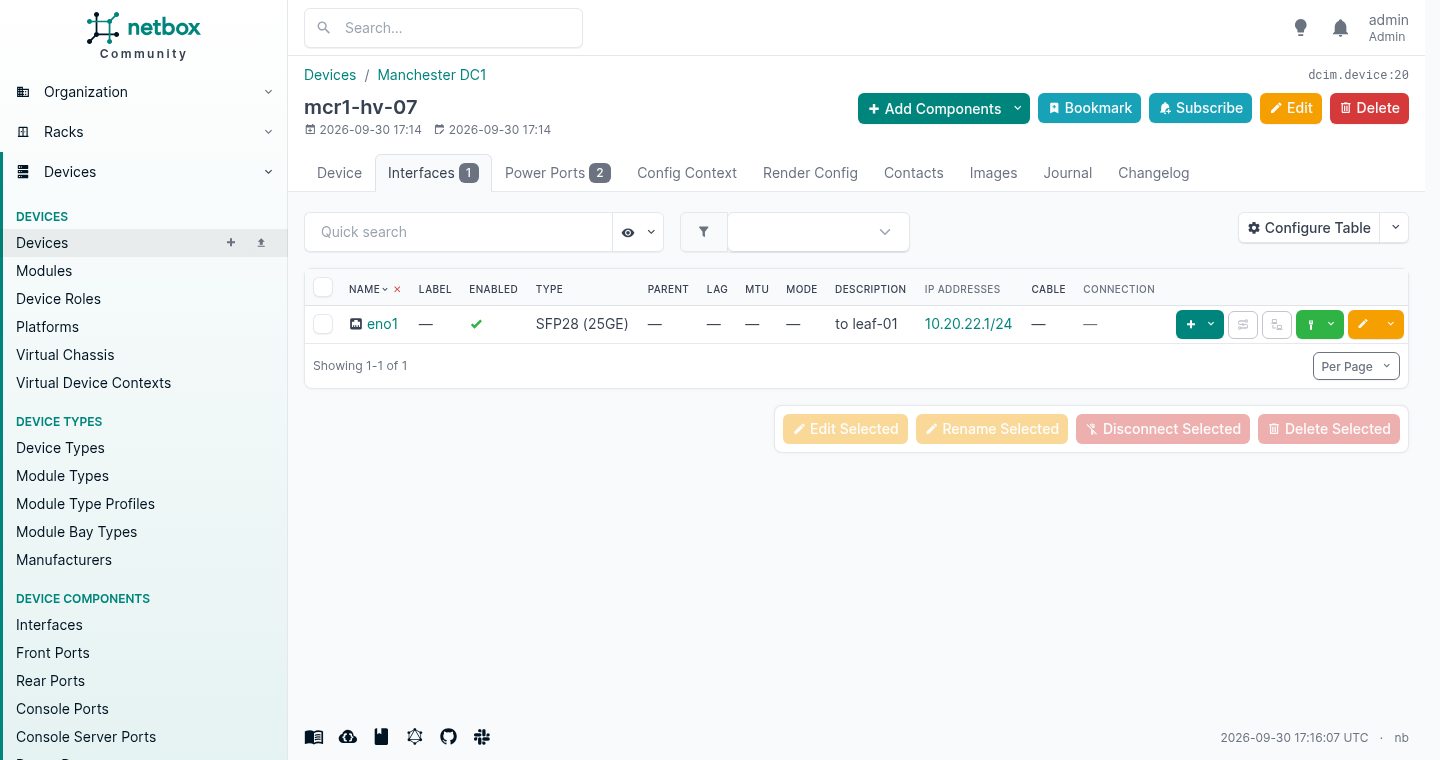
"address  : 10.20.22.1/24  (allocated)"
And it is there in the UI a second later, cabled to nothing yet but racked, tenanted and addressed:
The trap in that playbook
Run it a second time without changing a line and this happens:
"device   : mcr1-hv-07  (already correct)"
"interface: eno1  (already correct)"
"address  : 10.20.22.2/24  (allocated)"
The device and the interface are idempotent. The address is not, and it is not a bug. state: present means “make it look like this”. state: new means “give me a new one”, every single time, and that is exactly what it did: two addresses on one interface after two runs.
That is fine when you are genuinely provisioning something new, and it will quietly eat a prefix if you put it in a job that runs nightly. Allocate once and record the result, or use state: present with the address you already hold. The module is doing what you asked. The question is whether you asked for what you meant.
It is not only Ansible
The collection gets the attention because Ansible is where most network teams already are, but the API is the product and plenty of things speak it.
| Thing | What it is | Licence |
|---|---|---|
pynetbox | The Python client the collection itself uses | Apache 2.0 |
terraform-provider-netbox | Manage NetBox objects as Terraform resources, actively maintained by e-breuninger | MPL 2.0 |
nornir_netbox | NetBox as a Nornir inventory, for people doing Python rather than YAML | Apache 2.0 |
| Prometheus SD | Serves Prometheus its scrape targets from NetBox | MIT |
go-netbox | A Go client, though it has not been touched since May 2025 | see repository |
| Diode | NetBox Labs’ own ingestion pipeline for pushing discovered data in | NetBox Limited Use |
The Terraform one is the interesting entry for anybody already managing infrastructure that way, because it lets a single plan create the cloud resource and the NetBox record that documents it, rather than leaving the second half to somebody’s memory.15
Diode carries the same licence as Branching and Custom Objects, so the same reading applies before you build on it.
What The Afternoon Actually Buys
Everything above took me a day on one machine, and most of that day was seeding data so the screens had something in them. The install is twenty minutes either way. The decisions are the part that matters and they are all made in the first hour: tenants before anything, device types before devices, the numbers on the types rather than on the kit.
What you get for that is not documentation. That is not a distinction anybody makes until they have had both: documentation is a thing you write and then stop maintaining. What you get is a database that refuses to hold a contradiction: it will not let you put two things in one rack unit, or a rack in a location that belongs to another site, or a device on a type that does not exist. Every one of those refusals is an argument you are not having in six months.
And it will tell you things nobody asked it. That cabinet is 28.6% full of kit and 90.7% full of power. Nobody set out to find that. It fell out of putting a wattage on a device type once, and it is the difference between racking the next order there and finding out the hard way.
The honest caveat is the same one every source of truth has. It is only worth what it costs you to keep it right, and the only version of this that survives a busy quarter is the one where something breaks visibly when the data is wrong. Wire your monitoring, your provisioning or your firewall rules to read from it, and a wrong entry stops being a documentation problem somebody will get to. It becomes an outage at half nine on a Tuesday, with a name on it. That sounds like a cost. It is the whole mechanism.
Nobody is going to thank you for it either. A correct record shows up as the migration that took a fortnight instead of a quarter, the audit that took an afternoon, the customer who got a straight answer on the phone. None of that appears on a report next to your name.
Do it anyway. The alternative is a business that cannot describe itself, and a business that cannot describe itself is not being run. It is being remembered, by fewer people every year.
NetBox, Introduction — “Today, the open source project is stewarded by NetBox Labs and a team of volunteer maintainers”, and the origin at DigitalOcean in 2015, open sourced June 2016. ↩︎ ↩︎ ↩︎ ↩︎ ↩︎ ↩︎
NetBox, LICENSE.txt — Apache License 2.0, copyright DigitalOcean, LLC. Origin and stewardship from the introduction. ↩︎ ↩︎
Nautobot v1.0.0 release notes — “a divergent fork of NetBox 2.10”, published 26th April 2021, and the list of what it added relative to NetBox 2.10. ↩︎ ↩︎
Network to Code, “Why Did Network to Code Fork NetBox?”, 25th February 2021 — the SLA and long-term support reasoning, the divergence of vision, and “the NetBox project team suggested that we should consider forking”. ↩︎
NetBox Labs was founded in 2023 as a spin-out from NS1 following its acquisition by IBM, co-founded by NetBox lead maintainer Jeremy Stretch, and announced a $20m Series A in April 2023: NetBox Labs, “Let’s Go: Announcing NetBox Labs” and the Series A announcement. ↩︎
NetBox Labs, NetBox Enterprise — the self-managed commercial edition, with “24/7 expert assistance from the NetBox Labs team”; NetBox Cloud is the hosted offering. Specific SLA terms are not published on that page. ↩︎
Star and fork counts, release dates and licences for both projects read from the GitHub API on 30th September 2026: netbox-community/netbox and nautobot/nautobot. Nautobot’s parallel 3.2.x and 2.4.x releases both dated 28th September 2026. ↩︎
netbox-community/netbox-docker — the community container stack, Apache 2.0. ↩︎
NetBox, Installation — the supported versions table, and the v4.7 release notes for the raised PostgreSQL and Redis minimums. Version and edition read from
netbox/release.yaml. ↩︎NetBox Limited Use License 1.0 — carried by netbox-custom-objects and, identically, by netbox-branching. Both quoted clauses are verbatim. ↩︎
NetBox, HTTP Server installation, “What’s Next?” — “Some of the most popular plugins include” NetBox Branching, NetBox Custom Objects, NetBox DNS and NetBox BGP, with no mention of licence terms. ↩︎
NetBox, Data Validation configuration —
FIELD_CHOICES, and the plus-sign suffix that extends rather than replaces: “To replace the available choices, specify the app, model, and field name separated by dots … To extend the available choices, append a plus sign”. ↩︎netboxlabs/netbox-custom-objects documentation — “Deleting a Custom Object Type drops an entire database table and should be done with caution.” ↩︎
netbox.netbox on Ansible Galaxy and netbox-community/ansible_modules — version 3.23.0, GPL-3.0, 91 modules plus the
nb_inventoryinventory plugin. Download count read from Galaxy on 30th September 2026. Everything shown was run with ansible-core 2.21.4 and pynetbox 7.8.0. ↩︎Licences, activity and star counts read from each project on 30th September 2026: pynetbox (Apache 2.0), terraform-provider-netbox (MPL 2.0, v6.0.0-rc.1 on the Terraform registry), nornir_netbox (Apache 2.0), netbox-plugin-prometheus-sd (MIT), go-netbox (last pushed 9th May 2025) and Diode, which carries the same NetBox Limited Use License 1.0 as Branching and Custom Objects. ↩︎