The Problem With Reaching Home Assistant From Outside
Home Assistant runs the house here: the lights, the heating, the aircon, the car charger, the alarms. The app on the phone is how all of that gets used away from home, and it is also how the house knows where the phones are, because the app reports location and sensors in the background.
So it has to work when nobody is home. The question is how.
The usual answer is to put Home Assistant on the internet with a hostname and a login page. That works. It also means anyone on the planet can reach the login page, try passwords against it, and probe whatever sits behind it. A login page is a password standing between the internet and your front door locks.
I did not want that. The requirements were short:
- No login page reachable by the public. Nothing answers unless the device is one of ours.
- The Home Assistant app has to keep working in the background, with nobody tapping through a login.
- Nothing extra running on the phones. No VPN agent.
- Cloudflare’s free plan. The tunnel is already there.
Those four knock out most of the usual options before you start.
What Each Option Actually Gives You
Home Assistant’s own documentation lists the ways in: Home Assistant Cloud, a VPN, a reverse proxy or port forwarding1. Cloudflare adds its own versions of the last two. Here is how they score against those four requirements, what can go wrong with each, and what each costs in battery.
| Option | Who can reach the login page | App works in the background | Extra on the phone | What it really costs | Risks | Battery cost | IPv4 and IPv6 |
|---|---|---|---|---|---|---|---|
| Port forward to Home Assistant | Everyone | Yes | Nothing | Free on the bill. Every scan and password guess runs on Home Assistant, and a DDoS lands on your home line | Login page open to every scanner. A hole in the router straight onto the LAN. A home line behind carrier-grade NAT has no port to forward2. App: works on Android and iPhone, it is only a URL | Normal | IPv4 needs a public address of your own, not carrier-grade NAT. IPv6 needs a firewall pinhole, and a phone on IPv4-only Wi-Fi cannot reach it |
| Cloudflare Tunnel, nothing else | Everyone | Yes | Nothing | Free. Cloudflare takes a DDoS, but every password guess still runs on Home Assistant | Login page open to every scanner and password list. One guessed password and an attacker has a machine on your LAN. App: works on Android and iPhone, it is only a URL | Normal | Both. Cloudflare answers on either3, and the house only dials out4 |
| Tunnel plus a Cloudflare Access login | Only after a login | No, background calls hit the login | Nothing | Free. Strangers stop at Cloudflare, no load on Home Assistant | Location and sensors stop reporting without anyone noticing. Only Home Assistant is published, behind the login. App: cannot send the service-token header Access needs5 | Normal | Both, same as the tunnel |
| Tunnel plus WARP private network | Nobody outside | Yes | WARP agent | Free. Nothing public to scan | Runs on UDP ports a hotel or office network can block6. Android allows one VPN at a time7. A route can put the whole LAN on every enrolled phone8. App: needs nothing, but WARP has Android and iPhone clients and none for a Wear OS watch9 | Higher, an always-on VPN | Both. The agent reaches Cloudflare on either6 |
| Home Assistant Cloud | Everyone with the URL | Yes | Nothing | £6.50 a month or £65 a year10. Password guesses still run on Home Assistant | Login page public. Somebody else’s company holds the way in: no way in when their service is down. One guessed password and an attacker has a machine on your LAN. App: works on Android and iPhone | Normal | At home either, it dials out to a Nabu Casa relay11. IPv6 for the phone is not documented |
| Port forward to nginx or Caddy with a client certificate | Only devices holding a certificate | Yes | A certificate and your own CA’s root | Free on the bill. A stranger costs a TLS handshake on the proxy, never a Home Assistant login, and a DDoS lands on your home line | A hole in the router onto the proxy, not Home Assistant. You run the CA, and a stale CRL locks every phone out. App: as the certificate row below | Normal | As the port forward. nginx needs telling to listen on IPv6, Caddy does it by default |
| Tunnel plus client certificate | Only devices holding a certificate | Yes | A certificate | Free. Strangers turned away at the edge, no load on Home Assistant | A lost phone gets in until revoked. Plain HTTPS on 443, blocked only where the web is. Only Home Assistant is published, and only to certificate holders. App: supported on Android; the iPhone app is not documented; Wear OS needs the PKCS12 file at setup12 | Normal | Both, same as the tunnel |
The tunnel also takes IPv4 against IPv6 off the table. Cloudflare answers the phone on whichever it has, and the house only ever dials out, so a home line behind carrier-grade NAT, or one with IPv6 and no public IPv4 at all, works the same as any other. A port forward needs a public IPv4 address of your own, or IPv6 at both ends. Why so many home lines still have neither is its own story, in We Never Ran Out of Addresses. We Ran Out of Effort..
The tunnel on its own fixes the router, not the exposure. cloudflared makes outbound-only connections, so there is no inbound port to forward13, but the hostname it publishes still serves the login page to anyone who asks for it.
Does Cloudflare Access fix it? For a browser, yes, and that is how the desktops in Zero Trust VDI Without the Cloud Bill use it. For the app it is the wrong shape. Access puts a person in front of a login page, and the app’s background traffic has no person. The usual workaround is a service token sent as a header, and the app cannot send one. Its web view gives no way to add headers to POST requests or WebSockets, which is how the app talks to Home Assistant, and the developer discussion lands on client certificates as “a better (more secure) alternative”5.
WARP would do it, and it was ruled out because it means an agent on every phone. A VPN costs more battery than a normal link, because it is a tunnel held open all day whether the app is talking or not. It runs over UDP on ports a hotel or office network can drop, which leaves you locked out exactly when you are away6. And Android runs one VPN at a time7, so WARP and a work VPN cannot both be up. Home Assistant Cloud is a good service and pays for development, but it is a subscription, and the URL still serves a login page to whoever finds it. It also hands the way into your house to somebody else’s company. Their service, their account, their price, their terms. That is a loss of sovereignty, and it is the trade every cloud offering asks you to make: convenience now, somebody else in control for good.
Cloudflare is no different in kind, and it would be dishonest to pretend otherwise. Every tunnel option in this table puts it in the path, and it terminates the TLS at its edge, which is how the WAF rule gets to read the certificate check at all. The difference is how much it holds. Here it holds the gate. Home Assistant, its data and its passwords stay in the house, and if Cloudflare goes away the house carries on running, which is the last row of the table under “Where It Falls Down”. If even that is more trust than you want to hand over, the nginx and Caddy version does the same check in your own house, with your own CA, and takes on the port forward and the CA chores in exchange.
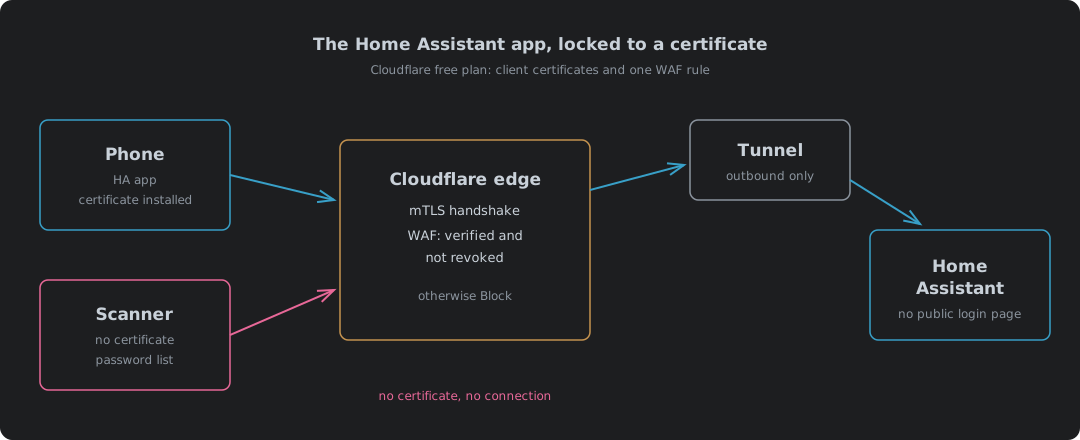
That leaves the client certificate. The phone proves what it is before Home Assistant sees a single byte.
What Being Open To The Internet Really Costs
Free on the bill is not the same as free. Anything that answers the internet pays for it in machine load. Every password guess against Home Assistant’s own login is a 12-round bcrypt check, and it runs one even when the username does not exist, so a stranger guessing costs exactly what you logging in does14. That load lands on the box that runs the house, around the clock, for as long as the scanners keep coming. And they do keep coming.
A port forward is worse again, because it puts your home address on the line. A DDoS aimed at it fills your broadband, and then the whole house is off the internet, not just Home Assistant. Behind the tunnel Cloudflare takes the flood, on every plan including Free15, and it has not thrown a customer off for the size of an attack since 201716. The certificate goes the last step. A stranger is turned away at the edge, and Home Assistant spends nowt on them.
Then there is the network Home Assistant sits on. It is not a web app on an island. It sits on the home LAN next to the cameras, the NAS and the laptops, and it holds the credentials for a good many of them. Get through its login and you have a machine inside the house, not just a dashboard. A port forward is a hole in the router pointing straight at that machine. WARP goes wrong the other way, by being too generous: a route can publish an entire private network to every enrolled phone, and narrowing it down is a separate policy you have to remember to write8. Lose a phone with that on it and the finder is on your LAN. The certificate publishes one hostname, to the devices that hold one, and nothing else on the network can be reached from outside at all.
mTLS On The Free Plan: Which Half Is Free
A fair bit of the advice online says mTLS on Cloudflare needs Enterprise. It does not. Cloudflare sells mTLS twice, and only one of them needs Enterprise.
| Client certificates plus WAF rule | Cloudflare Access mTLS | |
|---|---|---|
| Plan | Free, Pro, Business, Enterprise | Zero Trust Enterprise only |
| Certificate authority | Cloudflare-managed (bring your own is Enterprise) | Bring your own only |
| Certificates included | 100 active per zone | Not applicable |
| Enforced by | A WAF custom rule you write | An Access policy |
| Revocation | Built in, checked by the rule | Your own CRL and a Worker |
The first column is the one we want. Bringing your own CA is Enterprise on Cloudflare. Off Cloudflare it costs nothing, and client certificates from step-ca covers it. Cloudflare’s own comparison puts it plainly: the Application Security offering includes 100 client certificates per zone for free, while Access mTLS is a Zero Trust Enterprise feature17. The free, Pro and Business plans get 100 active certificates per zone, and revoking one frees its slot straight away18. Two phones use two of them.
The free plan also gets five WAF custom rules19. This needs one.
How The Check Works
Cloudflare does the work at its edge. When mTLS is switched on for a hostname, the TLS handshake asks the client for a certificate20. That alone blocks nothing. A client that sends no certificate still connects. It simply arrives with the verification field set to false.
The blocking is the WAF rule. Cloudflare exposes the result of the certificate check as fields in its rules language21:
(http.host eq "ha.example.com"
  and (not cf.tls_client_auth.cert_verified
       or cf.tls_client_auth.cert_revoked))
Action: Block
The second line is there for a reason. A certificate that has been revoked still verifies, because cert_revoked being true means cert_verified is true as well22. Check only the first field and a revoked certificate walks straight in. Revoking a lost phone’s certificate means nowt unless the rule asks.
Credit where it is due: the people in the Home Assistant Android thread worked this rule out and posted it5. Good write-up, and it saved a load of digging.
The Home Assistant Side
Home Assistant needs to be told it is behind a proxy, and it is not optional. Requests from a reverse proxy are blocked by design until Home Assistant is told to trust it23. The tunnel’s cloudflared connector counts as one.
Since 2026.8 these settings live in the UI, under Settings → System → Network → HTTP server, not in configuration.yaml23. Saving them restarts Home Assistant, and an administrator then has five minutes to confirm the new settings before they roll back on their own. That is a safety net worth knowing about before you lock yourself out.
| Setting | Value | Why |
|---|---|---|
| Trust X-Forwarded-For | On | Without it, proxied requests are refused |
| Trusted proxies | The cloudflared machine’s address only | Only that box may claim to be forwarding for someone |
| Enable IP banning | On, a handful of attempts | Bans land on the real client address, not Cloudflare’s |
| Home Assistant URL, Internet | https://ha.example.com | The app picks this up as its external URL |
The trusted proxies entry is narrow on purpose. Trust a whole subnet and any device in it can forge the client address, which makes the ban list worthless.
Then the app. The Companion app’s documentation covers this setup by name. If Home Assistant sits behind a reverse proxy doing TLS client authentication, the app asks for a certificate, and it wants it installed as a “VPN & app user certificate”12. On a phone with no certificate you get an error or a blank screen, which is the correct result for a phone that should not be in.
Set the app’s connection security level to Most secure. The plain http:// local address is then only used on the home Wi-Fi, and everywhere else the app uses the HTTPS hostname or refuses to connect at all24. It needs location permission set to “Allow all the time” on Android, which the app needs anyway for background location.
Building It, Step By Step
| Step | Where | What |
|---|---|---|
| 1 | Cloudflare tunnel | Add a public hostname, ha.example.com, pointing at Home Assistant on the LAN |
| 2 | SSL/TLS → Client Certificates | Create one certificate per phone. Copy the certificate and key, they are not shown again18 |
| 3 | Client Certificates → Hosts | Enable mTLS for ha |
| 4 | Security → WAF → Custom rules | Add the block rule above |
| 5 | SSL/TLS → Edge Certificates | Always Use HTTPS on, minimum TLS 1.2 |
| 6 | Home Assistant → Network | Trusted proxy, IP banning, external URL, then confirm within five minutes |
| 7 | A Linux box | Build a PKCS12 file per phone |
| 8 | Each phone | Install it as a VPN and app user certificate, then set the app to Most secure |
| 9 | Test | Mobile data, Wi-Fi off. App connects. Browser without the certificate gets blocked |
One certificate per phone, not one shared. When a phone is lost, you revoke that phone and the other carries on.
The phone wants the certificate and key in one PKCS12 file. Cloudflare hands you PEM, so join them:
openssl pkcs12 -export -in phone1.pem -inkey phone1.key \
  -name "ha-phone1" -out phone1.p12
This is where people get stuck. Android is fussy about the encryption inside the file, and the Home Assistant documentation says to try the current default first and fall back to a legacy container with OpenSSL’s -legacy flag only if it is refused25. The same advice turns up in the community threads where a file that installed fine on Apple kit was rejected by Android5.
The menu path to install it moves around between phone makers and Android versions. Google’s own page for the Pixel is a starting point26. Whatever the menus say, it is the user credential store you want, not the CA store.
Where It Falls Down
Nothing here is free of rough edges, so here they are.
| Case | What happens | What to do |
|---|---|---|
| Phone lost or sold | Its certificate still works until revoked | Revoke it in Client Certificates. The rule checks revocation |
| Wear OS watch | Cannot use the phone’s installed certificate | Supply the PKCS12 file during the watch’s own setup12 |
| iPhone | The Companion docs mark this section Android only | Test before relying on it |
| Laptop browser away from home | Blocked, no certificate | Install a certificate in the browser, or accept it |
| Cloudflare down | No remote access at all | The house still runs locally. That is the point of running it locally |
The browser one is a feature, not a fault. Anything without a certificate is a stranger, and that includes my own laptop until I give it one.
A Key, Not A Password
A password is something you know, and anything you know can be guessed, phished, reused or leaked from somebody else’s breach. Put a password page on the internet and you have entered a numbers game against everyone with a botnet and a wordlist. You might win it for years. You only have to lose once.
A certificate is something the device holds. Nobody guesses it. Nobody tries it a million times, because the request is dropped at the edge before there is anything to try it against. The login page is still there and it still matters, but it is now the second lock, not the only one.
What sits behind that page is not a web app. It is the locks, the heating, the car charger and the cameras. Treat it like the front door, because that is what it is.
The bit I keep coming back to is that none of this costs anything. Cloudflare gives away the certificates and the rule on the free plan. Home Assistant documents the app side in its own Companion docs. The only thing it costs is an evening reading the manuals properly, and as such the default of a password page facing the whole internet is a choice people make by not reading them.
Home Assistant — Remote access — Home Assistant Cloud, VPN, reverse proxy and port forwarding as the ways in. ↩︎
RFC 6598 — IANA-Reserved IPv4 Prefix for Shared Address Space — the 100.64.0.0/10 range for Carrier-Grade NAT, where many customers share one public address and none of them gets an inbound port. ↩︎
Cloudflare — IPv6 compatibility — on by default on every plan; Cloudflare “auto generates AAAA DNS records to allow IPv6 clients to connect” to proxied hostnames. ↩︎
Cloudflare — Tunnel run parameters, edge-ip-version —
cloudflaredconnects out to Cloudflare over IPv4 by default;6orautomakes it use IPv6. ↩︎home-assistant/android PR #3593 — Add custom header support — the web view cannot add headers to POST or WebSocket requests; client certificates suggested instead of service tokens; users reporting certificate format problems on Android. ↩︎ ↩︎ ↩︎ ↩︎
Cloudflare — Cloudflare One client firewall requirements — WireGuard on UDP 2408 with fallbacks on UDP 500, 1701 and 4500; MASQUE on UDP 443. ↩︎ ↩︎ ↩︎
Android Developers — VpnService — “There can be only one VPN connection running at the same time.” ↩︎ ↩︎
Cloudflare — Connect an IP/CIDR — “You can connect an entire private network, a subnet, or an application defined by a static IP”; Gateway network policies to filter that traffic are a separate, recommended step. ↩︎ ↩︎
Cloudflare — Download Cloudflare One Client — clients for Windows, macOS, Linux, iOS 15+, Android 5.0+ and ChromeOS; no Wear OS client listed. ↩︎
Nabu Casa — Pricing — Home Assistant Cloud at £6.50 a month or £65.00 a year, tax not included. ↩︎
NabuCasa/hass-nabucasa — remote.py — Home Assistant registers with Nabu Casa, is handed a relay
server, and connects out to it. ↩︎Home Assistant Companion — Getting Started, TLS client authentication — install as a “VPN & app user certificate”; Wear OS needs the certificate supplied as PKCS12 during onboarding. ↩︎ ↩︎ ↩︎
Cloudflare — Cloudflare Tunnel —
cloudflaredcreates outbound-only connections, so there is no inbound listener on the origin. ↩︎Home Assistant core — auth/providers/homeassistant.py — passwords hashed with bcrypt at 12 rounds; an unknown username still runs a dummy
checkpw“to make timing the same as if user was found”. ↩︎Cloudflare — DDoS Protection — automatic DDoS detection and mitigation, “Available on all plans”. ↩︎
Cloudflare blog — Unmetered Mitigation — “Cloudflare will no longer terminate customers, regardless of the size of the DDoS attacks they receive, regardless of the plan level they use.” ↩︎
Cloudflare — Use mTLS with Cloudflare protected resources — “100 Client Certificates per Zone are included for free”; Access mTLS is a “Zero Trust Enterprise only feature”. ↩︎
Cloudflare — Create a client certificate — 100 active certificates per zone on Free, Pro and Business; revoking frees the slot; certificate and key are not shown again after creation. ↩︎ ↩︎
Cloudflare — WAF custom rules — availability table: five custom rules on the Free plan. ↩︎
Cloudflare — Enable mTLS — enabling mTLS per hostname, then enforcing it with a WAF custom rule. ↩︎
Cloudflare — Client certificate variables — the mTLS fields available to WAF custom rules. ↩︎
Cloudflare — cf.tls_client_auth.cert_revoked — “When true, the cf.tls_client_auth.cert_verified field is also true.” ↩︎
Home Assistant — HTTP integration — reverse proxies, trusted proxies and IP banning; settings moved to the UI in 2026.8 and revert unless confirmed within five minutes. ↩︎ ↩︎
Home Assistant Companion — Connection security level — Most secure only uses an unencrypted URL on the home network; needs location “Allow all the time” on Android. ↩︎
Home Assistant Companion — Networking, TLS Client Authentication — try the current PKCS12 default first, the OpenSSL
-legacycontainer only if that fails. ↩︎Google — Pixel Phone Help, Add & remove certificates — installing a certificate manually on a Pixel. ↩︎