Same Lock, Your Own Door
The Home Assistant App Over Cloudflare, Locked To A Certificate puts the lock at Cloudflare’s edge. The phone holds a certificate, Cloudflare checks it, and anything without one never reaches the house. It works, it is free, and it means Cloudflare holds the gate and reads the traffic as it passes.
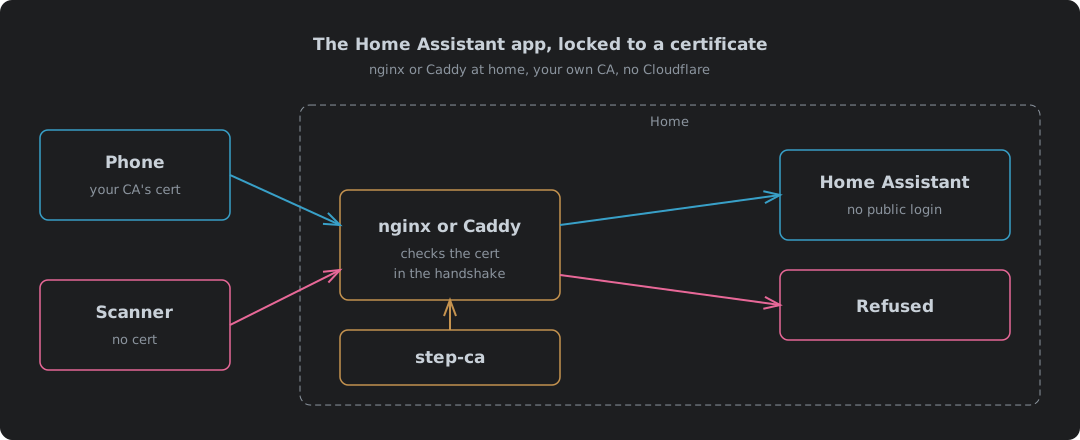
This is the same lock with the door in your own house. nginx or Caddy checks the certificate. Your own certificate authority issues it. Nobody else is in the path. The login page is still invisible to anything without a certificate, so what changes is not whether strangers get in. It is who does the work, and who carries the risk when it goes wrong.
Everything here was built and tested: nginx 1.30.5 and Caddy 2.11.7 in Podman, certificates from step-ca 0.30.2, each proxy hit with no certificate, a good certificate, a revoked one and a WebSocket upgrade, over IPv4 and IPv6. The backend in the test was a small stand-in that echoes back the headers it receives, so the results show exactly what Home Assistant would be handed.
What Changes When Cloudflare Leaves
| Cloudflare version | nginx or Caddy at home | |
|---|---|---|
| Who checks the certificate | Cloudflare’s edge, with a WAF rule | Your proxy, during the TLS handshake |
| Certificate authority | Cloudflare-managed | Your own, step-ca for client certificates |
| Who sees the traffic decrypted | Cloudflare, then Home Assistant | Your proxy and Home Assistant, nobody else |
| Way in from outside | A tunnel, outbound only | A port forward to the proxy |
| A DDoS lands on | Cloudflare | Your home line |
| A stranger’s connection costs | Nothing at home | A TLS handshake on the proxy, never a Home Assistant login |
| IPv4 and IPv6 | Both, Cloudflare answers either | Both if the line has both and the proxy listens on both |
| Revocation | Built in, checked by the rule | nginx checks a CRL; Caddy keeps an allowlist |
| When the provider is down | No remote access | Nothing changes |
| Running costs | Free plan | Free, plus your time on the CA |
The two rows that matter most pull opposite ways. Nobody else reads your traffic or can switch you off, and that is sovereignty, the whole reason to do it. But the port forward is back, so scans and floods hit your line instead of Cloudflare’s. The difference from the plain port forward in the Cloudflare post’s comparison is what they find when they arrive: a proxy that drops the connection during the handshake, not Home Assistant’s login page.
Be clear about what that does and does not buy. Your own reverse proxy gives you no DDoS protection at all. mTLS stops a stranger getting in. It does nothing to stop a stranger filling your line, and a flood does not need a certificate to fill it. Cloudflare absorbs that for you on every plan, the free one included1. Here there is nobody upstream to absorb it, so a big enough flood takes the whole house off the internet, and the proxy can only refuse connections it never gets to see.
nginx Or Caddy
Both do the job. They differ in one place that matters. Revocation.
| nginx 1.30.5 | Caddy 2.11.7 | |
|---|---|---|
| No certificate | Handshake completes, 400 No required SSL certificate was sent | Handshake refused, curl exit 55 |
| Revoked certificate | Refused, 400 The SSL certificate error | Let straight in with a CA check alone |
| Revocation method | A CRL, checked across the whole chain | An allowlist of certificates, the leaf verifier |
| WebSocket for the app | Needs Upgrade and Connection headers set | Works with no extra config |
| IPv6 | Only with listen [::]:443 added | Listens on both by default |
| Config | About 30 lines | About 15 lines |
Revocation is the one to decide on. Caddy’s documentation lists exactly one verifier shipped with standard Caddy, leaf, and it checks whether the certificate “is one of a defined set of permitted certificates”2. There is no CRL and no OCSP for client certificates. Point Caddy at the CA alone and a revoked phone walks in. The test showed exactly that: phone2, revoked an hour earlier, got a 200. The allowlist closes the gap. It is also a list you keep by hand, for as long as you run it.
The nginx Config
map $http_upgrade $connection_upgrade {
    default upgrade;
    ''      close;
}

server {
    listen 443 ssl;
    listen [::]:443 ssl;
    server_name ha.example.com;

    ssl_certificate         /etc/nginx/pki/server-chain.pem;
    ssl_certificate_key     /etc/nginx/pki/server.key;
    ssl_protocols           TLSv1.2 TLSv1.3;

    # The mTLS half: only certificates from our CA, and not revoked.
    ssl_client_certificate  /etc/nginx/pki/client-ca.pem;
    ssl_verify_client       on;
    ssl_verify_depth        2;
    ssl_crl                 /etc/nginx/pki/crl-chain.pem;

    location / {
        proxy_pass http://192.0.2.10:8123;
        proxy_http_version 1.1;
        proxy_set_header Host $host;
        proxy_set_header X-Forwarded-For $proxy_add_x_forwarded_for;
        proxy_set_header X-Forwarded-Proto $scheme;
        proxy_set_header Upgrade $http_upgrade;
        proxy_set_header Connection $connection_upgrade;
    }
}
| Line | Why it is there |
|---|---|
listen [::]:443 ssl | Without it nginx is IPv4 only, and a phone on an IPv6 network has nowhere to land |
ssl_verify_client on | No certificate, no entry. optional would let the request through to be judged later |
ssl_verify_depth 2 | step-ca signs from an intermediate, so the chain is phone, intermediate, root. The default of 1 stops short3 |
ssl_client_certificate | The intermediate and the root in one file |
ssl_crl | step-ca’s CRL and a root CRL in one file. nginx checks every link in the chain, so it needs both |
Upgrade and Connection | The app talks to Home Assistant over a WebSocket. Without these the app loads and then sits there |
The CRL file is the part that needs care, and all of it is in Client Certificates From step-ca: why step-ca’s CRL is rejected until a template fixes its scope, why nginx also wants a CRL from the root, and the timer that refreshes it before it expires. Skip that and nginx locks out every phone, the good ones included.
What the test got back:
| Client | IPv4 | IPv6 |
|---|---|---|
| No certificate | 400 No required SSL certificate was sent | 400 |
| phone1 | 200, X-Forwarded-For: 127.0.0.1 | 200, X-Forwarded-For: ::1 |
| phone2, revoked | 400 The SSL certificate error | 400 |
| phone1, WebSocket upgrade | 200, Upgrade: websocket passed through | 200, Upgrade: websocket passed through |
Before listen [::]:8443 went in, the IPv6 request did not connect at all. curl exit 7.
The Caddy Config
ha.example.com {
	tls /etc/caddy/pki/server-chain.pem /etc/caddy/pki/server.key {
		client_auth {
			mode require_and_verify
			trust_pool file /etc/caddy/pki/client-ca.pem
			verifier leaf {
				file /etc/caddy/pki/allowed-phones.pem
			}
		}
	}
	reverse_proxy 192.0.2.10:8123
}
require_and_verify means the certificate must be there and must chain to the CA2. verifier leaf is the revocation. Only the certificates in allowed-phones.pem get in, so revoking a phone means taking its certificate out of that file and reloading.
| Client | IPv4 | IPv6 |
|---|---|---|
| No certificate | Handshake refused | Handshake refused |
| phone1, on the list | 200, X-Forwarded-For: 127.0.0.1 | 200, X-Forwarded-For: ::1 |
| phone2, revoked, CA check only | 200 | |
| phone2, not on the list | Handshake refused | Handshake refused |
| phone1, WebSocket upgrade over HTTP/1.1 | 200, Upgrade: websocket passed through |
The allowlist has a trap of its own, and the test walked straight into it. The list holds exact certificates, not names. Reissue a phone’s certificate and the new one is not on the list. phone1 was reissued halfway through testing and Caddy refused it with tls alert bad certificate until the list was rebuilt. Every renewal is two jobs now. Issue the certificate, then update the list. Forget the second and the phone is locked out for nowt.
Caddy also logs enabling strict SNI-Host enforcement because TLS client auth is configured on start. That is it doing the right thing: a request has to ask for the same host name in the handshake as in the HTTP request, so nobody can pass the certificate check for one site and then ask for another.
The Home Assistant Side
Same settings as the Cloudflare version, aimed at a different proxy. Under Settings → System → Network → HTTP server4:
| Setting | Value | Why |
|---|---|---|
| Trust X-Forwarded-For | On | Without it Home Assistant refuses proxied requests |
| Trusted proxies | The proxy’s address only, IPv4 and IPv6, for example 192.0.2.20 and 2001:db8::20 | Only that box may claim to be forwarding for someone |
| Enable IP banning | On | Bans land on the real client address the proxy passes on |
| Home Assistant URL, Internet | https://ha.example.com | The app picks this up as its external URL |
List the proxy’s IPv6 address as well as its IPv4 one. The test shows nginx forwarding ::1 as the client address over IPv6, and in use it forwards whatever the phone came from. If Home Assistant only trusts the proxy’s IPv4 address, every request that reaches it over IPv6 from the proxy is refused.
The Phone
From step-ca, the phone needs three files. All of it is covered in the step-ca client certificates post, and setting up the CA itself in Your Own Certificate Authority.
| File | Install as |
|---|---|
| Root certificate | CA certificate |
| Intermediate certificate | CA certificate |
| The phone’s PKCS12 file | VPN and app user certificate5 |
The server certificate on the proxy comes from step-ca too. The Home Assistant Android app trusts CA certificates the user installs6, so it accepts it, and that is a second lock, not a nuisance. A device that does not hold your root does not trust the server, before the question of its own certificate even comes up.
Then set the app’s connection security level to Most secure, the same as the Cloudflare version7.
Where It Falls Down
| Case | What happens | What to do |
|---|---|---|
| CRL expires | nginx refuses every phone | Refresh it on a timer, as in the step-ca post |
| Root CRL expires | Same, a year on | A date in the diary |
| Caddy, phone revoked | Gets in unless it is off the allowlist | Keep the list, or use nginx |
| Caddy, phone reissued | Locked out until the list is updated | Update the list with every certificate |
| Home line behind carrier-grade NAT, no IPv6 | Nothing can reach the port forward | IPv6, or the Cloudflare version |
| A flood aimed at the home line | Takes the house offline, not just Home Assistant | The Cloudflare version, if that worries you more than a third party does |
| iPhone, Wear OS | Same as the Cloudflare version: Android is the documented app, Wear OS wants the PKCS12 at setup5 | Test before relying on it |
None of these is hidden. Each is a job. Write it down with a date or a command next to it and it stays a job, not a surprise.
Owning The Whole Thing
The Cloudflare version and this one keep the same stranger out. The difference is who you have to trust while they do it.
With Cloudflare you trust a company to hold the gate, decrypt the traffic and keep offering it free. With this you trust yourself to refresh a CRL, keep a list straight and notice when a date comes round. Neither is free of trust. One spreads it to someone you pay nothing and cannot call. The other keeps it in the house, where you can see it fail and fix it.
For the front door of a house, I know which I would rather. The work is a few files and a timer. As such the only thing it really asks is that you look after it, which is what owning anything has always meant.
Cloudflare — DDoS Protection — automatic DDoS detection and mitigation, “Available on all plans”. ↩︎
Caddy — tls directive, client_auth —
require_and_verify“Require clients to present a valid certificate that is verified”; “The one verifier, currently, shipped in standard Caddy isleaf”, which checks the certificate “is one of a defined set of permitted certificates”. ↩︎ ↩︎nginx — ngx_http_ssl_module —
ssl_verify_depthdefaults to 1;ssl_crl: “When using intermediate certificates, their CRLs should be specified in the same file.” ↩︎Home Assistant — HTTP integration — reverse proxies, trusted proxies and IP banning; settings in the UI since 2026.8. ↩︎
Home Assistant Companion — Getting Started, TLS client authentication — install as a “VPN & app user certificate”; Wear OS needs the certificate supplied as PKCS12 during onboarding. ↩︎ ↩︎
home-assistant/android — network_security_config.xml — trust anchors are
systemplususer: “Additionally trust user added CAs”. ↩︎Home Assistant Companion — Connection security level — Most secure only uses an unencrypted URL on the home network. ↩︎