Guides and notes on Home Assistant — smart home automation, integrations and dashboards.
Home Assistant is open-source software that brings all your smart home devices into one place, so you can control them together and set up automations that run on their own. It runs on your own hardware, so your data stays in your home.
These posts cover using it day to day: setting it up, adding devices and integrations, writing automations, building dashboards, and keeping it backed up and up to date.
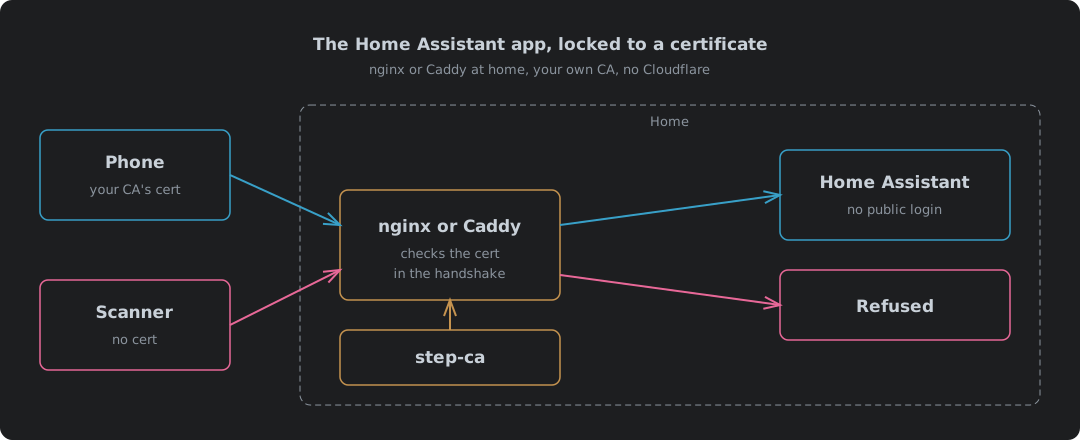
The Home Assistant App Locked To A Certificate, With nginx Or Caddy And No Cloudflare
Locking the Home Assistant app to a client certificate with nginx or Caddy at home, with step-ca as the certificate authority instead of Cloudflare. What changes when Cloudflare leaves the path, an nginx config and a Caddy config each tested with no certificate, a good one, a revoked one and a WebSocket upgrade over IPv4 and IPv6, why nginx can check a CRL and Caddy can only keep an allowlist, the Home Assistant trusted-proxy settings, what the phone needs installed, and where it falls down.
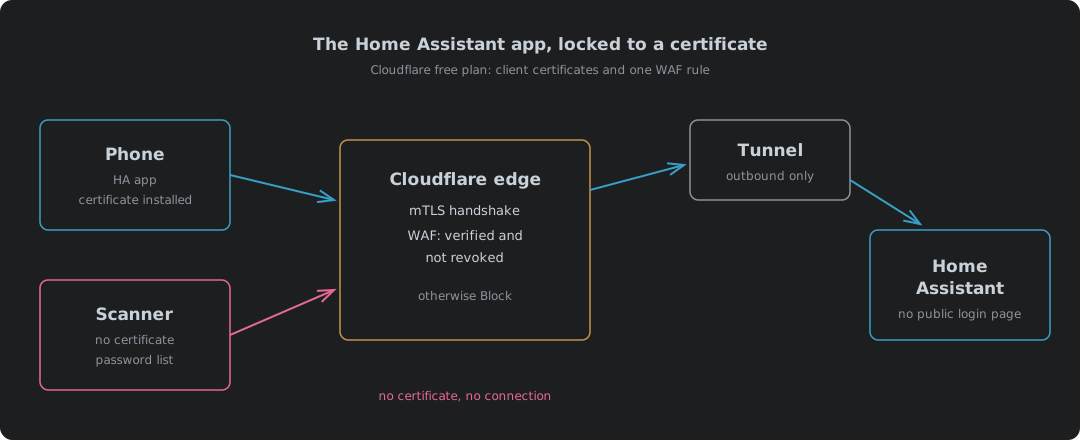
The Home Assistant App Over Cloudflare, Locked To A Certificate, On The Free Plan
Reaching Home Assistant from the Android app away from home without putting a login page on the internet. How the remote-access options compare on exposure, real cost (machine load and DDoS as well as the bill), blocking risk and battery, why Cloudflare Access and service tokens do not suit the app, how the free-plan client certificates and a WAF custom rule lock a tunnel hostname to the phones that hold a certificate, which Home Assistant settings the reverse proxy needs, building the PKCS12 file, putting a Let’s Encrypt certificate on the origin and why renewal needs a restart, what the scanners did in the first two hours, and what the phone, Chrome, Helium and the Companion app’s two clients each did with the certificate. A self-hosted nginx or Caddy version is a separate post.