The Bay That Takes Anything
The pitch for a tri-mode adapter is genuinely good, and it is worth stating properly before pulling it apart.
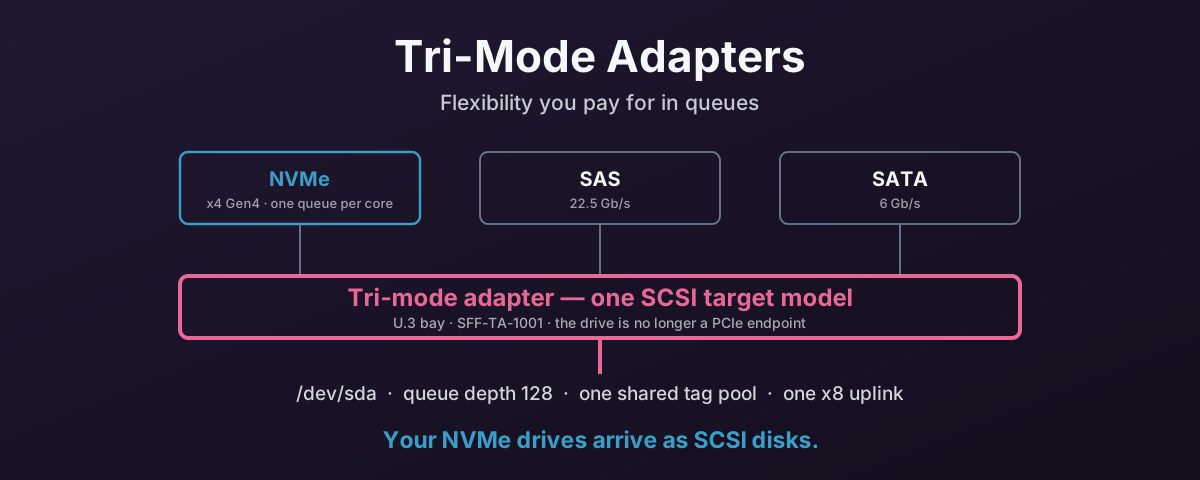
Buy a chassis with a U.3 backplane and a tri-mode controller, and every drive bay becomes universal. Slot 0 can hold a 24G SAS drive, slot 1 a cheap SATA boot device, slot 2 a Gen4 NVMe SSD, and the adapter negotiates whatever turns up. Broadcom calls the silicon Tri-Mode SerDes; the bay standard is SFF-TA-1001, known as U.3, which defines a common connector for SAS x1/x2, SATA, and NVMe at x1, x2 or x4. The management side is SFF-TA-1005, Universal Backplane Management, which is how the enclosure works out what it is actually talking to and drives the right activity LEDs.
For anyone specifying servers, that solves a real and annoying problem. You no longer have to decide the storage protocol at purchase order time, or keep two chassis SKUs, or discover that the NVMe-capable bays are the four on the left and your drives went into the other twenty. One part number covers the fleet, and a SAS estate can move to NVMe a drive at a time instead of a chassis at a time.
None of that is marketing. It is the reason these adapters sell, and it would be daft to pretend otherwise.
But the flexibility is not free, and the bill is not paid in pounds. It is paid in queues.
What Actually Happens to the Drive
An NVMe SSD is a PCIe endpoint. In a direct-attached server, its four lanes run to the CPU’s root complex — through a retimer or a PCIe switch, but electrically and logically it is a device on the PCIe bus. The kernel enumerates it, binds the nvme driver, and from that point the driver talks to the drive’s registers directly.
Put the same drive behind a tri-mode adapter and that stops being true.
The drive’s lanes now terminate at the controller. Broadcom’s documentation calls the relevant block the PCIe device bridge, and the word bridge is doing a lot of work: this is not a transparent switch that forwards your CPU’s transactions to a drive it can still see. The adapter is the PCIe endpoint your host enumerates. The drive is a target hanging off the far side of it, and the controller’s firmware re-originates every I/O.
So the adapter is not passing your NVMe commands through. It is terminating them, and speaking to the drive on your behalf.
Which raises the question of what protocol it speaks to you.
The OS Never Sees an NVMe Drive
It speaks SCSI.
Plug an NVMe SSD into a Broadcom tri-mode HBA and it does not appear as /dev/nvme0n1. It appears as /dev/sdb, bound to mpt3sas — the same driver that has been running LSI SAS controllers for over a decade. nvme list returns nothing. lsblk -o NAME,TRAN reports the transport as sas. As far as every layer of the storage stack above the driver is concerned, you bought a SAS disk.
This is not a bug or a firmware limitation waiting to be fixed. It is the design. Presenting everything as a SCSI target is exactly how one adapter serves three protocols: the controller normalises SAS, SATA and NVMe into a single device model, and the host gets one driver, one enumeration path, one set of tooling. The flexibility in the marketing and the SCSI presentation in dmesg are the same architectural decision looked at from either end.
The 9500 and 9600 generations do add a passthrough mechanism so vendor tooling can reach a drive’s NVMe admin commands, and Broadcom’s newer parts are much better at surfacing drive health than the 9400 was. But that is a management side channel. The data path — every read and write your workload issues — still runs down the SCSI stack.
And the SCSI stack has a queue model that predates flash by twenty years.
The Queue Model You Just Gave Up
This is the part that actually costs you performance, and it is worth being precise about, because “NVMe is faster than SAS” is not the reason.
NVMe’s central design decision was not a faster wire. It was to stop pretending that a storage device is a single serialised thing.
The specification allows up to 65,535 I/O queue pairs, and that figure gets quoted in every NVMe explainer going. It is the wrong number to reach for. No drive implements anything close to it, so anyone who has actually looked at a running system can wave the comparison away — and they would be right to. The real number is smaller, unglamorous, and makes the point better.
So here is a real drive. Not an enterprise part: a 256 GB SK Hynix OEM SSD, the kind soldered into a mid-range laptop, in a 16-core machine.
$ nproc
16
$ cat /sys/class/nvme/nvme0/queue_count
17
$ ls /sys/block/nvme0n1/mq | wc -l
16
$ cat /sys/block/nvme0n1/queue/nr_requests
1023
Seventeen queues: one admin queue, and sixteen I/O queues for sixteen cores. Each 1023 commands deep. The mapping is one-to-one — every hardware queue is bound to exactly one CPU:
$ cd /sys/block/nvme0n1/mq && grep -H . */cpu_list
0/cpu_list:1
1/cpu_list:9
2/cpu_list:3
3/cpu_list:11
...
One CPU per queue, all the way down — hardware queue 0 serves core 1 and nothing else.
That is what “NVMe has lots of queues” actually means in practice. Not 65,535 — one per core, however many cores you have. Linux creates a queue pair per CPU up to whatever the controller will grant, and controllers grant far more than a typical server has cores, so in practice the core count is the number. Put this drive in a 64-core box and you get 64.
That per-core split is where the performance comes from:
- A core submits into its own queue. No lock, because no other core touches it.
- Each queue gets its own MSI-X vector, affinitised to that core.
- The completion interrupt lands back on the core that issued the I/O, where the relevant cache lines already are.
- All sixteen cores can be in flight at once without ever contending on a shared structure.
Parallelism scales with your core count, and no core’s work is ever queued behind another’s. A cheap consumer drive does this. It is table stakes.
Now look at what the drive gets behind the adapter. The numbers below are not estimates — they are constants in the mainline mpt3sas driver.
The per-device queue depth is set from ioc->max_nvme_qd, which the driver takes from what the controller firmware reports and otherwise falls back to a compile-time default in drivers/scsi/mpt3sas/mpt3sas_base.h:
#define MPT3SAS_SATA_QUEUE_DEPTH	32
#define MPT3SAS_SAS_QUEUE_DEPTH		254
#define MPT3SAS_RAID_QUEUE_DEPTH	128
#define MPT3SAS_NVME_QUEUE_DEPTH	128
128. A device capable of tens of thousands of outstanding commands is given a queue depth of 128 — and notice it is shallower than the SAS default of 254 sitting two lines above it. The drive’s own capabilities never enter into the decision. The number comes from the controller.
The hardware queue count is worse, and the driver is candid about it. From mpt3sas_scsih.c:
shost->nr_hw_queues = 1;

if (shost->host_tagset) {
	shost->nr_hw_queues =
	    ioc->reply_queue_count - ioc->high_iops_queues;
	...
	dev_info(&ioc->pdev->dev,
	    "Max SCSIIO MPT commands: %d shared with nr_hw_queues = %d\n",
	    shost->can_queue, shost->nr_hw_queues);
}
Read that carefully, because three separate things are going on.
The default is one hardware queue. nr_hw_queues = 1. Multi-queue only happens on gen35 controllers with the host_tagset feature enabled, and even then it is what the driver’s own commit history describes as simulated multiple hardware queues — the I/O controller hardware is a single submission queue with multiple reply queues, and blk-mq is being fitted over the top of that.
The queue count comes from the controller, not the core count. It is reply_queue_count minus the high-IOPS queues — the adapter’s MSI-X vector allocation. It has nothing to do with how many CPUs you have, and it does not grow when you add drives. This is the exact inversion of the drive above, where the number of queues was the core count.
And the tag pool is shared. host_tagset means exactly what it says: one tag pool for the whole host adapter, and that log line says “shared” out loud. Every drive on the card draws from the same set of command slots. A twenty-four-bay chassis has twenty-four drives competing for one controller’s tags.
Put the two side by side. That laptop SSD had sixteen private queues of 1023, one per core, answering only to itself. The same drive behind the adapter gets a share of the card’s reply queues, 128 outstanding commands, and twenty-three neighbours drawing on the same pool.
So the loss is not that SCSI is slow. Modern SCSI on blk-mq is fine. The loss is structural:
- Queues belong to the adapter, not the drive. Adding drives divides a fixed resource rather than adding to it.
- The tag pool is shared host-wide. One drive under heavy load can starve the others in a way that simply cannot happen when each drive has its own queues.
- Per-device depth is capped at 128, regardless of what the drive can sustain.
- Interrupt locality is weakened. Completions arrive on whichever reply queue the controller used, not necessarily the core that submitted.
For a queue depth of 1 or 2 — a single-threaded process doing occasional reads — none of this registers. You will measure the same latency either way, within noise. The penalty appears exactly where you bought NVMe to help: many cores issuing many concurrent I/Os. The deeper the workload, the more of the drive you have paid for and cannot reach.
The Uplink Is One x8 Slot
The queue model is the subtle problem. The bandwidth ceiling is the obvious one, and you can read it off Broadcom’s own product briefs without needing a benchmark.
The 9500 series HBA is an x8 PCIe Gen 4.0 card. Broadcom’s published figures for it are 13,700 MB/s at 256K sequential read and 3M IOPS at 4K random read. The same brief says it supports up to 32 NVMe devices.
Put those two numbers next to each other and the question answers itself: how many drives does it take to run out of adapter?
Not many, and fewer every year. A Gen4 x4 SSD does roughly 7 GB/s. A Gen5 x4 SSD does roughly 14. Both are ordinary parts in 2026 — Gen4 is what the used U.2 market is full of, and Gen5 is what you get buying new.
| Ceiling | Gen4 drives to reach it | Gen5 drives to reach it |
|---|---|---|
| HBA 9500 — 13,700 MB/s sequential | 2 | 1 |
| HBA 9500 — 3M IOPS (4K RR) | 3 | 1–2 |
| eHBA 9600 — 6.4M IOPS (4K RR) | ~6 | ~3 |
| MegaRAID 9600 — 1.1M RAID 5 IOPS (4K RW) | ~1 | ~1 |
Read the top row again. A single Gen5 SSD meets the entire sequential ceiling of an HBA 9500. One drive, in a card rated for thirty-two. Everything after that is capacity. Not performance.
And the bottom row is the one that should stop a purchase order: on the current-generation MegaRAID, a full shelf of NVMe in RAID 5 delivers roughly what one mainstream drive does on its own.
The Drives Do Not Even Link at x4
There is a second throttle underneath the shared uplink, easy to miss because it sits in a specifications table rather than a headline.
Dell’s PERC 12 User’s Guide, covering the H965i tri-mode controllers, says:
Supports drive speeds for NVMe drives are 8 GT/s (Gen 3) and 16 GT/s (Gen 4) at maximum x2 lane width.
Each NVMe drive gets two lanes, not four. So before any contention for the uplink, before the tag pool, before the SCSI translation, a Gen4 drive is already down to about 3.5 GB/s — half of what it can do. Put a Gen5 drive in that bay and it negotiates down to Gen4 x2 and delivers roughly a quarter of its rated bandwidth.
It is worth being precise about what this does and does not change. It does not mean the adapter goes further. It takes about four x2-limited drives to fill the 9500’s uplink instead of two, but only because each drive is contributing half as much. The bottleneck has moved from the uplink down to the drive link. The total you can extract has not improved.
Direct-attached, those same thirty-two drives would each have their own x4 path to the root complex, at whatever generation the drive and the CPU can negotiate.
The RAID 5 row in that table deserves its own look, because it is Broadcom’s own number and it is published without spin. From the 9600 series brief:
900K to 1.1M RAID 5 IOPS (4K RW)
Parity RAID in controller firmware is the most expensive thing you can ask a tri-mode card to do, and this is the current generation doing it. Worth reading before someone specifies RAID 5 across twenty-four NVMe drives and expects twenty-four drives’ worth of performance.
What About an x16 Card?
The obvious objection to everything above is that the 9500 is an x8 Gen4 card, and the ceiling is an artefact of a narrow host link. Give the adapter sixteen lanes of Gen5 and the problem goes away.
It is a fair objection, and it deserves the strongest example rather than a straw man. So take Dell’s PERC13 H975i — the current generation, and about as good as tri-mode gets. Its user’s guide specifies “Gen 4 and Gen 5 PCIe x16 host interfaces”, and StorageReview measured 52.5 GB/s and 12.5M IOPS per controller, against up to sixteen NVMe drives.
Those are serious numbers, and they change the picture substantially. Against the 9500’s 13,700 MB/s and 3M IOPS, that is roughly four times the bandwidth and four times the IOPS, spread over half as many drives. Dell did not just widen the pipe — they also halved the fan-out, and the oversubscription ratio improved as a result. On IOPS in particular, 12.5M across sixteen drives is about 780K per drive, which is close to what a mainstream drive delivers on its own. At that point the controller is genuinely not the thing holding you back.
Credit where it is due, then: a modern x16 Gen5 tri-mode card is a much better piece of engineering than an x8 Gen4 one, and if bandwidth was your only objection, x16 largely answers it.
Three things it does not fix.
The drives still link at x2. This is the one that surprised me. The PERC13 guide, describing a Gen5 x16 controller, still says:
Supports drive speeds for NVMe drives are 8 GT/s (Gen 3), 16 GT/s (Gen 4), and 32 GT/s (Gen 5) at maximum x2 lane width.
A wider host link does not widen the downstream drive links. Every NVMe drive on the newest, fastest tri-mode RAID controller Dell sells is still connected by two lanes instead of four, and still gives up half its bandwidth before anything else happens.
The queue model is completely untouched. Nothing in this post’s queue section is a function of host link width. nr_hw_queues comes from the controller’s MSI-X reply queue allocation; the per-device depth of 128 is a driver and firmware constant; the tag pool is shared host-wide because host_tagset says so. Widen the host link to x16, x32, whatever you like — the drives are still SCSI targets sharing the card’s queues, there is still no /dev/nvme0n1, and you still cannot pass a drive to a VM.
And x16 does not manufacture bandwidth — it fans out lanes you already had. This is the argument that actually settles it. Sixteen Gen5 lanes into a PERC13 buys you 52.5 GB/s shared across sixteen bays. Those same sixteen lanes wired directly to four Gen5 drives at x4 buy you roughly 56 GB/s across four bays — the same bandwidth from the same lanes, except each drive gets its full x4, its own queue pair per core, and a real nvme device node.
So the honest way to describe an x16 tri-mode card is not “a faster adapter”. It is a lane multiplexer: it converts a fixed lane budget into more drive bays, and charges you the queue model for the conversion. Whether that deal is any good depends on one thing. Bays or parallelism.
What Happens When You Fill All the Bays
Which brings us to the case that actually matters, because nobody buys a 24-bay chassis to put four drives in it.
Past the saturation point, the aggregate line is flat. Adding drives adds capacity, and nothing else — so per-drive performance falls as 1/N. That arithmetic is unforgiving at realistic populations:
| Drives on an HBA 9500 | Aggregate | Per drive | Fraction of a Gen4 drive |
|---|---|---|---|
| 2 | 13.7 GB/s | 6.9 GB/s | 98% |
| 12 | 13.7 GB/s | 1.14 GB/s | 16% |
| 24 | 13.7 GB/s | 0.57 GB/s | 8% |
Look at the bottom row. Twenty-four NVMe drives behind an HBA 9500 deliver about 570 MB/s each. A SATA SSD does around 550. You have bought twenty-four NVMe drives, paid for a tri-mode controller to attach them, and arrived at SATA-class per-drive bandwidth.
The IOPS arithmetic is the same shape: 3M spread over twenty-four drives is 125K each, against the 1M a mainstream Gen4 drive manages alone — about an eighth of what you own.
The x16 card improves this considerably but does not escape it. A PERC13 at its full sixteen drives is 52.5 GB/s ÷ 16 = 3.3 GB/s per drive, or roughly 23% of a Gen5 drive — and that is before the x2 link halves it again.
Two effects at high drive counts are worse than the division suggests:
- Tag starvation is cross-device. The shared host tag pool means a single drive under heavy load can consume slots that other drives need. Twenty-four devices each nominally allowed 128 outstanding commands want 3,072 between them, drawn from one controller’s
can_queue. Head-of-line blocking between separate drives is a failure mode that simply does not exist when each drive owns its queues. - Rebuilds hit everything. A parity rebuild across a populated shelf saturates the one shared uplink, so foreground I/O to every other drive on the card degrades at the same time. With drives on independent lanes and software RAID, the rebuild competes for CPU, not for a single pipe.
When None of This Matters
There is an important counterweight, and it is the reason plenty of 24-bay tri-mode servers run perfectly happily.
The adapter ceiling only bites if something downstream can consume more than it delivers. A server with 2 × 25GbE has 6.2 GB/s of network — it cannot fill even an HBA 9500. If those twenty-four drives are a capacity tier serving files over that link, the adapter is nowhere near the bottleneck and the per-drive arithmetic above is irrelevant.
The moment it starts to matter is when the consumer gets faster than the card: 100GbE (12.5 GB/s) puts you level with a 9500’s entire sequential ceiling on its own, and local workloads — databases, compilation, analytics, virtualisation hosts with busy guests — have no network in the path at all.
So the question to ask about a populated shelf is not “is the adapter slow” but “what is going to consume this, and can it consume more than the card can deliver?” If the answer is a 25GbE link, stop worrying. If the answer is 100GbE, NVMe-oF, or a local database, the card is your bottleneck and the drive count is making it worse.
What Else Goes Missing
Beyond throughput, presenting an NVMe drive as a SCSI disk means the NVMe-specific parts of your toolkit stop working:
| Direct-attached | Behind a tri-mode adapter | |
|---|---|---|
| Device node | /dev/nvme0n1 | /dev/sdb |
| Driver | nvme | mpt3sas / mpi3mr |
nvme-cli | Works | Nothing to talk to |
| Health data | NVMe SMART log pages | Translated SCSI log pages |
| Namespace management | Yes | No |
| Firmware updates | nvme fw-download | Vendor tool via the controller |
| Format / sanitize | NVMe Format NVM | SCSI equivalents, if implemented |
| Hardware queues | One pair per core (16 on the machine above) | The card’s reply queues, shared by every drive |
| Queue depth | 1023 per queue | 128 per device |
One consequence catches people out often enough to call out separately: you cannot pass an individual drive through to a virtual machine. PCIe passthrough needs the drive to be a PCIe endpoint with its own IOMMU group, and behind a tri-mode adapter it is not one — the only PCIe device present is the controller. You can pass the entire adapter through, with every drive attached to it, or nothing. If your plan involved handing specific NVMe drives to specific guests, the backplane decision has already made that call for you.
So Who Actually Wants This in 2026?
Here is where the pitch at the top of this post has to face a harder question, because the world it was designed for has mostly gone.
Tri-mode was conceived when NVMe was the expensive tier you added to a SAS estate. In 2026 that is backwards: NVMe is the default, U.2 enterprise drives are abundant and cheap on the used market, and “mixed SAS, SATA and NVMe in one chassis” describes fewer and fewer real deployments. So who is actually buying it?
Mostly nobody — deliberately. The honest answer is that most tri-mode controllers were not chosen. They arrived, because the server vendor ships one, and the vendor ships one because a single U.3 backplane SKU lets them sell SAS, SATA and NVMe configurations out of the same chassis. That is a supply-chain win for the OEM. It does nowt for your performance, and as such it was never sold as doing so.
Three of the classic justifications no longer hold up well:
“I need mixed drive types.” Rarely in the same chassis, and even when you do, tri-mode is not the only way. A plain SAS HBA for the spinning disks plus NVMe wired to the root complex gets you both, with neither one penalised. Mixed estate does not imply mixed controller.
“I do not have enough PCIe lanes.” This was the real argument in 2019, on 40-lane platforms with 24 bays. A single-socket Genoa or Turin Epyc has 128 lanes. Twenty-four drives at x4 is 96. The scarcity that justified aggregating drives behind one controller has all but gone, and where it has not, a PCIe switch does the job without terminating the protocol.
“The bays need to be universal.” This one is worth separating carefully, because it is the argument most often used to justify the wrong component. U.3 is a backplane standard, not a controller requirement. A U.3 backplane can be cabled straight to the CPU’s PCIe lanes instead of through a tri-mode controller, and vendors document both topologies. You can keep the universal bays and delete the tax. If you have inherited a tri-mode server, the single most valuable thing you can check is whether the backplane can be re-cabled direct.
What is actually left:
- Hardware RAID at density, where policy or platform requires it — an audit requirement, a support matrix, a Windows or ESXi deployment with no software layer to do the job. This is the real remaining market, it is the one case where you are buying the RAID engine rather than the connectivity, and on current silicon it is a capable product: sixteen NVMe drives in hardware RAID 5 with a supercap-protected cache, out of sixteen lanes, is something direct attachment cannot offer at all.
- Bulk SAS HDD capacity, where £/TB still belongs decisively to spinning disks. But that is a plain SAS HBA’s job, and a cheaper one.
- Very large bay counts and external enclosures, where SAS expanders reach further and wider than PCIe will.
- Workloads that never go deep. If your queue depths sit in single digits, none of this registers. Plenty of real systems live here quite happily.
There is also a plain operational argument — one enclosure type, one driver, one spare on the shelf — and for a general-purpose virtualisation host that is worth something real. Just price it honestly against the fact that, per the table above, one Gen5 drive can meet the whole card’s sequential ceiling.
When It Is the Wrong Tool
The trade turns bad in proportion to how much concurrency your workload has.
Ceph is the clearest case. A storage node runs one OSD per drive, each with its own thread pools, all issuing I/O at once — and then a whole cluster’s worth of clients drives them concurrently. That is the shared-tag-pool worst case: twenty-four daemons contending for one controller’s command slots, each drive capped at 128 outstanding, everything funnelled through one x8 uplink. Put those drives straight on the root complex and each OSD gets its own queues, its own tags and its own lanes. An all-NVMe Ceph node should not have a tri-mode adapter in the data path.
The same logic applies to NVMe-oF targets, where you are re-exporting drives and every layer of serialisation compounds; to databases with deep asynchronous I/O; and to anything built on io_uring or SPDK, which exist specifically to exploit per-core queues that the adapter has just taken away.
The general rule: the more parallelism your software was written to exploit, the more a tri-mode adapter charges you for it.
How to Tell What You Have
If you have inherited a server and want to know which side of this you are on:
# What is the transport? "nvme" is direct, "sas" means it went through a controller
lsblk -o NAME,TRAN,MODEL,SIZE

# Is there a tri-mode controller in the machine at all?
lspci -nn | grep -Ei 'sas|megaraid|serial attached'

# Which driver claimed the disk?
ls -l /sys/block/sdb/device/driver

# Per-device queue depth — 128 is the mpt3sas NVMe default
cat /sys/block/sdb/device/queue_depth

# How many hardware queues does this device actually get?
ls /sys/block/sdb/mq/ | wc -l
ls /sys/block/nvme0n1/mq/ | wc -l    # compare against a direct-attached drive

# On a direct-attached drive, what did the controller actually grant?
# One admin queue plus one I/O queue per core, so expect nproc + 1
cat /sys/class/nvme/nvme0/queue_count
nproc

# The driver says it out loud at load time
dmesg | grep -i 'nr_hw_queues'
That last one prints the Max SCSIIO MPT commands: N shared with nr_hw_queues = M line quoted earlier. If nvme list is empty on a machine you were told is all-flash NVMe, the adapter is why.
The Short Version
A tri-mode adapter converts your NVMe drives into SCSI disks. That conversion is not a side effect. It is how one card serves three protocols, and it is what you are buying.
What you give up is specific and measurable: per-core queue pairs replaced by a controller’s shared reply queues, a per-device depth of 128, a tag pool divided among every drive on the card, an x2 link where the drive wanted x4, and one shared uplink where each drive previously had its own path to the root complex. The adapter stops being a connection and becomes the bottleneck, and on current hardware it becomes one quickly: two Gen4 drives reach an HBA 9500, four Gen5 drives reach even a PERC13.
A wider host link does help — an x16 Gen5 card has roughly four times the bandwidth and IOPS of an x8 Gen4 one — but it does not change the shape. It buys bays, not parallelism: the same sixteen lanes wired straight to four drives deliver the same bandwidth with none of the queue tax. And it does not rescue a full shelf. Twenty-four drives behind a 9500 get about 570 MB/s each, which is what a SATA SSD does.
In 2019, when NVMe was the tier you added to a SAS estate and platforms were short of lanes, that was a reasonable trade. In 2026 it usually is not. NVMe is the default, used U.2 drives are cheap, a single-socket Epyc has lanes to spare, and the one benefit that still stands — universal drive bays — belongs to the U.3 backplane, not to the controller. You can very often keep the bays and delete the tax by cabling the backplane straight to the CPU.
So buy a tri-mode adapter if you are buying its RAID engine and you need one. Do not buy it for the flexibility, and if you have inherited one in a chassis full of NVMe, go and find out how that backplane is cabled.
There is no sense paying twice for drives you then cannot use properly.