50 TOPS Doing Nowt
Every Ryzen AI laptop sold in the last two years has a Neural Processing Unit (NPU) in it, a block of silicon built for nothing but the maths behind AI models. On mine, a ThinkPad with a Ryzen AI 7 PRO 350, AMD rates it at up to 50 TOPS, trillions of operations a second1. You paid for it. On a stock Linux install it does nothing.
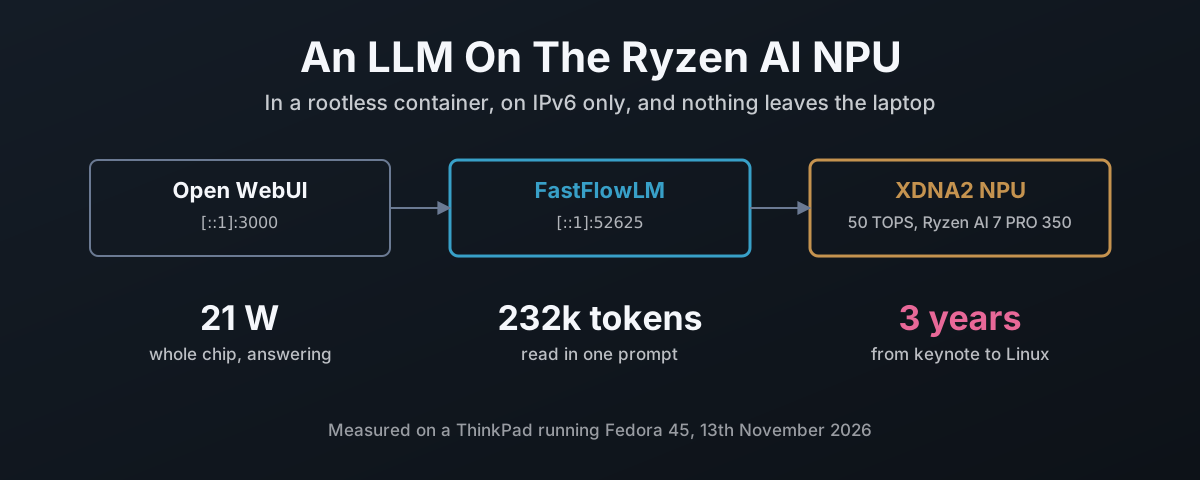
That changed this year. Once it is set up, the NPU runs a 4-billion parameter language model behind a chat window, plus speech-to-text, all on the laptop, with no account, no subscription and nothing leaving the machine, which for anything you would rather not type into somebody else’s website is the whole point. The whole chip draws about 21 W while it answers, and it idles at under 9 W.
| What runs | Where | Address |
|---|---|---|
| Qwen 3.5 4B, 256k-token context | NPU, in a container | http://[::1]:52625/v1 |
Speech-to-text: OpenAI’s Whisper, whisper-v3:turbo | NPU, same container | same, /audio/transcriptions |
| Open WebUI, the chat page | CPU, in a container | http://[::1]:3000 |
| amdxdna kernel driver, firmware | host | /dev/accel/accel0 |
Two rules shaped the build. Only the kernel driver and its firmware go on the host; every model framework runs in a rootless podman container. And every service listens on IPv6 loopback only, with nothing on IPv4 at all. Both turned out to be less work than doing it the messy way, and both caught problems I would otherwise have shipped.
What It Takes On Linux
The NPU in this chip is AMD’s second-generation design, XDNA2. That matters, because the software that runs language models on it supports XDNA2 parts (Ryzen AI 300 and 400 series, Strix Halo) and not the first generation in the Ryzen 7040 and 80402. Check yours before you start:
$ lspci -nn | grep -i 'neural\|signal processing'
c5:00.1 Signal processing controller [1180]: Advanced Micro Devices, Inc. [AMD] Strix/Krackan/Krackan2/Strix Halo Neural Processing Unit [1022:17f0] (rev 20)
Four layers sit between that device and a chat reply, and the split between host and container is the whole design:
| Layer | What it is | Lives on |
|---|---|---|
amdxdna | kernel driver, creates /dev/accel/accel03 | host, via DKMS |
| NPU firmware | npu_7.sbin, 1.1.2.64 on this chip | host, from linux-firmware |
XRT + amdxdna plugin | AMD’s runtime library and its NPU backend | container |
| FastFlowLM | the LLM runtime, NPU kernels included | container |
Kernel 7.x ships amdxdna in-tree, but AMD develops it first in its own repository, and the
userspace plugin has to match the kernel module it talks to4. The gap between the two
is not small. On this laptop:
| In-tree, Fedora’s 7.2.15 and 7.3.3 | Out-of-tree, amd/xdna-driver at 24dfd686 | |
|---|---|---|
| Driver interface | 0.105 | 0.19 |
| Module version | none | 2.27.0_20261113 |
| NPU PCI IDs it binds | 6 | 8 |
| Firmware files it asks for | 7 | 59 |
| Firmware this chip loads | 17f0_10/npu_7.sbin, 1.1.2.64 | the same file |
Nine interface versions apart, and Linux 7.3, the newest release, still carries 0.10. The one
thing they agree on is the firmware, and that comes from Fedora’s linux-firmware, not from either
driver. So I build both halves from one commit of amd/xdna-driver, put the module on the host,
and bake the matching userspace into the image.
The Driver: Build It All, Keep Only The Kernel Bit
amd/xdna-driver carries XRT as a git submodule, and building it produces RPMs for XRT and a
plugin package. The plugin package also carries the driver source, which it registers with
DKMS (Dynamic Kernel Module Support, the thing that rebuilds a module for every new kernel).
None of that is hard:
git clone --recursive https://github.com/amd/xdna-driver.git && cd xdna-driver
sudo ./tools/amdxdna_deps.sh
(cd xrt/build && ./build.sh -npu -opt)    # XRT RPMs in xrt/build/Release/
(cd build && ./build.sh -release)         # plugin RPM, driver source inside
On Fedora 45 the dependency script ends in an error. Ignore it:
| It asks for | What happens | Matters? |
|---|---|---|
protobuf-devel | conflicts with an installed protobuf3-compiler | no, XRT only skips a tracing tool without it |
redhat-lsb | no such package, Fedora dropped it | no |
| everything else | already installed |
The last tagged release there is from February, so main is the release channel. I went from a
May build to the November one: 550 commits, XRT 2.23 to 2.27.
The upgrade deletes the driver it just installed
My first go at upgrading took the module away entirely. RPM runs the new package’s install
script, which builds and registers the new driver with DKMS, and then runs the old package’s
removal script. That removal script reads the driver version from a file the new package has
already overwritten, so it unregisters the version that was just installed. The dnf output
says it in two lines, one after the other:
>>> Successfully installed and enabled DKMS for xrt-amdxdna/2.27.0
>>> Removing driver source: xrt-amdxdna/2.27.0...
Nothing failed, nothing went red, and the next boot would have quietly loaded whatever the kernel
shipped instead. Can I ask why a removal script runs on an upgrade without checking whether it is
an upgrade? RPM hands every scriptlet that answer as its first argument. It is one if.
It is also the reason the host does not get the RPMs at all now. The driver source is a tarball inside the plugin package, so I lift it out and give it to DKMS directly:
T=$(mktemp -d) && rpm2cpio xrt_plugin*.rpm | (cd $T && cpio -idm --quiet)
D=$T/opt/xilinx/xrt/share/amdxdna
sudo mkdir -p /usr/src/xrt-amdxdna-2.27.0
sudo tar -xf $D/amdxdna.tar.gz -C /usr/src/xrt-amdxdna-2.27.0
sudo cp $D/dkms.conf $D/configure_kernel.sh /usr/src/xrt-amdxdna-2.27.0/
sudo dkms install xrt-amdxdna/2.27.0
sudo modprobe -r amdxdna; sudo modprobe amdxdna
No reboot. It is Linux, and nothing has the device open at that point, so the module swaps
live. DKMS then
rebuilds it for every kernel dnf installs; when 7.3.3 arrived it was built before I had
rebooted into it.
Check it is the DKMS build that loaded and not the in-tree one, and that the firmware is new enough. FastFlowLM wants 1.1.0.0 or later2:
$ modinfo -F filename amdxdna
/lib/modules/7.2.15-300.fc45.x86_64/extra/amdxdna.ko.xz
$ cat /sys/bus/pci/drivers/amdxdna/*/fw_version
1.1.2.64
$ journalctl -k | grep 'Initialized amdxdna'
[drm] Initialized amdxdna_accel_driver 0.19.0 for 0000:c5:00.1 on minor 0
DKMS moves the kernel’s own module aside rather than deleting it, to
/var/lib/dkms/xrt-amdxdna/original_module/, so taking the DKMS build out puts it back.
One more thing to leave alone: amd_iommu=off on the kernel command line disables the NPU2.
FastFlowLM In A Container
FastFlowLM is the runtime that makes the NPU useful for language models. It is an Ollama-style command line and an OpenAI-compatible server, written for XDNA2, and it moved under AMD’s ROCm organisation this year6. The runtime is MIT-licensed. The NPU kernels it ships are closed binaries, free to use and redistribute unmodified7. I would rather they were open, and I will say so, but they are in the repository and nothing has to be fetched from anywhere else.
The image is three stages on Fedora 45: XRT from the driver build, FastFlowLM compiled against it, then a runtime with only what it needs. The part that matters:
FROM registry.fedoraproject.org/fedora:45 AS xrt
ARG XDNA_COMMIT
COPY dist/xdna-${XDNA_COMMIT}/ /rpms/
RUN dnf -y install /rpms/xrt_2*-base.rpm /rpms/xrt_2*-npu.rpm \
 && rpm -i --noscripts --nodeps --nosignature \
        --excludepath=/usr/lib/firmware --excludepath=/opt/xilinx/xrt/share/amdxdna \
        /rpms/xrt_plugin*.rpm \
 && echo /opt/xilinx/xrt/lib64 > /etc/ld.so.conf.d/xrt.conf && ldconfig
Each of those flags is there because something broke without it:
| Problem | Fix |
|---|---|
| The plugin’s scripts build a kernel module, which belongs on the host | --noscripts, and the driver source and firmware excluded |
| Fedora 45’s RPM 6 enforces signature checking by default8, and a self-built RPM is unsigned | --nosignature: I built it, I know where it came from |
XRT’s libraries are in lib64, which is not on the linker path | /etc/ld.so.conf.d/xrt.conf inside the image |
FastFlowLM finds XRT through pkg-config, and XRT’s setup.sh does not set the path | PKG_CONFIG_PATH=/opt/xilinx/xrt/lib64/pkgconfig in the build stage |
The finished image is 609 MB, and its tag carries the driver commit,
fastflowlm:v1.0.12-xdna24dfd686. A health check compares that against the commit the loaded
module reports and fails if they differ. An image built for the wrong driver is the one fault
here that is genuinely confusing to diagnose, so it gets caught before it gets that far.
The container gets one device, the NPU, and the memory-lock limit FastFlowLM needs to pin its buffers:
podman run --rm --device /dev/accel/accel0 --ulimit memlock=-1:-1 \
  localhost/fastflowlm:v1.0.12-xdna24dfd686 validate
[Linux]  NPU: /dev/accel/accel0 with 8 columns
[Linux]  NPU FW Version: 1.1.2.64
[Linux]  Memlock Limit: infinity
AMD’s own self-test, xrt-smi validate, put the NPU at 51 TOPS on a matrix multiply. That is the
50 on the box, delivered.
Starting At Boot, On IPv6 Only
Quadlet turns a short .container file into a systemd service9. As a user unit it runs
rootless, as me, and with lingering on it starts at boot with nobody logged in10:
[Unit]
Description=FastFlowLM NPU server
ConditionPathExists=/dev/accel/accel0

[Container]
Image=localhost/fastflowlm:v1.0.12-xdna24dfd686
AddDevice=/dev/accel/accel0
Ulimit=memlock=-1:-1
Network=host
Volume=%h/.config/flm:/models:Z
Exec=serve qwen3.5:4b --host ::1 --port 52625 -c 262144 -a whisper-v3:turbo
StopSignal=SIGINT

[Install]
WantedBy=default.target
loginctl enable-linger $USER
cp fastflowlm.container ~/.config/containers/systemd/
systemctl --user daemon-reload && systemctl --user start fastflowlm
-c 262144 sets the context window, and the context test below is
why it is that big. -a whisper-v3:turbo loads a second model next to the chat model, one that
turns speech into text; it gets its own section.
Three lines in there were learned the hard way:
| Line | Without it |
|---|---|
StopSignal=SIGINT | FastFlowLM ignores SIGTERM, podman’s stop signal, and is killed ten seconds later |
--host ::1 | it listens on 127.0.0.1, IPv4 |
::1, not [::1] | the bracketed form fails to parse; brackets belong inside a URL |
Prove the address rather than trust it:
$ ss -ltn 'sport = :52625'
LISTEN 0  4096  [::1]:52625  [::]:*
$ curl -s http://127.0.0.1:52625/v1/models || echo refused
refused
localhost still works for anything that resolves it to ::1 first, which Fedora’s
/etc/hosts and Chrome both do.
What It Does, Measured
Nine models through FastFlowLM’s own benchmark, decode being the speed the answer streams at:
| Model | Decode, 1k context | Decode, 8k context | Prompt reading, 8k |
|---|---|---|---|
llama3.2:1b | 77 tok/s | 56 tok/s | 2,009 tok/s |
qwen3.5:2b | 32 | 29 | 1,533 |
llama3.2:3b | 30 | 20 | 857 |
phi4-mini-it:4b | 25 | 17 | 744 |
qwen3:4b | 23 | 15 | 613 |
qwen3.5:4b | 17 | 15 | 657 |
gemma4-it:e4b | 14 | 12 | 642 |
qwen3:8b | 13 | 10 | 418 |
qwen3.5:9b | 11 | 10 | 451 |
Reading pace is five to eight tokens a second, so every one of these keeps ahead of you. Decode
roughly halves each time the model doubles, which is what you expect when the limit is memory
bandwidth and not compute. I run qwen3.5:4b. Phi-4 mini is quicker, but Qwen 3.5 holds its speed as a conversation grows,
handles images and tool calls, and keeps a prompt cache that saves re-reading the whole history on
every turn. That decides it.
256,000 tokens of context
Qwen 3.5 is built for a 262,144-token window11, and FastFlowLM defaults to 32,768. Past that
limit it does something worth knowing about: it logs Max length reached, stopping prefilling
and closes the connection with no reply and no error, so the chat window sits there with an empty
answer and you are left to guess whether the model, the server or the browser fell over.
So I raised it with -c 262144 and tested it properly. A code hidden in the first line of a
232,250-token prompt, roughly 175,000 words, asked for at the end:
| 8k context | 232k context | |
|---|---|---|
| Answer | correct | correct, AMBER-FALCON-7731 |
| Prompt reading | 657 tok/s | 210 tok/s |
| Wait for the first word | 12 seconds | 18.4 minutes |
| Decode | 15 tok/s | 2.4 tok/s |
| Memory reserved | ~5 GB | ~12.7 GB |
It works. It is slow. And the memory is reserved whether you use the window or not. With 90 GB in the machine I will pay that to have a long paste answered rather than silently dropped.
Can The GPU Help?
The same chip has a Radeon 860M, so the obvious question is whether it can take some of the load. Splitting one model across the NPU and the GPU, reading the prompt on one and writing the answer on the other, is not something any Linux runtime does today. Running a second runtime on the GPU is, so I measured that.
“Efficient” here means speed and energy together. The amdgpu driver reports package power for
the whole chip without root, and the amdxdna driver reports the NPU on its own, so every run
below was sampled four times a second. Same model at 4-bit throughout.
Of the GPU runtimes I looked at, one worked:
| Runtime | Result on the 860M |
|---|---|
| llama.cpp, Vulkan backend12 | works; 881 MB image |
| llama.cpp, ROCm backend | sees the GPU, then segfaults on the first piece of work, with or without a GPU-version override; 23 GB image |
| MLC-LLM, Vulkan13 | its compiler segfaults building the Qwen 3.5 architecture |
| vLLM, SGLang | not tried: built for datacentre GPUs and many users, not an 8-unit iGPU |
And the NPU against the one that worked:
| Qwen 3.5 4B | NPU, FastFlowLM | GPU, llama.cpp Vulkan |
|---|---|---|
| Idle, model loaded | 8.6 W | 16.0 W, against 9.7 W with it stopped |
| Prompt reading, ~6k tokens | 557 tok/s at 23.8 W | 411 tok/s at 46.1 W |
| Energy per prompt token | 0.043 J | 0.112 J |
| Decode | 18.2 tok/s at 21.0 W | 23.5 tok/s at 40.7 W |
| Energy per generated token | 1.16 J | 1.73 J |
The GPU writes answers about 29% faster. It burns twice the power doing it. The NPU reads prompts faster and on less than half the energy. The bigger number is the idle one: the GPU server loaded and doing nothing costs 6.3 W over the same machine with it stopped, all day. Running both at once took the NPU from 18.2 to 14.2 tokens a second and the GPU from 23.5 to 13.9, because they share the same memory. As such the GPU container exists, but it is started when I want a second model, and it is not enabled at boot.
The NPU itself drew under 2 W in every run. Most of the 21 W is the CPU and memory feeding it. That is the ceiling worth watching in future FastFlowLM releases.
Speech To Text On The NPU Too
Whisper is OpenAI’s speech-recognition model: audio in, text out, in 99 languages, and released under the MIT licence, so it runs anywhere without asking anybody14. Large-v3 is the current full-size version. Turbo is the same model with its decoder, the half that writes the text out, cut from 32 layers to 4. The model card puts the trade plainly: “way faster, at the expense of a minor quality degradation”. At 809 million parameters it is a fifth the size of the chat model.
FastFlowLM ships it already converted for the NPU as whisper-v3:turbo, a 623 MB download, and
loads it next to the chat model with -a whisper-v3:turbo. It will not serve Whisper on its own;
there has to be a chat model loaded too. Audio goes to the standard OpenAI transcription endpoint
and the text comes back.
| 19.6 seconds of speech | |
|---|---|
| First request, loading Whisper | 6.2 s |
| After that | 2.0 s, about ten times real time |
| Whole-chip power | ~24.7 W |
| Accuracy | every word right |
Spelt using American fake English spellings, mind: “color” and “program”. Whisper’s API takes a prompt, and a
prompt written in true British English spelling, the English of England where the language comes
from, is enough to fix it:
curl -s 'http://[::1]:52625/v1/audio/transcriptions' -F file=@speech.wav \
  -F model=whisper-v3:turbo -F language=en \
  -F 'prompt=British English spelling: colour, programme, organise, centre.'
We should not have to correct these models at all. Whisper was trained on 99 languages and still writes English the American way unless it is told otherwise, because the people who built it treat their spelling as the default and everybody else’s as an option you have to ask for. That is the annoying American defaultism the rest of the world hate, and it is baked in as a bias. The system prompt for the chat model carries the same instruction, in the section below, for the same reason.
A Chat Window, And 7,000 Tokens You Never Typed
Open WebUI is the browser front end15, in its own container, bound to [::1]:3000 the same
way and pointed at the NPU. Its microphone button goes to Whisper on the NPU instead of its own
default, which would have downloaded a model and run it on the CPU.
The first message I sent it was twenty words. It reached the NPU as a 7,223-token prompt, because Open WebUI 0.13 attaches the definitions of all its built-in tools (memory, notes, calendar, automations, web search) to every message, and an admin gets every one of them.
| Same twenty-word question | Prompt sent to the NPU | Wait for the first word |
|---|---|---|
| Built-in tools on, the default | 7,223 tokens | ~12 s |
| Built-in tools off for the model | 127 tokens | under 1 s |
For a local model that default should be off. Twelve seconds, every answer.
It also confidently told me it was “trained by Google” and running “on Google’s advanced infrastructure”. It is a Qwen model, made by Alibaba, running on a laptop. That is complete nonsense, and it should not happen.
It is not the setup. A model only sees the text it is sent, and the name in the drop-down is a label for the server, never passed to the model. So that answer came from the model alone, and it got wrong the one fact about itself that should never be in doubt. That is a design flaw, and it sits with whoever shipped the model.
Alibaba knew how to stop it. Qwen 2.5’s chat template opened every conversation with “You are Qwen, created by Alibaba Cloud” unless you gave it something else16. Qwen 3 dropped that line17, and Qwen 3.5 ships without it too18. Nothing replaced it, and going by that answer the model was never taught it well enough to manage on its own. Ask a 4B model “what are you?” with no prompt and it falls back on the most common answer in its training data, which is somebody else’s.
Is that a small thing? No. A model that will tell you, with full confidence, who built it and whose data centre it runs in, and get both wrong, will do the same with anything else it cannot check. Here you know the right answer. Most of the time you will not.
So it has to be told, in a system prompt:
| Asked “what are you, and what are you running on?” | Answer |
|---|---|
| No system prompt | “a large language model trained by Google… Google’s advanced infrastructure” |
| With one | “Qwen 3.5, a large language model created by Alibaba… running locally on your Lenovo ThinkPad using the AMD Ryzen AI 7 PRO 350’s NPU via FastFlowLM” |
The same prompt tells it to write British English, again because of the American defaultism that Whisper has too. Told, it does. It still cannot tell you what day it is. A model with no calendar and no internet guesses dates and recent events, and it will not always say so, whatever the prompt asks.
Three Years To Run AI On Linux
AMD put Ryzen AI on stage in January 2023 as “the first dedicated artificial intelligence hardware in an x86 processor”19. Count forward from that keynote:
| When | What happened on Linux | After the keynote |
|---|---|---|
| 4th January 2023 | Ryzen AI announced, in the Ryzen 7040 | |
| 25th January 2024 | amd/xdna-driver published on GitHub4 | 1 year |
| 24th March 2025 | amdxdna in mainline Linux, 6.1420 | 2 years 2 months |
| 27th March 2025 | this chip, the Ryzen AI 7 PRO 350, launches1 | 2 years 2 months |
| 11th March 2026 | FastFlowLM 0.9.35, its first native Linux release21 | 3 years 2 months |
| 11th August 2026 | FastFlowLM 1.0.0, now under AMD’s ROCm6 | 3 years 7 months |
| today | still no LLM runtime for the 7040 and 80402 | 3 years 10 months |
Three years and two months to run a language model on the NPU under Linux at all, and AMD’s own software did not do it. FastFlowLM did, a project that started outside the company and was taken in under ROCm this year. Its Linux release notes open with “The wait is finally over”, then say it uses “the exact same recipe you already know and love on Windows”21. The Fisher-Price OS (Windows) got it first, and they said so. AMD’s own Ryzen AI Software still says, in its current release notes, “Model generation is not supported on Linux in this release”22.
Anyone who bought the first generation has it worse. A Ryzen 7040 laptop from 2023 has an NPU that no language-model runtime on Linux will touch, and nothing published says one is coming. Same badge.
Can I ask why? Not who, why. What in AMD’s process let a chip be sold with AI in its name while the software to use that AI on Linux turned up years later, from outside? The spec sheet says “Up to 50 TOPS”1. The badge says Ryzen AI. Both are statements made to the person buying the laptop, and for this chip’s first year on Linux both were worth nowt.
Aimed At Copilot, Not The Data Centre
It is not that AMD finds Linux hard. In the data centre Linux is first class and AMD knows it: El Capitan at Lawrence Livermore is AMD EPYC processors and AMD Instinct accelerators, it was the fastest computer in the world until June this year23, and it runs TOSS, Livermore’s own build of Red Hat Linux24. Can you picture AMD selling an Instinct accelerator and telling the buyer the Linux software would follow eventually, from somebody else? It would be a no. AMD even wrote this NPU’s kernel driver and got it into mainline. The last layer, the one that makes the hardware do the job it was sold for, was the bit left waiting.
It should never have been a laptop project at all. The same XDNA architecture went into a data centre card the same year, the Alveo V70, sold as “the first Alveo production card leveraging AMD XDNA architecture with AI Engines”25. Build one software stack for the AI Engine, Linux first like the rest of the data centre, and the laptop gets it for free. So does the server. A small, frugal accelerator is exactly what you want to hand out to virtual machines, a slice each, for the small models that do not need a whole GPU. The kernel only learned to do that this year, splitting an NPU into virtual functions on the new AIE4 parts26. On the NPU in this laptop it cannot do it at all.
Instead the effort went to the Fisher-Price OS (Windows), and to Copilot. AMD launched this chip’s generation as processors that “Unlock Transformational AI Experiences for Windows Copilot+ PCs”27. Hardly anybody bought in. Copilot+ machines were 2.3% of the Fisher-Price OS (Windows) PCs sold in the first quarter of 2025, and Microsoft’s newer Copilot features run in the cloud anyway: “only one of its new AI capabilities actually requires an NPU”28. Microsoft also reports what it earns from PC makers down 7% on “lower PC market demand”, with “roughly 30% of the installed base still on Windows 10”29. So the NPU was aimed at an operating system people are not upgrading, to run an assistant they did not ask for, which mostly does not use the NPU.
Nor is it where AI gets built. The people who do this for a living run Linux, because that is where their tools run. TensorFlow says plainly that 2.10 “was the last TensorFlow release that supported GPU on native-Windows”30. The vLLM model server “does not support Windows natively”31. JAX lists its Fisher-Price OS (Windows) build as experimental, and its AMD support as “AMD GPU (Linux)”32. Where the Fisher-Price OS (Windows) does run these tools, it is through WSL 2, which by Microsoft’s own description is “an actual Linux kernel inside a managed VM”33. AMD aimed its AI chip at the one desktop the AI profession does not use. Partly supporting that is not enough, AMD.
Then AMD sells itself to investors as an AI company. On 11th November 2025 its chair and CEO said AMD “is uniquely positioned to lead the next generation of high-performance and AI computing”, in a release that boasts of growing its “AI PC portfolio 2.5x since 2024” and signs off with “full-stack AI solutions”34. Full stack. On the AI PC in this post the top of that stack came from a project AMD did not start, and on the first generation it never came. An AI company whose own AI chip waited three years to run AI on the operating system its data centre business is built on? Laughable.
First-class support is simple to describe. It works on the day you buy the machine, on the operating system you run, from the company that sold you the chip. This NPU has not met that yet. I bought the laptop for the rest of it and the NPU came along, which is the only reason this is a write-up and not a complaint. Anybody who bought one for the AI on the badge, and runs Linux, bought a promise that was kept late, and by somebody else.
Own The Silicon You Paid For
The NPU came with the laptop. The way it is sold, it is the bit that makes the machine ready for AI, and the AI on offer is somebody else’s, in somebody else’s data centre, reading what you type so it can be paid for some other way. Nothing about the hardware needs that arrangement. A 4B model on 21 W answers a question, reads a 175,000-word paste if you give it the time, and writes down what you say, and none of it leaves the desk.
Finished software it is not, and every rough edge above cost an hour to find and a line or two to fix. That is what open source costs when you actually run it. It is still a better deal than renting the same capability back, and the hour buys you knowing how it works.
The containers keep it honest. Nothing on the host but a kernel module and its firmware, one device passed to one container, an address nobody else can reach, and a check that fails the moment the pieces stop matching. It took a day. It will keep working, because I know why every line in it is there and the check will tell me the morning one of them stops being true.
AMD — Ryzen AI 7 PRO 350 — 8 cores, 16 threads, Radeon 860M, “NPU TOPS: Up to 50 TOPS”, launch date “3/27/2025”. ↩︎ ↩︎ ↩︎
Lemonade — LLMs on Linux with FastFlowLM — XDNA2 only (Ryzen AI 300/400, Strix Halo), not XDNA1; NPU firmware 1.1.0.0 or later; do not set
amd_iommu=off. ↩︎ ↩︎ ↩︎ ↩︎Linux kernel documentation — amdxdna — the in-tree accelerator driver for AMD NPUs. ↩︎
amd/xdna-driver — driver, XRT submodule and plugin; build the XRT base package from the bundled submodule so it works with the plugin; repository created 25th January 2024. ↩︎ ↩︎
Linux v7.3 — drivers/accel/amdxdna/amdxdna_pci_drv.c —
AMDXDNA_DRIVER_MAJOR 0,AMDXDNA_DRIVER_MINOR 10; the same in v7.2. ↩︎ROCm/FastFlowLM — NPU LLM runtime for XDNA2, OpenAI-compatible server, part of ROCm since v1.0.0; release used here is v1.0.12. ↩︎ ↩︎
FastFlowLM — LICENSE_BINARY.txt — terms for the bundled NPU kernel binaries. ↩︎
RPM 6.0.0 release notes — “RPM defaults to enforcing signature checking”. ↩︎
podman-systemd.unit(5) — Quadlet
.containerunits, includingAddDevice=,Ulimit=,StopSignal=andExec=. ↩︎loginctl(1) —
enable-lingerstarts a user manager at boot and keeps it running after logout. ↩︎Qwen/Qwen3.5-4B — “Context Length: 262,144 natively”; hybrid Gated DeltaNet and gated attention layers. ↩︎
ggml-org/llama.cpp — the
server-vulkancontainer image used for the GPU runs, build 12352. ↩︎mlc-ai/mlc-llm — tested with the 0.26 nightly packages. ↩︎
openai/whisper-large-v3-turbo — “a state-of-the-art model for automatic speech recognition (ASR) and speech translation”; pruned from large-v3, “the number of decoding layers have reduced from 32 to 4”; 809M parameters; MIT licence. ↩︎
open-webui/open-webui — release v0.13.3 used here. ↩︎
Qwen/Qwen2.5-7B-Instruct — tokenizer_config.json — the chat template’s default system message: “You are Qwen, created by Alibaba Cloud. You are a helpful assistant.” ↩︎
Qwen/Qwen3-4B — tokenizer_config.json — chat template with no default system message. ↩︎
Qwen/Qwen3.5-4B — tokenizer_config.json — chat template with no default system message. ↩︎
AMD — AMD Highlights Future of High-Performance and Adaptive Computing During Opening Keynote of CES 2023 — 4th January 2023: “AMD also unveiled Ryzen AI Technology – the first dedicated artificial intelligence hardware in an x86 processor.” ↩︎
Kernel Newbies — Linux 6.14 — released Monday 24th March 2025; “an amdxdna driver for AMD NPUs”. ↩︎
FastFlowLM v0.9.35 release notes — 11th March 2026: “The wait is finally over… FastFlowLM is officially available natively on Linux!” ↩︎ ↩︎
AMD — Ryzen AI Software release notes — known issues: “Model generation is not supported on Linux in this release.” ↩︎
TOP500 — June 2026 — “LineShine debuts as the new No. 1 system, ending El Capitan’s run atop the list”; El Capitan “is based on AMD 4th generation EPYC processors… and AMD Instinct MI300A accelerators”. ↩︎
LLNL — TOSS: Speeding Up Commodity Cluster Computing — “a fully functional cluster operating system, based on Red Hat Linux”. ↩︎
AMD — Alveo V70 — “the first Alveo production card leveraging AMD XDNA architecture with AI Engines… designed for AI inference efficiency”. ↩︎
Linux — accel/amdxdna: Add basic support for AIE4 devices — “Add initial support for AIE4 devices (PCI device IDs 0x17F2 and 0x1B0B), including… SR-IOV enablement”. The driver’s table gives virtual-function entries to those parts only; this laptop’s NPU is
17f0. ↩︎AMD — AMD Unveils Next-Gen “Zen 5” Ryzen Processors to Power Advanced AI Experiences — Computex, 2nd June 2024: “AMD Ryzen AI 300 Series Processors Unlock Transformational AI Experiences for Windows Copilot+ PCs”. ↩︎
Engadget — Microsoft’s Copilot+ AI PC plan fizzled, but it still served a purpose — 5th December 2025: Copilot+ systems “made up just 2.3 percent of Windows machines sold in the first quarter of 2025”; “only one of its new AI capabilities actually requires an NPU”. ↩︎
Windows Latest — Microsoft admits its end of support was the real Windows 11 sales driver — 31st July 2026, quoting Microsoft’s results call: “Windows OEM and Devices revenue decreased 7%… driven by lower PC market demand”; “roughly 30% of the installed base still on Windows 10”. ↩︎
TensorFlow — Install TensorFlow with pip — “TensorFlow 2.10 was the last TensorFlow release that supported GPU on native-Windows.” ↩︎
vLLM — GPU installation — “vLLM does not support Windows natively”. ↩︎
JAX — Installation — CPU wheels for “Windows, x86_64 (experimental)”; GPU sections for NVIDIA, Google Cloud TPU, Mac and “AMD GPU (Linux)”. ↩︎
Microsoft — Comparing WSL versions — “the use of an actual Linux kernel inside a managed VM”. ↩︎
AMD — AMD Unveils Strategy to Lead the $1 Trillion Compute Market and Accelerate Next Phase of Growth — Financial Analyst Day, 11th November 2025: “AMD is uniquely positioned to lead the next generation of high-performance and AI computing”; “AMD has expanded its AI PC portfolio 2.5x since 2024”; “AMD delivers full-stack AI solutions”. ↩︎