The last two posts built a mail server that meets a set of rules, once from four packages and once from a single binary. Almost nobody does that. They pay Microsoft, point their domain at Exchange Online, and let it handle the lot. So the fair question here is not “how do I build it” but “if I have already paid for the platform most of the country runs on, can I make it meet the same rules?”
The answer, from Microsoft’s own documentation and a read-only look at the DNS of real tenants, is: some of them well, several of them not at all, and the platform will not tell you which is which. This is the Fisher-Price edition of mail security. The corners are rounded off, the sharp tools are put away, and a few of the controls you would actually reach for are not there to turn on. Every claim is cited to a Microsoft page checked on 22nd October 2026, and every DNS result is reproducible with dig.
The Scorecard
Here are the house rules from the lead post, /en/email/why-every-mail-setting-has-to-be-right/, against what Exchange Online actually lets an administrator do.
| Rule | Exchange Online | Verdict |
|---|---|---|
| No plaintext in | TLS can be required only per partner connector, by named domain or IP | no tenant-wide switch |
| No plaintext out | opportunistic by default; forced TLS needs a per-destination connector | not the default |
| Outbound DANE | on by default; a Mandatory mode exists, per connector | good |
| Outbound MTA-STS | always on, validated automatically | good |
| IPv6 | inbound per accepted domain, opt-out by tenant or by Microsoft | stalled in practice |
| Drop unknown sender domains | no documented control | absent |
| Relay needs a login | SMTP AUTH, but basic auth on until end of 2026, and IP relay sends as any address | half-done |
| A login sends as itself | SMTP AUTH enforces Send As; Direct Send needs no auth at all | a hole |
| Reject SPF fail | not rejected; an off-by-default setting marks it as spam | no |
| Reject DKIM fail | no control rejects on DKIM alone | no |
| Inbound DANE + DNSSEC | GA, but opt-in, and not on the host every tenant uses | started, unfinished |
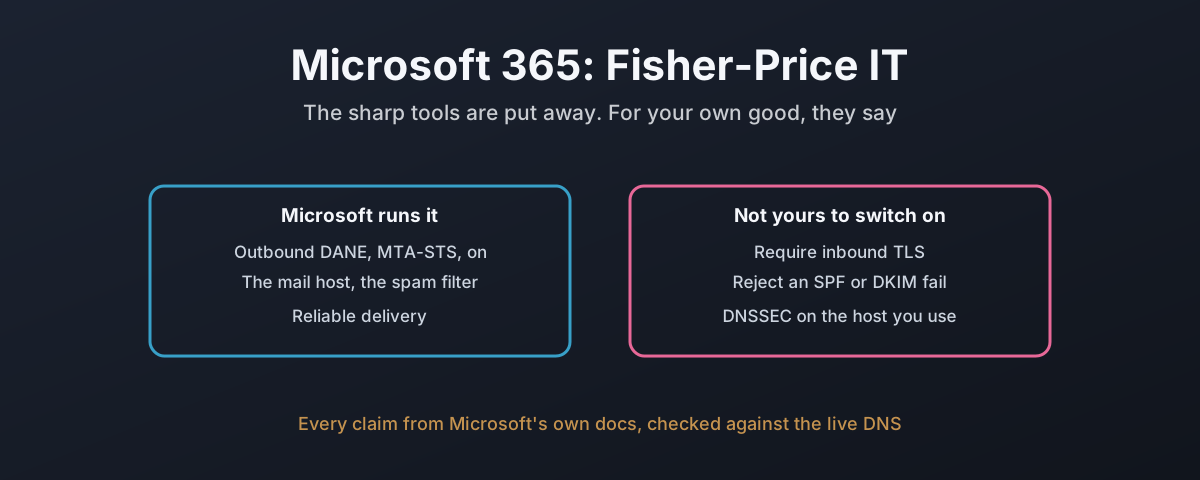
Five of those are a flat no or an absence. The shape of it is three columns: the things Microsoft decides and gets right, the handful you are allowed to turn on, and the ones that are simply not there to switch.
Read on for why each one is where it is, because the reasons are more damning than the verdicts.
What It Does Well, Said Plainly
Credit first, because it is earned. On the outbound path, Exchange Online is genuinely good. DANE validation has been on by default since 2022, MTA-STS validation is automatic with “nothing administrators need to do to apply it”,1 and a per-connector Mandatory DANE mode arrived in early 2026.2 That is more than most self-hosted servers manage out of the box.
Inbound DANE with DNSSEC went generally available on 28th October 2024, and the TLSA records validate on a tenant that has moved to the new host.34 So the capability exists. The catch is everything around it, which is the rest of this post.
No Plaintext In: There Is No Switch
The first house rule is that the server refuses mail arriving in the clear. On Exchange Online there is no way to require that of every sender. TLS can be demanded, but only on a partner connector, scoped to named domains or IP ranges, and the parameter “applies only to Partner type connectors”.5 For everyone else the default is opportunistic.6 You can require TLS from your named partners. You cannot require it from the internet at large, which is the set of senders the rule is about. No tenant-wide require-inbound-TLS control is documented to exist.
Drop Unknown Sender Domains: Not Documented At All
The Postfix build refuses mail whose sender domain does not exist, at MAIL FROM, before the body. I went looking for the Exchange Online equivalent across the anti-spam, authentication and anti-phishing documentation, and there is none. The nearest thing is composite authentication, and Microsoft is explicit that “a composite authentication failure doesn’t directly result in a message being blocked”.7 So I will say it the careful way: Microsoft documents no control that drops mail from a nonexistent sender domain. Whether something undocumented happens in the filtering, I cannot see from outside, and neither can you, which is rather the point.
Reject SPF And DKIM Failures: No, And No
This is the one that should stop an administrator in their tracks. The house rule is to reject a message that fails SPF hard, or whose DKIM signature is present and does not verify. Exchange Online does neither at the door.
For SPF there is a setting, buried in the advanced spam filter. It is “Off” by default, and when on it does not reject the message: it marks mail from an unlisted sender “as high confidence spam”.8 Read that twice. The strongest thing Exchange Online will do about someone forging a domain whose SPF says -all is file it in Junk, and even that is off out of the box. For DKIM, there is nothing at all: no setting rejects a message solely because its signature failed to verify. A failed signature feeds into DMARC and the composite score, and that is the end of it.
Rejection does happen in one case: when the sender’s domain publishes DMARC p=reject, Exchange Online honours it by default and refuses at SMTP time with 550 5.7.1.9 Good, and on by default, but it depends entirely on the sender having done the right thing. The controls the other builds used for your own inbound protection, reject on SPF fail and reject on a broken signature, are not there to switch on.
IPv6: Two Years On, The NCSC Cannot Be Reached Over It
IPv6 is mandatory in this series. Exchange Online supports it inbound, per accepted domain, after an opt-in, and subject to Microsoft automatically opting out “a small percentage of our customers”.10 That rollout was announced in October 2024 as taking three to six months. So I read the AAAA record on the mail host of twenty-two UK organisations running Microsoft 365. Nine, two years later, have none.
| No IPv6 on their MX | Has IPv6 |
|---|---|
| hmrc.gov.uk | ons.gov.uk |
| ncsc.gov.uk | met.police.uk |
| nhs.net | cam.ac.uk, ucl.ac.uk, kcl.ac.uk |
| lloydsbank.com | jisc.ac.uk, ja.net |
| mod.uk, justice.gov.uk | ofcom.org.uk |
| ico.org.uk | gov.wales |
| vodafone.co.uk, bt.com | sheffield.gov.uk, birmingham.gov.uk |
The National Cyber Security Centre’s own mailbox cannot be reached over IPv6, nor can HMRC, the NHS mail service, the Ministry of Defence, the Information Commissioner or Lloyds Bank.4 Whether each was opted out by Microsoft or never opted in cannot be told from the DNS. The result is the same, and all twenty-two are on the legacy mail host that, as we are about to see, cannot be signed.
DNSSEC: Not Planned For The Host You Actually Use
Here is where the documentation and the DNS stop agreeing with each other, and it is the sharpest finding in the post. Inbound DANE needs DNSSEC, and DNSSEC needs the mail host to sit in a signed zone. Every ordinary Exchange Online tenant has its MX pointed at a host under mail.protection.outlook.com. I checked whether that zone is signed, and it is provably not:
$ dig @1.1.1.1 +dnssec DS protection.outlook.com
;; flags: qr rd ra ad; ANSWER: 0
protection.outlook.com. 60 IN NSEC \000.protection.outlook.com. NS RRSIG NSEC
The parent zone is signed, and it returns an authenticated NSEC record proving there is no DS for protection.outlook.com. That is a signed statement that the delegation is unsigned. So every *.mail.protection.outlook.com MX, which is to say almost every Microsoft 365 tenant on earth, is in an unsigned zone and cannot do DANE.
The new, signed infrastructure lives under a different name, mx.microsoft, and moving to it is a manual, opt-in change. How many have? Of roughly thirty-five UK domains I sampled, not one was on it. The tenants I could find on the signed host were all Dutch. And Microsoft’s own April 2026 post says the plan is not to fix the host everyone uses:
Currently, there are no plans to enable DNSSEC on the mail flow domain mail.protection.outlook.com.2
So: DNSSEC and DANE are available on a new host, if you opt in and migrate, and the host every existing tenant is actually on will, by Microsoft’s own statement, not be signed. The capability shipped. The default did not move, and is not going to.
Microsoft’s own two biggest domains show the split, and one of them is worse than the tenants it lectures:
| microsoft.com | outlook.com | |
|---|---|---|
| Mail host | mail.protection.outlook.com | olc.protection.outlook.com |
| Zone signed | no | no |
| DMARC policy | p=reject | p=none |
| MTA-STS | enforce | enforce |
| IPv6 on MX | yes | no |
outlook.com, the consumer mail service, publishes DMARC p=none: it asks the world to check its mail and then do nothing about a failure, which is the setting the lead post calls a shrug.4 Microsoft’s corporate domain does better. Neither host is signed.
The Documentation Argues With Itself
When a vendor’s own documentation contradicts itself on a security control, that is not a nitpick. It is a customer being told two incompatible things about something that decides whether their mail is safe, and I pay attention to that the way I would with any supplier being paid to get it right. Three examples, all from pages Microsoft published, all live on 22nd October 2026.
| What | One page says | Another says |
|---|---|---|
SPF all qualifier | -all hard fail recommended | soft fail recommended |
| MTA-STS wildcard MX | publish mx: *.mail.protection.outlook.com | wildcards “must not be used” |
| DNSSEC on the main host | promoting DANE and DNSSEC | “no plans to enable DNSSEC on mail.protection.outlook.com” |
The SPF page recommends -all, “hard fail”.11 The Direct Send post recommends “a Soft Fail SPF configuration”.12 Both are current, and a customer following one is told off by the other. On MTA-STS, the inbound page tells a tenant to publish mx: *.mail.protection.outlook.com, says on the same page that “wildcards or ‘*’ must not be used as the MX prefix in all MTA-STS scenarios”,1 and then prints an example that uses exactly that wildcard. I am not asking Microsoft to invent anything. I am asking why the page telling a customer how to protect their mail flow cannot agree with itself about the one line that does the protecting.
Then the Direct Send hole, which is the identity rule, rule six, failing at the front door.
There is a way to send mail into a tenant as one of its own users with no authentication at all, because it “does not require any form of authentication”,12 and it is on by default. The setting to turn it off, RejectDirectSend, defaults to off, checks only the envelope sender and not the visible From:, and eighteen months on still has “no fixed date for General Availability”.12 A paid platform shipped an unauthenticated way to spoof a tenant’s own domain, left it on by default, and the fix is an opt-in toggle with no release date and a gap in what it checks. That is the register I reserve for a supplier taking the line that this is hard. It is not hard. As such, I will not pretend it is. It is a default that was set wrong and left.
Can You Build It Right On This? Mostly Not
So here is the honest reckoning, and it is not that Microsoft 365 is bad mail. It delivers reliably, its outbound security is genuinely good, and for an organisation with no mail expertise it is safer than the server they would otherwise have misconfigured. All true, and all beside the point this series is making.
The point is control, and on the controls that matter most for the threats in the lead post, Exchange Online does not give it to you. You cannot require inbound TLS from the internet, reject an SPF hard fail, reject a forged signature, or drop mail from a domain that does not exist. The one unforgeable transport protection, DANE with DNSSEC, is off on the host you are on and not planned to reach it. And the unauthenticated hole in the front door is on by default with no date to close it.
That is what the Fisher-Price edition means. Not that it is for children, but that the sharp tools have been taken away, you are handed the rounded ones, and you are told it is for your own good. Which, for a lot of shops, it is. For a lot of organisations it genuinely is. For anyone who has read this far and understood what the sharp tools were for, it is a platform that has decided, on your behalf, which of your security settings you may touch. The ones you most wanted are behind the glass.
You pay for it either way. The least you can do is know which of these rules it has quietly decided you may not keep.
Microsoft Learn — Enhance mail flow with MTA-STS — automatic outbound MTA-STS validation; also that “MTA-STS policy files aren’t something that Exchange Online can host”, and the self-contradicting wildcard guidance. ↩︎ ↩︎
Microsoft Tech Community — Modernizing DNS security for Exchange Online mail flow (23rd April 2026) — the per-connector DANE/MTA-STS modes, and “Currently, there are no plans to enable DNSSEC on the mail flow domain mail.protection.outlook.com.” ↩︎ ↩︎
Microsoft Tech Community — General Availability of Inbound SMTP DANE with DNSSEC (28th October 2024). ↩︎
DNS checked 22nd October 2026 with
dig @1.1.1.1 +dnssecagainst a validating resolver.protection.outlook.comreturns an authenticated NSEC proving no DS (unsigned);mx.microsoftis signed and its tenants publish validating3 1 1TLSA records. AAAA records read on the*.mail.protection.outlook.comMX host of twenty-two UK organisations; nine, including ncsc.gov.uk, hmrc.gov.uk, nhs.net and mod.uk, have none. ↩︎ ↩︎ ↩︎Microsoft Learn — New-InboundConnector — the
RequireTLSparameter “applies only to Partner type connectors”, scoped bySenderDomainsor sender IP. ↩︎Microsoft Learn — Exchange Online uses TLS to secure email connections — “By default, Exchange Online always uses opportunistic TLS”, and sends without encryption if the recipient does not offer it. ↩︎
Microsoft Learn — Email authentication in EOP — “a composite authentication failure doesn’t directly result in a message being blocked.” ↩︎
Microsoft Learn — Advanced Spam Filter settings — the “SPF record: hard fail” setting is “Off” by default and marks matching mail as high confidence spam rather than rejecting it. ↩︎
Microsoft Learn — Configure DMARC to validate the From address — with Honor DMARC on by default, a sender policy of
p=rejectis “Rejected during SMTP (550 5.7.1)”. ↩︎Microsoft Tech Community — IPv6 updates for Exchange Online (30th October 2024) — the three-to-six-month rollout, and automatic opt-out of “a small percentage of our customers”. ↩︎
Microsoft Learn — Set up SPF — “For Microsoft 365 domains, we recommend -all (hard fail).” ↩︎
Microsoft Tech Community — Introducing more control over Direct Send (28th April 2025, modified 20th May 2026) — Direct Send “does not require any form of authentication”;
RejectDirectSenddefaults to False, checks only the envelope sender, and “There is no fixed date for General Availability”; and the soft-fail SPF recommendation. ↩︎ ↩︎ ↩︎