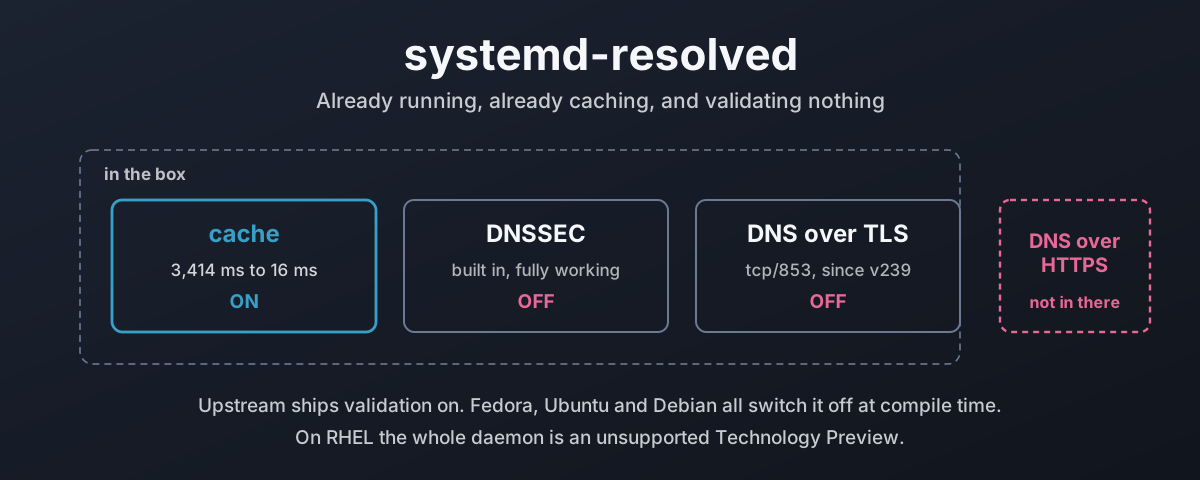
There is a DNS resolver running on your machine right now. You did not install it, you have probably never configured it, and it is answering every name lookup the box makes. On Fedora, Ubuntu and most desktop Linux it is systemd-resolved, and it has been sat there quietly since the day the system was installed.
It can do three things worth having. It caches, so the same lookup does not cross the network twice. It validates DNSSEC, so a forged answer gets rejected instead of believed. And it speaks DNS over TLS, so the local network cannot read every name you ask for.
By default it does exactly one of those. The other two are switched off, and on some distributions they are switched off at compile time, which means the setting you would change is not even the setting that decided it. A validator that never validates is neither use nor ornament.
This is what the thing actually does, measured on a running Fedora 44 box with systemd 259, and what changes when you turn the other two on. Including what your distribution decided for you at compile time, and how much of that you can simply overrule.
What Is Actually Answering Your Lookups
Start with the honest picture, because “it uses /etc/resolv.conf” has not been true on these systems for years.
systemd-resolved exposes itself four different ways, and which one a program uses decides what it gets back.1 The glibc path is nss-resolve, wired in through /etc/nsswitch.conf. The native paths are D-Bus and Varlink, which carry the DNSSEC verdict and the interface scope that getaddrinfo has no way to express. Then the stub listener, a real DNS server on the loopback for anything that speaks raw DNS and knows nothing about any of the above.
Four doors, one daemon.
On this machine that wiring looks like this:
$ ls -l /etc/resolv.conf
lrwxrwxrwx. 1 root root 39 May 30 13:56 /etc/resolv.conf -> ../run/systemd/resolve/stub-resolv.conf

$ cat /etc/resolv.conf
nameserver 127.0.0.53
options edns0 trust-ad
search damiendye.uk

$ grep ^hosts: /etc/nsswitch.conf
hosts:      files myhostname mdns4_minimal [NOTFOUND=return] resolve [!UNAVAIL=return] dns
resolve in that line is nss-resolve. dns after it is the traditional nss-dns, sat there as a fallback that only fires if resolved is not running at all.
There Are Two Stub Listeners, Not One
Everybody knows about 127.0.0.53. Fewer people know there is a second one.
$ ss -lntup | grep ':53 '
udp   UNCONN 0  0     127.0.0.54:53   0.0.0.0:*
udp   UNCONN 0  0  127.0.0.53%lo:53   0.0.0.0:*
tcp   LISTEN 0  4096  127.0.0.54:53   0.0.0.0:*
tcp   LISTEN 0  4096 127.0.0.53%lo:53 0.0.0.0:*
They are not two addresses for the same thing. The second one deliberately does less:2
127.0.0.53 | 127.0.0.54 | |
|---|---|---|
| Role | The full local resolver | Proxy mode only |
| Cache | Yes | No |
| DNSSEC validation | Yes, when enabled | Never |
| LLMNR and Multicast DNS | Yes | No |
Synthetic names (localhost, _gateway) | Yes | No |
| Upgrades to DNS over TLS | Yes | Yes |
| Synthetic name for it | _localdnsstub | _localdnsproxy |
| You get back | What resolved decided | What the upstream said |
The documentation is blunt about the second column. It will “pass most DNS messages relatively unmodified to the current upstream DNS servers and back, but not try to process the messages locally, and hence does not validate DNSSEC, or offer up LLMNR/MulticastDNS”.2
That makes 127.0.0.54 the right target for a program that wants to do its own validation, or one that needs the raw upstream response rather than resolved’s interpretation of it.
Both addresses have synthetic names, _localdnsstub and _localdnsproxy, which resolve without any configuration at all.
Four Modes For /etc/resolv.conf, Not Three
The mode is detected automatically from what the file is, and there are four of them.1
/etc/resolv.conf is | What it means | Clients bypassing NSS |
|---|---|---|
symlink to run/systemd/resolve/stub-resolv.conf | The recommended mode. Lists 127.0.0.53 and the live search domains | Go through resolved |
symlink to /usr/lib/systemd/resolv.conf | Static, lists 127.0.0.53, carries no search domains | Go through resolved |
symlink to run/systemd/resolve/resolv.conf | Lists the real upstream servers, kept current | Bypass resolved entirely |
| a real file managed by something else | resolved reads it as a consumer, not a provider | Bypass resolved entirely |
That third row catches people out. It looks like the tidy option, it is kept up to date, and it quietly means every program that reads resolv.conf directly is talking to your ISP’s resolver with no cache, no validation and no encryption, whatever you have configured in resolved.conf.
The trust-ad option in the file above matters too. Without it, glibc strips the AD bit off the answer before your program sees it, on the reasonable grounds that a random resolver’s claim to have validated something is worth nothing. With 127.0.0.53 as the nameserver the claim is coming from your own machine, so trust-ad is correct here and resolved writes it in for you.
On The systemd Conspiracy Theories
Before any of the detail, because this is the subject where it always turns up.
If your objection to what follows is a theory about Lennart Poettering personally, or about Red Hat’s motives, or about systemd being a plot to take something off you, you can sling your hook, because I am not interested in hearing your fiction.
Everything in this post came off a live machine: the source, the build flags, the shipped binary, the man pages and the measured behaviour. Every claim has a command next to it that you can run yourself and check. The build flags are public. The source is public. The one default I think is genuinely wrong was chosen by people who wrote their reasoning down where anybody can read it and argue with them, which is exactly what I do further down.
That is a good deal more transparency than you get from most of the software you run without a word of complaint.
Bring evidence or give over.
The Cache Is The Part That Just Works
This is the one feature that is on by default everywhere, and it is the one that earns its keep with no configuration at all.
The measurement, on this box, over 32 domains. Flush the cache, query the lot, query them again, and read the query time dig reports rather than timing the process:
$ resolvectl flush-caches
$ for n in $NAMES; do dig +tries=1 @127.0.0.53 "$n" A | grep 'Query time'; done
| median | mean | p90 | max | total for 32 names | |
|---|---|---|---|---|---|
| cold cache | 103.5 ms | 106.7 ms | 184 ms | 238 ms | 3,414 ms |
| warm cache | 0.0 ms | 0.5 ms | 1 ms | 3 ms | 16 ms |
3,414 milliseconds against 16. That is the whole argument for a local cache, and it is why this is the default.
Worth being honest about what that number is, though. It is the saving on a run of thirty-two names that had never been looked up, against the same run repeated, and no real workload looks like either. The useful figure is the tail rather than the median: the worst lookup in that set cost 238 ms cold and 3 ms warm. A page that pulls in eight hostnames does not care about your median, it waits for your slowest one.
The Knobs
[Resolve]
Cache=yes                 # yes | no-negative | no
CacheFromLocalhost=no     # default: do not cache answers from 127.0.0.1
StaleRetentionSec=0       # serve expired records when upstream is down
| Setting | Default | What it does |
|---|---|---|
Cache=yes | on | Cache positive and negative answers |
Cache=no-negative | Positive answers only, for when you are tired of waiting out a negative TTL | |
CacheFromLocalhost=no | on | Do not cache at all when the upstream is on 127.0.0.1 |
StaleRetentionSec=0 | off | Serve expired records when the upstream stops answering |
DNSCacheSize=4096 | 4096 | Records held per scope. systemd 261 and later only |
That third row is the one that bites. If your upstream is a dnsmasq or an unbound on loopback, resolved will not cache its answers at all, on the grounds that the thing it is talking to is already a cache. Point resolved at a filtering resolver on another host and you get two layers of caching. Point it at one on loopback and you get one.
StaleRetentionSec= is the interesting one, and it is off by default. Set it, and when the upstream stops answering, resolved keeps serving records past their TTL rather than failing.2 It always tries the upstream first. It does not apply to NXDOMAIN, because a name not existing is a perfectly valid answer and there is nowt stale about it. For a laptop that goes in and out of coverage, or a machine that has to keep working through a DNS outage, this is worth having:
[Resolve]
StaleRetentionSec=1d
systemd 261 added per-protocol cache sizing on top of this, with DNSCacheSize=, MulticastDNSCacheSize= and LLMNRCacheSize=, each defaulting to 4096 records and capped at 2^24.3 Not on this box, which runs 259, and not on any current stable distribution release. Worth knowing it is coming, because until now the cache size was not tunable at all.
The daemon also flushes everything on memory pressure, which is sensible and occasionally surprising when you are trying to work out why a cache hit rate looks poor.
Split DNS Is The Reason To Keep It
If you take one thing from this, take this section, because it is the feature that genuinely does something the old stub resolver could not.
The traditional resolv.conf has one list of nameservers for the whole machine. One list. Bring up a VPN and something has to overwrite it, which means either your internal names work and the rest of DNS goes through the corporate resolver, or the reverse. There is no third option. The file cannot express one.
resolved routes per-query, per-interface.1 Every link has its own servers and its own domains, and a lookup is sent to the link whose domain best matches the name, by label count.
| Configuration | Written as | Effect |
|---|---|---|
| Search domain | damiendye.uk | Suffix for single-label names, and routes matching queries to this link |
| Route-only domain | ~internal.example | Routes matching queries to this link, never used as a suffix |
| Catch-all route | ~. | Send everything not matched elsewhere to this link |
| Default route | DNSDefaultRoute=yes | Take unmatched queries, without claiming ~. |
So a laptop with a work VPN up gets this:
resolvectl domain tun0 '~corp.example' '~10.in-addr.arpa'
resolvectl dns    tun0 10.0.0.53
Names under corp.example and reverse lookups for 10.0.0.0/8 go down the tunnel. Everything else keeps going out of the local link as it did before. Nobody’s resolv.conf got rewritten, and when the tunnel drops the routes go with it.
One rule is worth stating plainly, because it is the one people reach for and get wrong. ~. on a link means prefer this link for everything. It also implicitly stops any other link being a default route. Want a link to take the leftovers without claiming the whole namespace? Set DNSDefaultRoute=yes and leave ~. alone.
Check what it decided rather than assuming:
$ resolvectl status
Link 3 (wlp4s0)
    Current Scopes: DNS LLMNR/IPv4 LLMNR/IPv6
         Protocols: +DefaultRoute LLMNR=resolve -mDNS -DNSOverTLS
                    DNSSEC=no/unsupported
Current DNS Server: 192.0.2.53
       DNS Servers: 192.0.2.53 2001:db8:1::53
        DNS Domain: damiendye.uk
     Default Route: yes
Every address in this post is from the documentation ranges, 192.0.2.0/24 and 2001:db8::/32, so do not paste them into a config and expect an answer.4 5 The figures and the behaviour are real, off a live machine. The addresses are stand-ins, because a global IPv6 address built the usual way carries the interface’s MAC in its bottom half, and publishing one hands out a piece of hardware inventory along with it.
That -DNSOverTLS and that DNSSEC=no are the next two sections.
It Can Validate DNSSEC
The daemon is described upstream as “a caching and validating DNS/DNSSEC stub resolver”.1 The validating half is real, it is not a wrapper round something else, and it works. It is just not switched on.
Turning it on per link needs no sudo, because resolvectl goes through polkit and an active local session is allowed:
$ resolvectl dnssec wlp4s0 yes
$ resolvectl status wlp4s0 | grep DNSSEC
                    DNSSEC=yes/supported
That /supported suffix is resolved reporting what it found when it probed the upstream, separately from what you asked for. yes/supported means you asked for validation and the server can carry it. no/unsupported on a default install means nobody asked, so nobody probed.
Once it is on, every lookup comes back with a verdict, and there are three of them.
Here are all three on this machine, against real names:
$ resolvectl query damiendye.uk
-- Data is authenticated: yes; Data was acquired via local or encrypted transport: no

$ resolvectl query systemd.io
-- Data is authenticated: no; Data was acquired via local or encrypted transport: no

$ resolvectl query dnssec-failed.org
dnssec-failed.org: resolve call failed: DNSSEC validation failed: missing-key
  (DNSKEY Missing: no SEP matching the DS found for dnssec-failed.org.)
damiendye.uk is signed, so the chain from the root validates and the data is authenticated. systemd.io is not signed, so there is nothing to check and resolved says so honestly rather than pretending. That is the systemd project’s own domain, which is a point I will come back to. dnssec-failed.org is published with deliberately broken signatures. That one fails hard, with a diagnostic naming the exact problem.
Here is the distinction that gets lost. Insecure is not a failure. An unsigned zone returns data and tells you it could not be verified. Only a zone that claims to be signed and then cannot prove it gets rejected.
The chain itself is visible if you want to see it:
$ dig +short @127.0.0.53 uk DS
43876 8 2 A107ED2AC1BD14D924173BC7E827A1...

$ dig +short @127.0.0.53 damiendye.uk DS
2371 13 2 A5B2825C57899A5A15EE9703832C8358E0D19EF29DC72DD83C691ED77C33BD7F

$ dig +short @127.0.0.53 damiendye.uk DNSKEY
256 3 13 oJMRESz5E4gYzS/q6XDrvU1qMPYIjCWz...
257 3 13 mdsswUyr3DPW132mOi8V9xESWE8jTo0d...
Root vouches for uk, uk vouches for damiendye.uk, and the 257 key signs the 256 key that signs the records. Algorithm 13 there is ECDSA P-256, which is what you want on a new zone rather than the RSA that the uk DS above is still using.
Through the plain stub, a program that never heard of resolved gets the same verdict as an AD flag:
$ dig @127.0.0.53 ietf.org A | grep flags
;; flags: qr rd ra ad;

$ dig @127.0.0.53 dnssec-failed.org A | grep status
;; ->>HEADER<<- status: SERVFAIL
And the daemon keeps a running tally, which is the quickest way to see whether validation is doing anything:
$ resolvectl statistics
DNSSEC Verdicts
                    Secure:  134
                  Insecure:   62
                     Bogus:    0
             Indeterminate:    2
What Validation Costs
Here I am going to disappoint you, because I tried to measure this properly and could not.
Warm, it is clean and it is nothing. The same 32 names against a full cache cost 16 ms without validation and 23 ms with it. Call it a rounding error.
Cold is where the cost should show, and a single client cannot isolate it. I ran the sweep both ways and got contradictory answers: on one ordering validation looked 74% slower, on another it looked faster, which is impossible and tells you what is really being measured. Whichever sweep runs second benefits from the upstream resolver having already fetched everything the first one asked for. The variable that dominates is not validation, it is whose cache was warm.
So I will not give you a number I cannot stand behind. What is true is the mechanism, and the documentation states the shape of it plainly: validation “requires retrieval of additional DNS data, and thus results in a small DNS lookup time penalty”.2 A cold validated lookup walks the delegation chain fetching DS and DNSKEY at every level before it can answer, so it costs extra round trips on names nobody has asked for yet, and nothing at all on names anybody has.
Which is also why the same page warns that turning the cache off “comes at a performance penalty, which is particularly high when DNSSEC is used”.2 The two features are not independent. Validation is affordable precisely because the cache means you pay for it once.
If you want the real figure for your own network, measure it there. One client on one connection cannot tell you.
So Why Is Validation Switched Off
Because your distribution turned it off when it built the package, and it did that for a reason it has written down.
Upstream systemd ships validation on. The build option says so:
option('default-dnssec', type : 'combo',
       choices : ['yes', 'allow-downgrade', 'no'],
       value : 'allow-downgrade')
and the upstream manual agrees: DNSSEC= “Defaults to allow-downgrade”.6
Now look at what Fedora passes to that build:7
-Ddefault-dnssec=no
-Ddefault-dns-over-tls=no
-Ddefault-mdns=no
-Ddefault-llmnr=resolve
And what Debian and Ubuntu pass:8
-Ddefault-dnssec=no
-Ddefault-llmnr=no
-Ddefault-mdns=no
-Ddns-over-tls=openssl
So the file at /usr/lib/systemd/resolved.conf on a Fedora box, the one headed “Entries in this file show the compile time defaults”, reads #DNSSEC=no. Read that again, because it is doing something sly: the line looks like the software telling you its own default, and what it is actually printing back at you is Fedora’s build flag, with upstream’s real default nowhere on the page.
| Setting | Upstream default | Fedora build | Debian/Ubuntu build | Result on this box |
|---|---|---|---|---|
DNSSEC= | allow-downgrade | no | no | DNSSEC=no |
DNSOverTLS= | no | no | no (compiled with OpenSSL) | -DNSOverTLS |
MulticastDNS= | yes | no | no | -mDNS |
LLMNR= | yes | resolve | no | LLMNR=resolve |
Every one of those matches what resolvectl status prints on this machine. Source, build flag, running system, all three agree.
Fedora’s reasoning is in the change proposal and it is refreshingly blunt. The feature “is known to cause compatibility problems with certain network access points”, and Fedora “is not prepared to handle an influx of DNSSEC-related bug reports”, so it goes off.9
Can I ask why the answer to a feature that breaks on bad networks is to disable it for everybody, rather than ship allow-downgrade like upstream does and let it turn itself off where it has to? Not who decided. What in the process led there. Because allow-downgrade exists precisely for the captive-portal case, it is upstream’s default for exactly that reason, and shipping no instead means a machine on a perfectly good network gets no validation either.
To be fair to them, allow-downgrade has its own problem, and it is a real one. The mode detects a resolver that cannot do DNSSEC and quietly stops validating. An attacker who can shape your DNS responses can make that detection fire on purpose, and the documentation says so plainly: it “makes DNSSEC validation vulnerable to ‘downgrade’ attacks”.2 A security feature any attacker can switch off is doing less than it looks.
So neither default is good. no gives you nothing. allow-downgrade gives you something an attacker can take away, and yes gives you the real thing plus everything in the next section.
How Much Of The Web Is Signed Anyway
Before spending much effort on validation it is worth knowing what fraction of your lookups it can possibly protect. So I asked resolved for the verdict on the apex of thirty-two domains that this subject actually implicates: the bodies that wrote the standard, the outfits that ship the resolver, and the infrastructure everybody resolves whether they mean to or not.
Sixteen of thirty-two. Half.
| Signed | Unsigned | |
|---|---|---|
| Standards and registries | ietf.org, iana.org, icann.org, rfc-editor.org, ripe.net, isc.org, nlnetlabs.nl, nic.cz, afnic.fr, verisign.com | none |
| Distributions and vendors | debian.org, fedoraproject.org, opensuse.org, almalinux.org | redhat.com, ubuntu.com, canonical.com, suse.com, rockylinux.org, archlinux.org |
| systemd itself | none | systemd.io, freedesktop.org |
| Infrastructure | cloudflare.com, gov.uk | github.com, kernel.org, google.com, wikipedia.org, mozilla.org, apache.org, gnu.org, quad9.net |
Read down the first column. Every single standards body and registry has signed. Ten out of ten, no exceptions: the people who wrote DNSSEC, and the people who run the registries that publish the DS records for everybody else. They did the work on their own zones.
Now read across the third row. systemd.io has no DS. The project that wrote the validating resolver this entire post is about has not signed its own domain, and neither has freedesktop.org, where its documentation lives. Below that, quad9.net is unsigned too, which is worth sitting with for a second: a public resolver whose whole pitch is that it validates DNSSEC for you, on a zone nobody can validate.
And the vendors split cleanly along one line. The community distributions signed. debian.org, fedoraproject.org, opensuse.org, almalinux.org. The companies did not. redhat.com, ubuntu.com, canonical.com, suse.com. Those are the four organisations that package and ship this resolver to most of the Linux estate.
No gap in the technology there. The protocol has been deployable for over fifteen years, the tooling is free, and the registries take the DS record without charging for it. I will tell you this for nowt: the people who wrote the standard have signed, and most of the people shipping the software have not.
There is a sharper version of the same point in gov.uk, which is signed, and then does this:
$ dig +short @127.0.0.53 www.gov.uk CNAME
www-cdn.production.govuk.service.gov.uk.

$ dig +short @127.0.0.53 service.gov.uk DS
                                          (nothing)
uk has a DS. gov.uk has a DS. service.gov.uk has none, so the chain stops dead there, and www.gov.uk resolves insecure even though the apex above it is signed properly. Somebody did the work on gov.uk and then pointed the actual website at an unsigned delegation. Half a job.
As such, if you are signing a zone, check the names people actually type. A signed apex that CNAMEs into an unsigned CDN zone buys you nowt.
DNS Over TLS Works, With Conditions
DNS over TLS is implemented, it is compiled into every mainstream build, and it works. It is off by default everywhere, including upstream, where DNSOverTLS= “Defaults to no”.6
The configuration is two lines, and the second one is the one people miss:
[Resolve]
DNS=9.9.9.9#dns.quad9.net 149.112.112.112#dns.quad9.net
DNSOverTLS=yes
That #dns.quad9.net is not decoration. It sets the name used for SNI and for validating the certificate. Leave it off and the certificate is “checked against the server’s IP” instead.2 That works with the big providers because they put IP addresses in their certificate SANs, but it is the weaker check, it breaks the moment a provider stops doing that, and it gives you no protection against being redirected to a different address that happens to hold a valid certificate for itself. Fedora’s own magazine article on this omits the hostname,10 which is a shame, because the syntax is right there in the shipped config file’s comments.
Strict And Opportunistic Are Very Different Settings
| Mode | On a server that supports DoT | On a server that does not | Authenticates the server |
|---|---|---|---|
yes | Encrypted | All lookups fail | Yes |
opportunistic | Encrypted | Silently plaintext | No |
no | Plaintext | Plaintext | n/a |
opportunistic reads like the sensible middle ground and mostly is not. The documentation says it outright: in that mode “the resolver is not capable of authenticating the server, so it is vulnerable to ‘man-in-the-middle’ attacks”,2 and anyone who can drop your port 853 traffic can force the downgrade. It protects you from passive observation on a network where nobody is trying. Against somebody who is, it does nowt.
yes is the honest setting. It also means that when it cannot connect, you get no DNS at all, which is worth knowing before you put it on a machine you cannot walk up to.
I tried strict DoT to Quad9 from this box and the query hung. No error, no timeout, nothing in the journal between the flush and my reverting it two minutes later:
Sep 27 17:12:11 systemd-resolved[40105]: wlp4s0: Bus client set DNS server list to: 9.9.9.9#dns.quad9.net, ...
Sep 27 17:12:14 systemd-resolved[40105]: wlp4s0: Bus client set DNSOverTLS setting: yes
Sep 27 17:12:15 systemd-resolved[40105]: Flushed all caches.
Sep 27 17:14:39 systemd-resolved[40105]: wlp4s0: Bus client set DNS server list to: 192.0.2.53, ...
I cannot tell you from here whether port 853 is reachable on that connection, because the shell I ran the test from could not reach port 443 either and was clearly filtered itself. What the log does show is the failure mode: strict DoT that cannot connect does not report anything useful. It waits. If you turn this on and your DNS goes quiet, check ss -tn dport = :853 before you go looking at resolved.
Testing It Properly
# does the transport actually come up
resolvectl flush-caches
resolvectl query ietf.org        # expect: acquired via ... encrypted transport: yes

# is anything still going out in the clear
sudo tcpdump -ni any 'port 53 and not host 127.0.0.53'
The second command is the one that tells the truth. With DoT working, nothing should leave the machine on port 53, and anything that does is a program that found its way round the stub.
DNS Over HTTPS Does Not Exist Here
Straightforward answer to the question: systemd-resolved does not support DNS over HTTPS. Not partially, not behind a flag, not with a build option nobody turns on. There is no DoH in there at all.
And that is not read off the documentation, which could simply be out of date. It is what the binary contains:
$ strings /usr/lib/systemd/systemd-resolved | grep -icE 'application/dns-message|dns-query|:443'
0

$ grep -oE 'name="DNSOver[A-Za-z]*"' /usr/share/dbus-1/interfaces/org.freedesktop.resolve1.Manager.xml
name="DNSOverTLS"
No DoH wire format, no HTTP/2, one encryption property on the D-Bus interface and it is TLS. The complete list of resolved.conf directives upstream runs to seventeen settings and none of them mentions HTTPS.6
It has been asked for. Issue #8639, “Add support for DNS-over-HTTPS to systemd-resolved”, was opened on 2 April 2018 and is still open, with two pull requests attached and nothing merged.11 Eight years and counting.
Is that the wrong call? Not obviously, and the argument for DoT is decent. Both carry DNS inside TLS and both stop the same passive observer. DoH’s advantage is that it hides on port 443 with everything else, so a network that wants to block encrypted DNS has to work much harder. That is genuinely useful if the network operator is the adversary.
It cuts the other way too. Where the operator is you, that indistinguishability means you cannot audit your own DNS either, and every application shipping its own DoH client stops using the system resolver, which is how you get a browser that ignores your split DNS, your cache and your internal zones. On your own kit, a resolver visible on a known port is a feature.
So: if DoT reaches your resolver, use it and you lose nothing. If port 853 is blocked, resolved has no answer and you want a DoH proxy in front of it, dnscrypt-proxy or cloudflared on loopback with resolved pointed at it. Caching and validation stay resolved’s job. Only the transport moves.
What Your Distribution Actually Ships
The same daemon behaves very differently depending on who packaged it. Enabling the service is the easy half. The half that gets skipped is plugging it into the networking tools the distribution actually uses, and on one of these four it is genuinely not plugged in until you do it yourself.
| Installed | Enabled | nss-resolve wired in | Config arrives via | Supported | |
|---|---|---|---|---|---|
| Fedora (33+) | yes | yes | yes, in systemd-libs | NetworkManager | yes |
| Ubuntu | yes | yes | yes | netplan, then NM or networkd | yes |
| Debian (12+) | separate package | no | no, separate package | you choose and wire it | yes |
| RHEL / Rocky / Alma (9, 10) | yes | no | yes | NetworkManager, once told | Technology Preview |
Validation And A Full Cache: The Settings Themselves
These are the same four lines everywhere, because resolved.conf is resolved.conf on every distribution. What differs is only how the rest of the configuration reaches the daemon, which is the next four sections.
# /etc/systemd/resolved.conf.d/60-local.conf
[Resolve]
DNSSEC=allow-downgrade
Cache=yes
CacheFromLocalhost=no
StaleRetentionSec=1d
Use a drop-in rather than editing /etc/systemd/resolved.conf, because the main file is lower precedence than any drop-in and a package update can argue with you over it. The numbering is a documented convention: vendors take 10 to 40 under /usr/, you take 60 to 90 under /etc/, so yours wins.6
On systemd 261 and later there is a fifth line worth adding, because until then the cache size was not tunable at all:
DNSCacheSize=16384 # systemd 261+; default 4096, max 2^24
Apply it and confirm the daemon agrees with the file, rather than assuming it read it:
systemd-analyze cat-config systemd/resolved.conf   # every fragment, in precedence order
systemctl restart systemd-resolved
resolvectl status | grep -E 'DNSSEC|Protocols'
resolvectl statistics                              # verdicts should start moving
DNSSEC=allow-downgrade is the setting I would put on a machine I am not going to babysit, for the reasons in the section above. DNSSEC=yes is the honest one and it fails closed. Pick deliberately.
Plugging It Into The Network Stack
Turning the service on is one command. Getting your distribution’s own networking tools to hand it their DNS configuration is the part that varies, and it is where “enabled” and “working properly” come apart.
| Where DNS config comes from | To enable DNSSEC | To size the cache | Extra wiring needed | |
|---|---|---|---|---|
| Fedora | NetworkManager, automatically | drop-in | drop-in | none |
| Ubuntu | netplan, then NM or networkd | drop-in, or per-link in .network | drop-in | none |
| Debian | whichever stack you chose | drop-in, or per-link in .network | drop-in | libnss-resolve, plus the stack below |
| RHEL family | NetworkManager, once told | drop-in | drop-in | dns=systemd-resolved |
Fedora
The most complete integration of the four, and the only one where everything is already plugged in.
NetworkManager owns the network and hands DNS to resolved without being told to. On this box there is no dns= line anywhere in /etc/NetworkManager/ and it still works, because NetworkManager detects the running daemon and uses it. /etc/resolv.conf is the stub symlink, and glibc is wired in because libnss_resolve.so.2 ships in systemd-libs, which is not optional:
$ rpm -qf /usr/lib64/libnss_resolve.so.2
systemd-libs-259.9-1.fc44.x86_64

$ grep ^hosts: /etc/nsswitch.conf
hosts: files myhostname mdns4_minimal [NOTFOUND=return] resolve [!UNAVAIL=return] dns
So on Fedora the drop-in above is the whole job. Nothing else to connect.
Ubuntu
Enabled by default, and nss-resolve is wired in the same way. The difference is that configuration usually arrives through netplan:
network:
  version: 2
  ethernets:
    enp1s0:
      dhcp4: true
      nameservers:
        addresses: [9.9.9.9, 149.112.112.112]
        search: [example.com]
Netplan hands that to its renderer, NetworkManager on desktop or systemd-networkd on server, and the renderer hands it to resolved. Note what netplan cannot express. There is no netplan key for DNSSEC=, and none for DNSOverTLS=. Those go in the drop-in above, which is where they belong anyway.
If you are on systemd-networkd, the per-link settings are also available natively in the .network file, and a per-link setting beats the global one:
# /etc/systemd/network/10-lan.network
[Network]
DNS=9.9.9.9#dns.quad9.net
DNSSEC=yes
DNSOverTLS=yes
Domains=~.
Debian Needs Wiring In By Hand
This is the one that is genuinely not plugged in, and the reason the section above exists.
Since Debian 12 systemd-resolved is a separate package, and the release notes are explicit about the upgrade: “The new systemd-resolved package will not be installed automatically on upgrades”, and “until it has been installed, DNS resolution might no longer work since the service will not be present on the system.”12 The same notes settle the wider question: “systemd-resolved was not, and still is not, the default DNS resolver in Debian.”
Installing it is three packages, not one, and the second is the one everybody misses:
apt install systemd-resolved libnss-resolve
systemctl enable --now systemd-resolved
libnss-resolve is only Suggests:, not a dependency,13 and Suggests is the one relationship apt does not act on. So nobody installs it.
The reason nobody notices is more interesting than the reason nobody installs it. Leave it out and glibc still reaches resolved, because /etc/resolv.conf points at the stub and plain nss-dns talks to it. Most of the daemon keeps working:
Without libnss-resolve | With it | |
|---|---|---|
| Cache | Yes, via the stub | Yes |
| DNSSEC validation | Yes, it happens in the daemon | Yes |
| DNS over TLS | Yes | Yes |
AD bit reaches glibc | Yes, resolv.conf carries trust-ad | Yes |
| Secure vs insecure vs bogus | No, one bit only | Yes |
| Link-scoped addresses | No | Yes |
/etc/hosts read by the daemon | No | Yes |
Nothing in the left column looks broken, so nothing gets fixed. What you lose is what the DNS wire format cannot carry, and the clearest case is an address with a scope on it:
$ getent hosts _gateway            # via nss-resolve
fe80::5054:ff:fe12:3456 _gateway

$ dig +short @127.0.0.53 _gateway  # via the stub, as nss-dns would
192.0.2.1
Same name, same daemon, two different answers. A link-local IPv6 address is meaningless without the interface it is scoped to, and there is nowhere in a DNS response to put that, so the stub can only hand back the IPv4. The native API has somewhere to put it and gives you the address you actually wanted.
The verdict row is the same problem. AD is one bit, signed or not. The native API separates secure from insecure from bogus, which is the difference between “nobody signed this” and “somebody signed this and somebody else has been at it”. An application that cares cannot tell those apart over the wire.
That is the gap between the service running and the service being plugged in, and it stays invisible until you go looking for it.
Check it landed:
grep ^hosts: /etc/nsswitch.conf # wants 'resolve [!UNAVAIL=return] dns'
How the rest of your networking reaches it depends on which of Debian’s stacks you are on.
The package declares Provides: resolvconf and Conflicts: resolvconf, openresolv,13 so it takes over the resolvconf interface outright. /usr/sbin/resolvconf becomes a symlink to resolvectl, which is a multi-call binary: invoked under that name it speaks the resolvconf(8) protocol and pushes everything it is handed straight into resolved.14 Anything that already calls resolvconf -a therefore keeps working unmodified, with systemd-resolved as the only supported backend.
Not all of the interface survives, and the gaps fail loudly rather than silently:
resolvconf option | Under systemd-resolved |
|---|---|
-a <iface> | Registers per-link DNS read from stdin. The one that matters |
-d <iface> | Unregisters, same as resolvectl revert |
-x | Mapped to a ~. routing domain |
-p | Marks the link as not a default route (systemd 257+) |
-f | Makes -a and -d quiet about an interface that is not there |
-m | Accepted and silently ignored |
-u, -i, -I, -l, -r, -R, -v, -V | Not supported. The command fails |
One trap worth knowing before you debug it: the shim only writes /etc/resolv.conf when that file is a symlink to /run/systemd/resolve/resolv.conf, and not when it is a static file.14
ifupdown, the default on a Debian server install. Thedns-nameserversstanza in/etc/network/interfaceswas always implemented by the oldresolvconfpackage’s hooks, andsystemd-resolvedconflicts with that package and ships no/etc/network/if-up.d/hooks of its own. For a static interface, do not rely on the stanza. Set the servers on the link explicitly and let resolved own them:# /etc/network/interfaces auto enp1s0 iface enp1s0 inet static address 192.0.2.10/24 gateway 192.0.2.1 up /usr/sbin/resolvconf -a $IFACE <<< 'nameserver 192.0.2.53' down /usr/sbin/resolvconf -d $IFACEDHCP on ifupdown is already handled.
isc-dhcp-clientships hooks named for the daemon,/etc/dhcp/dhclient-enter-hooks.d/resolved-enterand/etc/dhcp/dhclient-exit-hooks.d/resolved,15 so a lease’s DNS servers land on the right link with nothing to configure.systemd-networkdis the cleanest option and needs no shim at all, because the two halves are the same project. Per-link DNS, DNSSEC and DoT are native keys in the.networkfile, exactly as in the Ubuntu example above.NetworkManager, on a Debian desktop, needs telling once:
# /etc/NetworkManager/conf.d/10-resolved.conf
[main]
dns=systemd-resolved
Pick one and know which one you picked. The failure mode here is not a daemon that refuses to start, it is two stacks both believing they own /etc/resolv.conf, which reads as intermittent DNS and wastes an afternoon. resolvectl status says which link the servers landed on. If the answer is none of them, nothing is feeding the daemon, and that is the bug.
RHEL, Rocky And Alma
And here is the one worth reading twice. The package is there, nss-resolve is available, NetworkManager can drive it, and Red Hat’s documentation says this:
systemd-resolved is an unsupported Technology Preview.16
That wording has been in the RHEL 9 release notes since 9.0 and it is still there at 9.8. Technology Preview means no production SLA, and Red Hat explicitly does not recommend it for production use.
Nor is it enabled. NetworkManager owns resolv.conf on these systems, so turning it on is a NetworkManager setting rather than just enabling the unit:
# /etc/NetworkManager/conf.d/10-resolved.conf
[main]
dns=systemd-resolved
systemctl enable --now systemd-resolved
systemctl reload NetworkManager
resolvectl status          # confirm NM actually handed the servers over
After that the drop-in above applies unchanged, and validation and the cache behave exactly as they do on Fedora.
So on RHEL you have a decision that does not exist on the others. Want a validating, caching, split-DNS-capable local resolver on a supported RHEL box? Then the supported answer is not this one. It is unbound, or dnsmasq through NetworkManager’s own dns=dnsmasq, both of which Red Hat will actually stand behind.
The label is not a comment on the code. It is a comment on what Red Hat will put an SLA behind, and a caching validating resolver is a thing customers open tickets about. Fair enough. But if you are buying RHEL for the support, running name resolution on an unsupported component is a decision to make deliberately and write down, not one to drift into because it was in the repo.
Nothing Is Actually Crippled, And Here Is How To Prove It
The premise is worth testing, because “my distro disabled it, I will have to rebuild” is the reflex and here it is wrong.
systemd has two entirely different kinds of build option, and they get talked about as though they were one:17
| Build option | Kind | Upstream | Fedora | Debian and Ubuntu | Changeable at runtime |
|---|---|---|---|---|---|
resolve | capability | on | built | true | no, and both build it |
nss-resolve | capability | enabled | built, ships in systemd-libs | enabled, ships as libnss-resolve | no, and both build it |
dns-over-tls | capability | auto | auto, resolves to OpenSSL | openssl | no, and both compile it in |
openssl | capability | enabled | enabled | enabled | no, and both enable it |
default-dnssec | default only | allow-downgrade | no | no | yes, in a drop-in |
default-dns-over-tls | default only | no | no | upstream default | yes, in a drop-in |
default-mdns | default only | yes | no | no | yes, in a drop-in |
default-llmnr | default only | yes | resolve | no | yes, in a drop-in |
Read the last column. Every setting this post has complained about sits in the bottom half, and every one is a default, not a capability. The code is compiled in on both. Nobody removed anything.
The proof is earlier in this post and needed no compiler. On the stock Fedora package, with DNSSEC=no baked in, one command turned validation on and it worked in full: a signed zone authenticated, an unsigned one reported honestly, a broken one refused with a precise diagnostic. Had it been compiled out, resolvectl status would never have said yes/supported.
So check your own build before you reach for a toolchain:
# is the crypto there at all
systemctl --version | tr ' ' '\n' | grep -E '^[+-](OPENSSL|GNUTLS|GCRYPT)$'

# ask for the feature and read back what the daemon says it can do
resolvectl dnssec <link> yes
resolvectl status <link> | grep DNSSEC          # yes/supported means the code is there
On this Fedora box that is -GCRYPT +GNUTLS +OPENSSL, which is plenty: DNSSEC needs one of them and DoT is built against OpenSSL.
What The Distributions Really Do Strip
There is one thing both of them take out, and it is not in the list anybody complains about.
Upstream compiles a fallback DNS server list into the binary: Cloudflare, Google and Quad9.17 Both Fedora and Debian build with -Ddns-servers= set to nothing, and you can confirm it on the shipped binary rather than taking my word:
$ strings /usr/lib/systemd/systemd-resolved | grep -ciE 'quad9|one\.one\.one|dns\.google'
0
Nothing. No hyperscaler baked into the executable.
That is the one place both distributions have improved on upstream, and it deserves saying plainly given how much of this post has been about defaults I think are wrong. A machine that loses its DNS configuration should fail loudly and wait for you. It should not quietly route every name you look up to a resolver in another jurisdiction that you never chose. Want a fallback? Set FallbackDNS= and pick who it is.
If You Genuinely Do Need A Rebuild
One real case exists: a minimal or embedded build where somebody passed -Ddns-over-tls=false and the transport is genuinely absent. Check with the commands above first, because it is rare and looks identical to the setting just being off.
If you do need it, rebuild the package, never make install:
# Fedora
dnf download --source systemd
rpmbuild --rebuild --define '_with_upstream 1' systemd-*.src.rpm

# Debian and Ubuntu
apt source systemd
cd systemd-*/ && editor debian/rules       # change the -Ddefault-* flags
dpkg-buildpackage -us -uc -b
I have not run either on this machine, so treat them as the shape of the job, not a tested recipe. The principle is what matters. systemd is PID 1, and a hand-built make install over your distribution’s copy takes it out of the package manager: no more security updates, and the next upgrade fights you for the files. Building the package keeps both. For almost everybody the honest answer is that a four-line drop-in does the same job in twenty seconds, which is why this section mostly exists to talk you out of it.
Three Configurations Worth Running
Not a menu of every option. Three positions, each of which I would actually defend.
| Laptop, hostile networks | Server, your own network | Strict | |
|---|---|---|---|
| What you are defending against | The cafe and the hotel portal | Nothing local; the upstream already validates | A resolver path you do not trust |
DNSSEC= | allow-downgrade | no | yes |
DNSOverTLS= | opportunistic | no | yes |
StaleRetentionSec= | 1d | 1d | unset |
| Survives a captive portal | Yes | n/a | No |
Survives a filtered .arpa | Yes | Yes | No |
| Survives port 853 blocked | Yes | n/a | No |
| An attacker can downgrade it | Yes, both settings | n/a | No |
A laptop on networks you do not control. Encrypt the transport, and take the downgrade risk in exchange for the thing still working behind a captive portal.
# /etc/systemd/resolved.conf.d/60-local.conf
[Resolve]
DNS=9.9.9.9#dns.quad9.net 149.112.112.112#dns.quad9.net
DNSOverTLS=opportunistic
DNSSEC=allow-downgrade
Cache=yes
StaleRetentionSec=1d
A server on a network you do run, validating upstream. It already happened one hop away. Do not do it twice, and do not take a dependency on a public resolver.
[Resolve]
DNSSEC=no
DNSOverTLS=no
Cache=yes
CacheFromLocalhost=no
StaleRetentionSec=1d
A machine where you want the real thing. Strict on both counts, nothing for an attacker to downgrade, and you have checked the upstream can carry it.
[Resolve]
DNS=9.9.9.9#dns.quad9.net 149.112.112.112#dns.quad9.net
DNSOverTLS=yes
DNSSEC=yes
Cache=yes
That third one will break reverse DNS if anything in your path filters .arpa, it will break entirely if port 853 is blocked, and it fails closed rather than quietly. Those are the terms. Know them before you deploy it, not after, because a box that cannot resolve owt is a long drive if it is not in the next room.
Whichever you pick, apply it and then check what the daemon actually decided rather than what you wrote:
systemd-analyze cat-config systemd/resolved.conf   # every file, in order
systemctl restart systemd-resolved
resolvectl status                                  # the state it is really in
resolvectl status is the oracle here, the same way the build is the oracle for a Hugo site. A setting in a file is an intention. What status prints is what is happening.
The rest of the verbs are worth knowing, because between them they answer nearly every question you will have about this daemon without reading a log:
| Command | What it tells you |
|---|---|
resolvectl status | Per-link servers, domains, protocols, and the live DNSSEC and DoT state |
resolvectl query NAME | The answer, the protocol used, the DNSSEC verdict, and whether it came from cache |
resolvectl statistics | Cache hits against misses, and the running secure/insecure/bogus tally |
resolvectl show-cache | Everything currently cached, per scope |
resolvectl flush-caches | Empty the cache without restarting the daemon |
resolvectl dns LINK ... | Set servers on one link at runtime, no config file |
resolvectl dnssec LINK yes | Turn validation on for one link, to test before committing |
resolvectl domain LINK ~x | Set routing and search domains on one link |
resolvectl revert LINK | Throw away every runtime change on that link |
resolvectl show-server-state | Per-server feature probing: what each upstream was found to support |
resolvectl monitor | Watch queries and answers live, which beats guessing |
Everything in that middle block is runtime only and does not survive a link coming back up, which makes it the right way to try a setting before you write it into a drop-in. It also means nmcli device reapply will quietly undo your testing, so check status after, not before.
The Defaults Are A Position, Not An Accident
Three features in the box. One switched on.
Tempting to read that as laziness. It is not. Every one of those defaults was argued over by people who could see the bug queue on the other side of the decision, and Fedora at least wrote down honestly that it could not face the support load. That is a real constraint and I will not pretend otherwise.
But a default is a position, and this one says a lookup nobody can verify is an acceptable thing to build on. We have had the standard since 2005. The registries publish the records for free, the resolver on your machine implements the whole thing, and the reason it sits idle is that too much of the internet never signed owt, so switching it on makes your machine the one that looks broken. That is the shape of every standard nobody enforces. Doing it properly is a cost you carry on your own, and the benefit only turns up when enough others have carried it too.
Which is why the census is the part of this I would actually go and act on. Not the settings. The settings are twenty minutes. The census says the organisations publishing the guidance, shipping the resolver and hosting the world’s source code have mostly not signed their own zones, and that gov.uk signed the apex and then pointed the one website nobody can avoid using at an unsigned delegation. Somebody did the hard part and then never checked the name people type.
You can only fettle your own. If you run a zone, sign it, lodge the DS, then go and look up the www name the way a visitor would and confirm the chain survives to the end. It is an afternoon. Do that and the argument for validation stops being theoretical for everybody resolving your name, which is the only part of this any of us can actually mend.
systemd-resolved.service(8)— “implements a caching and validating DNS/DNSSEC stub resolver”; the four client interfaces, the two stub listeners, synthetic records, the routing rules and the four/etc/resolv.confmodes. ↩︎ ↩︎ ↩︎ ↩︎resolved.conf(5), as shipped in systemd 259.9 on Fedora 44 —DNSSEC=,DNSOverTLS=,Cache=,CacheFromLocalhost=,StaleRetentionSec=and the127.0.0.54proxy stub description. ↩︎ ↩︎ ↩︎ ↩︎ ↩︎ ↩︎ ↩︎ ↩︎resolved.conf(5)—DNSCacheSize=,MulticastDNSCacheSize=andLLMNRCacheSize=, “Each defaults to 4096”, added in systemd 261. ↩︎RFC 5737 — “IPv4 Address Blocks Reserved for Documentation”:
192.0.2.0/24,198.51.100.0/24and203.0.113.0/24. ↩︎RFC 3849 —
2001:DB8::/32reserved for documentation, “to reduce the likelihood of conflict and confusion when relating documented examples to deployed systems”. ↩︎resolved.conf(5), upstream latest —DNSSEC=“Defaults toallow-downgrade”,DNSOverTLS=“Defaults tono”, the drop-in numbering convention, and the complete directive list with no DNS over HTTPS option. ↩︎ ↩︎ ↩︎ ↩︎Fedora
systemd.spec, rawhide — the meson build flags-Ddefault-dnssec=no,-Ddefault-dns-over-tls=no,-Ddefault-mdns=no,-Ddefault-llmnr=resolve. ↩︎Debian
systemdpackaging,debian/rules—-Ddefault-dnssec=no,-Ddefault-llmnr=no,-Ddefault-mdns=no,-Ddns-over-tls=openssl. Ubuntu’s systemd derives from this packaging. ↩︎Fedora Change: systemd-resolved — Fedora 33 made it the default resolver; changes the default “from the upstream default
DNSSEC=allow-downgradetoDNSSEC=no” because the feature “is known to cause compatibility problems with certain network access points” and Fedora “is not prepared to handle an influx of DNSSEC-related bug reports”. ↩︎Fedora Magazine — Use DNS over TLS — the recommended
DNSOverTLS=yesconfiguration, given with bare IP addresses and no#hostnameSNI form. ↩︎systemd issue #8639 — “Add support for DNS-over-HTTPS to systemd-resolved”, opened 2 April 2018, still open. ↩︎
Debian 12 release notes, 5.2.3 — “The new
systemd-resolvedpackage will not be installed automatically on upgrades”; “until it has been installed, DNS resolution might no longer work”; “systemd-resolved was not, and still is not, the default DNS resolver in Debian.” ↩︎Debian
systemdpackaging,debian/control— thesystemd-resolvedstanza:Provides: resolvconf,Conflicts: resolvconf, openresolv,Replaces: resolvconf, andlibnss-resolvelisted only underSuggests:. ↩︎ ↩︎resolvconf(1), the resolvectl compatibility mode — resolvectl “is a multi-call binary. When invoked as ‘resolvconf’ … it is run in a limited resolvconf(8) compatibility mode”; systemd-resolved “is the only supported backend”; which options are supported, ignored or rejected; and the rule that /etc/resolv.conf is only written when it is a symlink to /run/systemd/resolve/resolv.conf. ↩︎ ↩︎Debian
isc-dhcp-clientfile list — ships/etc/dhcp/dhclient-enter-hooks.d/resolved-enterand/etc/dhcp/dhclient-exit-hooks.d/resolved. ↩︎RHEL 9.4 release notes, Technology Previews — “Note that
systemd-resolvedis an unsupported Technology Preview.” Carried unchanged from RHEL 9.0 through 9.8. ↩︎systemd
meson_options.txt— the split between capability options (resolve,nss-resolve,dns-over-tls,openssl) and default-value options (default-dnssec,default-dns-over-tls,default-mdns,default-llmnr), and the compiled-indns-serversfallback list. ↩︎ ↩︎