Why Certificates Instead Of Keys
SSH trusts on first use. Connect to a new machine and it shows you a fingerprint and asks if you are sure. Nobody checks. Everybody types yes. It is the same habit as clicking through a browser warning, and it is exactly what a machine in the middle needs you to do.
The other direction is no better. Every server keeps an authorized_keys file per user, and every one of them grows. Keys get added and never removed. Somebody leaves, and their key stays on a box nobody remembers until the day it matters. Rebuild a server and every client shouts that the host key changed, so people learn to delete the warning too.
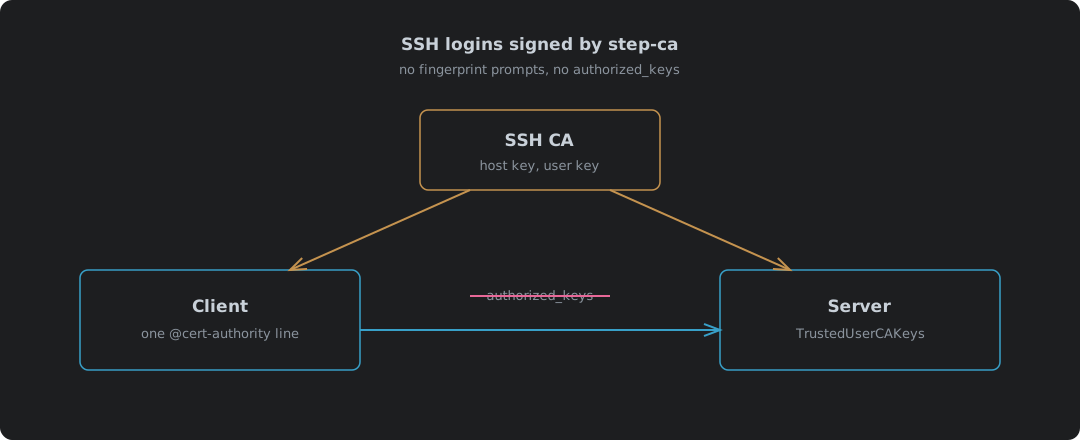
An SSH certificate authority ends both. The CA signs each host’s key, and clients trust the CA, not a list of fingerprints. The CA signs each user’s key for a few hours, and servers trust the CA, not a list of keys. Nothing to accept on first connect, nothing to clean up when someone goes, and a user certificate that dies by itself by tomorrow.
This is a different setup from the X.509 side of step-ca covered in Your Own Certificate Authority: step-ca In A Container, which is why it has its own post. Same container, different keys, different files on every machine. Everything here was run with step-ca 0.30.2 and OpenSSH 10.0 in a Podman pod.
| Without a CA | With step-ca | |
|---|---|---|
| A client meets a new server | Shows a fingerprint, you type yes | Checks the host certificate against the CA, says nothing |
| A server is rebuilt | Every client warns the key changed | Sign the new key, clients never notice |
| A user gets access | Their key goes in authorized_keys on each server | The CA signs their key, every server accepts it |
| A user leaves | Find and delete their key on every server | Stop signing; their certificate is dead within 16 hours |
| What each server keeps | One authorized_keys per user | One CA public key |
Switching The SSH CA On
The SSH keys are made when step-ca is first set up, or not at all. Set DOCKER_STEPCA_INIT_SSH=true on the first start1, and the log shows two extra keys:
SSH Host CA Key: ecdsa-sha2-nistp256 AAAAE2VjZHNhLXNoYTItbmlzdHAyNTYAAAAIbmlzdHAy...
SSH User CA Key: ecdsa-sha2-nistp256 AAAAE2VjZHNhLXNoYTItbmlzdHAyNTYAAAAIbmlzdHAy...
| Key | Signs | Who trusts it |
|---|---|---|
| Host CA | Each server’s host key | Every client, in known_hosts |
| User CA | Each person’s login key | Every server, in sshd_config |
It also adds an sshpop provisioner, which is what lets a host renew its own certificate later. If the CA is already running without SSH, there is no switch to flip. It is a new CA.
Signing The Host
Take the server’s existing host key, sign it, and give the certificate back to the server:
step ssh certificate --host --sign \
  --provisioner admin --provisioner-password-file prov-pass \
  nas.home.example ssh_host_ecdsa_key.pub
The order matters. With the provisioner flags after the hostname and key file, step refused it:
too many positional arguments were provided in 'step ssh certificate <key-id> <key-file>'
Put every flag first and it signs. The certificate, as ssh-keygen -L reads it:
| Field | Value |
|---|---|
| Type | ecdsa-sha2-nistp256-cert-v01@openssh.com host certificate |
| Key ID | nas.home.example |
| Principals | nas.home.example |
| Valid | 30 days, 2026-10-09T18:34:30 to 2026-11-08T17:35:30 |
The principal is the name a client must use to connect. Connect by a name that is not on the certificate and the client will not accept it, so sign every name the host answers to.
The Server
Two lines in sshd_config2:
HostCertificate /etc/ssh/ssh_host_ecdsa_key-cert.pub
TrustedUserCAKeys /etc/ssh/ssh_user_ca_key.pub
HostCertificate hands the host certificate to clients, and its key “must match a private host key already specified”2. TrustedUserCAKeys is the user CA’s public key, “trusted to sign user certificates for authentication”2. Run sshd -t before restarting. A typo in either path and sshd says Could not load host certificate, which is far better found now than from a locked-out session.
There is no authorized_keys on the test server at all. ls /home/damien/.ssh/authorized_keys comes back No such file or directory, and the logins below work anyway.
The User
The CA makes the key pair and signs it in one go:
step ssh certificate damien id_ecdsa \
  --provisioner admin --provisioner-password-file prov-pass
| Field | Value |
|---|---|
| Type | user certificate |
| Principals | damien |
| Valid | 16 hours |
| Extensions | permit-agent-forwarding, permit-port-forwarding, permit-X11-forwarding, permit-pty, permit-user-rc |
Sixteen hours is the point. It covers a working day and dies overnight. Revoking a user is mostly a matter of not signing for them tomorrow.
The Client
One line in known_hosts replaces every fingerprint it would otherwise collect3:
@cert-authority *.home.example ecdsa-sha2-nistp256 AAAAE2VjZHNhLXNoYTItbmlzdHAy...
That says: any host under home.example whose certificate is signed by this key is genuine. The @cert-authority marker is what makes it a CA line rather than one host’s key.
What The Test Showed
All four from a client holding nothing but the user certificate and that one known_hosts line, with StrictHostKeyChecking=yes, so nothing could be accepted on the fly:
| Test | Result |
|---|---|
Signed key with its certificate, as damien | logged in as damien, exit 0 |
| Same key, certificate removed | Permission denied (publickey,password,keyboard-interactive) |
Certificate used to log in as root | Permission denied: the certificate only names damien |
| Client without the host CA line | Host key verification failed. |
The third is the one people miss. A certificate does not open every account on the box, only the principals written into it. A key in someone’s authorized_keys cannot do that.
Renewing
A host renews its own certificate with the key it already holds. That is the sshpop provisioner, which “allows a client to renew, revoke, or rekey an SSH certificate using that certificate for authentication with the CA”4. No password5:
step ssh renew --force ssh_host_ecdsa_key-cert.pub ssh_host_ecdsa_key
| Serial | Valid until | |
|---|---|---|
| Signed | 15166325869329416997 | 2026-11-08 17:35:30 |
| Renewed | 6678957789797316768 | 2026-11-08 17:35:59 |
A new serial and a fresh 30 days. Put it on a weekly timer and the host never lapses. Reload sshd after it, or the old certificate stays in memory.
Users renew by asking again. One step ssh certificate a day, or at the first login of the day, and that is the whole job.
Where It Falls Down
| Case | What happens | What to do |
|---|---|---|
| CA down | Existing certificates keep working; nobody gets a new one | Run the CA on something that stays up; users have 16 hours of slack |
| Host certificate lapses | Clients refuse the host, as if it were a stranger | A renewal timer, and sshd reloaded after it |
| A user must go today, not tomorrow | Their certificate works until it expires | RevokedKeys in sshd_config takes a revoked-keys list2 |
| Hostname not in the principals | Client refuses the host | Sign every name it answers to |
| SSH CA not made at setup | No way to add it | A new CA, set up with SSH on |
| The CA’s SSH keys stolen | Whoever has them can log in anywhere and be any host | Keep the CA on its own box, backed up, offline if you can |
The last one is the trade. Every authorized_keys file was its own small risk. Now there is one large one, in one place. That is better, because one place can be watched and locked down, but only if somebody does.
Trust Where It Can Be Checked
The fingerprint prompt and the authorized_keys file have something in common. Both ask a person to make a trust decision with no information, every day, forever. People are not good at that and never will be, so they stop deciding and start typing yes.
A CA moves that decision to one place, once, where it can be done properly. That is the whole idea, and it is the same one behind every standard worth having: do the careful thing once, write it down, and stop asking people to do it in their heads a hundred times a week. The machine checks the signature. You check the CA. That is a division of labour that holds up.
smallstep/certificates — docker/entrypoint.sh —
DOCKER_STEPCA_INIT_SSH=trueadds--sshtostep ca init. ↩︎OpenBSD manual — sshd_config(5) —
HostCertificate: “The certificate’s public key must match a private host key already specified by HostKey”;TrustedUserCAKeys: “public keys of certificate authorities that are trusted to sign user certificates for authentication”;RevokedKeys: “Keys listed in this file will be refused for public key authentication”. ↩︎ ↩︎ ↩︎ ↩︎OpenBSD manual — sshd(8), SSH_KNOWN_HOSTS FILE FORMAT — the “@cert-authority” marker “to indicate that the line contains a certification authority (CA) key”. ↩︎
Smallstep — Provisioners, SSHPOP — “An SSHPOP provisioner allows a client to renew, revoke, or rekey an SSH certificate using that certificate for authentication with the CA.” ↩︎
Smallstep — step ssh renew — the command used to renew the host certificate. ↩︎