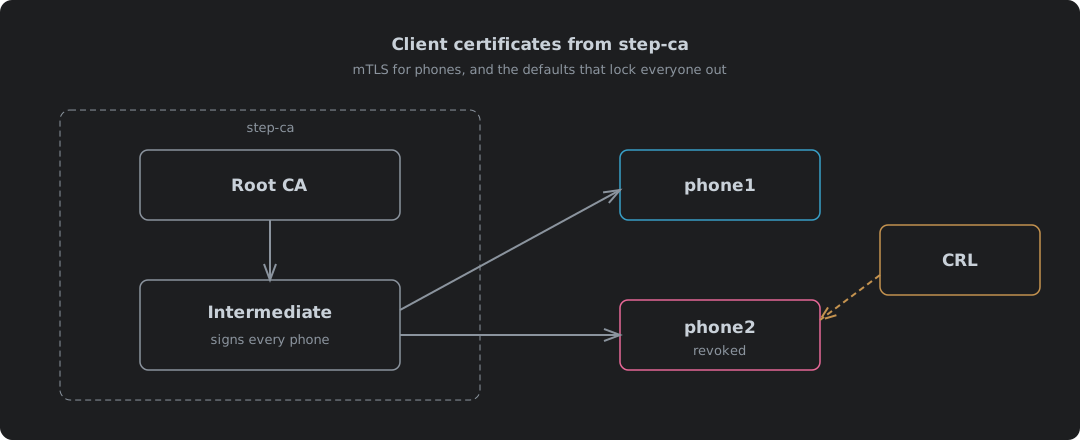
Why Phones Are The Hard Case
step-ca’s defaults are built for servers. A server renews itself every morning, and Your Own Certificate Authority: step-ca In A Container shows that working for ACME clients and anything else that can run step ca renew. That post also covers starting the CA, its two passwords and trusting the root, and this one carries on from there. A phone holding a client certificate for the Home Assistant app cannot renew anything, and when one goes missing you need to lock it out today, not when its certificate runs out. Five defaults stand in the way, and none of them shout. They just leave you with certificates that die tomorrow and a revocation list that rejects everybody.
| Default | What it does to a phone | Fix |
|---|---|---|
| Certificates last 24 hours at most | The phone’s certificate dies tomorrow, and the Home Assistant app cannot renew it | Raise maxTLSCertDuration in ca.json |
| CRL switched off | Revoking a lost phone changes nothing anywhere | Turn on the crl block |
| CRL scope does not match the certificates | nginx rejects every phone, good ones included | Set idpURL and add a template with crlDistributionPoints |
| No CRL for the intermediate | nginx still rejects every phone | Sign an empty root CRL once a year |
| CRL lasts 24 hours | When it lapses, nginx rejects every phone again | Refresh it on a timer |
Cloudflare does the CA half of this for you on its free plan, as the Cloudflare version shows. Doing it yourself means doing all five. The tests below ran on a CA named Home Assistant CA, which is the name in the output.
Default One: Certificates Last A Day
Ask for a year and the CA says no:
The request was forbidden by the certificate authority: requested duration of
8760h1m0s is more than the authorized maximum certificate duration of 24h1m0s.
That is the right default for servers and ACME clients, which renew all day without anyone noticing. A phone is the exception. The Home Assistant app has no way to renew its own client certificate, so a 24-hour certificate means walking to every phone every day.
The validity period is a setting, and it lives in step-ca’s own config. Each provisioner in ca.json takes claims1:
"claims": {
  "maxTLSCertDuration": "8760h",
  "defaultTLSCertDuration": "24h"
}
| Claim | Meaning | Set to |
|---|---|---|
maxTLSCertDuration | The longest certificate this provisioner will sign | 8760h, a year |
defaultTLSCertDuration | What you get without asking | Left at 24h, so a year is always a deliberate choice |
minTLSCertDuration | The shortest it will sign | Left alone |
Restart the container and a year goes through. A year is a judgement, not a rule. Shorter means less time for a stolen certificate to be useful, and more trips round the house reinstalling them.
Default Two: The CRL Is Off
A certificate revocation list (CRL) is the CA’s signed list of certificates it has withdrawn. It is how a lost phone gets locked out before its certificate expires, and step-ca does not make one unless told to. The docs mark the feature as experimental1.
"crl": {
  "enabled": true,
  "generateOnRevoke": true,
  "cacheDuration": "24h"
}
| Field | Does | Default |
|---|---|---|
enabled | Makes a CRL at all | Off |
generateOnRevoke | Rebuilds the list the moment a certificate is revoked | Off |
cacheDuration | How long each list stays valid | 24 hours1 |
idpURL | The URL the list says it covers | The CA’s own name plus /1.0/crl2 |
Remember that 24 hours. It comes back.
Default Three: A CRL Nothing Will Accept
With the CRL on, revoke a phone and check both phones against it:
$ openssl verify -CAfile client-ca.pem -CRLfile crl.pem -crl_check phone1.crt phone2.crt
CN=phone1
error 44 at 0 depth lookup: different CRL scope
error phone1.crt: verification failed
CN=phone2
error 44 at 0 depth lookup: different CRL scope
error phone2.crt: verification failed
Both fail, the good phone included. Put that list in front of nginx and nobody gets in.
The list itself says why. step-ca marks every CRL with a critical Issuing Distribution Point, which says “this list covers certificates that point here”. The certificates it issued point nowhere:
$ openssl crl -in crl.pem -noout -text
        X509v3 Issuing Distribution Point: critical
            Full Name:
              URI:https://localhost/1.0/crl
$ openssl x509 -in phone1.crt -noout -ext crlDistributionPoints
No extensions in certificate
OpenSSL will not apply a list whose scope does not match the certificate. So it fails closed. Which is right, and no use to anyone.
| The CRL says it covers | The certificate says its CRL is at | Result | |
|---|---|---|---|
| Out of the box | https://localhost/1.0/crl, critical | Nowhere | different CRL scope, everyone refused |
idpURL and a template | http://ca.home.example/1.0/crl | http://ca.home.example/1.0/crl | Good phones pass, revoked ones fail |
The default URL is not even one the CA serves on. step-ca’s source says as much: “this is currently using the port 443 by default”2. Two settings fix it, and both must name the same URL. idpURL goes in the crl block of ca.json, and a template on the provisioner stamps the matching crlDistributionPoints into every certificate3:
{
  "subject": {{ toJson .Subject }},
  "sans": {{ toJson .SANs }},
  "keyUsage": ["digitalSignature"],
  "extKeyUsage": ["serverAuth", "clientAuth"],
  "crlDistributionPoints": ["http://ca.home.example/1.0/crl"]
}
"options": { "x509": { "templateFile": "templates/leaf-crl.tpl" } }
Reissue the phones’ certificates, since only new certificates carry the field, and the same check gives the right answer:
CN=phone2
error 23 at 0 depth lookup: certificate revoked
error phone2.crt: verification failed
phone1.crt: OK
The Root Needs A CRL Too
That check only looked at the phone’s certificate. nginx looks at the whole chain. It sets OpenSSL’s CRL_CHECK_ALL flag4, and its documentation says it plainly: “When using intermediate certificates, their CRLs should be specified in the same file”5. step-ca issues certificates from its intermediate and only ever lists the intermediate’s revocations. Nothing says whether the intermediate itself is still good:
$ openssl verify -CAfile client-ca.pem -CRLfile crl.pem -crl_check_all phone1.crt
O=Home Assistant CA, CN=Home Assistant CA Intermediate CA
error 3 at 1 depth lookup: unable to get certificate CRL
The fix is a CRL signed by the root that revokes nothing. OpenSSL makes one from the root key and the CA’s own password file, and it can last a year because the root revokes nothing day to day:
[ca]
default_ca = root
[root]
database = index.txt
crlnumber = crlnumber
default_md = sha256
default_crl_days = 365
private_key = root_ca_key
certificate = root_ca.crt
crl_extensions = crl_ext
[crl_ext]
authorityKeyIdentifier = keyid:always
touch index.txt && echo 1000 > crlnumber
openssl ca -config root-crl.cnf -gencrl -passin file:password -out root.crl.pem
Both lists in one file, and the whole chain checks out:
$ openssl verify -CAfile client-ca.pem -CRLfile crl-chain.pem -crl_check_all phone1.crt phone2.crt
CN=phone2
error 23 at 0 depth lookup: certificate revoked
error phone2.crt: verification failed
phone1.crt: OK
Put a date in the diary for a year’s time. When the root CRL lapses, every phone is locked out again.
Publishing The CRL
The CRL has to live where the URL in every certificate points. Not on the CA itself.
| Choice | Why |
|---|---|
| A web server in front, not port 9000 | Port 9000 is step-ca’s whole API, signing included. Nobody needs any of it but the list |
| Plain HTTP, not HTTPS | RFC 5280 says a distribution point “SHOULD include at least one LDAP or HTTP URI”6. Fetching over HTTPS needs a certificate check, which needs the list. HTTP breaks the circle |
| No worry about tampering | The list is signed. Change a byte and the signature fails |
| Only the two CRL paths answer | Everything else is a 404 |
Both web servers do it in a few lines, and both pass the list straight through from step-ca and serve the root CRL as a file:
server {
    listen 80;
    listen [::]:80;
    server_name ca.home.example;

    location = /1.0/crl {
        proxy_pass https://127.0.0.1:9000;
        proxy_ssl_trusted_certificate /etc/step/root_ca.crt;
        proxy_ssl_verify on;
        proxy_ssl_name localhost;
    }

    location = /root.crl {
        alias /etc/step/root.crl;
        default_type application/pkix-crl;
    }

    location / {
        return 404;
    }
}
http://ca.home.example {
	handle /1.0/crl {
		reverse_proxy https://127.0.0.1:9000 {
			transport http {
				tls_trust_pool file /etc/step/root_ca.crt
				tls_server_name localhost
			}
		}
	}
	handle /root.crl {
		header Content-Type application/pkix-crl
		root * /etc/step
		file_server
	}
	handle {
		respond 404
	}
}
| Request | nginx | Caddy |
|---|---|---|
/1.0/crl | 200, application/pkix-crl, issuer the intermediate | 200, application/pkix-crl, issuer the intermediate |
/root.crl | 200, application/pkix-crl | 200, application/pkix-crl |
/roots.pem, /1.0/sign and the rest of the API | 404 | 404 |
Both answer on IPv6 as well as IPv4, and they should. Caddy listens on both by default. nginx only listens where it is told, so listen 80; alone is IPv4 only and needs the listen [::]:80; beside it. Tested over ::1, the list came back 200 from both once nginx had that line. step-ca itself listens on both out of the box.
The test ran on ports 8080 and 8081, so the URL in the test certificates carried a port. In use it is port 80 and the URL is exactly what the template says.
Keeping It Fresh
Every CRL step-ca makes carries a nextUpdate 24 hours out. After that it has expired, and an expired list fails the same way a missing one does:
$ openssl verify -CAfile client-ca.pem -CRLfile crl-chain.pem -crl_check_all \
    -attime $(( $(date +%s) + 172800 )) phone1.crt
error 12 at 0 depth lookup: CRL has expired
That is the good phone. Two days on. Locked out, because nothing fetched a new list.
nginx only reads ssl_crl when it starts or reloads. So something has to fetch the list, rebuild the file and reload nginx every few hours, for as long as this runs, whether anybody is watching or not.
#!/bin/sh
# Fetch step-ca's CRL, add the root CRL, and reload nginx only if both parse.
set -eu
dir=${CRL_DIR:-/etc/nginx/pki}
tmp=$(mktemp)
trap 'rm -f "$tmp" "$tmp.pem"' EXIT
curl -fsS --max-time 20 "${CRL_URL:-http://ca.home.example/1.0/crl}" -o "$tmp"
openssl crl -inform DER -in "$tmp" -out "$tmp.pem"
openssl crl -in "$dir/root.crl.pem" -noout
cat "$tmp.pem" "$dir/root.crl.pem" > "$dir/crl-chain.pem.new"
mv "$dir/crl-chain.pem.new" "$dir/crl-chain.pem"
${RELOAD:-nginx -s reload}
| Run | Result |
|---|---|
| Normal | New list in place, nginx reloaded, phone1 200, revoked phone2 400 |
| CA unreachable | curl: (22) The requested URL returned error: 404, exit 22, old list left alone, no reload |
set -e is doing the real work. A failed fetch must never write an empty file over a good one, because a broken list locks everyone out just as surely as a stale one. Run it every few hours from a systemd timer or cron. That gives it several goes before anything lapses. Nowt clever, and it is the bit that keeps the door working.
Issuing A Phone Its Certificate
One certificate per phone, named for the phone, for a year:
step ca certificate phone1 phone1.crt phone1.key \
  --provisioner admin --provisioner-password-file prov-pass \
  --not-after 8760h --kty EC
The phone wants the certificate, its key and the intermediate in one PKCS12 file, and step builds that itself7:
step certificate p12 phone1.p12 phone1.crt phone1.key \
  --ca certs/intermediate_ca.crt
MAC: sha256, Iteration 2048
PKCS7 Encrypted data: PBES2, PBKDF2, AES-256-CBC, Iteration 2048, PRF hmacWithSHA256
That is the modern encryption, which is what the Home Assistant Companion docs say to try first, before falling back to a legacy container8.
The phone needs three things from the CA, not one:
| File | Install as | Why |
|---|---|---|
root_ca.crt | CA certificate | So the phone trusts the server certificate step-ca issued for the proxy |
intermediate_ca.crt | CA certificate | The chain between the root and every certificate the CA actually signs |
phone1.p12 | VPN and app user certificate | The phone’s own key, the thing that gets it in |
The Home Assistant Android app trusts CA certificates the user installs as well as the built-in ones9, so a server certificate from step-ca works. It is the better lock for this job, too. The hostname only matters inside the house and to the phones, and a device without your root does not even trust the server, let alone get past it.
When the phone goes missing:
step ca revoke --cert phone2.crt --key phone2.key --reason "phone lost"
Certificate with Serial Number 89334534279272070053632987406394420097 has been revoked.
The new list is built on the spot, and the next refresh puts it in front of nginx.
A CA Is A Promise You Keep Every Day
Running this, what struck me is how little of the work is issuing certificates. One command. That is all. The work is all in the promises around it: that a revoked phone stays out, that a good phone stays in, that the list is never stale. step-ca keeps the first and leaves the rest to you, and its defaults assume you are a fleet of servers renewing themselves every morning.
That is not a fault, it is who it was built for. But it is the gap between what a tool does and what it is sold as doing. “Run your own CA” sounds like a container and an afternoon. It is a container, an afternoon, a template, a root CRL with a date in the diary, and a timer you will forget exists until the day it stops.
Do it anyway. A CA you run is one nobody else can switch off, reprice or read. Just know that owning the keys means owning the chores, and the chores are what keep the door shut.
Smallstep — step-ca configuration —
maxTLSCertDuration,defaultTLSCertDuration,minTLSCertDuration; thecrlblock is “(experimental)”,cacheDuration“Defaults to 24h”. ↩︎ ↩︎ ↩︎smallstep/certificates v0.30.2 — authority/tls.go — the CRL’s Issuing Distribution Point is
idpURLif set, otherwise the CA’s own name plus/1.0/crl, marked critical. ↩︎ ↩︎Smallstep — Certificate templates —
crlDistributionPoints“defines URLs with the certificate revocation list”. ↩︎nginx — src/event/ngx_event_openssl.c —
ssl_crlsetsX509_V_FLAG_CRL_CHECK|X509_V_FLAG_CRL_CHECK_ALL. ↩︎nginx — ngx_http_ssl_module, ssl_crl — “When using intermediate certificates, their CRLs should be specified in the same file.” ↩︎
RFC 5280 — Internet X.509 PKI Certificate and CRL Profile — section 4.2.1.13: the DistributionPointName “SHOULD include at least one LDAP or HTTP URI”. ↩︎
Smallstep — step certificate p12 — packages a certificate, its key and CA certificates into a PKCS12 file. ↩︎
Home Assistant Companion — Networking, TLS Client Authentication — try the current PKCS12 default first, the OpenSSL
-legacycontainer only if that fails. ↩︎home-assistant/android — network_security_config.xml — trust anchors are
systemplususer: “Additionally trust user added CAs”. ↩︎