The Host Exists This Time. It Is Just on the Wrong Hypervisor
Last time the problem was that the machine named in the inventory did not exist yet — no IP, no SSH, no Python, nothing to connect to. Every task had to be delegated away from it.
A VMware migration inverts that and changes nothing. The machine exists, it is running, people are using it. You still never connect to it. It is a name and a bag of variables describing something to rebuild somewhere else. Every task still runs on the control node, and now there are two APIs on the other end instead of one.
A note on what this is. This post is the design and the playbook, not a war story. I have not yet run it against a production estate end to end. Everything I say about module behaviour below was read out of the shipped code and checked, and I have said plainly where a claim comes from the source rather than from a run. When I have done a real migration with it, the numbers and the surprises will get their own post.
Versions this was checked against:
$ ansible --version | head -1
ansible [core 2.20.7]

$ ansible-galaxy collection list | grep -E 'vmware|proxmox'
community.proxmox 1.6.0
community.vmware  6.2.1
vmware.vmware     2.9.0
The fragments below are cut from a single playbook — migrate.yml, a vSphere dynamic
inventory in inventory/vmware.vms.yml, and one group_vars/all.yml. I have
genericised the datacenter, node and storage names for readability.
The Shape of the Job
Five steps, and only the last one costs anything.
The ordering is the whole design. Discovery changes nothing. Building the network changes only Proxmox. Building the shells changes only Proxmox, and a shell with no disk is cheap to delete. Moving the disks is slow but live. Only the last play powers anything off.
Walk away halfway through and every guest is still running on VMware, untouched.
Two Collections, and One of Them Is Being Retired
You need both, and not for the reason you would guess.
collections:
  - name: community.vmware
    version: ">=6.2.1"
  - name: vmware.vmware
    version: ">=2.5.0"
  - name: community.proxmox
    version: ">=1.6.0"
community.vmware is the old, broad collection and it is being taken apart. Its MANIFEST.json declares {"vmware.vmware": ">=2.5.0"} as a hard dependency, so installing the first pulls in the second whether you asked for it or not. Modules are moving across one at a time, and the ones you reach for in a migration are at different stages of that move:
vmware_dvs_portgroup_info— still only incommunity.vmware, and it is what reads your VLANs.vmware_vmotion— still only incommunity.vmware.vmware_guest_powerstate— deprecated, removed incommunity.vmware7.0.0. Usevmware.vmware.vm_powerstate.vmware_vm_inventory— deprecated, removed in 7.0.0. Usevmware.vmware.vms.
Ansible tells you about the module deprecations on the first run, which is decent of it:
[DEPRECATION WARNING]: community.vmware.vmware_guest_powerstate has been deprecated.
Use vmware.vmware.vm_powerstate instead. This feature will be removed from
collection 'community.vmware' version 7.0.0.
It does not warn you about the inventory plugin, because inventory plugins are parsed before that machinery is running. You have to go and read the plugin.
There is a third trap in the split. vmware.vmware.vm_portgroup_info looks like exactly what a network migration wants — per-VM, per-NIC, gives you the portgroup and the VLAN. But it is built on ModuleRestBase and imports com.vmware.vapi, which means it needs the vSphere Automation SDK on the control node, not just pyVmomi. Its documented return is also stale: the RETURN block promises name and vlan_id, while the code actually builds portgroup_name and a vlan_info dict for the distributed case. I went a different way, below, and needed neither.
The Inventory Is the Discovery
There is no “go and find the VMs” play in this playbook, because by the time the first task runs the inventory has already done it — in one property-collector query rather than a per-VM loop.
# inventory/vmware.vms.yml
plugin: vmware.vmware.vms

hostname: "{{ lookup('ansible.builtin.env', 'VMWARE_HOST') }}"
username: "{{ lookup('ansible.builtin.env', 'VMWARE_USER') }}"
password: "{{ lookup('ansible.builtin.env', 'VMWARE_PASSWORD') }}"
validate_certs: false

search_paths:
  - /Datacenter-1

properties:
  - name
  - config.name
  - config.uuid
  - config.guestId
  - config.firmware
  - config.template
  - config.hardware.numCPU
  - config.hardware.numCoresPerSocket
  - config.hardware.memoryMB
  - config.hardware.device
  - summary.runtime.powerState

gather_compute_objects: true
hostnames: ['name']
filter_expressions:
  - 'config.template'
The filename matters. The plugin’s verify_file only claims files ending vms.yml, vms.yaml, vmware_vms.yml or vmware_vms.yaml. Call it vcenter.yml and it is silently not your inventory.
search_paths filters before the query, not after. On a large estate that is the difference between seconds and minutes — unlike filter_expressions, which the docs are explicit about: it runs after collection and “does not affect the speed of the inventory plugin”.
filter_expressions drops a host when the expression is true. config.template therefore removes templates, which reads backwards the first time.
And the important line is config.hardware.device, which is in no default property list anywhere. It is the whole hardware inventory of the VM, and it carries three things this migration cannot proceed without: the MAC of every NIC, the dvportgroup key each NIC is attached to, and the datastore path of every disk. Without it you are back to a vmware_guest_info loop, one round trip per VM.
The devices come back as JSON with their vSphere type preserved in _vimtype. That is worth knowing because it is how you tell a NIC from a disk. I checked the encoder rather than guessing:
{
  "_vimtype": "vim.vm.device.VirtualVmxnet3",
  "macAddress": "00:50:56:87:a5:9a",
  "backing": {
    "_vimtype": "...DistributedVirtualPortBackingInfo",
    "port": {
      "_vimtype": "vim.dvs.PortConnection",
      "portgroupKey": "dvportgroup-1014"
    }
  }
}
So a compose block can pull the awkward paths up into flat hostvars:
compose:
  vm_moid: moid
  vm_firmware: config.firmware
  vm_memory_mb: config.hardware.memoryMB
  vm_num_cpu: config.hardware.numCPU

  # A virtual NIC is any device with a MAC. Filtering on _vimtype does not
  # work cleanly here, because VMXNET3, E1000 and SR-IOV cards are all
  # different types with no shared substring.
  vm_nics: >-
    config.hardware.device
    | selectattr('macAddress', 'defined')
    | selectattr('macAddress', 'ne', None) | list

  # Disks are one exact type, so this one can match on it.
  vm_disks: >-
    config.hardware.device
    | selectattr('_vimtype', 'eq', 'vim.vm.device.VirtualDisk') | list
That asymmetry is real and it catches people. There is no VirtualEthernetCard type to match. That is the abstract base class, and what vCenter actually hands you is VirtualVmxnet3, VirtualE1000, VirtualE1000e, VirtualPCNet32 or VirtualSriovEthernetCard. There is no substring common to all of them. Having a MAC, though, is a thing only a NIC does.
Every Info Module Hides the Field You Need
This is the through-line of the whole job, and once you have seen it three times you start checking every default before you write the task.
vmware_dvs_portgroup_info has six show_* options. Five default to true. The sixth is show_vlan_info, and it defaults to false.
show_mac_learning=dict(type='bool', default=True),
show_network_policy=dict(type='bool', default=True),
show_teaming_policy=dict(type='bool', default=True),
show_uplinks=dict(type='bool', default=True),
show_port_policy=dict(type='bool', default=True),
show_vlan_info=dict(type='bool', default=False),
Leave it alone and you get MAC learning policy, teaming policy, uplink ordering and port policy for every portgroup in the estate. Everything except the VLAN tag, which is the only field a network migration is actually asking about. So the task is inside out from what you would write by instinct: turn the one thing on, turn the other five off.
- name: Read the distributed portgroups
  community.vmware.vmware_dvs_portgroup_info:
    datacenter: "{{ vcenter_datacenter }}"
    show_vlan_info: true
    show_network_policy: false
    show_teaming_policy: false
    show_port_policy: false
    show_mac_learning: false
    show_uplinks: false
  register: dvs_pgs
It is not a one-off. vmware.vmware.vms has gather_compute_objects, which populates cluster and esxi_host — default false. community.vmware.vmware_vm_info has show_allocated, which is the block holding CPU and memory — default false. In all three cases the expensive-to-collect field is the one the migration needs, and the default protects a read-only reporting use case that is not the one you are in.
vlan_id Is Three Different Types
Then you get the VLAN tags and find they are not one shape. Straight from get_vlan_info:
if isinstance(vlan_obj, vim...TrunkVlanSpec):
    ...
    return dict(trunk=True, pvlan=False, vlan_id=vlan_id_list)
elif isinstance(vlan_obj, vim...PvlanSpec):
    return dict(trunk=False, pvlan=True, vlan_id=str(vlan_obj.pvlanId))
else:
    return dict(trunk=False, pvlan=False, vlan_id=str(vlan_obj.vlanId))
An access portgroup gives you the string "100". A PVLAN gives you a string. A trunk gives you a list of strings, each either "20" or "20-30". And every distributed switch has at least one trunk on it whether you made one or not, because the uplink portgroup is a trunk carrying "0-4094".
So | int is not available to you until you have thrown the other two shapes away:
access_pgs: >-
  {{ dvs_pgs.dvs_portgroup_info | dict2items | map(attribute='value') | flatten
     | rejectattr('vlan_info.trunk') | rejectattr('vlan_info.pvlan')
     | rejectattr('vlan_info.vlan_id', 'in', ['0', 0])
     | list }}
Three rejects, in that order. Trunks go, PVLANs go, and then untagged portgroups go, which also disposes of the uplink groups and anything on VLAN 0.
I am not translating trunks or PVLANs automatically and I would push back on anyone who did. A VMware trunk landing on Proxmox needs either a Q-in-Q zone or a VLAN-aware VNet, and which one is right depends on what the guest expects to see. That is a decision, not a mapping. The playbook prints them and moves on:
TASK [Report what was found]
ok: [localhost] => {
    "msg": "3 access portgroups -> [100, 200]. Not translated:
            ['dvs_001-uplink'] (trunks), ['isolated'] (PVLANs)."
}
Mirroring the VLANs into SDN
One VLAN zone bound to a bridge, then one VNet per VLAN with the tag on it.
- name: Create the VLAN zone
  community.proxmox.proxmox_zone:
    zone: "{{ sdn_zone }}"
    type: vlan
    bridge: "{{ sdn_bridge }}"
    mtu: "{{ sdn_mtu }}"
    state: present

- name: Create one VNet per VMware VLAN
  community.proxmox.proxmox_vnet:
    vnet: "{{ sdn_vnet_prefix }}{{ item.vlan_info.vlan_id | int }}"
    zone: "{{ sdn_zone }}"
    tag: "{{ item.vlan_info.vlan_id | int }}"
    alias: "{{ item.portgroup_name }}"
    state: present
  loop: "{{ access_pgs | unique(attribute='vlan_info.vlan_id') }}"
  throttle: 1
VNet names are short and constrained, and VMware portgroup names are not. Production-Web-Tier-VLAN100 is a perfectly ordinary portgroup name and an impossible VNet name. So the name is generated — v100, from the tag — and the human-readable original goes in alias, where it stays visible in the UI and in pvesh output. Deriving the name from the VLAN rather than from the portgroup also means the mapping is reversible by inspection six months later.
Two portgroups on the same VLAN collapse into one VNet. That is correct — they were the same broadcast domain in VMware too — but you should see it happen, which is what unique(attribute='vlan_info.vlan_id') is doing. Two portgroups called prod-web and prod-web-b, both on VLAN 100, produce one v100.
throttle: 1 is not caution, it is the module. Every SDN write in community.proxmox takes a global cluster lock, applies the pending config and releases it — get_global_sdn_lock(), then apply_sdn_changes_and_release_lock(). Run them in parallel and they queue on the lock anyway; the throttle just stops you pretending otherwise. Worth knowing too that rollback on failure is version-dependent — the module checks is_lock_and_rollback_supported and, on older PVE, tells you it could not roll back rather than doing it.
One cosmetic thing that will make you doubt yourself. At 1.6.0 proxmox_vnet emits its entire params dict as an Ansible warning on every single create:
self.module.warn(f"{vnet_params}")
self.proxmox_api.cluster().sdn().vnets().post(**vnet_params)
That is a debug line somebody left in. It is noise, not a fault.
Build the Shells, With No Disks
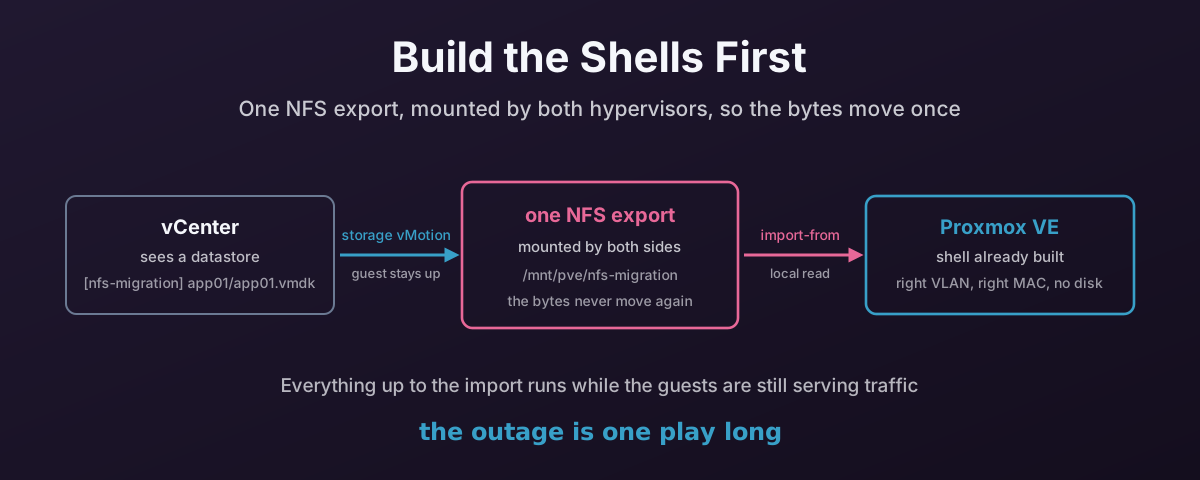
Now the VMs, and this is where the design earns itself. Every VM gets built in Proxmox with the right CPU count, the right memory, the right firmware and the right NICs on the right VLANs. No disks at all.
A diskless shell is fast to create, free to delete, and boots to a PXE prompt if somebody starts it by accident. You can build four hundred of them in an afternoon, look at the result, decide it is wrong, delete the lot and do it again. Nothing has been copied, nothing has been powered off, and nobody has noticed.
The derived values are declarations, not tasks. Ansible evaluates them lazily against whichever host is in scope, so every VM gets its own without a single set_fact:
# group_vars/all.yml
pve_vmid: "{{ vmid_base | int + (vm_moid | regex_replace('^vm-', '') | int) }}"
pve_bios: "{{ 'ovmf' if vm_firmware == 'efi' else 'seabios' }}"
pve_cores: "{{ vm_cores_per_socket | int }}"
pve_sockets: "{{ ((vm_num_cpu | int) / (vm_cores_per_socket | int)) | round(0, 'ceil') | int }}"
The VMID comes from the vCenter MoID. vm-42 becomes 20042. That matters more than it looks: the cutover play has to find the VM the build play created, and a re-run must land on the same one rather than quietly building a second. Letting the API allocate the next free ID — which is what happens if you omit vmid, and which I wrote about last time — makes that impossible.
Memory needs no conversion. VMware reports config.hardware.memoryMB and Proxmox wants MB. Sockets do: VMware gives you total vCPUs and cores-per-socket, Proxmox wants sockets and cores.
- name: Create the VM shell
  delegate_to: localhost
  community.proxmox.proxmox_kvm:
    node: "{{ proxmox_node }}"
    vmid: "{{ pve_vmid }}"
    name: "{{ inventory_hostname }}"
    cores: "{{ pve_cores }}"
    sockets: "{{ pve_sockets }}"
    memory: "{{ vm_memory_mb }}"
    ostype: "{{ pve_ostype }}"
    bios: "{{ pve_bios }}"
    scsihw: "{{ default_scsihw }}"
    efidisk0: "{{ {'storage': pve_target_storage, 'efitype': '4m',
                   'pre_enrolled_keys': false}
                  if pve_bios == 'ovmf' else omit }}"
    agent: "enabled=1"
    onboot: false
    state: present
onboot: false on purpose. Nothing should start by itself in the middle of a migration, least of all a machine whose disks are still being written to by another hypervisor.
Firmware is not optional to get right. A UEFI guest imported onto a SeaBIOS VM will import perfectly and then refuse to boot, and you will spend an hour on it. config.firmware is efi or bios and maps straight onto ovmf and seabios. A UEFI guest also needs an EFI vars disk, which has to be created with the VM — see below for why.
proxmox_kvm Will Not Fix a NIC, and Will Not Tell You
Last time I wrote that proxmox_kvm declines to converge rather than updating. Here is the sharper version of that, which bit me while writing this and is worth being exact about.
update defaults to false, so re-running against a VM that already exists does nothing. Fine, and documented. But set update: true and the module still refuses to touch some parameters:
# If update, don't update disk (virtio, efidisk0, tpmstate0, ide, sata, scsi)
# and network interface, unless update_unsafe=True
if update_unsafe is False:
    ...
    if "efidisk0" in kwargs:
        del kwargs["efidisk0"]
It deletes them from the request and carries on. So you correct a NIC in your inventory mapping, re-run with update: true, watch Ansible report changed, and the NIC is exactly as wrong as it was. The changed is true — something else in the payload was updated — but not the thing you were fixing.
update_unsafe: true lifts the restriction, and the name is honest. The same guard covers disks, so on a VM that has disks, an unsafe update is a good way to acquire a second copy of one. That is not a switch to reach for during a migration.
The way out is to not use net at all. NICs go on with proxmox_nic, which is a module whose entire job is one interface and which converges properly:
- name: Attach each NIC to its VNet
  delegate_to: localhost
  community.proxmox.proxmox_nic:
    vmid: "{{ pve_vmid }}"
    interface: "net{{ idx }}"
    bridge: "{{ sdn_vnet_prefix }}{{ pg_vlan[item.backing.port.portgroupKey] }}"
    mac: "{{ item.macAddress }}"
    model: "{{ default_net_model }}"
    state: present
  loop: "{{ vm_nics }}"
  loop_control:
    index_var: idx
That is the same split I ended up at last time: proxmox_kvm to define the machine, proxmox_disk and proxmox_nic for the things that change afterwards. The parameter is mac, not mac_addr.
efidisk0 cannot be moved out the same way — proxmox_disk has no efitype or pre_enrolled_keys — so it has to go on at create time and be right first time.
Carry the MAC across. VMware hands out MACs from 00:50:56:... and Proxmox will take them without complaint. Keeping them means DHCP reservations still match, MAC-locked licences still validate, and any firewall rule written against a MAC still fires. Changing them means a day of small mysteries. proxmox_nic also accepts model: vmxnet3 if you need the guest to see the same NIC it saw before, but on KVM, virtio is the better card, and a Windows guest is going to want new drivers either way.
Refuse Rather Than Guess
A NIC on a standard portgroup has no backing.port at all. Its backing is a NetworkBackingInfo with a deviceName. It will not be in the map, and the right thing to do is stop:
- name: Every NIC must sit on a distributed portgroup with a VNet
  ansible.builtin.assert:
    that:
      - vm_nics | rejectattr('backing.port.portgroupKey', 'defined') | list | length == 0
      - vm_nics | map(attribute='backing.port.portgroupKey')
          | reject('in', pg_vlan.keys() | list) | list | length == 0
    fail_msg: >-
      {{ inventory_hostname }} has NICs that do not map to a Proxmox VNet.
      Attaching it to the wrong network is worse than not building it.
Two conditions rather than one, because the first has to run before the second: map(attribute=...) over a NIC with no port would explode on the undefined lookup. Reject the shapeless ones first, then check the rest against the map.
One Export, Mounted Twice
Here is the part that makes the whole thing cheap.
Put an NFS export where both hypervisors can mount it. vCenter sees a datastore called nfs-migration; the Proxmox nodes mount the same export and see /mnt/pve/nfs-migration. Now storage-vMotion the VMDKs onto it.
Storage vMotion is live. The guest keeps serving traffic the entire time. Nothing is cut over, no window is needed, and it can be abandoned halfway with no consequence beyond wasted I/O. It is the slowest stage by a wide margin and it costs nothing.
- name: Relocate to the NFS datastore
  delegate_to: localhost
  throttle: 2
  community.vmware.vmware_vmotion:
    moid: "{{ vm_moid }}"
    destination_datastore: "{{ nfs_datastore_vmware }}"
    timeout: "{{ vmotion_timeout }}"
timeout defaults to 3600 — one hour. A 2 TB VMDK will not make it, and the failure mode is nasty in a quiet way: the Ansible task fails while the vMotion carries on running in vCenter. You now have a playbook that says it failed and an estate that is still busy. Set it to something that reflects your actual storage.
throttle: 2, because the bottleneck is not the control node. Storage vMotion is bounded by the array and the network. Six at once does not give you six times the throughput; it gives you six slow migrations and an angry storage team.
The module is idempotent in the way you want — it sets storage_vmotion_needed = False if the VM is already on the target datastore — so re-running to pick up stragglers is safe.
By the time this finishes, the bytes are sitting on storage that Proxmox already mounts. As such, nothing else needs to copy them. Ever.
The Cutover
This is the only play that costs downtime, and the order inside it is not negotiable.
First, a problem that is easy to miss: the inventory is now stale. It was gathered before the vMotion, so vm_disks still holds the old datastore paths. Import from those and you are pointing Proxmox at a path it cannot see.
- name: Re-read the inventory now the disks have moved
  ansible.builtin.meta: refresh_inventory
Which is also why caching is switched off in the inventory config. A warm cache would hand refresh_inventory back exactly the stale data it was called to replace. That is a real trade — vCenter is not fast — but a wrong path here is a failed cutover in a window, and the round trip is cheap by comparison.
Then power off. Importing a VMDK that an ESXi host still has open gives you a crash-consistent copy at best:
- name: Shut the guest down in VMware
  delegate_to: localhost
  vmware.vmware.vm_powerstate:
    moid: "{{ vm_moid }}"
    state: "{{ 'shutdown-guest' if vm_power_state == 'poweredOn' else 'powered-off' }}"
    timeout: 600
    force: true
shutdown-guest is a graceful shutdown through VMware Tools; force: true hard-stops anything that will not go within the timeout. On the new module the parameter is timeout, not state_change_timeout as it was on the deprecated one.
Then the import, which is the pivot:
- name: Import each VMDK onto its VM
  delegate_to: localhost
  throttle: 2
  community.proxmox.proxmox_disk:
    vmid: "{{ pve_vmid }}"
    disk: "scsi{{ idx }}"
    storage: "{{ pve_target_storage }}"
    import_from: >-
      {{ item.backing.fileName
         | regex_replace('^\[[^\]]+\]\s*', '/mnt/pve/' ~ nfs_storage_pve ~ '/') }}
    format: "{{ pve_target_format }}"
    timeout: "{{ import_timeout }}"
    create: regular
    state: present
  loop: "{{ vm_disks }}"
  loop_control:
    index_var: idx
The regex_replace is doing the translation between the two worlds. vCenter names a disk [nfs-migration] app01/app01.vmdk; Proxmox reaches the same file at /mnt/pve/nfs-migration/app01/app01.vmdk. Same export, same bytes, no second copy. You keep the descriptor .vmdk and ignore the -flat.vmdk beside it — qemu-img reads the descriptor and follows it to the extent.
Three things about import_from that are all in the module and all worth knowing before the window opens.
It only fires on create. In the update branch:
# 'import_from' fails on disk updates
playbook_config = self.get_create_attributes()
playbook_config.pop("import_from", None)
If scsi0 already exists on that VM, the parameter is dropped and you get an ordinary update. So a re-run after a bad import does not re-import. It silently does nothing at all and reports success. If an import goes wrong, delete the disk before trying again.
timeout defaults to 600 seconds. Ten minutes, to import and convert a virtual machine’s disk. The module’s own documentation says to raise it; take the advice.
And an absolute path needs root. The documentation is blunt about it:
<STORAGE>:<VMID>/<FULL_NAME>or<ABSOLUTE_PATH>/<FULL_NAME>.<STORAGE>:import/<FULL_NAME>for PVE 9.x and later, to use storage’s import directory. Attention! Only root can use absolute paths.
Which lands awkwardly against the advice I gave last time, and still stand by: use a scoped API token, not root. That advice holds for every other stage here: discovery, SDN, building shells, setting boot order all work fine with a token. This one task does not, and no amount of privilege on the role will change it, because the restriction is on the user being root rather than on a permission.
There are three honest ways out, and no clever fourth:
- PVE 9.x: use
<storage>:import/<file>and stay on the token. - PVE 8.x: do this one task as
root@pam, and only this one. - PVE 8.x, no root over the API: run
qm importdiskover SSH instead.
The playbook takes the first two via a flag, because pretending otherwise would just move the problem to whoever runs it.
Finally the boot order, which is an ordinary update and therefore untouched by the update_unsafe restriction:
- name: Boot from the first imported disk
  delegate_to: localhost
  community.proxmox.proxmox_kvm:
    node: "{{ proxmox_node }}"
    vmid: "{{ pve_vmid }}"
    boot: "order=scsi0"
    update: true
Nowt starts the guest. That is deliberate. Start it by hand, watch it come up, and only then think about deleting anything in VMware.
Running It
The whole thing is one playbook, tagged by stage, because these are not steps you want to run together:
ansible-playbook migrate.yml --tags discover   # look, change nothing
ansible-playbook migrate.yml --tags sdn        # build the VLANs
ansible-playbook migrate.yml --tags build      # build the diskless shells
ansible-playbook migrate.yml --tags relocate   # storage vMotion, live
ansible-playbook migrate.yml --tags cutover    # power off and import
--limit is your friend throughout. Do one VM first. Do one cluster. The playbook has no opinion about how much you bite off, and the inventory gives you groups for free — power_poweredOn, cluster_<name>, plus vmware_windows and vmware_linux from the groups block.
Check what you are pointing at before you point at it:
ansible-inventory --graph
ansible-inventory --host some-vm
What I Would Still Watch For
Things I expect to find when this meets a real estate, written down now so I cannot claim afterwards that I saw them coming:
- Windows guests will not boot cleanly off a VirtIO SCSI controller without the driver being present first.
virtio-scsi-singleis the right controller and the wrong one to hand a Windows VM that has never seen it. That is a whole problem of its own and it is not solved by anything above. - VMware Tools should come off before the move, not after.
- Snapshots. A VM with a snapshot chain has more than one
.vmdkper disk and importing the base gets you the state before the snapshot. Consolidate first. config.hardware.deviceordering is what decides which disk becomesscsi0. It has matched the guest’s own ordering everywhere I have looked, but I would check it on a multi-disk database server before trusting it in a window.- Independent and RDM disks will not storage-vMotion like ordinary ones.
None of that changes the shape. Build the shells first, move the disks while everything is still running, and keep the outage to the one play that needs it.