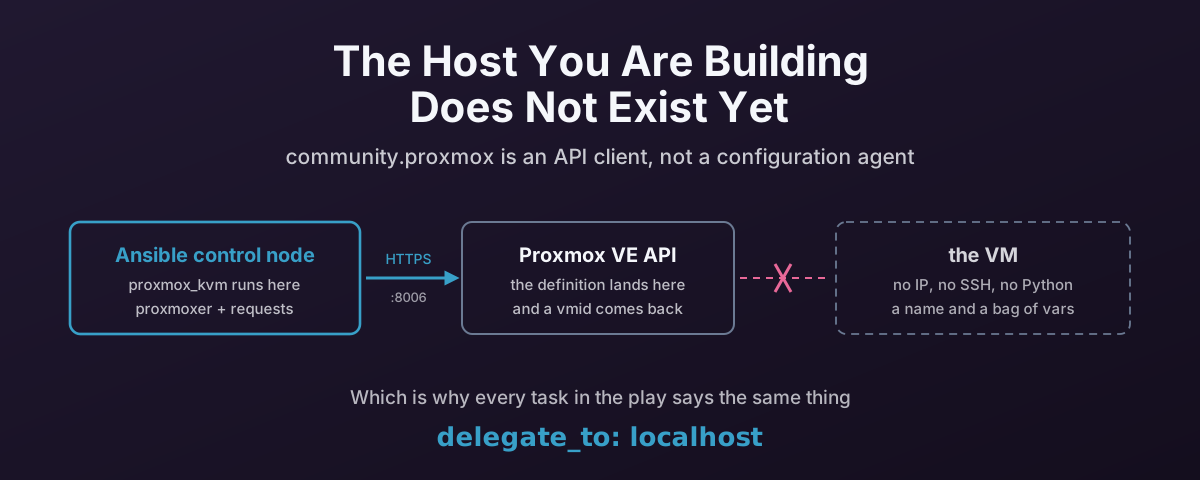
The Assumption Ansible Usually Gets to Make
Almost every Ansible module you have used works like this: Ansible connects to the host named in the inventory, copies a small Python program to it, runs it, and reads back the result. The host is the thing being changed and the thing doing the work.
Creating a virtual machine breaks that in the most basic way possible. The host you are building does not exist. It has no IP, no SSH daemon, no Python, and no operating system. There is nowt to connect to.
So community.proxmox is not a configuration agent. It is an API client that happens to be shipped as an Ansible collection. As such, everything in this post follows from that one fact — where the tasks run, how you get credentials in, why re-running does not do what you expect, and why --check is not telling you the truth.
The examples here are cut down from a playbook that builds Windows and Linux VMs from NetBox records: proxmox-create-vms.yml. I have genericised the node, storage and bridge names for readability — the real thing is in that repository.
Everything I claim about module behaviour below was checked against community.proxmox 1.6.0, which is the version I have installed:
$ ansible-galaxy collection list community.proxmox
# /home/damien/.ansible/collections/ansible_collections
Collection        Version
----------------- -------
community.proxmox 1.6.0
First: The Collection Moved
If you are reading an older playbook or an older answer, the modules were called community.general.proxmox_kvm. They now live in a dedicated collection, and that is where the development is happening. Version 1.6.0 ships 47 modules, covering Ceph, SDN, firewall, HA rules and cluster join, none of which existed in the community.general era.
ansible-galaxy collection install community.proxmox
pip install 'proxmoxer>=2.0' requests
The Python dependency is not optional and not bundled: the collection declares requirements: ["proxmoxer >= 2.0", "requests"], and those need to be installed wherever the module actually executes — which, as the next section explains, is not the Proxmox node.
requirements.yml, if you would rather pin it:
---
collections:
  - name: community.proxmox
    version: ">=1.6.0"
The collection is tested against ansible-core 2.17 through 2.20. Renaming your community.general.proxmox_* tasks to community.proxmox.proxmox_* is most of the migration.
Every Proxmox Task Runs on localhost
Two lines at the top of the play do the heavy lifting, and both look like they are disabling something useful:
- name: Create Proxmox virtual machines
  hosts: "{{ target_hosts | default('cluster_pve:&status_planned') }}"
  gather_facts: false
  serial: 1
gather_facts: false is not an optimisation. Fact gathering connects to the inventory host, and the inventory host is a VM that has not been built yet. Leave it on and the play fails before the first task.
Then every Proxmox task carries delegate_to: localhost:
- name: Create Proxmox VM
  delegate_to: localhost
  register: created_vm
  community.proxmox.proxmox_kvm:
    api_user: "{{ proxmox_user }}"
    api_password: "{{ proxmox_password }}"
    api_host: "{{ proxmox_api_ip }}"
    name: "{{ inventory_hostname }}"
    node: "{{ proxmox_api_host }}"
    ...
The inventory host is now just a name and a bag of variables. inventory_hostname becomes the VM’s name; its variables describe the machine you want. Nothing connects to it. The task runs on the control node, which opens an HTTPS session to api_host and posts a VM definition.
You will also see this written as local_action:, which is the older syntax for the same thing. The teardown playbook in that repository uses it throughout. They are equivalent. delegate_to is the current spelling.
The Escape Hatch Points at the Node
Some things genuinely have to happen on a Proxmox host, and those tasks delegate somewhere else entirely:
- name: Fail if no ISO file exists for the OS
  delegate_to: "{{ proxmox_api_host }}"
  ansible.builtin.stat:
    path: "{{ iso | replace('isos:', '/mnt/pve/isos/template/') }}"
  register: iso_file
  failed_when: not iso_file.stat.exists
That is a real SSH connection to a real node, checking a real path on shared storage, because the API will happily accept an ISO reference that does not resolve to a file and you would rather find out now than at boot. Note the string surgery translating a PVE storage reference (isos:iso/debian.iso) into a filesystem path. The storage abstraction is not available to stat.
So a single play has tasks executing in three different places, and getting them mixed up is the most common way these playbooks fail:
qm escape hatch is the only part that needs SSH to a hypervisor.Credentials, and a Default That Is About to Change
The auth options are shared by every module in the collection through a documentation fragment, so they are the same everywhere: api_host, api_user, and then either api_password or the pair api_token_id / api_token_secret. All of them fall back to environment variables — PROXMOX_HOST, PROXMOX_USER, PROXMOX_PASSWORD, PROXMOX_TOKEN_ID, PROXMOX_TOKEN_SECRET, PROXMOX_VALIDATE_CERTS — which is the cleanest way to keep secrets out of the play entirely.
An API token is the better default. It is scoped, it is revocable without changing a human’s password, and it can be given exactly the privileges the playbook needs rather than the ones a person happens to have:
- name: Create Proxmox VM
  delegate_to: localhost
  community.proxmox.proxmox_kvm:
    api_host: "{{ proxmox_api_ip }}"
    api_user: ansible@pve
    api_token_id: automation
    api_token_secret: "{{ proxmox_token_secret }}"
    validate_certs: true
    ca_path: /etc/ssl/certs/pve-cluster-ca.pem
Set validate_certs explicitly, today. The collection’s own documentation says it plainly:
Currently defaults to
falseand changes default totruewith community.proxmox 2.0.0.
Which means a playbook that never mentions it is not validating TLS right now, and will start validating — and therefore start failing against the self-signed certificate every fresh Proxmox install ships with — the moment someone runs --upgrade. Better to make that decision on purpose than to have it land in the middle of a build. If you are keeping the self-signed certificate, say validate_certs: false and take the finding; if you have a proper chain, point ca_path at it. Either way it is written down.
The Minimum Viable Create
Strip the production task down to what actually defines a machine and it is readable:
- name: Create Proxmox VM
  delegate_to: localhost
  register: created_vm
  community.proxmox.proxmox_kvm:
    api_host: "{{ proxmox_api_ip }}"
    api_user: ansible@pve
    api_token_id: automation
    api_token_secret: "{{ proxmox_token_secret }}"
    validate_certs: true

    node: pve1
    name: "{{ inventory_hostname }}"
    cores: "{{ vcpus | int }}"
    memory: "{{ memory }}"
    machine: q35
    bios: ovmf
    ostype: l26
    scsihw: virtio-scsi-single
    scsi:
      scsi0: "vmdata:32,format=qcow2,discard=on,ssd=1"
    sata:
      sata0: "isos:iso/debian-13-netinst.iso,media=cdrom"
    net:
      net0: "virtio,bridge=vmbr0"
    efidisk0:
      storage: vmdata
      format: raw
      efitype: 4m
      pre_enrolled_keys: true
    boot: "order=scsi0;sata0"
    agent: "enabled=1,fstrim_cloned_disks=1"
    onboot: true
    tags:
      - production
A few things about that shape are worth knowing before you write your own.
The device options are PVE syntax inside YAML. scsi, sata, net, virtio, ide are all typed dict, keyed scsi0, net0 and so on, and the values are the comma-separated option strings straight out of man qm — <storage>:<size>,option=value for a disk, [model=]<enum>,option=value for a NIC. The module does not model them; it forwards them. When something is rejected, the answer is in the PVE options reference, not in the Ansible docs.
You will also see these written as a JSON string rather than a YAML mapping:
net: '{"net0":"virtio,bridge={{ vlan_bridge }}"}'
Both work. Ansible coerces the string for a dict-typed parameter. The JSON form exists because it is easier to template a whole structure in one Jinja expression. The mapping form is easier to read six months later.
boot has two generations of syntax. The module accepts the legacy letters, where boot: "cdn" means “try disk, then CD-ROM, then network”. Current PVE wants an explicit ordered list — boot: "order=scsi0;sata0;net0" — which is unambiguous about which disk. The legacy form still works. The explicit form is what you want in new work. One genuine gotcha buried in the module docs: network boot requires setting rng0 since PVE 8.3.5.
numa and numa_enabled are different parameters. numa_enabled is the boolean that turns NUMA on. numa is a dict describing a topology (cpus, hostnodes, memory, policy). Setting numa: true is a type error, and it is an easy hour to lose. If you care why any of this matters, NUMA alignment on Proxmox covers the underlying problem.
machine: q35 and bios: ovmf are the right defaults, not decoration — that argument in full.
Omitting vmid means the module asks the API for the next free ID. Convenient, and the direct cause of the next thing.
Why serial: 1
“Fetch the next available ID, then create a VM with it” is two API calls with a gap in the middle. Two workers doing that concurrently can read the same free ID, and the loser gets an error or, worse, a surprise.
serial: 1 makes the create phase one host at a time. It is not fast and it does not need to be. The expensive part of building a VM happens after this playbook hands off. The counterpart play that starts the finished VMs uses serial: 5, because starting has no shared counter to race on.
If you would rather have the parallelism, allocate the VMID yourself from your source of truth and pass it explicitly. Then there is no read-modify-write and no race.
Idempotency Is Not What You Expect
This is the section to read twice, because proxmox_kvm does not behave like ansible.builtin.package.
name is not an identity. VM names are not unique across a Proxmox cluster, and the module says so. With state: present and no vmid, if a VM with that name already exists, the module exits changed=false with msg: "VM with name <x> already exists" and does nowt. It does not compare your parameters to reality. It does not converge. It declines.
update defaults to false. So editing memory: in your playbook and re-running is a no-op. The VM keeps the memory it was built with, the task reports success, and nothing anywhere tells you the two have diverged.
update: true still refuses the interesting parameters. From the module documentation:
Because of the operations of the API and security reasons, I have disabled the update of the following parameters
net,virtio,ide,sata,scsi. Per example updatingnetupdate the MAC address andvirtiocreate always new disk…
update_unsafe: true lifts that restriction, and the warning is not for show:
Use this option with caution because an improper configuration might result in a permanent loss of data (for example disk recreated).
So the disk you thought you were resizing can be replaced with a new empty one. Do not reach for this — the refused parameters have their own modules, and that is the next section.
And --check does not cover any of this. The collection declares check-mode support per module, and it is inconsistent in exactly the wrong direction:
| Module | check_mode | diff_mode |
|---|---|---|
proxmox_kvm | none | none |
proxmox_disk | none | none |
proxmox_template | none | none |
proxmox_snap | full | none |
proxmox_nic | full | none |
proxmox_pool | full | none |
The split is not “read-only modules can, write modules cannot” — proxmox_nic creates and deletes interfaces and honours check mode perfectly well. It is that the three modules dealing in storage and VM lifecycle do not. A --check run of a build playbook skips the VM creation silently and then reports on a world where the VM was never made, so every task after it is reasoning about the wrong state. On a build playbook, --check is not a safety net, and treating it as one is worse than not running it.
So Make Existence the Gate
Given all that, the workable pattern is to stop asking the module to be idempotent and decide for yourself whether to build. The production playbook does it like this:
- name: Check if VM is present or manually built
  delegate_to: localhost
  community.proxmox.proxmox_vm_info:
    api_host: "{{ proxmox_api_ip }}"
    api_user: "{{ proxmox_user }}"
    api_password: "{{ proxmox_password }}"
    name: "{{ inventory_hostname }}"
    config: current
  register: existing_vm
  ignore_errors: true
  failed_when: (existing_vm.proxmox_vms | length) == 0

- name: Configure Proxmox VM
  when: existing_vm is failed
  block:
    - name: Create Proxmox VM
      ...
proxmox_vm_info with config: current returns the VM and its live configuration, or an empty list. failed_when turns “empty list” into a failure, ignore_errors: true stops that failure ending the play, and when: existing_vm is failed becomes “the VM is not there, build it”.
Using a deliberately failed task as a boolean reads badly, and I am not going to pretend otherwise. The alternative is when: (existing_vm.proxmox_vms | default([]) | length) == 0, which is honest about being a length check and does not need ignore_errors. Both work. The version above is what is in production, and its one real advantage is that the registered result carries the existing configuration for later tasks to read.
The important part is the shape, not the spelling: check, then branch, and treat creation as a one-time event. A VM’s ongoing configuration is a different problem from a VM’s existence, and this module is only good at the second one.
Disks and NICs Have Their Own Modules
Here is the thing I glossed over above, and it changes the whole picture: the parameters proxmox_kvm refuses to update are not a gap in the collection. They are delegated. community.proxmox.proxmox_disk and community.proxmox.proxmox_nic add, change and remove exactly the things the create module will not touch — keyed on the same scsi0 and net0 names you used when you built the VM.
Both are better-behaved than proxmox_kvm, and one of them is the only module in this workflow that can be dry-run.
proxmox_nic — Add, Retag or Remove an Interface
- name: Move the VM's primary NIC to a new bridge and VLAN
  delegate_to: localhost
  community.proxmox.proxmox_nic:
    api_host: "{{ proxmox_api_ip }}"
    api_user: ansible@pve
    api_token_id: automation
    api_token_secret: "{{ proxmox_token_secret }}"
    vmid: "{{ created_vm.vmid }}"
    interface: net0
    bridge: vmbr1
    tag: 120
    model: virtio
    mtu: 1
    queues: 4
    firewall: true
    state: present
interface is the only required option beyond auth — net[n] where n is 0 to 31 — and state: present or absent gives you add and remove. model defaults to virtio, which is the right answer unless a guest cannot cope.
The reason this module exists is the MAC address. Recall why proxmox_kvm refuses to update net: “updating net update the MAC address”. proxmox_nic fixes that explicitly:
When not specified this module will keep the MAC address the same when changing an existing interface.
So you can retag a VLAN, move a bridge, change the MTU or turn the firewall on without the guest’s NIC identity changing underneath it. That matters more than it sounds: a new MAC invalidates DHCP reservations, breaks anything licensed to a NIC, and desynchronises the NetBox interface record the create playbook so carefully wrote. This is the module that lets a day-2 network change be boring.
A few options worth knowing before you need them:
rateis in MBps — MegaBytes per second, not bits. The documentation is explicit and the factor-of-eight error is very easy to make.link_down: truedisconnects the interface, described in the docs as “like pulling the plug”. A clean way to isolate a suspect VM without stopping it or touching the guest.trunkstakes a list of VLAN IDs to pass through, for a guest that does its own tagging.mtu: 1is not a typo and not a 1-byte MTU — it means “inherit the bridge MTU”, and it only applies tovirtio.queuessets multiqueue, 0 to 16. Worth matching to vCPU count on anything pushing real traffic.
And it supports check mode fully. --check on a proxmox_nic task tells you the truth, which makes it the one part of this workflow you can safely rehearse. Its messages are properly idempotent too. An unchanged interface reports Nic net0 unchanged on VM with vmid 103 rather than claiming a change.
proxmox_disk — The Whole Disk Lifecycle
proxmox_disk is the largest module of the three, and its state is doing five different jobs:
state | What happens | Reversible? |
|---|---|---|
present | create the disk, or update options on an existing one | n/a |
resized | grow it — PVE cannot shrink, and the docs say do that manually | no |
detached | becomes unused[n]; the volume and its data stay | yes |
moved | change backing storage, or hand the disk to another VM | original kept unless delete_moved |
absent | removed from backing storage | no |
The gap between detached and absent is the safety net proxmox_kvm never gives you. Detaching is a config change; deleting destroys data. Two different words, two different consequences.
Adding a second disk to a VM that already exists:
- name: Add a data disk
  delegate_to: localhost
  community.proxmox.proxmox_disk:
    api_host: "{{ proxmox_api_ip }}"
    api_user: ansible@pve
    api_token_id: automation
    api_token_secret: "{{ proxmox_token_secret }}"
    vmid: "{{ created_vm.vmid }}"
    disk: scsi1
    storage: vmdata
    size: 200
    format: qcow2
    iothread: true
    aio: io_uring
    discard: "on"
    ssd: true
    backup: true
    state: present
create is the knob proxmox_kvm should have had. It controls what state: present is allowed to do:
regular(the default) — create the disk if missing, otherwise update its options.disabled— update options only, and never create. This is the one to reach for when you are changingcacheoriothreadon a disk that must already exist. It cannot surprise you by conjuring a new volume because a key was misspelled.forced— always create. An existing disk is detached and left unused, not deleted.
That last behaviour is the important detail. create: forced is the destructive-looking option, and it still does not destroy anything: the old volume survives as unusedN and you can re-attach it. Compare that with proxmox_kvm plus update_unsafe, whose documented failure mode is a disk recreated. Same rough operation, much better blast radius.
Growing a disk:
- name: Grow the data disk by 100 GiB
  delegate_to: localhost
  community.proxmox.proxmox_disk:
    api_host: "{{ proxmox_api_ip }}"
    api_user: ansible@pve
    api_token_id: automation
    api_token_secret: "{{ proxmox_token_secret }}"
    vmid: "{{ created_vm.vmid }}"
    disk: scsi1
    size: "+100G"
    state: resized
Watch the units, because size changes meaning with state. With state: present it is GiB as a bare number (size: 200). With state: resized it takes a suffix — +100G to add to the current size, or 500G as an absolute target. One parameter, two conventions, and the failure is silent if you guess wrong.
Moving a disk to different storage, which is the live-migration-of-one-volume case:
- name: Move the disk to NVMe storage
  delegate_to: localhost
  community.proxmox.proxmox_disk:
    api_host: "{{ proxmox_api_ip }}"
    api_user: ansible@pve
    api_token_id: automation
    api_token_secret: "{{ proxmox_token_secret }}"
    vmid: "{{ created_vm.vmid }}"
    disk: scsi1
    target_storage: nvme-pool
    bwlimit: 200000
    delete_moved: true
    timeout: 3600
    state: moved
target_storage moves within one VM; target_vmid hands the disk to a different VM and requires the same storage on both. They are mutually exclusive. delete_moved defaults to false, so by default you finish with two copies and the original sitting there as unused — safe, and a good way to fill a storage pool if you never come back to it.
timeout defaults to 600 here, against 30 in proxmox_kvm. Same-looking parameter, twentyfold difference, because these operations copy data. Raise it for large images or slow storage — the docs say so for both moved and import_from.
Which brings up the option that makes this module the V2V and cloud-image path:
import_from: "vmdata:9000/base-debian13.qcow2"
import_from builds the disk from an existing volume rather than allocating an empty one — <STORAGE>:<VMID>/<NAME>, or <STORAGE>:import/<NAME> using the storage import directory on PVE 9.x and later. It is mutually exclusive with size, and only root can use absolute filesystem paths.
The rest of the parameter list is the reason to attach disks with this module rather than inline in the create call: cache, aio, iothread, discard, ssd, backup, detect_zeroes, and the full throttling family — iops, iops_rd, iops_wr, their _max and _max_length variants, and the bps_*_max_length burst controls. None of that is reachable through proxmox_kvm after creation.
Two caveats, both from the module’s own documentation:
- Some option changes need a reboot. “Some updates on options (like
cache) are not being applied instantly and require VM restart.” A green task means the config was written, not that the running VM is behaving differently. - It does not support check mode.
check_mode: none, same asproxmox_kvm. So the collection splits down the middle: NIC changes can be rehearsed with--check, disk changes cannot.
The Division of Labour
| To do this | Use |
|---|---|
| Create the VM | proxmox_kvm, once, gated on existence |
| Change cores, memory, tags, agent, onboot | proxmox_kvm with update: true |
| Add, retag, disconnect or remove a NIC | proxmox_nic |
| Add, grow, move, detach or remove a disk | proxmox_disk |
| Snapshot | proxmox_snap (also full check mode) |
| Anything none of them expose | qm set over SSH |
Change a disk or NIC through proxmox_kvm | nothing — this is what update_unsafe is for, and it is why you should not use it |
Build the VM with a minimal proxmox_kvm call, then attach the disks and interfaces with their own modules. It is more tasks, and it is the version where day-2 changes have a route that does not involve an option whose documented risk is losing a disk.
Where the Module Stops
proxmox_kvm has a huge parameter list and still does not cover everything qm can do. Rather than wait, the production playbook drops to the CLI on the node:
- name: Set RNG source and better SPICE quality
  delegate_to: "{{ proxmox_api_host }}"
  become: true
  ansible.builtin.command:
    cmd: >-
      /usr/sbin/qm set {{ created_vm.vmid }}
      --rng0 source=/dev/urandom
      --spice_enhancements videostreaming=all
There is nothing wrong with this. It is not idempotent in any meaningful sense — qm set is a write, and it will report changed every run — but it is explicit, it is readable, and it does not pretend. If a module gains the parameter later, you delete the task.
Other things need a second pass through the module with update: true, because they cannot be set in the same call that creates the VM:
- name: Add SPICE-compatible USB device
  delegate_to: localhost
  community.proxmox.proxmox_kvm:
    api_host: "{{ proxmox_api_ip }}"
    api_user: "{{ proxmox_user }}"
    api_password: "{{ proxmox_password }}"
    node: "{{ proxmox_api_host }}"
    vmid: "{{ created_vm.vmid }}"
    usb:
      usb0: "spice,usb3=1"
    update: true
  when: spice_usb | default(false)
Note it passes vmid, not name. Once you have the ID, use it. It is the only identifier the API treats as unique.
And for the things QEMU can do that PVE has no option for, there is args, which is passed to the QEMU command line verbatim:
    args: >-
      -global scsi-hd.physical_block_size=4k
      -global scsi-hd.logical_block_size=4096
That one presents the virtual disk as 4Kn rather than 512e, which matters more than it sounds like it does — block sizes, 4Kn and 512e. The module labels args “for experts only”, and the reason is that PVE does not validate it and a bad flag stops the VM booting with an error that comes from QEMU rather than from Proxmox.
The Cluster Is Not Instantly Consistent
- name: Let registration complete on cluster
  ansible.builtin.pause:
    seconds: 5
  when: created_vm.changed
A pause in a playbook is usually a smell, and this one is load-bearing. The create call returns when the API has accepted the definition, which is not the same as every node agreeing the VM exists — and the very next task wants to set an ACL on /vms/<vmid>. Five seconds of patience is cheaper than a retry loop around an error that only shows up under load.
The teardown playbook has the same shape for the same reason: stop, wait, then delete.
Reading Back What You Built
proxmox_kvm documents three return values: vmid, status and msg. In practice you will want a fourth, and it is not in the documentation.
- name: Get MAC address of VM
  ansible.builtin.set_fact:
    primary_mac_addr: "{{ created_vm.mac.net0 }}"
created_vm.mac is real — the module builds it in get_vminfo() and splats it into the result — but it is absent from the documented RETURN block, which means nothing promises it will keep working. Worth knowing exactly how it behaves, because there are two traps in it:
- It only appears when the module actually created the VM.
macis only assembled on the create-and-deploy path. Take the “already exists” branch and the result hasvmidandmsgand nothing else. - It only contains the interfaces you passed in. The code walks the parameters you supplied and picks out the ones matching
net[0-9], then reads each one’s stored config back from the API. Nonetparameter, nomackey.
Which is why the production playbook needs both halves, and the second one is ugly:
- name: Get MAC address of VM
  ansible.builtin.set_fact:
    primary_mac_addr: >-
      {{ created_vm.mac.net0 if created_vm is defined and created_vm.changed
         else ((existing_vm.proxmox_vms[0].config.net0 | split(','))[0] | split('='))[1] }}
When the VM already existed, there is no mac, so the MAC has to be dug out of the raw config string. net0 comes back from the API as virtio=AE:AE:5C:A8:89:85,bridge=vmbr0, so: split on commas, take the first field, split on =, take the second half. It is string surgery on an API response, and it is the honest cost of a module whose return shape depends on which branch it took.
If you need the MAC reliably in both cases, get it from proxmox_vm_info unconditionally and parse one shape rather than two.
Driving It From a Source of Truth
Look again at the line that opens the play:
hosts: "{{ target_hosts | default('cluster_pve:&status_planned') }}"
That is the actual architecture, and it is worth stating plainly: the VMs to build are not a list in a vars file. They are the hosts in your inventory whose recorded status says they should exist and do not yet.
The inventory here is NetBox. A VM is requested by creating a NetBox record with status planned, carrying its CPU, memory, disk, VLAN, owner and platform. The playbook selects planned machines, builds them, allocates an IP, writes DNS, and then sets the record to staged — at which point that host no longer matches the play’s host pattern, and a handler refreshes the inventory so the next play sees the new state:
handlers:
  - name: Refresh inventory
    ansible.builtin.meta: refresh_inventory
The status field is a state machine, the playbook is one transition in it, and the whole thing is re-runnable because a host that has already moved on is no longer selected. That is a much better property than any amount of module-level idempotency, and it is the reason the create task can get away with being a one-shot.
community.proxmox also ships its own inventory plugin, which builds an inventory from the cluster — the right choice when Proxmox is the source of truth. Here it is the other way round: NetBox is authoritative and Proxmox is where its intent gets realised. That is a whole post of its own and I will write it separately.
Taking It Away Again
Creation without teardown is half a lifecycle, and the removal path has its own trap — you cannot delete a running VM:
- name: Force stop the VM if it is running
  delegate_to: localhost
  community.proxmox.proxmox_kvm:
    api_host: "{{ proxmox_api_ip }}"
    api_user: "{{ proxmox_user }}"
    api_password: "{{ proxmox_password }}"
    name: "{{ inventory_hostname }}"
    state: stopped
    force: true
    timeout: 10

- name: Allow the cluster to stop the VM before removing it
  ansible.builtin.pause:
    seconds: 10

- name: Remove the VM from the cluster
  delegate_to: localhost
  community.proxmox.proxmox_kvm:
    api_host: "{{ proxmox_api_ip }}"
    api_user: "{{ proxmox_user }}"
    api_password: "{{ proxmox_password }}"
    name: "{{ inventory_hostname }}"
    state: absent
    force: true
    timeout: 10
state: stopped is a graceful shutdown, and the interaction with timeout is documented and worth memorising: if the timeout is reached with force: true the VM is powered off hard; with force: false the task fails instead. A ten-second graceful window followed by a pull of the plug is a reasonable policy for a machine that is being torn down, and a terrible one for anything else.
The full teardown (proxmox-remove-vms.yml) then unwinds the rest of the record: DNS, the allocated IP, the NetBox interfaces, the NetBox VM, and the stale entries in known_hosts. It wraps the block in ignore_errors: true, which is defensible in a teardown. You are removing things that may already be gone, and a half-deleted machine is worse than a noisy log.
What I Would Change in a Fresh Build
Having read the module source rather than just its documentation, four things:
- Use an API token, not
api_userplusapi_password. Scoped, revocable, and it never belongs to a person. - Set
validate_certsexplicitly, before 2.0.0 changes it under you. - Allocate the VMID yourself from the source of truth. It removes the read-modify-write race, lets you drop
serial: 1, and gives every later task a stable identifier instead of a name that is not unique. - Create the VM bare, then attach its disks and NICs with
proxmox_diskandproxmox_nic. More tasks, but every disk and interface then has a module that can change it later — includingcreate: disabledfor option-only edits andstate: detachedinstead of deletion — rather than a config that can only be changed throughupdate_unsafe. - Get the MAC from
proxmox_vm_infoin one place, so there is one shape to parse instead of a conditional across a documented and an undocumented return value.
And do not reach for --check on a build playbook. The module that matters cannot honour it.
A dry run that always says yes is worse than no dry run at all, because you will believe it.
References
- community.proxmox collection docs — the full 47-module surface
- community.proxmox on GitHub — where the source above lives;
plugins/modules/proxmox_kvm.pyis the file to read when the docs are ambiguous proxmox_kvmmodule documentation — the parameter list, and theupdate/update_unsafewarnings quoted aboveproxmox_vm_infomodule documentation —config: currentandconfig: pending- PVE
qmoptions reference — the real specification for everyscsi[n],net[n]andbootstring you pass through - proxmoxer — the Python client the collection is built on
- damo2929/ansible-example — the playbooks these excerpts come from, including the NetBox-driven inventory, DHCP generation and hypervisor build